Core configuration
Every surface, LLM or IDE, is backed by the same stored configuration record. It carries the surface’s identity and routing, plus a set of optional configuration blocks, each covered by its own reference page. Nothing is mandatory: a surface with no optional blocks configured behaves as a thin, low-latency proxy to its provider. See Surfaces → for the conceptual model.
In the dashboard’s surface builder, an LLM Surface opens on a canvas with three fixed nodes: an Access Point node (the listener and route), an LLM node (the provider, model, and credentials), and a Response node. A non-configurable Caller figure represents the calling client. The Prompt Guard, Judge, Jury, and Expert Witness nodes are also already on the canvas, and Prompt Guard, Judge, and Jury stay off until you turn on their Enabled switch. Other capabilities are elements you drag from the palette: Caller Context, OPA Policy, Rate Limit, and Router drop onto the edge between the Access Point and the LLM node, while the Inputs elements, Web Search, Web Fetch, and Drift Harness attach to the LLM node.
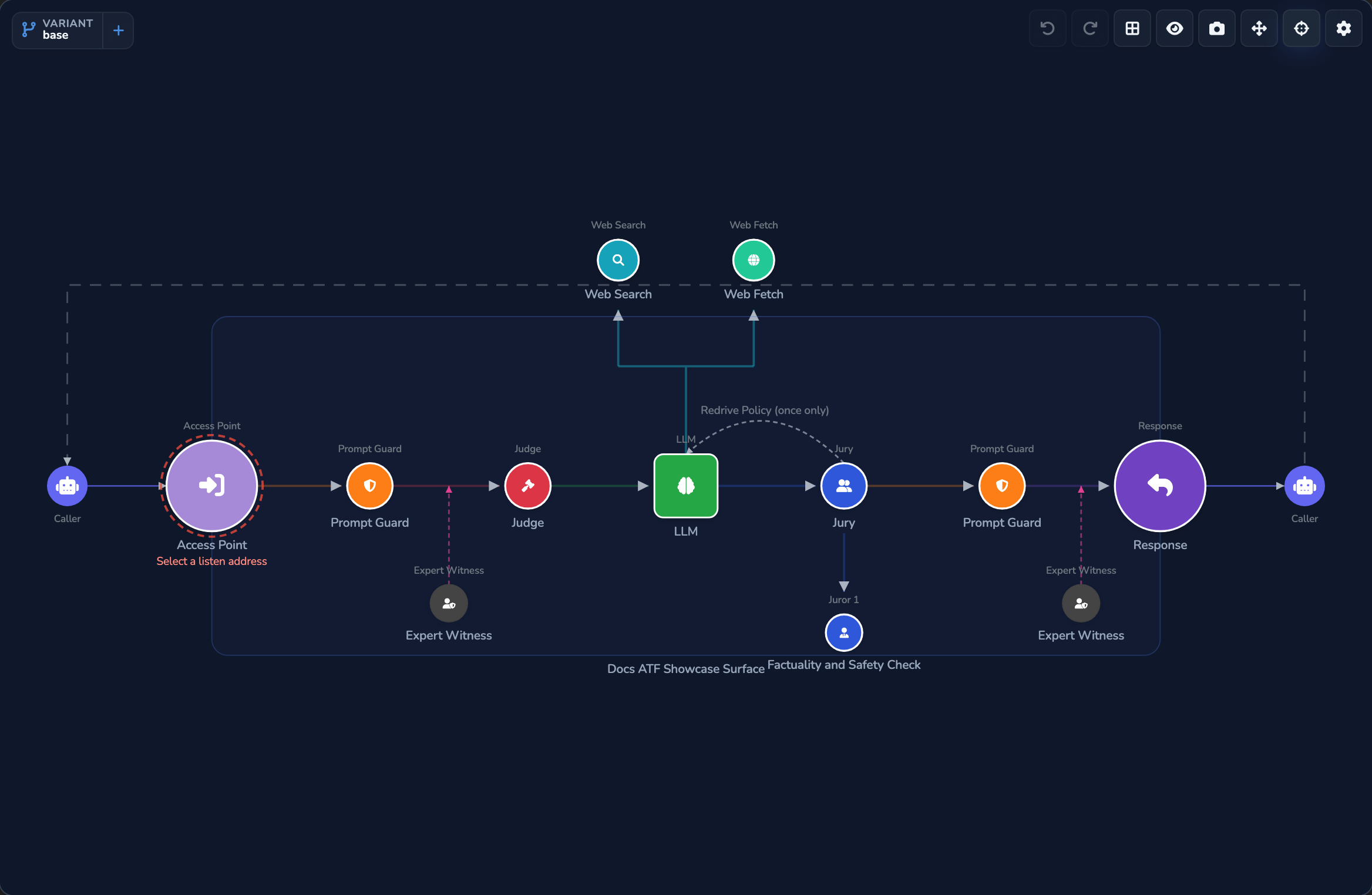
Most surface-wide settings live in the Surface Configuration editor, opened with Configure Surface Features on the Access Point node or the Surface node. Its sections are Surface-wide usage limit, Team usage attribution, SSE streaming passthrough, Identity pass-through, Client API formats, Response cache, Canary / A-B traffic split, Breach & anomaly alerts, Governance recording, and VP evidence.
Identity and lifecycle
Every surface carries a stable identity and a simple on/off state, independent of whatever else it’s configured to do.
| Field | Required | What it does | Default |
|---|---|---|---|
| Surface ID | Read-only | Unique identifier assigned at creation. Never changes. | Auto-assigned |
| Name | Yes | Human-readable name. Appears in the dashboard, logs, and metrics. | — |
| Description | No | Optional free-text description. | — |
| Surface Enabled | No | In the dashboard this is a single checkbox, labelled Surface Enabled on an LLM Surface, IDE Surface enabled on an IDE Surface, that flips the surface between enabled and disabled (an unchecked surface shows a DISABLED badge). Deleting a surface removes it from active routing and hides it from listings, but the record is retained so historical usage attribution survives. | On |
Listener and routing
Where a surface listens for traffic, what path it answers on, and which client wire formats it accepts. All three are set on the Access Point node.
- A new surface starts on the appliance’s first listen address and path prefix, with a generated custom path. Change the Custom path to something callers will recognise.
- Keep every client API format on unless you want to lock a surface to particular client dialects, for example a surface that should only ever be called through the Anthropic Messages shape.
| Field | What it does | Default |
|---|---|---|
| Listen address | The appliance listener this surface answers on, picked from a dropdown of the appliance’s listen addresses. | The first listen address |
| Route | The URL path this surface answers on, combined with the listen address to form the full route callers send requests to. Composed from the Path prefix dropdown and the Custom path text input, and shown read-only in a Pipe Route banner (IDE Route on an IDE Surface). | The first path prefix, plus a generated custom path |
| Client API formats | Client wire formats this surface answers, set in the Client API formats section of the Surface Configuration editor, one switch per format, each labelled with its format and path, for example OpenAI Chat Completions ( /v1/chat/completions ). The format is chosen per request by path (/v1/chat/completions for OpenAI Chat Completions, /v1/messages for Anthropic Messages, /v1/responses for OpenAI Responses), and the response comes back in the same format. A request in a format the surface has turned off gets an HTTP 404 response. | All three formats |
Identity pass-through
Forwards the caller’s own validated bearer token to the provider instead of the surface’s stored API-key secret. Some upstreams need to know which signed-in user is calling, so answers and access stay grounded in that person’s own identity rather than a shared service account.
- Leave this off for a normal shared-credential surface; the stored API-key secret is simpler and is what most providers expect.
- Turn it on when a Bearer-accepting upstream needs the caller’s identity.
- It needs JWT-bearer source authentication, so the token is validated before it’s passed on.
- Selecting Microsoft 365 Copilot as the provider turns it on and adds a Caller Context element for the JWT bearer check.
| Field | What it does | Default |
|---|---|---|
| Forward caller’s token to the provider | Forwards the caller’s validated inbound bearer token as the outbound credential instead of the surface’s stored API-key secret. In the dashboard this is a switch labelled “Forward caller’s token to the provider (identity pass-through)” under an Identity pass-through section. | Off |
Surface type
The dashboard offers two kinds of surface, each with its own creation flow and its own page in the sidebar.
| Surface type | What it does |
|---|---|
| LLM Surface | The default and most common choice: one configured LLM provider. See Providers →. |
| IDE Surface | Works differently: a governed, per-caller-filtered model-discovery menu that aggregates other surfaces, rather than fronting a single provider itself. See IDE Surfaces →. |
Optional configuration blocks
Beyond identity, routing, and the provider itself, a surface can add further optional capabilities: guardrails, content-based routing, routing rules and canary splits, failover and caching, cost and usage limits, team attribution, source authentication, OPA policies, VP evidence, governance recording, drift detection with the Drift Harness element, server tools, and the Inputs elements. Each stays off until you add or enable it, and each is documented on its own page. For governance recording (Record signed governance records), a new surface stays off (see Governance records → Surface recording toggle). See Surfaces reference → for the full list.
One of these has no page of its own: a per-request reasoning cap, which limits how many reasoning (“thinking”) tokens a provider can spend on a single request. When set, a caller’s requested reasoning budget is clamped to this value and the effort level is lowered to match. Set it in the surface’s Config JSON view as "max_reasoning_tokens": 2048, for example. Left unset (null), reasoning is uncapped.
Integrations
Integrations (Slack, email, webhook, …) can be triggered on surface events such as a surface being created, updated, or deleted, or an execution completing or failing. Each mapping, set on the surface’s Integrations tab, names the integration to notify, which events trigger it, and any template variables to pass along. Usage alerts go to the integrations chosen on each alert (see Cost and usage limits → Usage alerts). See Notifications and alerts → for the full event-type taxonomy.
Sandbox sign-in
When a surface has Forward caller’s token to the provider (identity pass-through) turned on, testing it from the dashboard’s Sandbox tab needs a delegated caller token to send. This field tells the Sandbox tab which identity to sign in as for that testing.
The Sandbox Sign-in picker only appears in the Sandbox tab’s header when at least one of these is true: this surface has identity pass-through on, your organisation has at least one OAuth Identifier profile set up under Credentials → OAuth Identifiers, or this surface already references one. If none of those apply, the picker doesn’t show at all, and the Sandbox otherwise works normally without it. When a sign-in profile applies to the surface, the header also shows a Sign in to test button. After you sign in, Sandbox requests run as you until you select Sign out or the sign-in expires.
| Field | What it does | Default |
|---|---|---|
| Sandbox Sign-in | Reference to an OAuth Identifier profile (Credentials store) used as the surface’s sandbox sign-in identity. Set this to whichever OAuth Identifier profile represents the account you want the Sandbox tab to test as. When identity pass-through is on and no other sign-in configuration applies, the picker reads Select a sign-in profile (required). | No Sandbox Sign-In Profile |
Related
- Providers: Every supported LLM provider and its fields.
- Guardrails: Prompt Guard, Expert Witnesses, Judge, and Jury field reference.
- Routing and variants: Decider, Router, canary, and the variant catalogue.
- Surfaces concept model: How surfaces work at runtime.
- Inputs and modalities: How the client API formats and Inputs elements decide what a surface accepts.
Glad to hear it. Thanks for letting us know.
Sorry to hear that. Thanks for letting us know.