Providers
An LLM Surface’s LLM node holds one provider configuration. Select the node and use Configure LLM… to open the full-page editor, whose LLM Configuration card holds the fields below. The provider list, its endpoints and models, and the parameters each model accepts all come from the model catalogue on the Models page.
Provider configuration
Choosing a provider sets the wire format, which endpoints and models the Endpoint and Model dropdowns offer, and which API key the surface asks for. Get it right and the surface speaks the format your provider actually understands, with cost and telemetry attributed to the right vendor instead of lumped in as something generic.
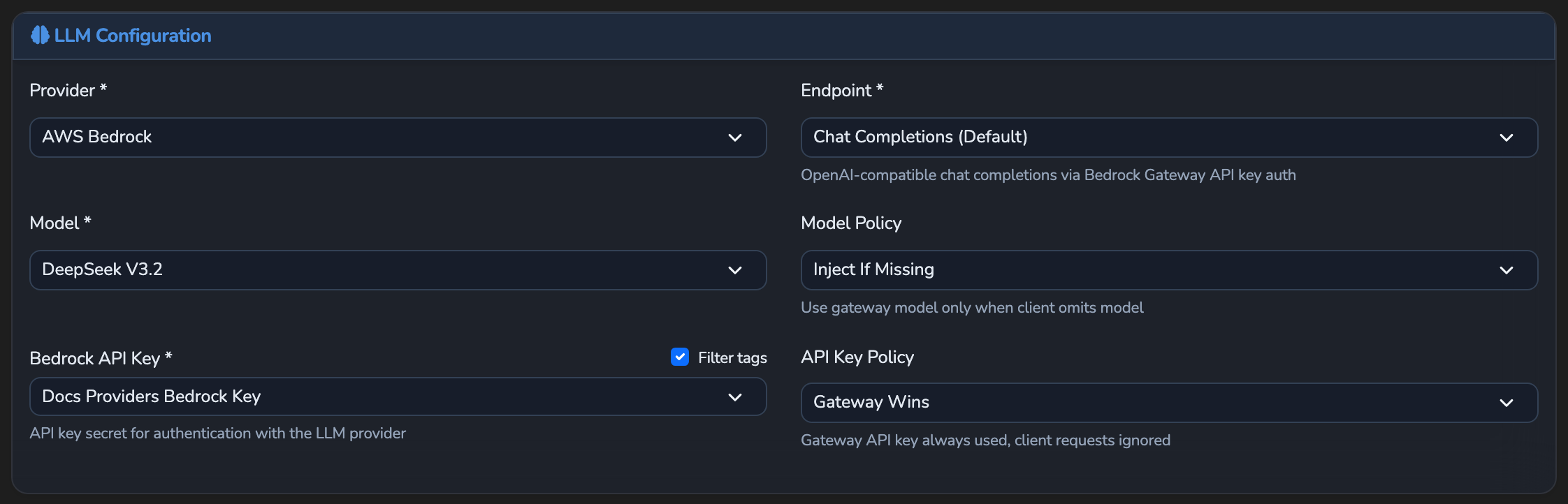
| Field | What it does | Default |
|---|---|---|
| Provider | The provider adapter, picked from the catalogue (see Provider list). Required. | Not set |
| Endpoint | The provider’s API endpoint, picked from a dropdown of the catalogue endpoints that serve chat completions. The base URL comes from the catalogue. Required. | Not set |
| Model | The model, picked from a dropdown of the provider’s catalogue models. Required. | Not set |
| Model Policy | Whether the surface’s model or the caller’s model wins (see Parameter override policy). | Inject If Missing |
| Provider’s API key field (for example OpenAI API Key) | A secret from the Secrets page holding the provider’s API key. The field takes its label from the selected provider, for example OpenAI API Key or Bedrock API Key. When the provider names no label, the full-page editor shows API Key Secret and the canvas sidebar shows API key secret. The picker is disabled for a provider that takes no key: Ollama, and Microsoft 365 Copilot, which forwards the caller’s own Entra token instead. | Not set |
| API Key Policy | Whether the surface’s API key or the caller’s key wins. | Gateway Wins |
Create the API key secret first, pasting in the key from the provider’s own dashboard, then pick it here, so the raw key stays out of the surface configuration.
The LLM node’s sidebar also shows the selected model’s catalogue price, per 1K input and output tokens, or a note that the catalogue has no price for it.
Provider list
- Microsoft 365 Copilot, OpenAI, Anthropic, Google Gemini, AWS Bedrock, and Ollama are first-class providers. Pick the one whose models you want to call. For a provider that takes an API key, use a key from your own account with that provider.
- For an OpenAI-compatible provider (Groq, xAI (Grok), OpenRouter, Fireworks AI, Cerebras, DeepSeek, Moonshot AI (Kimi), SambaNova Cloud, Hyperbolic, NVIDIA NIM, Nebius AI Studio), pick its own preset rather than OpenAI. A preset supplies that provider’s base URL and the label for its API key field, so cost and telemetry are attributed to it by name.
- For a provider outside the built-in catalogue, define a custom provider on the Models page (see Custom providers), then pick it here.
- Azure OpenAI is listed in the provider catalogue but isn’t available on this appliance.
Provider notes:
| Provider | Notes |
|---|---|
| AWS Bedrock | The catalogue endpoint is in the us-east-1 region. |
| Ollama | No API key is needed. |
| Microsoft 365 Copilot | Delegated-only: the caller’s Entra bearer token is forwarded (identity pass-through), so answers are grounded on the signed-in user’s Microsoft 365 content under their own access control. Selecting it turns on Forward caller’s token to the provider and adds a Caller Context element to the canvas. |
Custom providers
The Models page lists the catalogue under three tabs: Built In, Custom, and JSON. To add a provider outside the built-in catalogue, an administrator defines it once as JSON in the Custom Model (JSON) card on the JSON tab. A unique identifier and a display name are required. A base URL, the label for its API key field, and its models with their prices are optional. Once saved, it’s listed on the Custom tab and appears in every surface’s provider list. A surface that picks it takes its endpoint from the definition’s base URL, so set one for calls to reach the provider’s endpoint.
Model parameters
Below the LLM Configuration card, a Model Parameters & Override Policies card lists the parameters the selected model declares in the catalogue, each with a value and its own override policy dropdown. The parameters shown depend on the model, for example:
| Provider | Parameters in the shipped catalogue |
|---|---|
| OpenAI | Max Completion Tokens and Reasoning Effort on most models. Temperature on gpt-realtime. |
| Anthropic | Max Tokens, Top P, and Top K. |
| Google Gemini | Max Output Tokens, Temperature, Top P, and Top K on most models. |
| AWS Bedrock | Temperature, Max Tokens, and Top P. |
| Ollama | Max Tokens, Temperature, and Top P, plus Top K on some models. |
The OpenAI-compatible presets and Microsoft 365 Copilot declare no model parameters, so the card doesn’t appear for them.
Reasoning Effort names the effort level the surface sends when its policy applies. Its options come from the selected model, for example none, low, medium, high, and xhigh on gpt-5.5, or minimal, low, medium, and high on gpt-5. The catalogue default is medium. This is what lets one variant send a different effort level from another.
Parameter override policy
The parameter override policy decides, per parameter, whether the surface’s configured value or the caller’s request value wins. This lets one surface be strict about some parameters and flexible about others: pinning the model and capping the token limit for cost control, say, while still letting callers tune their own temperature.
- Gateway Wins guarantees cost or behaviour regardless of what a caller sends, useful for pinning the model or capping the token limit.
- Use Client Wins for a pure passthrough surface where callers should control their own sampling.
- Inject If Missing gives sensible defaults to callers who don’t specify a value.
| Value | Meaning |
|---|---|
| Gateway Wins | The surface’s configured value always overrides the caller’s. |
| Client Wins | The caller’s value is authoritative; the surface never injects its own, even when the caller omits the parameter (true passthrough). |
| Inject If Missing | The surface’s value is injected only when the caller did not provide one. |
Model Policy and each model parameter’s policy start at Inject If Missing. API Key Policy starts at Gateway Wins.
Upstream headers
Upstream headers add extra headers to requests sent to this surface’s own upstream, alongside the provider credential. Use them to reach an upstream that authenticates the appliance separately from the model, such as a mesh ingress, a reverse proxy, or a tunnel with its own ingress key.
Set them in the surface’s Config JSON view, in the upstream_headers list. Each entry names the header and the secret that holds its value, read when the request is sent:
"upstream_headers": [
  { "name": "x-ingress-key", "secret_id": "ingress-key" }
]| Key | What it does |
|---|---|
name | The header to send. Some names are reserved and aren’t accepted: the credential headers Authorization, Proxy-Authorization, x-api-key, api-key, and x-goog-api-key, plus anthropic-version, standard HTTP headers such as Content-Type, Content-Length, and Host, and any name starting with x-agent-stream-. Set a provider credential as the provider’s API key secret instead. |
secret_id | The Secret ID of a secret on the Secrets page that holds the header’s value. |
A surface takes up to 16 headers; a save with more is rejected. The headers go only to the surface’s own upstream; Decider candidates and failover or load-balancing targets don’t receive them.
Token pricing resolution
A call’s cost is worked out from the first price found in this order:
- A declared price for the upstream that served the call: the
upstream_pricingobject in the surface’s Config JSON view, withinput_per_millionandoutput_per_millionin USD per million tokens, for example"upstream_pricing": { "input_per_million": 2.5, "output_per_million": 10 }. Zero is a valid declared price. - A cost-tracking price override in the same Config JSON view: the top-level
input_price_per_1kandoutput_price_per_1kkeys, in USD per 1K tokens, for example"input_price_per_1k": 0.0025, "output_price_per_1k": 0.01. The override is used only when both prices are above zero. - The matched endpoint’s catalogue price, for example a discounted batch endpoint.
- The model’s catalogue price.
- A small built-in table covering OpenAI GPT-4 and GPT-3.5 Turbo models and Anthropic Claude Opus, Sonnet, and Haiku models (including Claude models served through AWS Bedrock).
The catalogue price is looked up for the model the upstream actually ran. When no price is found at any level, the call costs $0. Adding or changing a declared price or a price override needs the surface pricing permission, and editing the model catalogue needs the model catalogue editing permission. Both default to Administrator.
Related
- Providers and Models: How the provider catalogue, presets, and custom providers fit together.
- Cost and usage limits: Cost tracking, usage limits, and usage alerts.
- Resilience and caching: Failover and load-balancing targets, which reuse the same provider shape.
- Guardrails: The Judge, Jury, and Decider LLM targets, which use this same provider/model/endpoint shape.
- Core configuration: Identity pass-through and the reasoning budget, which sit beside the provider settings.
Glad to hear it. Thanks for letting us know.
Sorry to hear that. Thanks for letting us know.