IDE Surfaces
An IDE Surface aggregates other surfaces (LLM Surfaces and their variant aliases) into a single, governed, per-caller-filtered model menu for IDE AI clients. It is a dispatching front door, not just a list: GET {route}/v1/models returns the caller’s filtered model list, and POST {route}/v1/chat/completions (and other suffixes) dispatches by the request’s model field to the chosen member surface, re-running that member’s full governance under the same caller identity. See IDE Surface → for the conceptual model.
Catalogue configuration
The stored configuration for an IDE Surface.
| Field | What it does |
|---|---|
| LLM Surfaces | The surfaces exposed by this catalogue. Add as many as you need. Order here is a fallback; each member’s explicit order takes precedence when the list is rendered. Labelled LLM Surfaces on the Catalogue panel roster in the dashboard. |
| Publish OAuth Metadata to Caller | Optional sign-in details published to IDE clients (see Central client sign-in). Set on the Access Point panel, as a reference to an OAuth Identifier profile. |
Catalogue members
Each entry references an LLM Surface, optionally pinned to a variant, plus presentation and per-member gating, turning that surface (or one of its variants) into a single selectable entry in the IDE’s model picker. The mnemonic, display name, and gating here are what a developer actually sees and can be restricted to, independent of how the surface is configured elsewhere.
- Pin a Target Variant when you want the catalogue to expose a specific named variant (say, a canary or a
$high-effort configuration) rather than the surface’s base configuration. - A Mnemonic is worth setting when the default model id (the surface ID, plus
$and the variant alias when one is set) isn’t the name you want developers to see or type: a short, memorable id instead of an internal surface id, for example. - OAuth Identifier (upstream sign-in) gives this member its own token, distinct from the front-door caller token, for cases where the provider needs one. Microsoft 365 Copilot is the clear example, since it needs a Graph-audience token. Leave it unset to forward the caller’s own front-door token instead.
- A Policy Definition (Model Policy) restricts one specific model in the catalogue to a subset of callers, for example gated to one Entra group, without touching the underlying LLM Surface’s own policy.
Switching either toggle on adds its own chip node to the canvas rather than expanding inline; each chip carries its own field, opened by selecting the chip itself: the Upstream Sign-in chip’s panel holds an OAuth Identifier profile, and the Model Policy chip’s panel holds a Policy Definition.
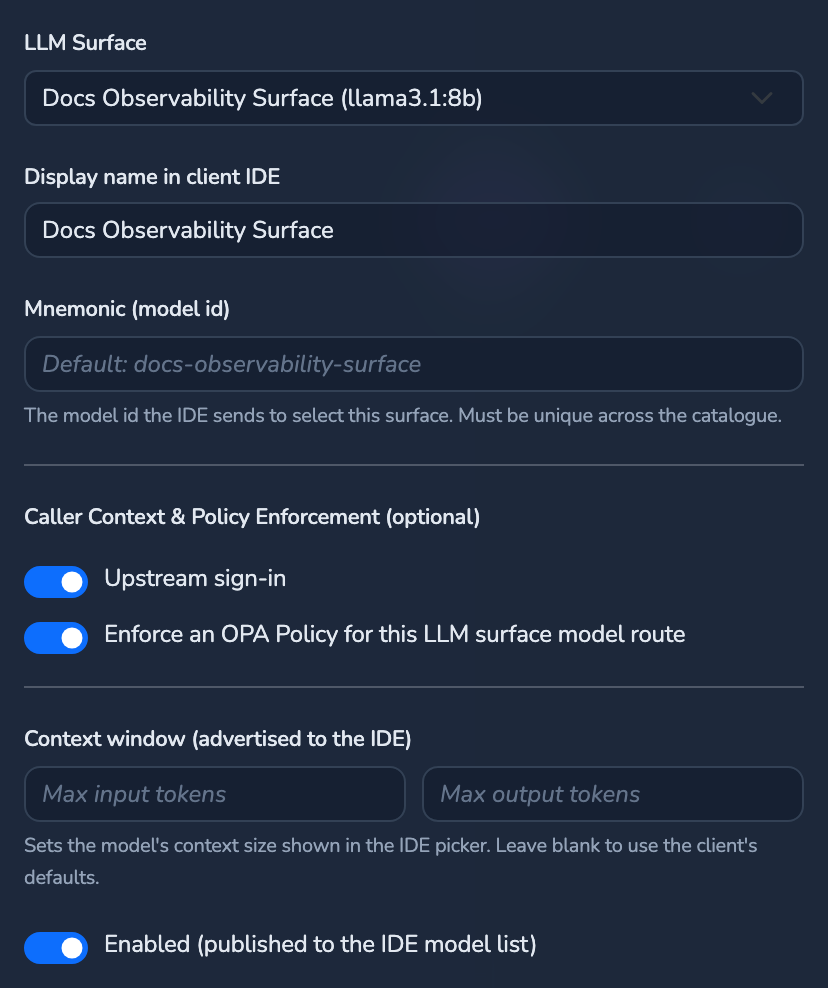
| Field | What it does |
|---|---|
| LLM Surface | The referenced LLM Surface. Required. |
| Target Variant | Variant alias to expose. The Base surface option exposes the surface’s base configuration. |
| Mnemonic (model id) | Operator-chosen mnemonic that becomes this entry’s client-facing model id, overriding the default model id (the surface ID, plus $ and the variant alias when one is set) when set and non-blank. Must be unique across every member. |
| Display name in client IDE | Display name shown in the client model picker. Defaults to the mnemonic, then the surface/model name, when omitted. |
| Enabled (published to the IDE model list) | On by default, as a toggle. When off, the entry is withheld from the published list without deleting it from the catalogue. |
| OAuth Identifier | Reference to an OAuth Identifier profile (Credentials store) giving this member its own upstream sign-in token (e.g. a Graph-audience token for Microsoft 365 Copilot), distinct from the front-door token. Absent means the caller’s front-door token is forwarded. Edited behind the member panel’s Upstream sign-in toggle, which opens a chip panel labelled OAuth Identifier. |
| Policy Definition | Id of an IDE-type policy definition evaluated on this specific model, after the front-door gates pass and the member is resolved, under the caller’s front-door identity: a Model Policy. A denial blocks the dispatch with 403; a set-but-uncompiled policy fails closed. Edited behind the member panel’s Enforce an OPA Policy for this LLM surface model route toggle, which opens a chip panel labelled Policy Definition. |
The unique, client-facing model id for a member prefers a trimmed, non-blank Mnemonic; otherwise it is the canonical surface id, or surface id plus variant alias. Reorder members in the client model picker with the ↑/↓ “Move up”/“Move down” buttons on the Catalogue panel’s member roster.
Two number inputs under the member panel’s Context window (advertised to the IDE) label advertise the model’s limits to the IDE:
| Field | What it does |
|---|---|
| Max input tokens | Advertised maximum input token count for this member’s model. |
| Max output tokens | Advertised maximum output token count for this member’s model. |
Central client sign-in
This block publishes public (never secret) sign-in identifiers at the surface’s unauthenticated bootstrap endpoint, so an IDE client can acquire a token and discover models from nothing but the Access Point URL, with no prior configuration.
Manage tenant, client, and scopes once in the Credentials store as an OAuth Identifier profile, then reference it here via Publish OAuth Metadata to Caller. The inline Tenant ID, Client ID, and Scopes fields can also be set in the Config tab’s JSON, as a fallback.
| Field | What it does | Default |
|---|---|---|
| Provider | Identity provider the client signs in with: Microsoft Entra ID. Fixed. | Microsoft Entra ID |
| Tenant ID | Directory (tenant) the client targets. Set through the referenced OAuth Identifier profile or the Config tab’s JSON. | Not set |
| Client ID | Public client app registration the editor uses to request the token. Set through the referenced OAuth Identifier profile or the Config tab’s JSON. | Not set |
| Scopes | API scopes the client requests. Set through the referenced OAuth Identifier profile or the Config tab’s JSON. | None added |
| Publish OAuth Metadata to Caller | Reference to an OAuth Identifier profile. When set, the profile’s public identifiers are resolved and overlaid onto this block at publish time, so the identifiers are managed once in the Credentials store; the inline fields above act as a fallback. Chosen from the Publish OAuth Metadata to Caller dropdown on the Access Point panel. | Not set |
Validation: the provider must be non-blank; when a profile reference is set, the profile is expected to supply tenant/client/scopes so the inline fields may be blank; otherwise, for the Entra provider, a non-blank tenant ID, client ID, and at least one non-blank scope are all required.
Each member with an OAuth Identifier reference also publishes an upstream sign-in slot:
| Field | What it does |
|---|---|
| ID | Identifier the client uses to match this sign-in slot to its model entry. Set automatically. |
| Provider | Same meaning as Central client sign-in above, resolved for this member’s own OAuth Identifier profile. |
| Tenant ID | Same meaning as above. |
| Client ID | Same meaning as above. |
| Scopes | Same meaning as above. |
| OAuth Identifier ID | The profile this slot was resolved from. |
Members that share a profile id yield a single deduplicated slot.
Related
- IDE Surface concept: Why an IDE Surface is a dispatching front door rather than a static list.
- Core configuration: The IDE Surface type.
- OPA policies: The IDE front-door policy layer and the per-member Model Policy.
- Providers and Models: Microsoft 365 Copilot provider configuration.
Glad to hear it. Thanks for letting us know.
Sorry to hear that. Thanks for letting us know.