Guardrails
See Guardrails → for how the four layers compose conceptually. This page is the field-level reference for each layer’s configuration block.
Prompt Guard
The Prompt Guard block holds regex-based content filtering plus model-backed PII detection, screening what a caller sends before it reaches the model and what the model sends back before it reaches the caller. Its regex rules run inside Agent Stream with no extra LLM call, making it the fastest and cheapest of the four guardrail layers. It’s the natural first stop for known-shape sensitive data (SSNs, emails, credit cards) before reaching for something heavier like Judge or Jury.
- Regex guards handle anything with a recognisable shape (SSNs, emails, credit cards, custom patterns) instantly and with no extra model call, so start there.
- Model-backed PII detection only earns its cost when you need to catch PII without a fixed shape, like names, addresses, or organisations. It calls a detection model, so pair it with regex rather than using it alone.
- Add guards on the request side to stop sensitive data before it reaches the model at all; add them on the response side to catch anything the model itself echoes back or generates.
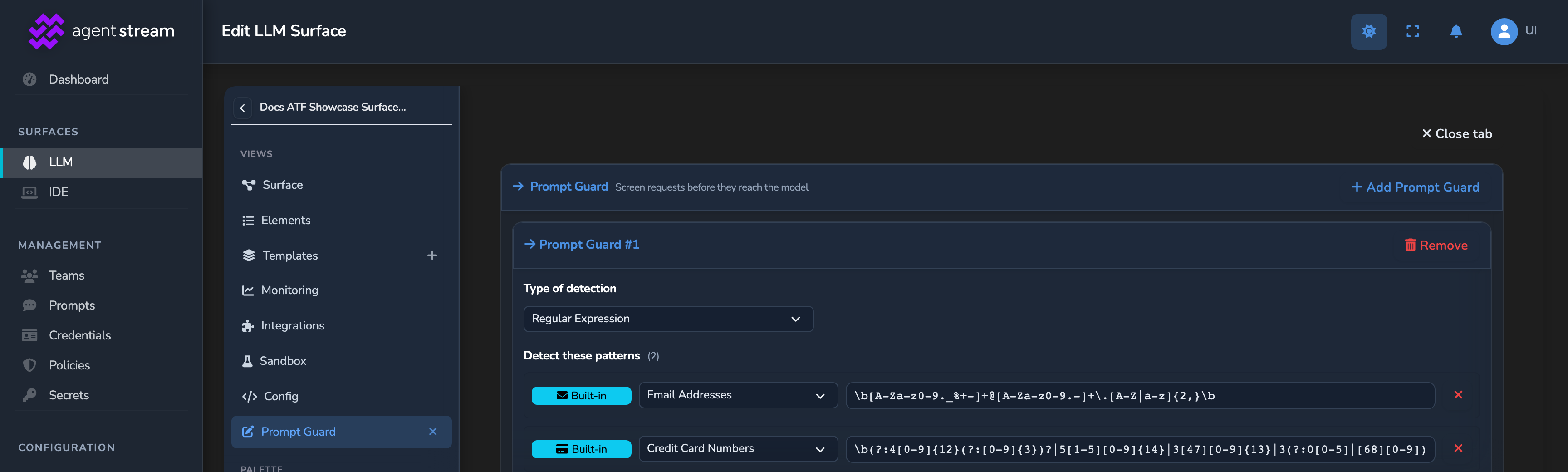
Prompt Guard appears twice on every LLM Surface canvas, once on the request side and once on the response side, and both start disabled. Each node has its own Enabled switch, so you switch the two sides on separately. Select a Prompt Guard node and turn on its Enabled switch, then open its editor: Edit request guards… on the request-side node, Edit response guards… on the response-side node. The button stays disabled until that node’s Enabled switch is on. In the editor, Add Prompt Guard creates a guard, and its Type of detection chooses Regular Expression or AI Matching. AI Matching is offered on the request side only.
| Field | What it does | Default |
|---|---|---|
| Enabled | Switch on each Prompt Guard node’s sidebar, one for the request side and one for the response side. That node’s edit button (Edit request guards… or Edit response guards…) stays disabled until it’s on. | Off |
| Request Guards | Guards applied to client requests before they reach the LLM. Add as many as you need with Add Prompt Guard. Opened with Edit request guards…, headed Prompt Guard with the subtitle “Screen requests before they reach the model”; each guard shows as a numbered “Prompt Guard #N” card. | None added |
| Response Guards | Guards applied to LLM responses before they reach the client. Add as many as you need with Add Prompt Guard. Reached with Edit response guards…, headed Prompt Guard with the subtitle “Screen responses before they reach the caller”. | None added |
| AI Matching guards | Model-backed PII detection (see below). Add as many as you need. Each appears as a “Prompt Guard” card with Type of detection set to AI Matching, in the request-side list (request only; the response side offers Regular Expression only). | None added |
Regex guards
Regex guards match a request or response against a pattern and, on a hit, reject, redact, or pseudonymise the matched text.
- Reject the call completely is a hard stop, not a filter, for when a match means something has already gone wrong and the call shouldn’t proceed.
- Redact the text that matches the pattern fits most cases: the sensitive value just needs to disappear, with no need to preserve context across turns.
- A conversation that keeps referring to the same hidden value across turns needs Use a NER ID to preserve context instead. Each distinct value gets its own stable ID rather than being replaced by the same static token every time. See PII protection and NER IDs →.
| Field | What it does | Default |
|---|---|---|
| Regex Rules | The rule set (below). Once Regular Expression is chosen under Type of detection, the card shows a “Detect these patterns” list plus a “When detected” handling control. | — |
| Rejection Response | Custom rejection response, shown under the “When detected” control’s Rejection response heading once “Reject the call completely” is chosen. Only meaningful when the handling is set to reject. | — |
The rule set:
| Field | What it does | Default |
|---|---|---|
| When detected | What happens on a match, picked from a single “When detected” dropdown with three options: “Reject the call completely,” “Redact the text that matches the pattern,” and “Use a NER ID to preserve context.” “Redact the text that matches the pattern” replaces each match of a type with a fixed token, such as <EMAIL>. “Use a NER ID to preserve context” gives each distinct value its own stable NER ID, such as [EMAIL_NER_001], so entity relationships survive while the raw value is hidden. The replacement token isn’t configurable. | “Reject the call completely” on a request-side guard. “Redact the text that matches the pattern” on a response-side guard. |
| Restore Original Values in the Response | Restore the original values in the final response, as a toggle. Only meaningful on a request-side guard using the NER ID option. | Off |
| Link Pronouns to a Person’s NER ID | Link singular gendered pronouns (he/she/…) to a person’s NER ID when exactly one person has been named so far. Only meaningful on a request-side guard using the NER ID option. | Off |
| Detect These Patterns | The patterns to match, shown under a “Detect these patterns (N)” heading with “Built-in Pattern” / “Custom Regex” add buttons. | None added |
Add a pattern with Built-in Pattern to pick a ready-made detector by name, or with Custom Regex to write your own expression, with an optional label.
The Built-in Pattern dropdown shows each available pattern by its label. The list includes:
- Email Addresses
- US SSN (Simple Format)
- Phone Numbers
- Credit Card Numbers
- Date of Birth
- IP Addresses (IPv4)
- Passport Numbers (US)
- US Street Addresses
The rejection response:
| Field | Default |
|---|---|
| Status code | 403 |
| Content-Type | application/json |
| Response body | A JSON prompt_guard_violation error |
Judge and Jury offer this same override further down their own panels, each under its own heading.
Model-backed PII detection
An AI Matching guard sends the request text to an OpenAI-compatible detection model that returns typed PII entities (names, addresses, organisations, …), catching PII that regex cannot. Send text only to a trusted detection endpoint, ideally one you host yourself.
- Link coreferences gives every mention of the same person or organisation, such as “Bob” and “Robert Smith”, one shared NER ID. It scans the whole prompt rather than each message on its own, so each turn sends more text to the detection model. Turn it on when the model needs to tell who’s who across mentions.
- Cache detections stays on by default so repeated messages in a multi-turn history skip the detection model on later turns.
- The default, Reject if PII detection is unavailable, fails a request rather than letting it through unmasked. Switch to Continue with regex masking only instead if availability matters more than catching non-regex PII on that one call.
| Field | What it does | Default |
|---|---|---|
| Enabled | A detector is active as soon as it’s added. Remove it with the card’s Remove button. | On |
| Provider | The detection model’s provider (for example OpenAI or Ollama), picked from the Provider dropdown under Detect using this AI Model. Required. | Not set |
| Endpoint | The provider’s endpoint, picked from an Endpoint dropdown of the provider’s catalogue endpoints. Required. | Not set |
| Model | The detection model, picked from the provider’s catalogue models. Required. | Not set |
| Provider’s API key field (for example OpenAI API Key) | Secret reference for the detection endpoint’s API key. The field takes the provider’s own label, or API Key Secret for a provider without one. | Not set |
| Entity types to detect | Entity types the model should return. Select or clear the preset types, or add your own; a custom type has its own remove button. | PERSON, ORGANIZATION, LOCATION, ADDRESS, EMAIL_ADDRESS, PHONE_NUMBER |
| When detected | What to do when PII is found, from the same three-option “When detected” dropdown used by regex guards: reject the call, redact each match with a fixed token such as <EMAIL>, or replace it with a NER ID such as [EMAIL_NER_001]. With “Reject the call completely”, the restore and coreference options below don’t apply. | Use a NER ID to preserve context |
| Rejection Response | Custom rejection response, shown under the “When detected” control’s “Rejection response” heading once “Reject the call completely” is chosen. | Not set |
| Restore in response | Restore detected values in the response, as a toggle. | Off |
| Link coreferences | Give the model’s coreference groups (aliases like “Bob” and “Robert Smith”) a single NER ID, as a toggle. Only meaningful when “When detected” is set to use a NER ID. | Off |
| Cache detections | Cache detection results so repeated messages (multi-turn history re-sends) skip the model, as a toggle. | On |
| Timeout (seconds) | Per-detection-call timeout. | 30 seconds |
| If PII detection is unavailable | If the detector is unavailable (errors or times out), reject the request or continue with only local regex masking applied. Separate from the “Reject” handling above, which rejects when PII is detected. Dropdown labelled “If PII detection is unavailable” with options “Reject if PII detection is unavailable” and “Continue with regex masking only”. | Reject if PII detection is unavailable |
Expert Witnesses
Expert Witnesses attaches one or more purpose-trained external safety classifiers: a sibling to Judge and Jury, but a pure classifier rather than a general reasoning LLM. Different witnesses can sit on different seams (for example, Azure Prompt Shields on the request and Azure Content Safety on the response). A pure classifier is typically faster and cheaper than a full reasoning LLM call, so reach for Expert Witnesses when a purpose-trained detection service already exists for what you’re screening (prompt injection, jailbreaks, harm categories) rather than asking a general LLM (Judge or Jury) to reason about it from scratch.
- With an existing EnkryptAI account, use EnkryptAI (Guardrail), bound to a guardrail you configure directly in EnkryptAI’s own console.
- The named cloud-security providers (Azure Prompt Shields, Azure Content Safety, Lakera) make sense when you already use that vendor elsewhere in your stack.
- Generic (OpenAI-moderation shape) is for a custom or self-hosted classifier that speaks the OpenAI-moderation-style response shape.
- Fail open on provider error stays off by default, so a guardrail outage blocks calls instead of silently letting them through. Turn it on only if availability matters more than this particular check on that seam. Among the guardrails, this switch and the AI Matching detector’s If PII detection is unavailable setting are the only fail-open choices, and both start fail-closed.
Each witness:
| Field | What it does |
|---|---|
| Name | The witness’s name, edited inline in the card header. The placeholder reads “Witness N”. |
The connector configuration:
| Field | What it does | Default |
|---|---|---|
| Enabled | Whether this witness runs, as a toggle. | On |
| Provider | Which provider’s request/response wire format to use, from a dropdown (see below). | EnkryptAI (Detect API) |
| Endpoint URL | Absolute URL of the provider’s detection endpoint. Filled in automatically for the EnkryptAI and Lakera Guard providers. The Azure providers and Generic (OpenAI-moderation shape) need your own endpoint URL. | The EnkryptAI Detect API endpoint |
| API Key Secret | Secret reference for the provider API key. | Not set |
| Timeout (Seconds) | Per-call timeout. | 10 seconds |
| Fail open on provider error | On allows the call through when the provider errors or times out (fail-open); off blocks it (fail-closed). | Off |
| Custom headers | Static headers sent on every provider call, in addition to the auth header. The literal {key} in a value is replaced by the resolved API key: used for provider-specific routing headers such as EnkryptAI’s X-Enkrypt-Deployment. EnkryptAI’s Deployment, Guardrail, and Policy headers are set in their own fields rather than in this list. | None added |
| Model | Optional model field injected into the request body. Required by the EnkryptAI AI Proxy (shown only when that provider is selected); unset for providers that take no model. | Not set |
Which seam a witness checks, the request before it reaches the LLM or the response before it reaches the client, is fixed by whether you place it on the request-side or response-side canvas node. Unlike Prompt Guard, Judge, and Jury, Expert Witnesses have no custom-rejection-response editor; a flagged verdict always uses the default rejection.
Provider options
| Provider | Description |
|---|---|
| EnkryptAI (Detect API) (default) | EnkryptAI Guardrails detection API (/guardrails/detect): a pure classifier, no LLM call. |
| EnkryptAI (Guardrail) | EnkryptAI’s saved-guardrail detect endpoint (/guardrails/guardrail/detect), bound to a guardrail you name in the Guardrail field, which is sent as the X-Enkrypt-Guardrail header. Preferred over EnkryptAI (Policy — Legacy). |
| EnkryptAI (AI Proxy) | EnkryptAI AI Proxy (/ai-proxy/chat/completions). The deployment named in the Deployment field binds both the guardrail policy and the model; the proxy runs its own completion, so as a witness it incurs an extra model call. |
| EnkryptAI (Policy — Legacy) | EnkryptAI’s legacy saved-policy detection API (/guardrails/policy/detect), deprecated by EnkryptAI in favour of EnkryptAI (Guardrail). |
| Lakera Guard | Lakera Guard detection API (/v2/guard). |
| Azure Prompt Shields (request) | Azure AI Content Safety Prompt Shields (text:shieldPrompt): prompt-injection and jailbreak detection on the request. |
| Azure Content Safety (response) | Azure AI Content Safety harm-category moderation (text:analyze): severity-scored hate, sexual, self-harm, and violence detection. |
| Generic (OpenAI-moderation shape) | A generic OpenAI-moderation-style API returning a flagged or blocked verdict. |
Judge
The Judge block evaluates a request before it reaches the LLM. In Decide LLM based on content mode on a buffered request, it runs in parallel with the Decider; otherwise, including on a streamed request, it completes before the model is called. A surface with a Judge can still stream its responses. Reach for it when you need judgment calls beyond what a fixed regex pattern or a narrow classifier can make: standard content-moderation categories, or your own custom criteria.
The Judge node is already on every LLM Surface canvas and starts disabled. To switch it on, select the node, turn on its Enabled switch, then open its editor with Edit judge…. The Judge doesn’t run on realtime voice, where model replies can be reviewed with the Jury instead, and the dashboard won’t save a canvas with both an enabled Judge and an enabled Audio Stream element.
- Builtin Content Moderation covers standard categories (hate, violence, sexual content, etc.) as a single classification call with nothing to write; it’s enough for most surfaces.
- Custom, domain-specific judgment calls for User-Defined LLM Judge instead: you write the criteria via Strictness, Focus Areas, and Custom Instructions, and a full LLM reasons about the request against them.
- Start Confidence Threshold around 0.7–0.8, then adjust from there: raise it if legitimate requests are getting rejected on borderline calls, lower it if clearly bad requests are slipping through as low-confidence approvals.
- For a reasoning model (e.g. Qwen3) that exhausts its token budget on reasoning before producing a decision, turn on Disable Thinking / Chain-of-Thought. Left off, the system already auto-retries with thinking disabled once that happens.

| Field | What it does | Default |
|---|---|---|
| Enabled | Master switch, as a toggle. | Off |
| Moderation Mode | A two-button toggle: Builtin Content Moderation (uses the provider’s content-safety classifier, such as the OpenAI Moderations API) or User-Defined LLM Judge (uses a Chat Completions LLM with a custom system prompt). | Builtin Content Moderation |
| Moderation Provider / Judge LLM Provider | Provider/model/endpoint for the Judge call. Headed Moderation Provider in builtin mode and Judge LLM Provider in LLM mode, with Provider / Endpoint / Model / API key (labelled for the provider, for example OpenAI API Key) / Timeout / Model Parameters controls (see the target fields below). | Not set |
| Generated System Prompt | System prompt (LLM mode only). Shown as an editable, auto-regenerated preview headed “Generated System Prompt” with a “Preview” badge. Edits are overwritten when the Strictness/Focus Areas/Confidence/Custom Instructions controls change. | Generated from the default strictness |
| Strictness Level | Used for prompt generation. Shown as a Strict/Balanced/Lenient button group headed “Strictness Level”. | Balanced |
| Focus Areas | Injected into the system prompt. | None added |
| Confidence Threshold | Reject decisions below this confidence (0.0–1.0) are treated as approvals. | Not set |
| Custom Instructions | Custom domain-specific instructions appended to the system prompt. | Not set |
| Disable Thinking / Chain-of-Thought | Disable chain-of-thought for a reasoning model, as a checkbox: injects /no_think into the system prompt and adds "think": false to Ollama requests. Dashboard checkbox label is “Disable Thinking / Chain-of-Thought”. | Off |
| Rules | Rejection rules, evaluated in order; the first match triggers rejection. No match ⇒ approved. Built from the “Moderation Categories” (builtin mode) or “Decision Evaluation” (LLM mode) controls, combined with the “Custom Rejection Response” card below. | None |
A judge rule’s name is generated automatically from whichever higher-level control produced it (a builtin-mode rule is named “Content flagged” or “Category: <cat>”; an LLM-mode rule “JSON field rejection” or “Regex rejection”), so you configure Moderation Categories or Decision Evaluation above rather than a rule list directly. The rejection response itself comes from the “Custom Rejection Response” card: Status Code (default 403), Response Body, Content-Type (default application/json).
Provider/model/endpoint target fields (shared by Judge, Jury, Decider, failover, and load-balancing targets):
| Field | What it does | Default |
|---|---|---|
| Provider | e.g. OpenAI, Anthropic, Google Gemini, picked from a dropdown. | Not set |
| Model | Model identifier. | Not set |
| Endpoint | API endpoint. The Judge panel shows a read-only “Endpoint (auto-selected)” field with the resolved endpoint’s name (derived from provider + mode); the Juror panel shows an “Endpoint *” dropdown of the provider’s known endpoints. | Not set |
| Provider’s API key field (for example OpenAI API Key) | Secret ID for the API key. The field takes the provider’s own label, or API Key Secret for a provider without one. | Not set |
| Model Parameters | Provider-specific model parameters, shown as a “Model Parameters” section (LLM-mode only for Judge) with per-parameter sliders/inputs (e.g. Temperature, Max Tokens, Top P). | Not set |
| Timeout (Seconds) | Request timeout. | 30 seconds |
Jury
The Jury block evaluates the LLM’s response before it returns to the caller. It’s the mirror of Judge on the way out, catching problems that only reveal themselves once the model has generated an answer (a policy violation, an unwanted claim, whatever your jurors are built to catch). Because the Jury needs the whole response, an enabled Jury answers a streaming request with a buffered response. On a realtime voice surface, the Jury reviews each model reply when Review realtime model replies is on (see Server tools and modalities → Realtime voice).
Like the Judge, the Jury node comes with every LLM Surface canvas, switched off. Select it and turn on its Enabled switch, then use Add juror to add jurors and Verdict & redrive settings… for the verdict and redrive options.
- Parallel, the default, is the strictest bar: every juror must approve independently, and since they run concurrently it costs no extra latency over the slowest one.
- Serial exits early on the first rejection, so order cheaper or faster jurors first.
- Majority trades some strictness for resilience against a single juror’s false positive: more than half approving is enough.
- Redrive Policy defaults to no retries. Change it only if the model should get a chance to fix its own answer using the Jury’s rejection reason, since each redrive step costs another full model call.
| Field | What it does | Default |
|---|---|---|
| Enabled | Master switch, as a toggle. | Off |
| Execution mode | How jurors are executed (below). | Parallel — all must approve |
| Jurors | One or more juror definitions. Shown as “Jurors (N)” with the roster list and an “Add juror” button. | None added |
| Redrive Policy | Maximum retry loops when the Jury rejects the response: the Jury rejection reason is appended to the conversation and the LLM is called again, up to this many times. Shown as a “Redrive policy” dropdown with preset options (“Return verdict immediately”, “Redrive once/twice/three times with jury feedback”). | Return verdict immediately (no retries) |
| Redrive Prompt Template | Prompt template for the retry message. Use {reason} as a placeholder for the Jury’s rejection reason. Shown only when redrive policy is set above “Return verdict immediately,” labelled “Redrive prompt template”. | A built-in template |
| Final Negative-Verdict Response | Custom rejection response after all retries are exhausted. Section is headed “Final negative-verdict response”. | Not set |
Execution modes:
| Option | Behaviour |
|---|---|
| Parallel — all must approve (default) | All jurors run in parallel; all must approve. |
| Serial — staged, stops on first reject | Jurors run one after another; stops on the first rejection. |
| Majority — > 50% must approve | All jurors run in parallel; more than half must approve. |
Each juror:
| Field | What it does | Default |
|---|---|---|
| Enabled | Whether this juror participates, as a toggle. A disabled juror keeps its configuration but is skipped at runtime. | On |
| Name | Human-readable name. Labelled “Name” in the juror’s sidebar panel and “Juror Name” in the full-area juror editor. | Not set |
| LLM Configuration | Provider/model/endpoint for this juror, with the same Provider / Endpoint (dropdown) / Model / API key (labelled for the provider) / Timeout (seconds) / Model Parameters controls described above. | Not set |
| View Generated System Prompt | System prompt for this juror, shown in a collapsible “View Generated System Prompt” section. | Not set |
| Decision Evaluation | How to interpret this juror’s response, set with the Decision Mode radio buttons (below). | JSON |
| Strictness Level, Focus Areas, Confidence Threshold, Custom Instructions, Disable Thinking | Same meaning as the equivalent Judge fields. The juror’s checkbox is labelled “Disable Thinking”. | Strictness Balanced; the others as for the Judge |
Decision evaluation modes:
| Mode | Fields | Approval rule |
|---|---|---|
| JSON (default) | JSON Field Name (default “decision”) and Approve Value (default “approve”). | The named JSON field on the juror’s response equals the Approve Value. |
| Regex | Approve Pattern and Reject Pattern (optional, checked first). | Response text matches the Approve Pattern (and does not match the Reject Pattern, when set). |
The Jury’s own version of this override, under its Final negative-verdict response heading:
| Field | Default |
|---|---|
| HTTP status code | 403 |
| Response body | A JSON error with the code content_policy_violation |
| Content-Type | application/json |
Related
- Guardrails concept: The four-layer model, fail-closed behaviour, and the rejection taxonomy.
- PII protection and NER IDs: How masking and pseudonymisation work conceptually.
- Routing and variants: The Decider, which shares the same provider/model/endpoint target shape used here.
- OPA policies: Access-control decisions that run alongside these content guardrails.
- Core configuration: Where Prompt Guard, Expert Witnesses, Judge, and Jury sit among a surface’s other optional configuration blocks.
Glad to hear it. Thanks for letting us know.
Sorry to hear that. Thanks for letting us know.