Cap spend and rate per member
This guide configures a member’s own monthly ceilings, per-minute rate caps, and model allow-list, so a single caller, behaving like its own virtual key, cannot exhaust a shared surface budget or use a model it shouldn’t. For the conceptual model, see Teams and attribution →.
A surface-wide usage limit caps total spend, but cannot stop one caller from consuming the entire budget before anyone else gets a share, and cannot restrict which models a specific caller may use.
Use this guide when:
- Different callers on the same surface need separately enforced budgets, not one shared ceiling.
- A specific caller should be restricted to a subset of models.
- You need to bound a short burst from one caller without throttling every other caller on the surface.
You do not need per-member caps if every caller sharing a surface can be trusted to the same shared budget from Cap spend per pipeline stage.
Prerequisites
- A member already created and attributed. See Attribute usage to members and teams if you do not have one yet.
Steps
Set the member’s monthly ceilings
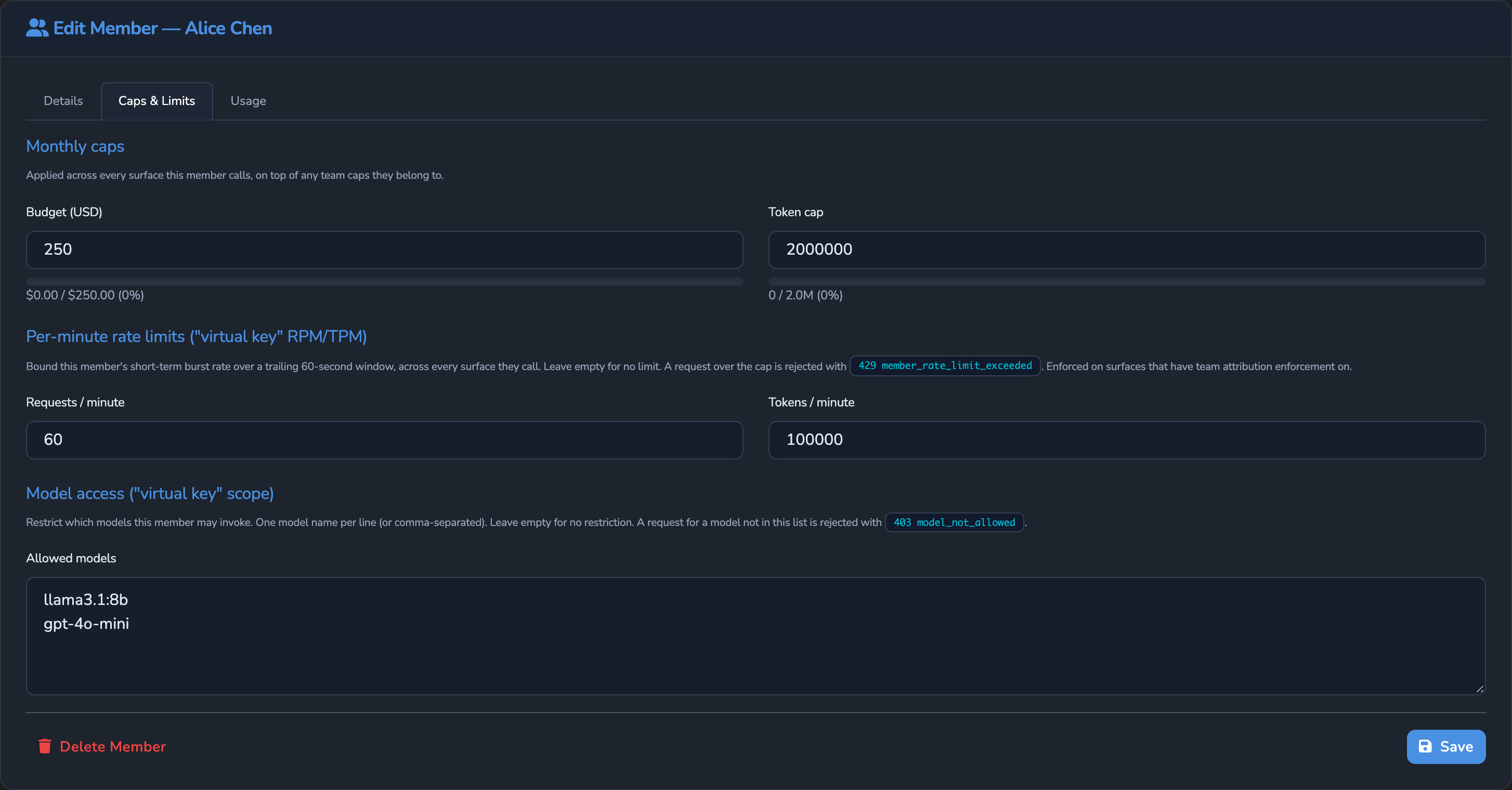
On the Teams page, switch to the Members tab, open the member to configure, and switch to its Caps & Limits tab. Under Monthly caps, set Budget (USD), Token cap, or both: a personal ceiling across every team and surface this member touches.
These caps reset on the 1st of each month (UTC). To reset them on a monthly anniversary instead, set Resets monthly from under Budget period to the date the anniversary counts from. Select Use calendar month to return to the 1st of each month.
Set its per-minute rate caps
Set Requests / minute and Tokens / minute. Both are enforced over a trailing 60-second window, not a fixed wall-clock minute boundary.
Restrict which models it may call
Add model names under Allowed models, the member’s model allow-list. Leave this empty for an unrestricted member. This list is checked on every request, whether or not Enforce team / member limits (block at 429) is on. A request that omits model entirely (a surface-controlled model) is never blocked here.
Turn on Enforce, if not already
Back on the surface’s team-attribution block, confirm Enforce team / member limits (block at 429) is on. Without it, the budget, token, and per-minute caps configured above are tracked for reporting but never block a request.
Optional: allow individual overage
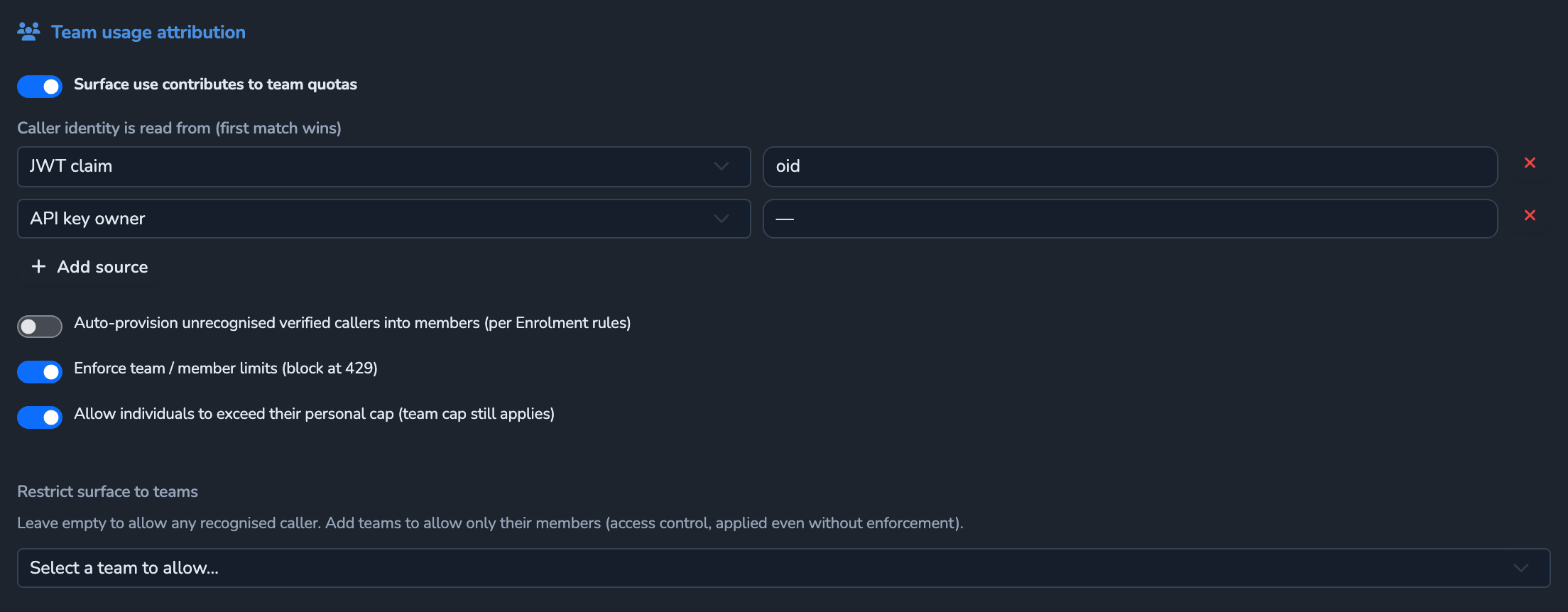
Turn on Allow individuals to exceed their personal cap (team cap still applies) on the surface’s team-attribution block if a member’s personal monthly caps should be advisory rather than a hard stop. Team caps and the member’s per-minute caps still block in that case. The switch is available only once Enforce team / member limits (block at 429) is on.
Save
Select Save on the member and, if you changed the surface, its save button (Save changes) under Manage. Changes apply immediately.
Confirm
Replace <YOUR_APPLIANCE_HOST> and <YOUR_SURFACE_ROUTE> with your surface’s values, and use a credential matching your member’s identifier.
Test 1: a request naming a disallowed model returns 403
curl -k -X POST "https://<YOUR_APPLIANCE_HOST><YOUR_SURFACE_ROUTE>/v1/chat/completions" \
  -H "Authorization: Bearer <TOKEN_MATCHING_YOUR_MEMBER_IDENTIFIER>" \
  -H "Content-Type: application/json" \
  -d '{
    "model": "a-model-not-on-the-allow-list",
    "messages": [
      { "role": "user", "content": "Say hello." }
    ]
  }'
The -k flag disables TLS certificate verification. Use this for local testing only. Remove it in production.
Expected: 403 Forbidden with error code model_not_allowed, since the requested model is not in this member’s Allowed models list.
Test 2: exceeding the per-minute cap returns 429
Send requests naming an allowed model faster than the configured Requests / minute within a trailing 60-second window. Expected: once the cap is exceeded, further requests return 429 with error code member_rate_limit_exceeded until the window rolls forward. Tokens / minute returns the same error code.
The monthly ceilings behave the same way once Enforce team / member limits (block at 429) is on. After the member’s spend or tokens reach Budget (USD) or Token cap, further requests return 429 with error code team_quota_exceeded. The request that takes the member past the cap still completes.
Troubleshooting
| Symptom | Likely cause | Fix |
|---|---|---|
| Caps are configured but never trigger. | Enforce team / member limits (block at 429) is off on the surface’s team-attribution block. | Turn it on. Without it, the budget, token, and per-minute caps are recorded but never block. |
| The model allow-list rejects even the intended model. | Allowed models doesn’t include the model name exactly as the request sends it. | Confirm the model string matches character-for-character, including any provider-specific suffix. |
| A member exceeds its own monthly budget without being blocked. | Allow individuals to exceed their personal cap is on, so only team caps and per-minute caps still block. | Turn it off if the member’s own cap should be a hard stop too. |
| The per-minute cap trips sooner than expected. | The window is a trailing 60 seconds from each request, not a fixed per-minute clock boundary; a short burst anywhere within that span counts. | Space requests out, or raise the cap if the burst pattern is legitimate. |
Next steps
- Alert on budget breaches and cost spikes: Add a surface-wide notification alongside this member-level hard cap.
- Control access to a surface with an OPA policy: Gate access by claim in addition to a member’s own caps.
Related
- Members reference: Every member field, identifier kind, and the auto-provisioning defaults that can stamp these caps automatically.
- Teams and attribution: The conceptual model this guide is built on.
- Teams reference: The team gate’s exact enforcement order, and how team-wide caps interact with a member’s own.
- Cost and usage limits reference: The surface-wide usage-limit mechanism this member-level cap is distinct from.
Glad to hear it. Thanks for letting us know.
Sorry to hear that. Thanks for letting us know.