Validate bearer tokens on a surface
This guide creates a JWT verification strategy, a reusable configuration naming a trusted issuer and its signing keys, and attaches it to a surface’s JWT bearer source authentication. For how this fits alongside the other authentication methods, see Security and access control →.
A surface authenticating callers only by a shared API key can confirm a caller holds the right secret, but not who they are. A JWT bearer token additionally carries a subject and a full set of claims, such as tenant, role, or department, that downstream OPA policy and audit can act on individually, rather than treating every holder of the key as the same caller.
Use this guide when:
- Your callers already receive OAuth or OIDC access tokens from an identity provider, and you want the surface to validate them directly.
- A policy or audit trail needs the caller’s subject and claims, not just a pass/fail authentication check.
- More than one surface needs to trust the same issuer’s tokens.
You do not need this if a shared API key is sufficient proof of identity for your callers, since a JWT verification strategy is more setup for the same yes/no authentication outcome without additional claim data.
Prerequisites
- An active LLM Surface.
- Administrator role in the dashboard, to create a JWT verification strategy.
- The issuer’s expected
issclaim value, and its JWKS source: a reachable JWKS URL, or the issuer’s public keys as JSON if it has no discovery endpoint. - The
audvalue your issuer puts in the access tokens it issues for this API. - A valid access token from that issuer, to use in the Confirm section below.
Steps
Create a JWT verification strategy
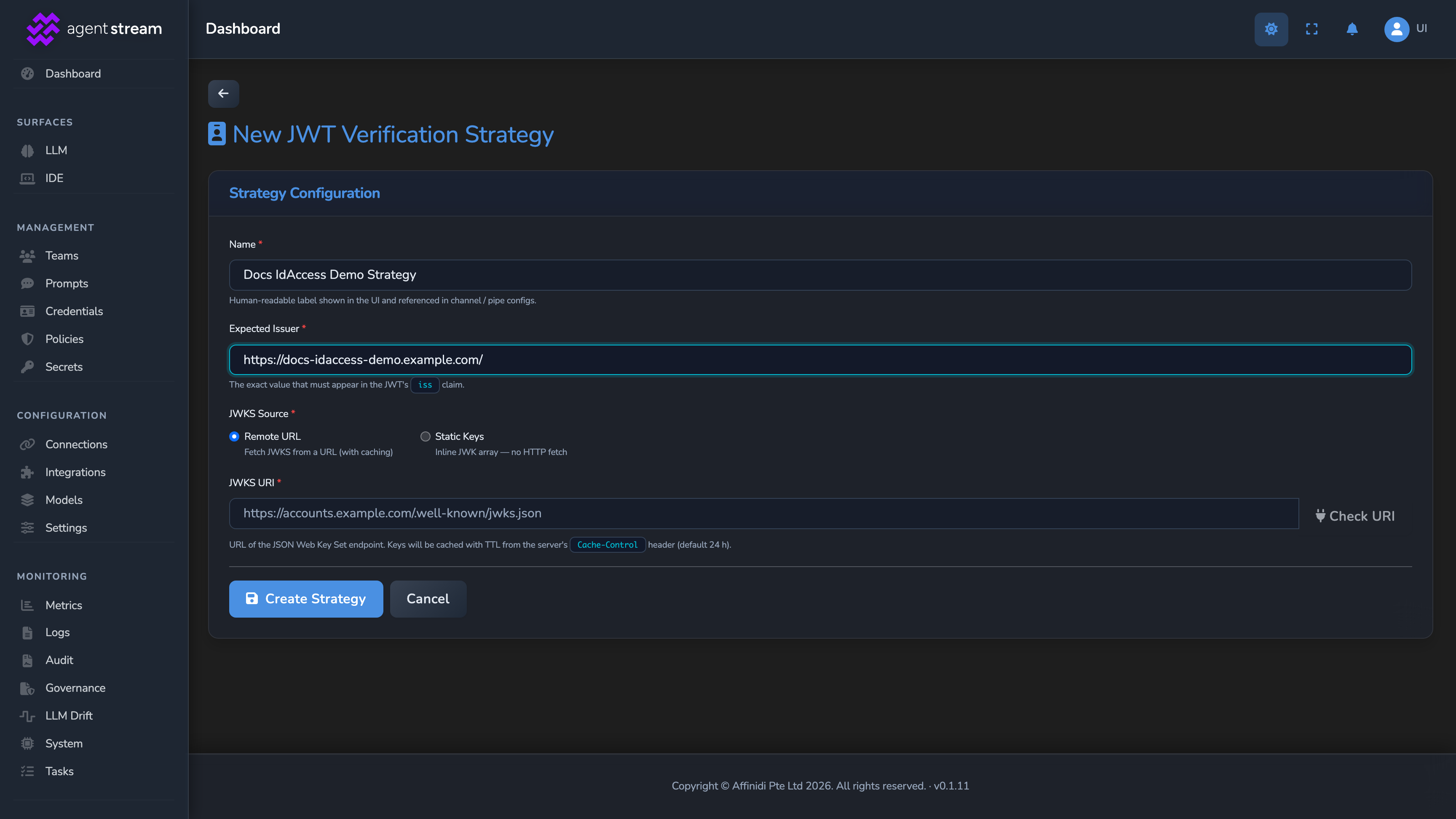
Select Credentials in the dashboard sidebar, open the JWT Verification tab, and select Add Strategy. On an empty list, the button reads Add your first strategy. Fill in the New JWT Verification Strategy form:
| Field | Description |
|---|---|
| Name | A descriptive label, for example Auth0 production. |
| Expected Issuer | The exact iss claim value the token must contain, including a trailing slash if the issuer’s tokens carry one. |
| JWKS Source | Remote URL, with a reachable JWKS URI, or Static Keys, with the keys pasted into JWK Array as a JSON array of JWK objects (the contents of the JWKS keys field). |
With Remote URL, wait for JWKS URI is reachable and valid. to appear below the URI, or select Check URI. Then select Create Strategy.
Attach the strategy to the surface
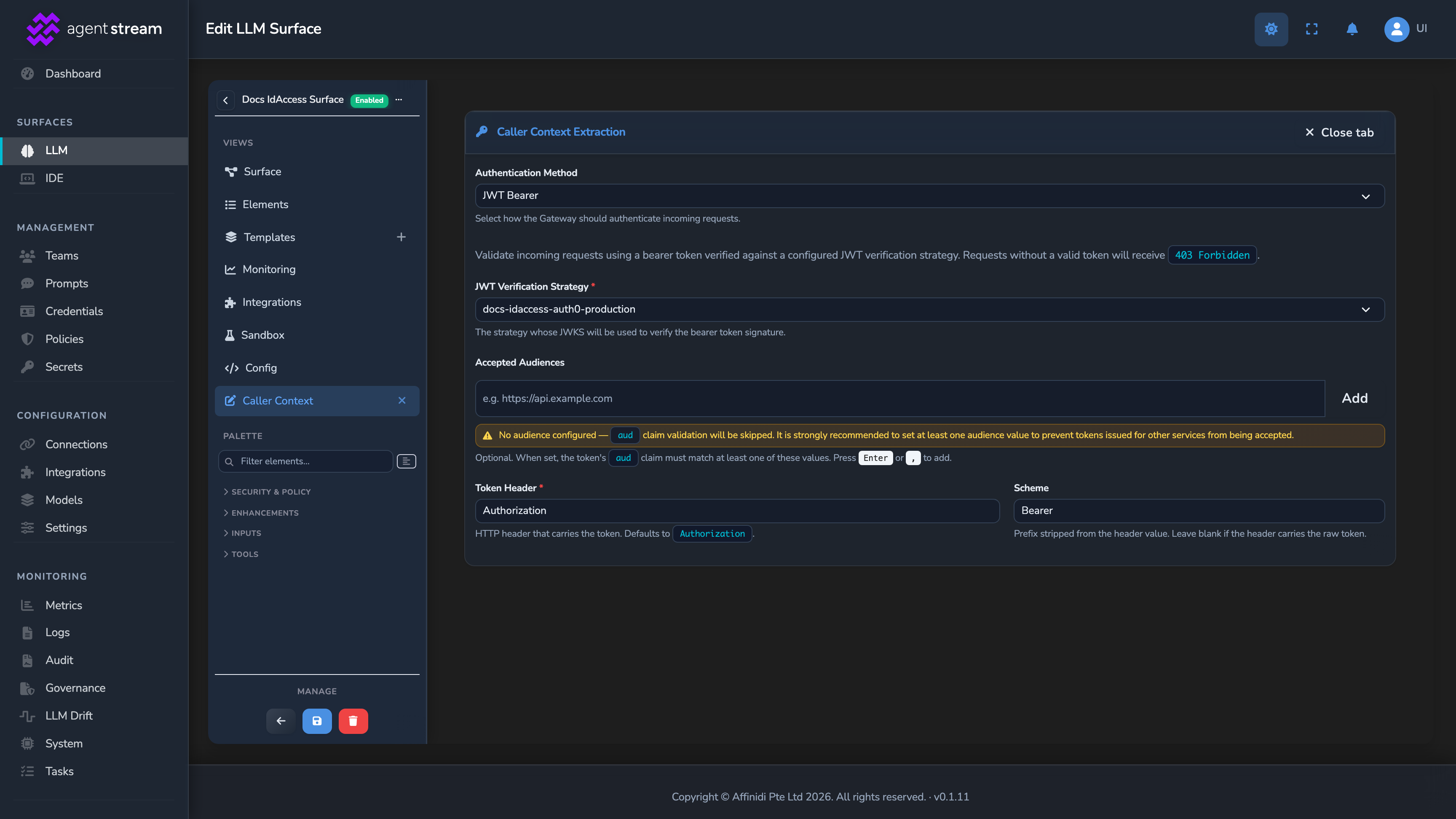
Under SURFACES in the dashboard sidebar, select LLM and open your surface. If the canvas has no Caller Context element, drag it from the Security & Policy palette group onto the request path.
Select the Caller Context element, confirm Authentication Method is JWT Bearer, and select Configure…. In the Caller Context Extraction editor, select your strategy under JWT Verification Strategy. The surface authenticates callers only once a strategy is selected.
Add the accepted audiences
In the same editor, type your issuer’s aud value under Accepted Audiences and select Add, or press Enter. Add more values if your callers’ tokens can carry different audiences. A token matches if its aud contains any one of them.
Add at least one value. With Accepted Audiences empty, the surface rejects every token.
Adjust the token header, if not using a standard bearer header
Token Header defaults to Authorization and Scheme defaults to Bearer, matching a standard Authorization: Bearer <token> header. Change these only if your callers present the token differently.
Save the surface
Select the save button (Save changes) under Manage. The change applies immediately.
Confirm
Replace <YOUR_APPLIANCE_HOST>, <YOUR_SURFACE_ROUTE>, and <YOUR_JWT_TOKEN> with your surface’s values and a valid token from your issuer.
Test 1: a valid token returns 200
curl -k -X POST "https://<YOUR_APPLIANCE_HOST><YOUR_SURFACE_ROUTE>/v1/chat/completions" \
  -H "Authorization: Bearer <YOUR_JWT_TOKEN>" \
  -H "Content-Type: application/json" \
  -d '{
    "messages": [
      { "role": "user", "content": "Say hello." }
    ]
  }'
The -k flag disables TLS certificate verification. Use this for local testing only. Remove it in production.
Expected: 200 OK. The surface validated the token’s signature and issuer, and the request proceeded through the pipeline with the token’s subject and claims available downstream.
Test 2: a missing token returns 401
Send the same request with the Authorization header removed. Expected: 401 Unauthorized, with the error code source_authentication_failed, since no bearer token was presented at all.
Test 3: a token for a different audience returns 401
Send the same request with a valid token from the same issuer whose aud is not listed under Accepted Audiences. Expected: 401 Unauthorized, with the error code source_authentication_failed.
Troubleshooting
| Symptom | Likely cause | Fix |
|---|---|---|
| Saving the strategy fails when validating the JWKS URI. | The appliance can’t reach the URI, or the URI is a loopback or cloud-metadata address, or it carries a username and password. | Use an http or https JWKS URI the appliance can reach, with no credentials in it. Loopback and cloud-metadata addresses are rejected. |
A valid token still returns 401. | The token’s iss claim does not match Expected Issuer exactly, including a trailing-slash difference. | Decode the token (for example at jwt.io) and compare its iss claim byte-for-byte against the strategy’s Expected Issuer. |
A token with the right issuer still returns 401. | The token’s aud claim does not match any value under Accepted Audiences. | Add the token’s aud value to Accepted Audiences. |
Every token returns 401. | Accepted Audiences is empty, so the surface rejects every token. | Add your issuer’s aud value under Accepted Audiences, then save the surface. |
| The editor shows No JWT verification strategies configured. instead of a strategy dropdown. | No strategy has been created yet. | Complete the first step above, then return to the surface’s Caller Context element. |
The provider itself receives the caller’s raw JWT in its own Authorization header. | Forward caller’s token to the provider (identity pass-through) is turned on. This switch is separate from source authentication and is off by default. | If pass-through is not deliberate for this surface, select the surface’s Surface node, select Configure Surface Features, scroll to Identity pass-through, and turn that switch off. |
Next steps
- Limit dashboard actions with RBAC roles: Restrict who can create and edit JWT verification strategies in the first place.
- Rotate provider credentials without downtime: Apply the same credential-hygiene discipline to the provider side of a surface.
- OPA policies: Gate requests on the subject and claims this authentication step establishes.
Related
- Source authentication reference: Every JWT bearer, API key, and mTLS field, and the identity each produces.
- Security and access control: The conceptual model for all four authentication methods together.
- OPA policies reference: The
source_auth.claimsfield a Rego policy can evaluate against.
Glad to hear it. Thanks for letting us know.
Sorry to hear that. Thanks for letting us know.