Roll out a model with a canary split
This guide creates a variant that overrides a surface’s model, then routes a small percentage of alias-less traffic to it with a canary split, so a change is tested against real production traffic before it becomes the default for every caller. For the conceptual model, see Variants and progressive rollout →.
Rolling out a new model, provider, or guardrail posture usually means redeploying the client or standing up a parallel endpoint. Without a canary split, the only way to compare a candidate change against production traffic is to switch the whole surface over and watch what happens to every caller at once.
Use this guide when:
- You want to test a new model, provider, or guardrail posture against a small percentage of real traffic before promoting it.
- The change should be reachable at the same route clients already call, with no client-side redeploy.
- You need per-variant cost, latency, and rejection figures to decide whether to promote, adjust, or roll back.
You do not need a canary split if you only need one caller group to explicitly opt into a variant; address the variant directly with $alias instead, and skip the canary weighting.
Prerequisites
- An active LLM Surface.
- The candidate provider, model, or guardrail configuration you want to test.
Steps
Create a variant
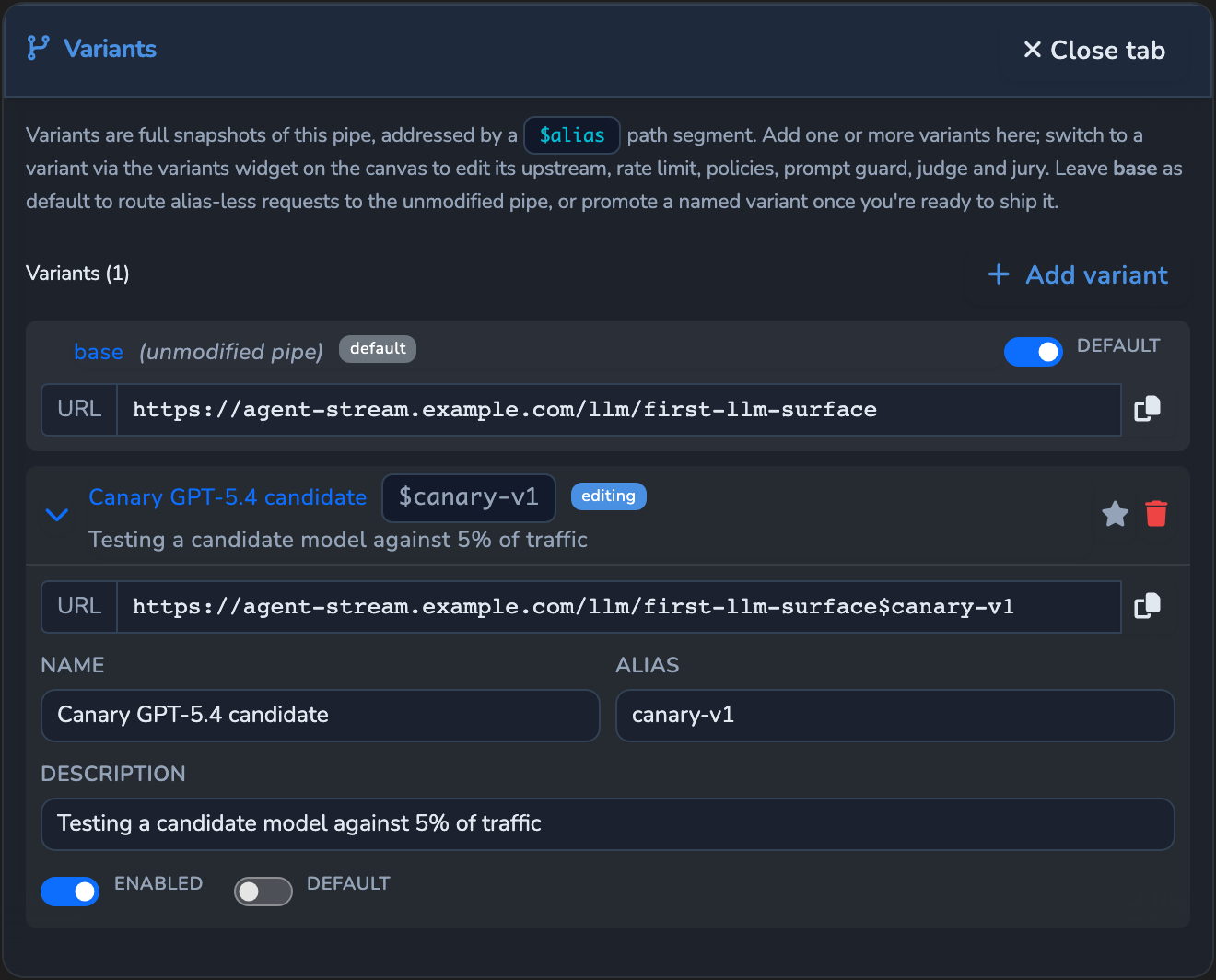
Under SURFACES in the dashboard sidebar, select LLM and open your surface. On the canvas’s Variant widget, select + (Add a new variant). If the surface already has a variant, open the widget, select Manage variants…, then select Add variant. The new variant opens in the Variants tab with a placeholder alias such as alias1. Change its Alias (lowercase letters, digits, and dashes, 1–32 characters) and Name, and leave Enabled on.
Change the variant’s model
With the new variant selected on the Variant widget, select the LLM node and change its Provider and Model to the candidate. Change only what differs from the base surface.
The variant keeps its own copy of the settings it covers, including its provider and model, rate limit, OPA policy, Prompt Guard, Judge, Jury, and elements from the Inputs palette, so a later change to the base surface does not flow into it. If the base surface accepts images, audio, or documents, keep the same Inputs palette elements on the variant, so those requests are still accepted when the split sends them to it. The variant keeps the base surface’s identity and route.
Save the variant
Select the save button (Save changes) under Manage. The variant is now reachable directly at {route}$alias/... alongside the base surface’s own route.
Enable the canary split
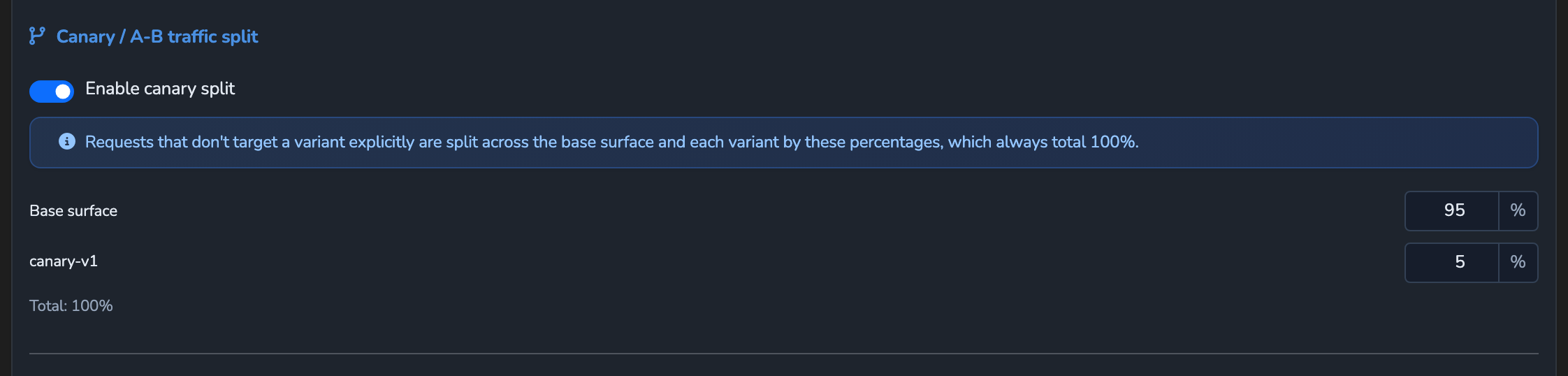
Select the Surface node on the canvas (the root container the rest of the pipeline sits inside) and select Configure Surface Features in its side panel. Scroll to Canary / A-B traffic split and turn on Enable canary split.
Set the split percentage
In the canary rows, one per target (Base surface plus each variant’s alias), enter a small percentage for your new variant, such as 5. Entering a value rebalances the other rows automatically so every row’s percentage still sums to 100%.
Save the surface
Select the save button (Save changes) under Manage. The change applies immediately.
Confirm
Replace <YOUR_APPLIANCE_HOST>, <YOUR_SURFACE_ROUTE>, and <ALIAS> with your surface’s values and the variant’s alias.
Test 1: an explicit alias always returns 200 from the variant
curl -k -i -X POST "https://<YOUR_APPLIANCE_HOST><YOUR_SURFACE_ROUTE>\$<ALIAS>/v1/chat/completions" \
  -H "Content-Type: application/json" \
  -d '{
    "messages": [
      { "role": "user", "content": "Say hello from the canary variant." }
    ]
  }'
The -k flag disables TLS certificate verification. Use this for local testing only. Remove it in production.
Expected: 200 OK, with x-agent-stream-provider and x-agent-stream-model naming the variant’s overridden provider and model. An explicit $alias in the route always wins over any canary split.
Test 2: alias-less traffic reaches the variant in roughly the configured percentage of responses
Send a batch of requests to the base route with no $alias, varying the prompt or with the Response cache off, and tally the x-agent-stream-provider/x-agent-stream-model headers across responses, the same way as in Balance traffic across providers by cost or latency. Expected: roughly the configured percentage of responses show the variant’s provider and model, with the remainder showing the base surface’s.
Troubleshooting
| Symptom | Likely cause | Fix |
|---|---|---|
| Alias-less traffic never reaches the variant, even with a canary split configured. | A routing rule matches the request first; routing rules take precedence over a canary split. | Select the Router element on the canvas and check its rules with Configure routing rules…. Adjust or remove the matching rule, or turn off Enforce routing, if the canary split should apply instead. |
| The Base surface share is answered by a variant, not the base surface. | A variant is marked Default, so alias-less traffic outside the split goes to it. | In the Variants tab, keep base as the default while the canary runs. |
A request to {route}$alias/... returns 503 with the error code variant_disabled. | The variant’s Enabled switch is off. | Re-open the variant and turn its Enabled switch back on. |
| Editing the canary split’s percentages does not add up to 100%. | The dashboard automatically rebalances every other row when you edit one, so editing rows out of order can leave an unintended split. | Adjust the row for the variant you actually care about last, so the rebalance settles on the intended split. |
| The variant does not reflect a change you made to the base surface afterwards. | A variant keeps its own copy of the settings it covers, so later base changes do not flow into it. | Select the variant on the Variant widget and make the same change there, or delete the variant and create a new one from the updated base surface. |
Next steps
- Fail over to a backup provider on error: Add backup providers on the base surface once the new model carries production traffic.
- Balance traffic across providers by cost or latency: Compare the canary approach to distributing every request across a weighted pool.
- Observability: Watch the variant’s per-variant cost, latency, and rejection figures before promoting it.
Related
- Routing and variants reference: Every canary, routing-rule, and variant field.
- Variants and progressive rollout: The precedence order between an explicit alias, routing rules, and a canary split.
- LLM drift detection: Replay captured traffic through a candidate variant to check it against a baseline before it takes any live traffic.
Glad to hear it. Thanks for letting us know.
Sorry to hear that. Thanks for letting us know.