Fail over to a backup provider on error
This guide adds one or more ordered backup providers to a surface, so a transport- or upstream-level failure on the primary provider falls through to a backup instead of failing the request. For the conceptual model, see Resilience and caching →.
Without a configured backup, a single provider outage, rate limit, or degraded model takes the whole surface down for every caller, with no path to recovery beyond waiting for the provider itself. Every team building this retry logic independently produces inconsistent, unaudited failure handling across an organisation’s surfaces.
Use this guide when:
- A surface’s primary provider has an availability or rate-limit history you want to route around automatically.
- You have a second provider or model that can serve as an acceptable substitute when the primary fails.
- You want provider failures handled the same way, and observed the same way, across every surface.
You do not need failover if your surface already uses load balancing. A surface uses one of the two at a time, and a load-balancing pool already falls through on the same errors.
Prerequisites
- An active LLM Surface with its primary provider configured, and its LLM node’s Mode set to LLM Direct. The failover settings are available only in that mode.
- Credentials for each backup provider, stored as secrets.
Store each backup provider’s API key as a secret and select it in the provider’s API key field. Never hardcode a key into a policy, prompt, or configuration field, and rotate each credential through the secrets manager. Confirm no credential value appears in surface request logs or debug output before enabling logging on a surface with failover enabled.
Steps
Switch the surface to Failover mode
Under SURFACES in the dashboard sidebar, select LLM and open your surface. Select the LLM node on the canvas, then select Configure LLM…. In the Failover & Load Balancing card, select Failover.
Add your first backup provider
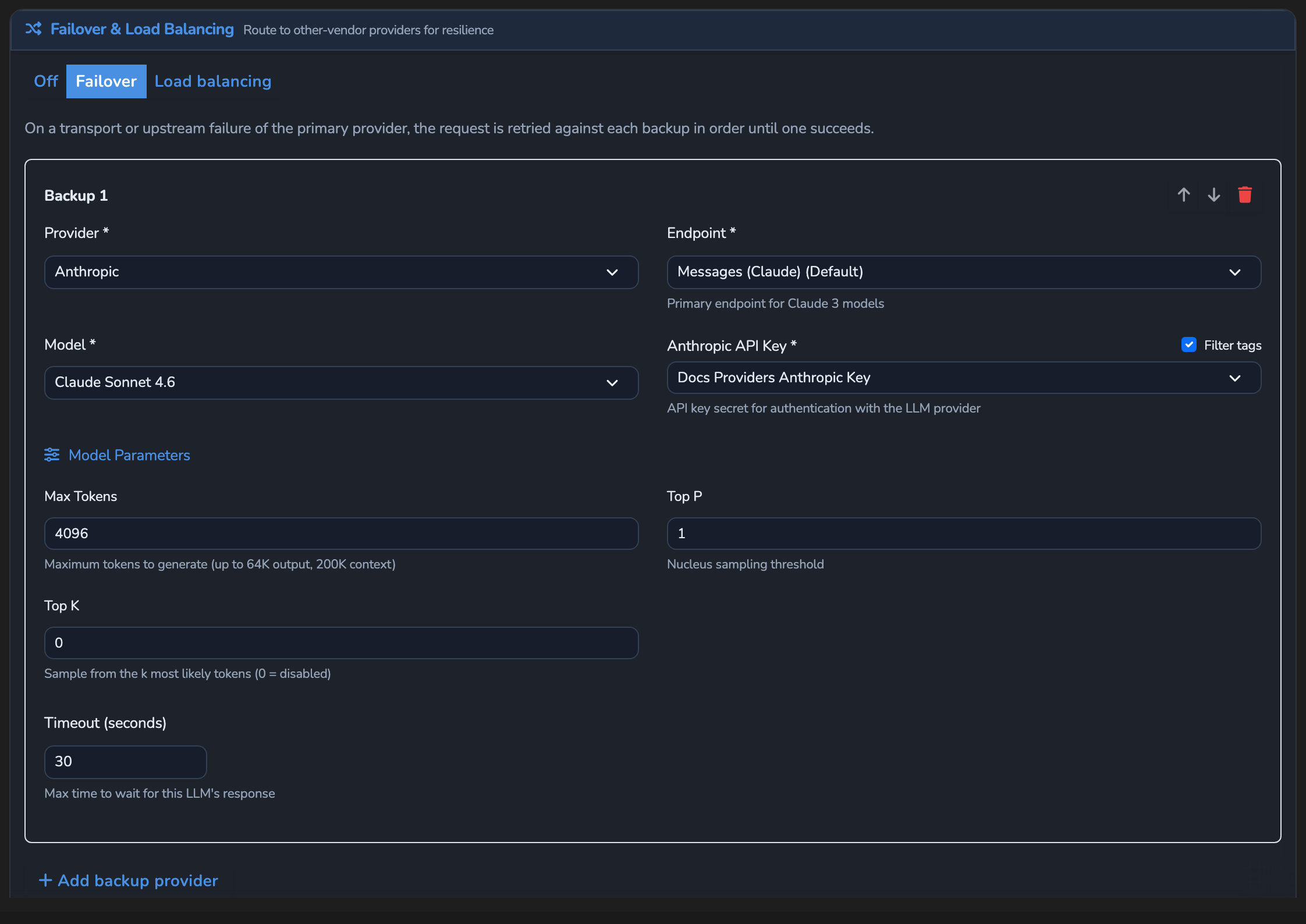
Switching to Failover mode already adds a Backup 1 card automatically. On it, select the Provider, then the Model, and set the provider’s API key field, for example Anthropic API Key. Selecting the Provider also sets its chat completions endpoint, so you can leave Endpoint unchanged. Optionally adjust Timeout (seconds), which defaults to 30.
Add further backups in trial order
Select Add backup provider for each additional fallback. Backups are tried in the order they appear, Backup 1 first. Use the Move up and Move down arrows on a card to order the list from most to least preferred.
Save the surface
Select the save button (Save changes) under Manage. The change applies immediately.
Confirm
Replace <YOUR_APPLIANCE_HOST> and <YOUR_SURFACE_ROUTE> with your surface’s values. If the surface has a Response cache, turn it off for the test or vary the prompt, so a cached answer doesn’t stand in for a live provider call. To force a primary-provider failure for this test, temporarily point the LLM node’s API key field (for OpenAI, OpenAI API Key) at a secret holding an invalid value, then restore it afterwards.
Test 1: a primary-provider failure returns 200 from Backup 1, not the primary
curl -k -i -X POST "https://<YOUR_APPLIANCE_HOST><YOUR_SURFACE_ROUTE>/v1/chat/completions" \
  -H "Content-Type: application/json" \
  -d '{
    "messages": [
      { "role": "user", "content": "Say hello from the failover test." }
    ]
  }'
The -k flag disables TLS certificate verification. Use this for local testing only. Remove it in production.
Expected: 200 OK. Check the x-agent-stream-provider and x-agent-stream-model response headers; they should name Backup 1’s provider and model, not the primary’s, confirming the fallthrough happened.
Test 2: a guardrail rejection keeps its own rejection response, with no attempt against any backup
Send a request that a configured Prompt Guard rule rejects, or that exceeds the surface’s rate limit. Expected: the guardrail’s or rate limiter’s own rejection response, unchanged, with no attempt against any backup. Content-safety rejections and Agent Stream’s own rate limit never trigger failover.
Troubleshooting
| Symptom | Likely cause | Fix |
|---|---|---|
| The request fails outright instead of falling through to a backup. | The primary failed with a content-safety rejection or a rate-limit block, neither of which triggers failover, or no backup targets are configured. | Confirm the failure is a transport- or upstream-level error, and that at least one backup target is saved under Failover. |
Saving the surface fails with an error starting endpoint_url must be an absolute URL. | The backup’s provider is a custom provider with no base URL, so its endpoint can’t be resolved to a complete URL. | Add a default_base_url to that provider’s definition on Models → JSON, or choose a different backup provider, then save the surface again. |
| A backup never seems to get used, even during a real primary outage. | The Failover & Load Balancing card is set to Load balancing or Off. | Re-open Configure LLM… and confirm the card reads Failover. |
| The LLM node has no Configure LLM… button. | The node’s Mode is not LLM Direct, so the upstream is configured on the Decider instead. | Set Mode to LLM Direct to use failover. |
| Every backup also fails. | The failover chain is exhausted: every configured target failed on this request. | Add a further backup, or confirm the existing backups’ credentials and endpoints are correct. |
Next steps
- Balance traffic across providers by cost or latency: Distribute normal traffic across a pool instead of only falling back on failure.
- Roll out a model with a canary split: Test a new provider or model against a small percentage of traffic first.
- Resilience and caching: Why content rejections never trigger failover.
Related
- Resilience and caching reference: Every failover and load-balancing field.
- Response headers: The
x-agent-stream-providerandx-agent-stream-modelheaders this guide’s Confirm section checks. - Cost and usage governance: How a backup provider’s spend is metered the same as the primary’s.
Glad to hear it. Thanks for letting us know.
Sorry to hear that. Thanks for letting us know.