Compare or summarise answers across models
This guide sets an LLM Surface’s Mode to Compare output from multiple LLMs or Summarise output from multiple LLMs, so every request fans out to several candidate models at once. For how these modes differ from LLM Direct and Decide LLM based on content, see Pipeline and stages →.
A surface in LLM Direct mode answers from one model, so judging a second model means calling it separately and lining the answers up by hand, with no single record of what each model said.
Use this guide when:
- You are evaluating models and want every candidate’s answer, model, tokens, and cost for the same request in one response.
- You want one answer built from several models’ answers, consolidated by a merger model and then checked by the surface’s Jury and response guardrails like any single answer.
You do not need these modes if each request should be answered by one model chosen for it. Use Decide LLM based on content instead, where a router model picks one candidate to answer.
Prerequisites
- An LLM Surface.
- A secret holding the API key for each candidate’s provider, and for the merger’s provider if you use Summarise output from multiple LLMs.
- A budget that allows for every candidate being called and billed on every request.
Steps
Choose the mode
Under SURFACES in the dashboard sidebar, select LLM and open your surface. Select the LLM node and set Mode:
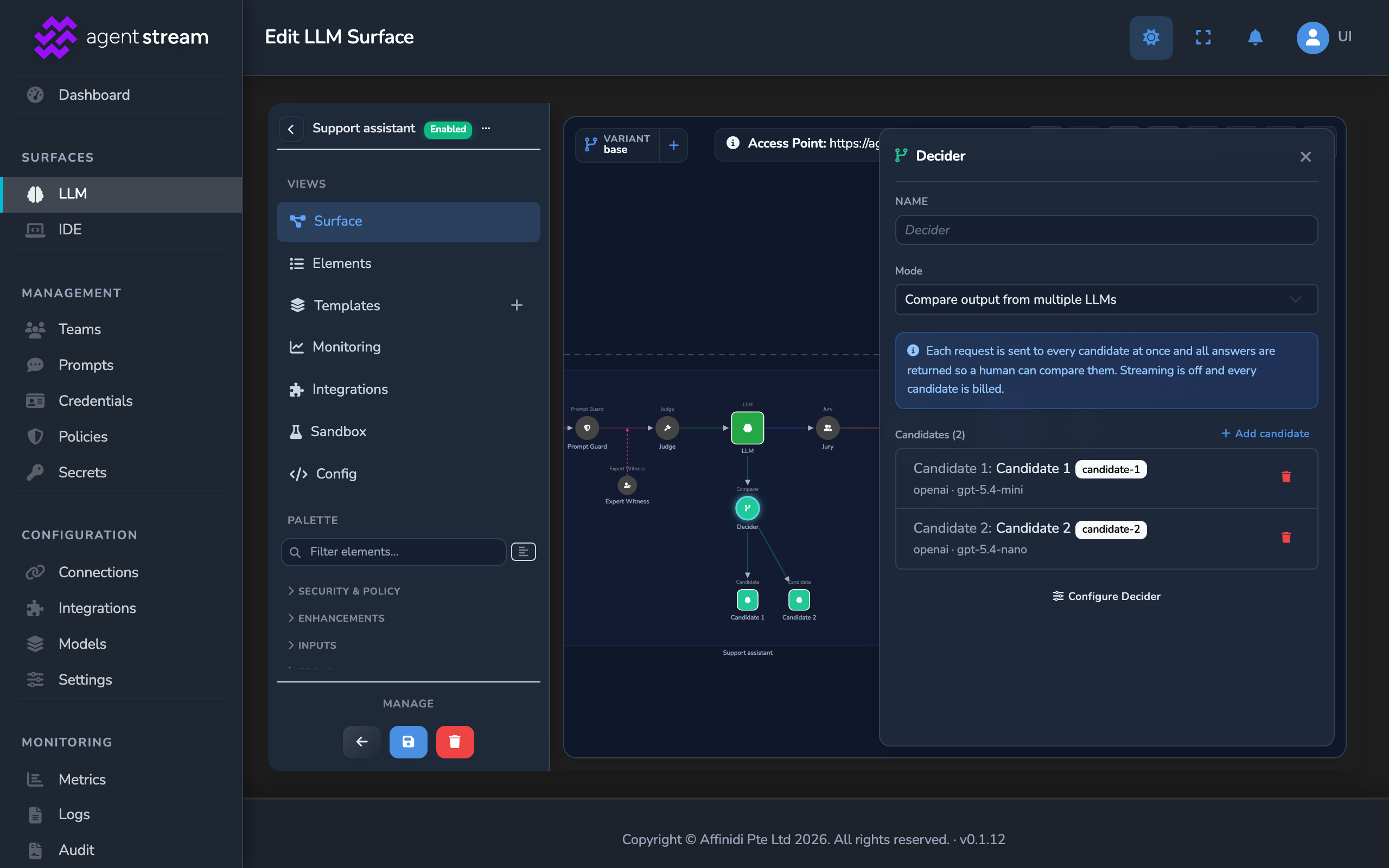
- Compare output from multiple LLMs returns every candidate’s answer. On the canvas, the routing node keeps its name, Decider, with the caption Comparer above it.
- Summarise output from multiple LLMs consolidates the answers into one. The routing node’s caption reads Summariser.
The side panel switches to the new routing node, which starts with one candidate, Candidate 1.
Add candidates
In the routing node’s side panel, select Add candidate once for each additional model. A surface in these modes takes up to 10 candidates.
Set each candidate’s model
Select a candidate in the Candidates list, or its node on the canvas, then select Configure candidate…. In the Candidate Configuration editor, give it a recognisable Name, then set Provider, Endpoint, Model, and the provider’s API key secret, such as OpenAI API Key. The name and model label each answer in a Compare response. Select Close tab and repeat for every candidate.
Set the merger model (Summarise only)
Select the Decider node, captioned Summariser, then select Configure Decider. In the Decider Configuration editor, under Merger LLM, set Provider, Endpoint, Model, and the API key secret. Leave Merge instructions empty to use the built-in instruction, or write your own. The candidate answers are added to it automatically. Select Close tab.
Compare output from multiple LLMs has no merger, so skip this step for Compare.
Save the surface
Select the save button (Save changes) under Manage.
Confirm
Replace <YOUR_APPLIANCE_HOST> and <YOUR_SURFACE_ROUTE> with your surface’s values. Each test call is billed once per candidate, plus once for the merger in Summarise mode.
Test 1: a Compare request returns 200 with every candidate’s answer
curl -k -s -D - -X POST "https://<YOUR_APPLIANCE_HOST><YOUR_SURFACE_ROUTE>/v1/chat/completions" \
  -H "Content-Type: application/json" \
  -d '{
    "messages": [
      { "role": "user", "content": "Explain a canary release in one sentence." }
    ]
  }'
The -k flag disables TLS certificate verification. Use this for local testing only. Remove it in production.
Expected: 200 OK, with the response headers x-agent-stream-provider: mirror and x-agent-stream-model: collect. The answer text holds one section per candidate, headed ### Candidate N: <name> (<model>). The x_mirror field lists each candidate with its name, provider, model, content, input_tokens, output_tokens, cost, and latency_ms.
Test 2: a Summarise request returns 200 with one merged answer
Send the same request to a surface in Summarise output from multiple LLMs mode.
Expected: 200 OK, with one answer and no per-candidate sections. The x-agent-stream-model response header names the merger’s model.
Test 3: a streaming request returns 200 as one complete response
Add "stream": true to the request body and send it again.
Expected: 200 OK, with Content-Type: application/json and the whole answer in one response, because every candidate’s answer is gathered before the surface replies.
Troubleshooting
| Symptom | Likely cause | Fix |
|---|---|---|
| Saving fails with Candidate: Select an API key secret for this candidate. | A candidate has no API key secret. | Select Show me in the error, or open the candidate’s Configure candidate…, and choose the secret. |
The request returns 502 with a message containing All mirror candidates failed. | Every candidate’s provider call failed, for example because of a wrong API key or a model the provider does not offer. | Check each candidate’s Provider, Model, and API key secret, then send the request again. |
One Compare section shows an _error: …_ line in place of an answer. | That candidate’s provider call failed. The other candidates still answered. | Fix the failing candidate’s settings, or remove it with its delete button in the Candidates list. |
| Add candidate is greyed out. | The surface already has 10 candidates. | Remove a candidate before adding another. |
| The LLM node’s side panel shows Open decider… in place of Configure LLM…. | In Compare and Summarise modes, the models are set on the candidates and the merger. | Configure models through the routing node. To return to one model, set Mode to LLM Direct. |
Next steps
- Block and re-review calls with Judge and Jury: Add a Jury review to the merged answer in Summarise mode.
- Cap spend per pipeline stage: Put a limit on spend now that every request calls several models.
Related
- Routing and variants reference: Every Mode option, candidate field, and Merger LLM field.
- Pipeline and stages: Where the Comparer and Summariser run in the request path, and which guardrails apply to their answers.
- Cost and usage governance: How each candidate’s tokens and cost are counted.
Glad to hear it. Thanks for letting us know.
Sorry to hear that. Thanks for letting us know.