Balance traffic across providers by cost or latency
This guide switches a surface from a single fixed provider to a pool of providers, selected on every request by a strategy you choose. For the conceptual model, see Resilience and caching →.
A surface with one fixed provider sends every request to the same place regardless of that provider’s current latency or relative cost against alternatives. Without load balancing, taking advantage of a cheaper or faster alternative model means manually re-pointing the surface, rather than letting traffic find the best option automatically.
Use this guide when:
- You want normal traffic spread across more than one provider or model, not only a fallback used on failure.
- Cost or latency should drive which pool member handles a request, rather than a fixed, manually chosen split.
- You are comparing two or more equivalent models under real production traffic.
You do not need load balancing if you only want a backup used when the primary fails; use Fail over to a backup provider on error instead. A surface uses one of the two at a time.
Prerequisites
- An active LLM Surface with its primary provider configured, and its LLM node’s Mode set to LLM Direct. The load-balancing settings are available only in that mode.
- Credentials for each additional pool member, stored as secrets.
Store each pool member’s API key as a secret and select it in the provider’s API key field. Never hardcode a key into a policy, prompt, or configuration field, and rotate each credential through the secrets manager. Confirm no credential value appears in surface request logs or debug output before enabling logging on a surface with load balancing enabled.
Steps
Switch the surface to Load balancing mode
Under SURFACES in the dashboard sidebar, select LLM and open your surface. Select the LLM node on the canvas, then select Configure LLM…. In the Failover & Load Balancing card, select Load balancing.
Choose a selection strategy
Set Strategy to one of:
| Strategy | Behaviour |
|---|---|
| Weighted round-robin (default) | Deterministic weighted round-robin across the pool. |
| Lowest latency | Routes to the pool member with the lowest recent average latency over completed requests. Members with no measurements yet are tried first to gather a baseline. |
| Lowest cost | Routes to the pool member with the lowest price: its declared price when one is set, otherwise the catalogue price for its model. Members with neither are deprioritised. A surface declares its own price in its Config JSON view (Administrator). |
Weights still decide which members take part under every strategy. A member with weight 0 is only a fallthrough target.
Set the primary’s weight
Set Primary weight for the surface’s own provider (default 1). Set it to 0 to drain the primary from first-pick selection while keeping it as a last-resort fallthrough target.
Add pool members
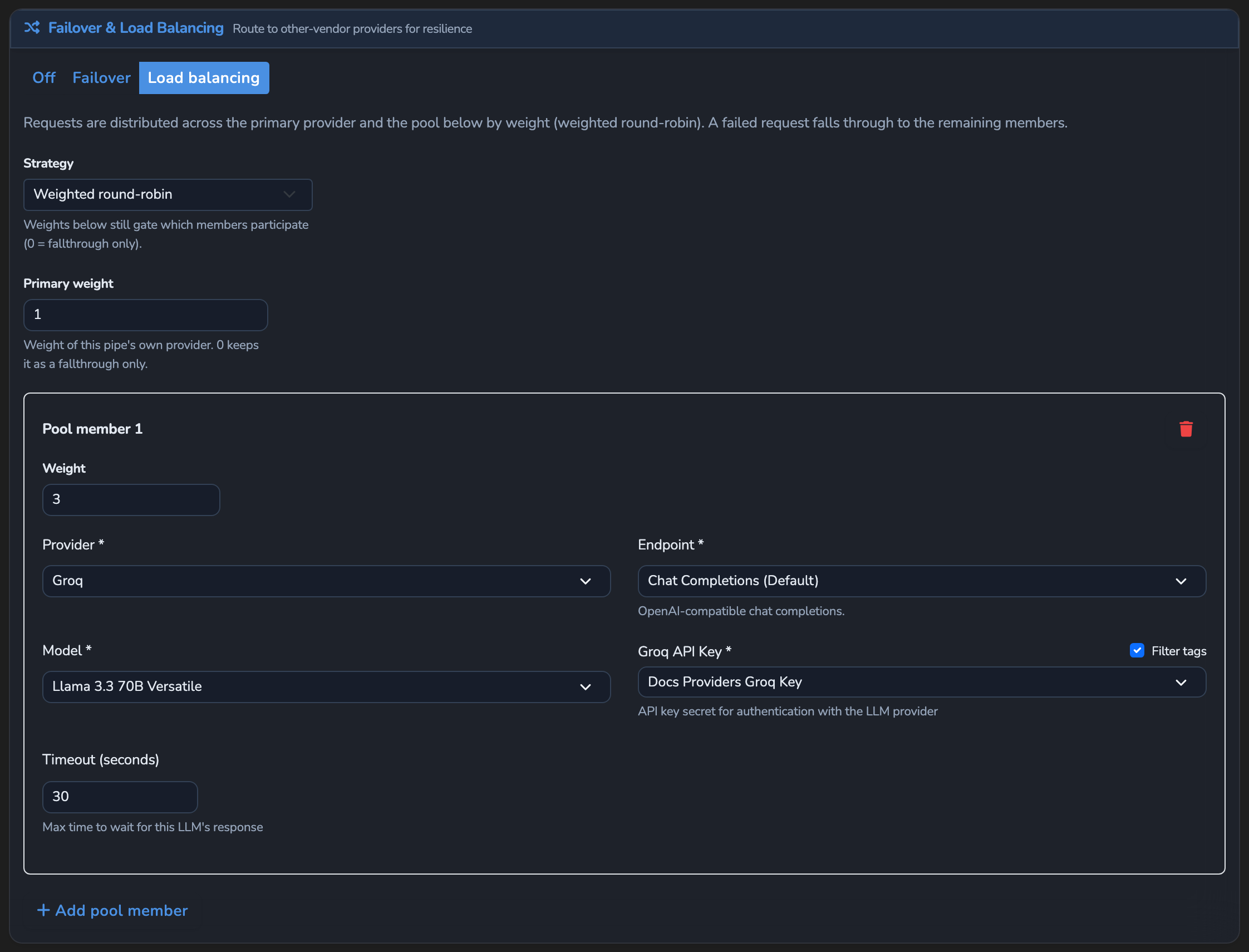
Switching to Load balancing mode already adds a Pool member 1 card automatically. On it, and on each further card added with Add pool member, set Provider, Endpoint, Model, the provider’s API key field (for example Groq API Key), and Weight (default 1; 0 excludes it from first-pick selection while keeping it as a fallthrough target).
Save the surface
Select the save button (Save changes) under Manage. The change applies immediately.
Confirm
Replace <YOUR_APPLIANCE_HOST> and <YOUR_SURFACE_ROUTE> with your surface’s values. If the surface has a Response cache, turn it off for these tests, because a cached answer repeats the provider header of the member that first answered.
Test 1: the x-agent-stream-provider header shows the pool member roughly three times more often than the primary
With Strategy set to Weighted round-robin, Primary weight at 1, and one pool member at Weight 3, send a batch of requests and tally the x-agent-stream-provider header on each response:
for i in $(seq 1 20); do
  curl -k -s -o /dev/null -D - -X POST "https://<YOUR_APPLIANCE_HOST><YOUR_SURFACE_ROUTE>/v1/chat/completions" \
    -H "Content-Type: application/json" \
    -d '{"messages":[{"role":"user","content":"Say hello."}]}' \
    | grep -i x-agent-stream-provider
done
The -k flag disables TLS certificate verification. Use this for local testing only. Remove it in production.
Expected: across the 20 requests, the pool member’s provider appears roughly three times as often as the primary’s, matching the 1:3 weight ratio.
Test 2: the x-agent-stream-provider header names the cheaper pool member on every request
Switch Strategy to Lowest cost and repeat the same batch. Expected: every response’s x-agent-stream-provider and x-agent-stream-model headers name whichever pool member has the lower price, on every request, rather than a mix.
Troubleshooting
| Symptom | Likely cause | Fix |
|---|---|---|
| Every request still goes to the primary, even with pool members configured. | The Failover & Load Balancing card still reads Off or Failover, or Primary weight dominates the pool’s total weight. | Confirm the card reads Load balancing, and lower Primary weight relative to the pool members’ weights if you want more traffic to shift away from it. |
| Traffic looks unevenly distributed right after selecting Lowest latency. | Pool members with no latency measurements yet are tried first to gather a baseline; distribution stabilises only once every member has been sampled. | Allow enough traffic through for every member to be sampled before judging the steady-state distribution. |
| A pool member never gets picked under Lowest cost. | The member has no declared price and its model has no catalogue pricing, so it is deprioritised regardless of its actual cost. | Confirm the model is present in the model catalogue with pricing. |
| The LLM node has no Configure LLM… button. | The node’s Mode is not LLM Direct, so the upstream is configured on the Decider instead. | Set Mode to LLM Direct to use load balancing. |
| Saving the surface fails with a total-weight validation error. | An enabled pool has a zero total weight: every target’s weight, plus the primary’s, sums to zero. | Set a positive weight on at least one target or on the primary. |
Next steps
- Fail over to a backup provider on error: The simpler, backup-on-failure alternative to a weighted pool.
- Roll out a model with a canary split: Compare a full configuration change on a percentage of traffic, rather than balancing every request across a pool.
- Cache repeated responses to cut cost and latency: Avoid a pool call altogether on repeated prompts.
Related
- Resilience and caching reference: Every load-balancing field and validation rule.
- Response headers: The
x-agent-stream-providerandx-agent-stream-modelheaders this guide’s Confirm section checks. - Providers: How catalogue pricing resolves, which the Lowest cost strategy depends on.
Glad to hear it. Thanks for letting us know.
Sorry to hear that. Thanks for letting us know.