Roll out an OPA policy globally
This guide marks a saved policy definition as a global appliance-wide assignment for a surface type, then switches it to monitor-only mode right away so you can observe what it would deny before it blocks real traffic for long. For the conceptual model, see OPA policies →.
Attaching the same policy to every surface one at a time, as in Control access to a surface with an OPA policy, does not guarantee every surface actually carries it, and a mistake in a policy that goes straight to enforcing could lock out every surface of that type at once.
Use this guide when:
- One policy, such as a baseline compliance rule, should apply to every LLM or IDE surface, not be configured per-surface.
- You are rolling out a new organisation-wide rule and want to observe its effect before it can block real traffic.
- Individual surfaces should not be able to opt out of a mandatory rule.
You do not need a global assignment if a policy only matters on one or two specific surfaces; attach it directly to those surfaces instead.
Prerequisites
- A saved policy definition of type LLM or IDE. See Control access to a surface with an OPA policy if you do not have one yet.
- The Administrator role, which can open Policies and make a policy global.
- Policy decisions recorded to the audit log. In Settings, open the Security tab, turn on Record policy decisions to the audit log under Audit Log, and select Save. It is off by default, and without it the audit log has nothing to show in step 3.
Steps
Open the policy in the dashboard
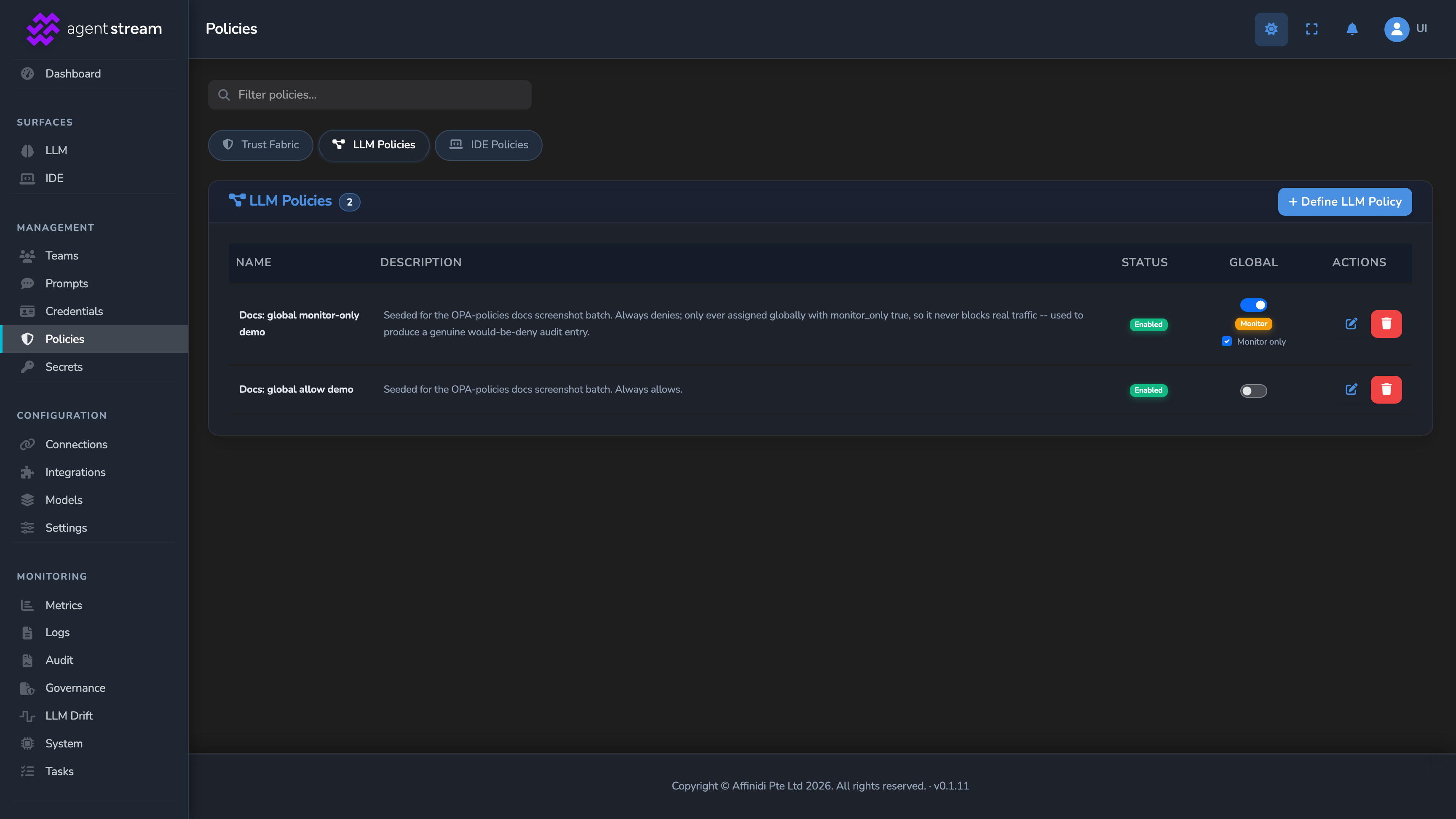
Select Policies in the dashboard sidebar and switch to the tab matching your policy’s type (LLM Policies or IDE Policies). Global enforcement is a switch on the policy’s own row in this list.
Turn on global enforcement in monitor-only mode
On your policy’s row, turn on the Global switch. A confirmation popover appears. Select Continue to enforce this policy across every surface of that type. Global enforcement starts as soon as you select Continue, so turn on Monitor only on the same row straight afterwards. The policy then stops blocking and only logs what it would have denied.
Observe what the policy would have denied
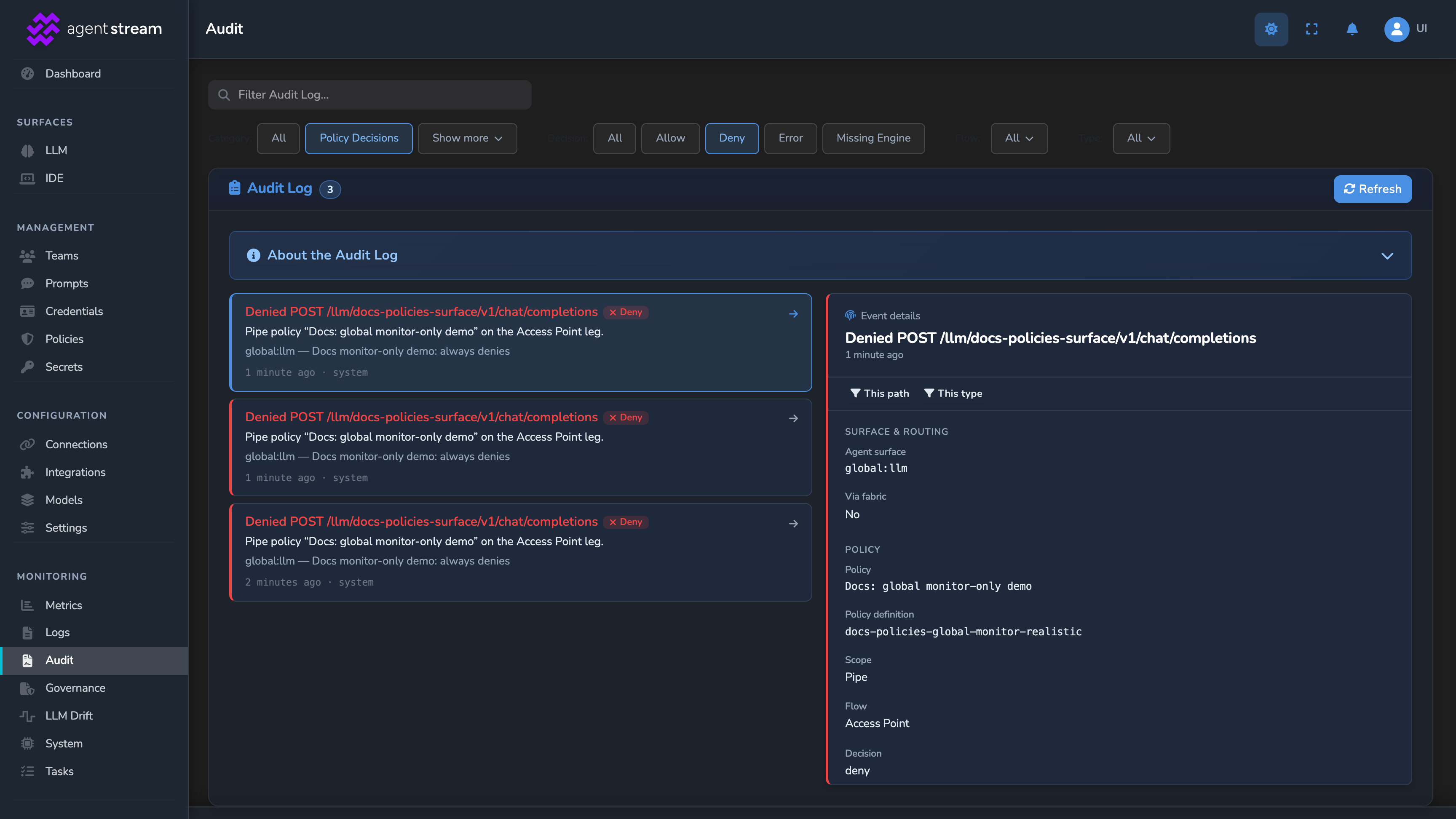
Let real traffic run for a representative period. Select Audit in the dashboard sidebar (administrator-only) and check the decisions this assignment recorded, to see what it would have blocked had it been enforcing. To know whether a logged deny actually blocked the request, check the assignment’s Monitor only state on the Policies page. The audit entry is the same in both modes.
Turn off monitor-only to enforce
Once you are satisfied the policy denies only what it should, turn off Monitor only on the assignment. From this point, a deny from this policy blocks the request on every surface of the type, ANDed with each surface’s own policy set.
Confirm
Replace <YOUR_APPLIANCE_HOST> and <YOUR_SURFACE_ROUTE> with a surface of the type your assignment targets, and use a request your policy is written to deny.
Test 1: in monitor-only mode, a would-be deny still returns 200
curl -k -X POST "https://<YOUR_APPLIANCE_HOST><YOUR_SURFACE_ROUTE>/v1/chat/completions" \
  -H "Content-Type: application/json" \
  -d '{
    "messages": [
      { "role": "user", "content": "Say hello." }
    ]
  }'
The -k flag disables TLS certificate verification. Use this for local testing only. Remove it in production.
Expected: 200 OK, since Monitor only is still on. Confirm the Audit page recorded a deny decision for this request from the global assignment.
Test 2: after disabling monitor-only, the same request returns 403
Turn off Monitor only and resend the identical request. Expected: 403 Forbidden with the error code policy_denied and the message Request denied by appliance-wide policy, now enforced for real across every surface of that type.
Troubleshooting
| Symptom | Likely cause | Fix |
|---|---|---|
| The global assignment does not seem to affect a specific surface. | The surface is not the type the assignment targets (LLM or IDE), or the surface’s own policy set already denies the request independently for a different reason. | Confirm the surface’s type matches the assignment, and check the surface’s own OPA Policy block separately; global and surface-level policies combine deny-overrides. |
| Turning off monitor-only immediately locked out every surface of the type. | The policy denies more than intended, and monitor-only observation was skipped or too short to catch it. | Re-enable Monitor only to stop blocking traffic immediately, fix the policy’s rule using real captured decisions, and repeat the monitor-only observation step before disabling it again. |
| Monitor-only mode shows no recorded decisions at all. | Record policy decisions to the audit log is off, no traffic reached a surface of the assigned type during the observation window, or the account checking the log lacks audit-log access. | Turn on Record policy decisions to the audit log under Settings → Security and select Save, confirm traffic is flowing to a surface of that type, and confirm your account can view the Audit page. |
| Every surface of the type denies every request. | The globally enforced definition is disabled or empty, and an enforced global assignment that can’t be evaluated denies every request. | Re-open the policy definition, turn Enabled back on, and select Save, or turn off its Global switch. |
| A monitor-only assignment records no decisions at all. | Its policy definition is disabled or empty, so the monitor-only assignment is skipped. | Re-open the policy definition and confirm Enabled is on. |
Next steps
- Control access to a surface with an OPA policy: Add a surface-specific rule on top of this global baseline.
- Verify caller credentials with VP evidence: Extend a global policy to gate on a verified credential, not just claims.
- Limit dashboard actions with RBAC roles: Restrict who can create or edit a global policy assignment in the first place.
Related
- OPA policies reference: The global assignment fields and how they combine with a surface’s own policy set.
- RBAC reference: The policy-management and audit-log permissions this guide depends on.
- Observability: Where policy decisions surface alongside other request telemetry.
Glad to hear it. Thanks for letting us know.
Sorry to hear that. Thanks for letting us know.