Control surface access with an OPA policy
This guide writes an LLM-type Rego policy definition and attaches it to a surface’s OPA Policy block, so every request is evaluated against a rule you author, on top of whatever source authentication already checked. For the conceptual model, see OPA policies →.
Source authentication proves a caller presented a valid credential; it says nothing about whether that specific caller, claim, or context should be allowed to use this particular surface. Without a policy, every authenticated caller gets identical access.
Use this guide when:
- Access should depend on a claim value, request attribute, or organisational rule, not just “is this credential valid.”
- Different callers on the same surface need different access decisions, for example by tenant, role, or department.
- You need every access decision recorded against the exact policy version that produced it, for audit.
You do not need a policy if accepting or rejecting a credential is the whole access decision; source authentication alone already covers that.
Prerequisites
- An active LLM Surface with JWT bearer source authentication configured, so
input.source_auth.claimsis populated for the policy to evaluate. - Administrator role in the dashboard. Viewing, creating, editing, deleting, and publishing a policy are administrator-only.
Steps
Write the policy definition
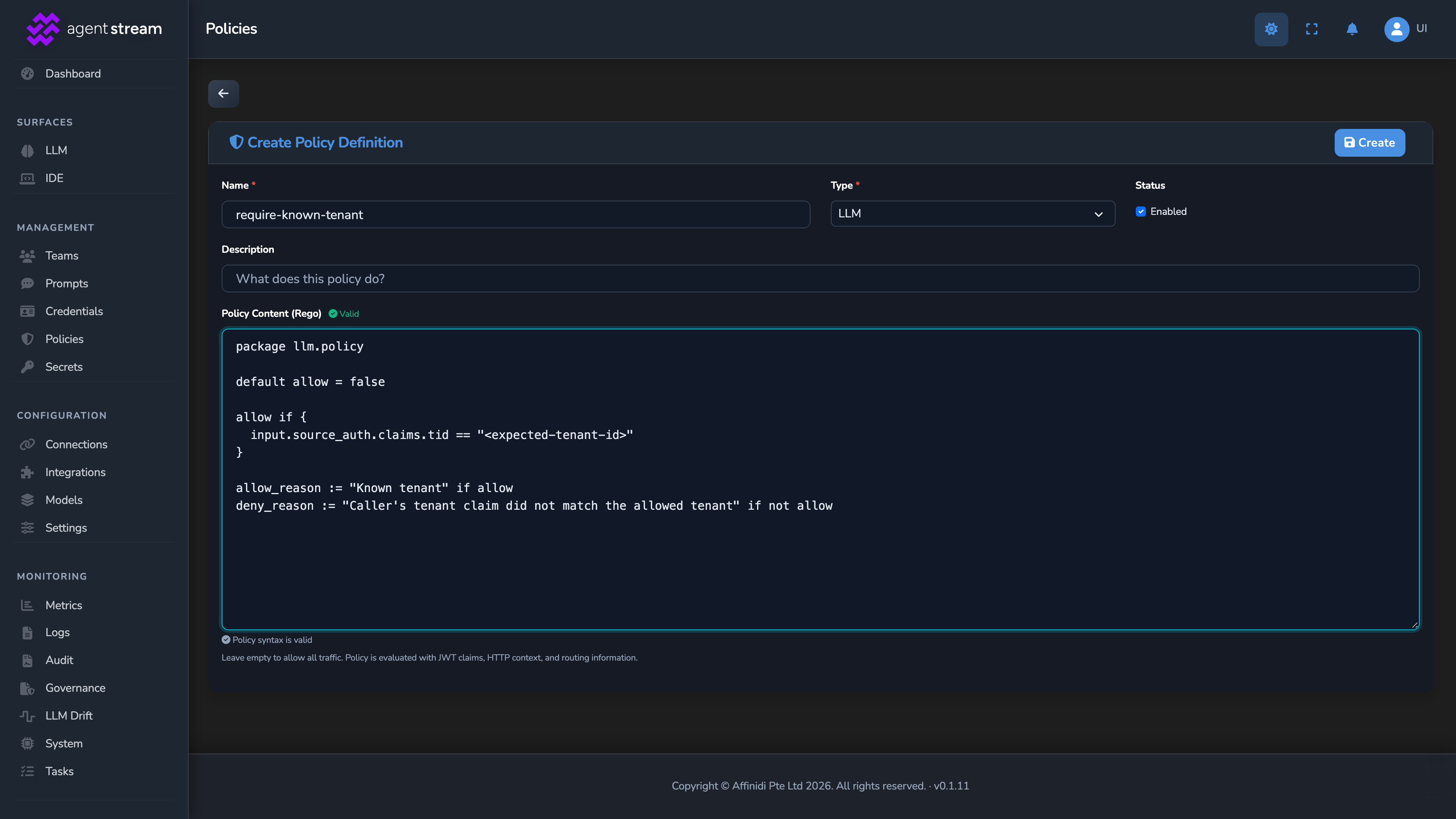
Select Policies in the dashboard sidebar, switch to the LLM Policies tab, and select Define LLM Policy. In Create Policy Definition, set:
| Field | Value for this guide |
|---|---|
| Name | A descriptive label, for example require-known-tenant. |
| Type | LLM, preselected when you start from the LLM Policies tab, so the policy applies to LLM Surfaces. Its Rego must declare package llm.policy. Type is locked once you create the policy. |
| Policy Content (Rego) | The Rego source (below). |
package llm.policy

default allow = false

allow if {
  input.source_auth.claims.tid == "<expected-tenant-id>"
}

allow_reason := "Known tenant" if allow
deny_reason := "Caller's tenant claim did not match the allowed tenant" if not allow
allow_reason and deny_reason are optional companion rules; when present, they flow into policy audit logs and observability as a human-readable reason alongside the allow/deny decision.
Select Create. Creating or saving rejects a policy that calls any of these Rego builtins: numbers.range(, http.send(, opa.runtime(, and print(. If your save fails, check the policy for these calls.
Dry-run it against a sample input
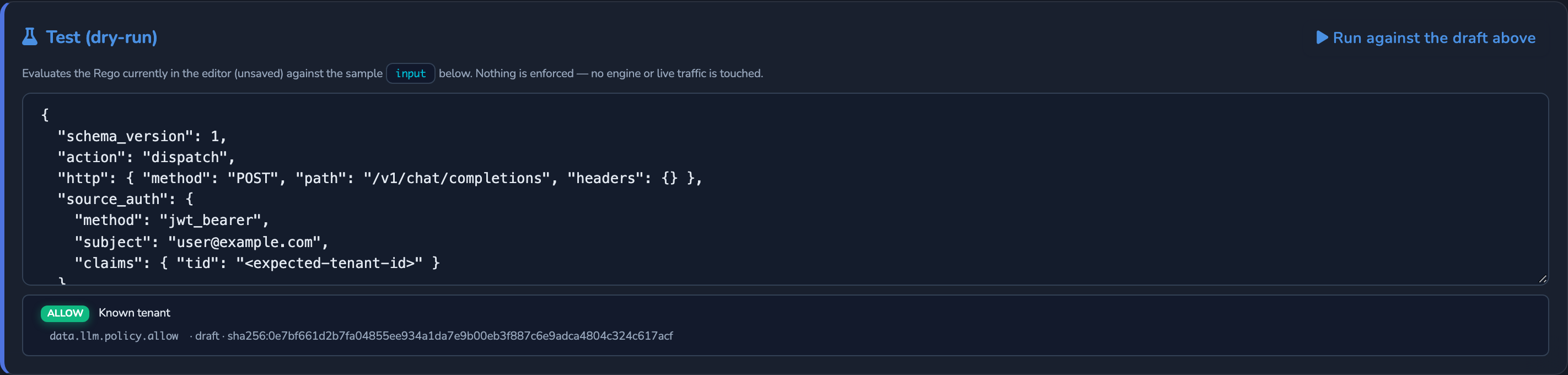
After you select Create, the editor stays open on the new policy. In its Test (dry-run) panel, paste a representative input document and select Run against the draft above to confirm the policy produces the decision you expect before it is ever enforced against real traffic.
Attach the policy to the surface
Under SURFACES in the dashboard sidebar, select LLM and open your surface. If the canvas has no OPA Policy element, drag it from the Security & Policy palette group onto the request path. Select it and set Policy Definition to the definition you just created. Until a definition is selected, the element denies every request.
If the surface has variants, the element applies to the variant selected on the Variant widget. Add it to each variant that needs the policy.
Optional: combine with more than one policy
A surface’s OPA Policy element attaches exactly one policy definition from the dashboard. To evaluate more than one policy against this surface, enforce the additional policy or policies globally instead: see Roll out an OPA policy globally →. A global assignment is ANDed with this surface’s own attached policy, deny-overrides: each one must independently return allow = true for the request to proceed, and the first to deny blocks it.
Optional: log decisions while testing
Turn on Log OPA decisions to emit a log line for every OPA evaluation on this surface, carrying the full input and the resulting allow/deny. This is a debugging aid only: leave it off in production, since input carries request headers and caller identity.
Save the surface
Select the save button (Save changes) under Manage. The change applies immediately.
Confirm
Replace <YOUR_APPLIANCE_HOST> and <YOUR_SURFACE_ROUTE> with your surface’s values, and present a caller token whose tid claim matches or does not match your policy’s expected tenant.
Test 1: a request from the allowed tenant returns 200
curl -k -X POST "https://<YOUR_APPLIANCE_HOST><YOUR_SURFACE_ROUTE>/v1/chat/completions" \
  -H "Authorization: Bearer <TOKEN_WITH_MATCHING_TID>" \
  -H "Content-Type: application/json" \
  -d '{
    "messages": [
      { "role": "user", "content": "Say hello." }
    ]
  }'
The -k flag disables TLS certificate verification. Use this for local testing only. Remove it in production.
Expected: 200 OK. Source authentication passed, and the policy’s tid check allowed the request.
Test 2: a request from a different tenant returns 403
Resend the same request with a token whose tid claim does not match. Expected: 403 Forbidden with the error code policy_denied. On the surface’s Monitoring tab, Surface Logs shows an OPA policy denied request line with your deny_reason text.
Troubleshooting
| Symptom | Likely cause | Fix |
|---|---|---|
| Every request is denied, including ones that should pass. | The policy’s condition has a typo, or default allow = false is never satisfied for a real request’s actual claim shape. | Re-run the Test (dry-run) panel against a real sample input captured with Log OPA decisions, and compare the claim path used in the rule against what the token actually carries. |
| Saving the policy fails with a compile error. | The Rego uses a rejected builtin (numbers.range(, http.send(, opa.runtime(, or print(), or exceeds the fixed source-size limit. | Rewrite the rule without the rejected builtin, and split an overly large policy into smaller definitions if it hits the size limit. |
| A globally-enforced policy and this surface’s own policy are both attached, and the request is denied even though the surface’s own policy should allow it. | The two are combined deny-overrides: every applicable policy must allow. The global assignment still denies the request independently. | Check the global policy’s own dry-run result too, not just this surface’s attached policy. |
| A policy that used to allow a request now denies it, with no config change. | The sample input you tested against does not reflect a change in the real caller’s claims (for example, a token issuer rotated a claim’s shape). | Compare a freshly captured real input (via Log OPA decisions) against the sample input you last tested, and update it to match. |
Next steps
- Roll out an OPA policy globally with monitor-only mode: Enforce this same policy across every LLM surface instead of attaching it one at a time.
- Verify caller credentials with VP evidence: Gate this policy on a cryptographically verified credential, not just JWT claims.
- Attribute usage to members and teams: Combine policy-based access control with per-caller quotas.
Related
- OPA policies reference: The full
inputdocument, how global and surface policies combine, and every policy-definition field. - Guardrails: Content-safety checks that run alongside policy in the request pipeline.
- Security and access control: How source authentication establishes the identity this policy evaluates.
Glad to hear it. Thanks for letting us know.
Sorry to hear that. Thanks for letting us know.