Pseudonymise PII with NER IDs
This guide changes a Prompt Guard rule’s match action from static redaction to NER ID pseudonymisation, and turns on response-side restoration, so a masked prompt stays useful to the model without the provider ever seeing the raw value. For the concept behind pseudonymisation, see PII protection and NER IDs →.
Static redaction replaces every match of a type with the same placeholder, such as <EMAIL>. When a prompt names more than one person, this collapses every one of them into the same indistinguishable shape, and the model can no longer tell which address or email belongs to which person.
Use this guide when:
- Your surface handles prompts that mention more than one person, account, or record whose values need to stay distinguishable from each other.
- You need the model to produce a personalized answer, such as a separate reply to each of two customers, without ever seeing either customer’s real details.
- The caller should receive the real value back in the response, not a placeholder.
You do not need NER IDs if a single generic placeholder per category is enough for your use case; static redaction is simpler and has no restoration step to configure.
Prerequisites
- An active LLM Surface. Every LLM Surface canvas has a Prompt Guard node, created automatically. Step 1 turns it on if it isn’t enabled yet.
- Dashboard access with permission to edit surfaces.
Steps
Open the Prompt Guard editor on the request seam
Under SURFACES in the dashboard sidebar, select LLM, then open your surface. Select the request-side Prompt Guard node, to the left of the Judge, turn on its Enabled switch, then select Edit request guards…. The button stays disabled until Enabled is on.
Add a pattern rule for each value type
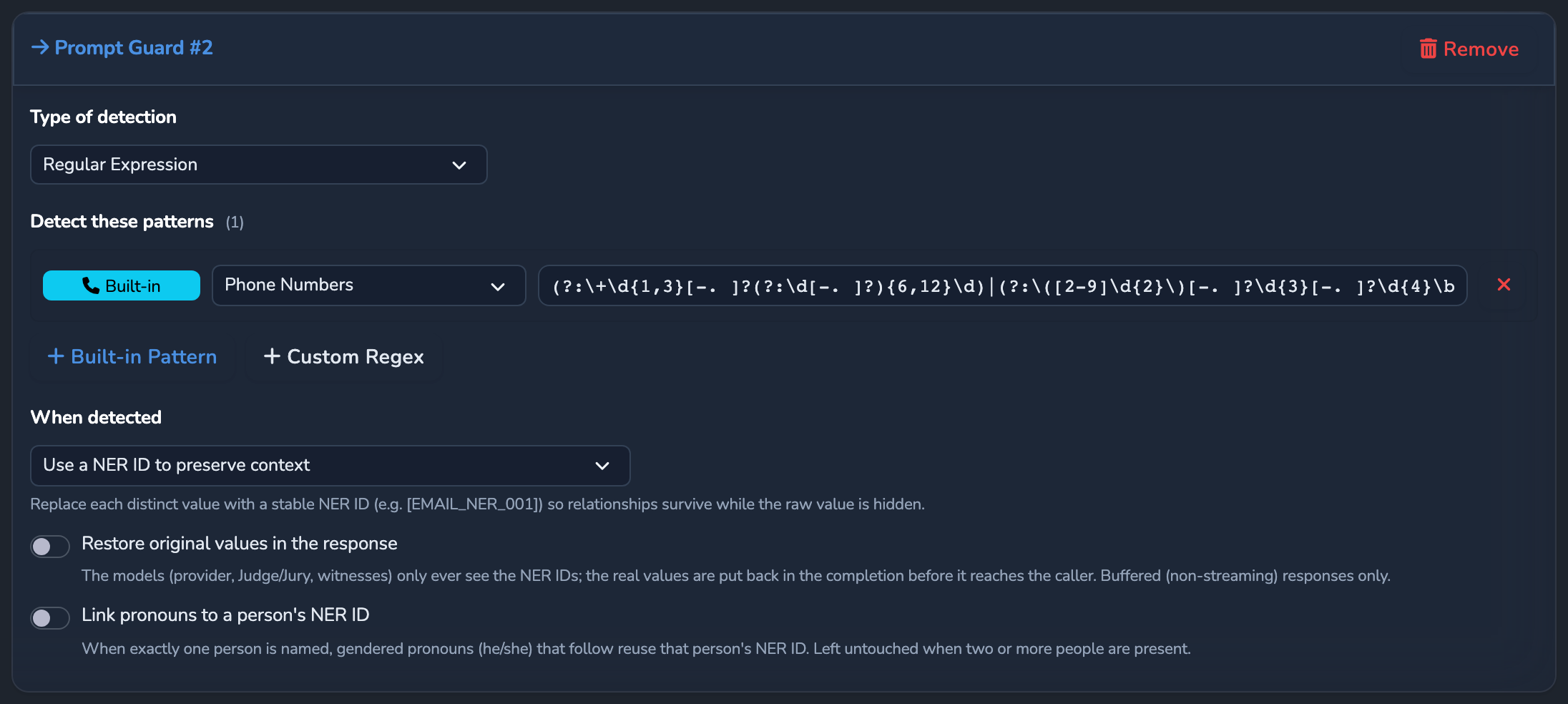
Select Add Prompt Guard, then set Type of detection to Regular Expression. Under Detect these patterns, select Built-in Pattern or Custom Regex to add a rule for each value type that should get its own pseudonym. Give a custom rule a label, which becomes the prefix of its NER IDs in upper case. The Built-in Pattern list includes types such as Email Addresses, US SSN (Simple Format), and Credit Card Numbers.
Set “When detected” to preserve context
In the When detected dropdown, which appears once the first rule is added, select Use a NER ID to preserve context. This replaces the redact-and-reject options with pseudonymisation: every distinct matched value gets its own stable NER ID, such as [EMAIL_NER_001], reused for that exact value everywhere it appears in the request.
Enable restore in the response
Turn on Restore original values in the response. This swaps every pseudonym back to its real value after every model-facing stage, the provider call, the Decider, the Judge, and the Jury, so only the final response the caller receives carries real values.
Optional: link pronouns to a named person
If a prompt refers back to a masked person with “he” or “she”, turn on Link pronouns to a person’s NER ID. It makes no model call. It links a singular gendered pronoun to a PERSON NER ID only while exactly one person has been named earlier in the same message. The prompt needs a PERSON NER ID for it to act on, such as one from an AI Matching guard or a Custom Regex labelled PERSON.
Save the surface
Select the save button (Save changes) under Manage. The change applies immediately.
Confirm
Replace <YOUR_APPLIANCE_HOST> and <YOUR_SURFACE_ROUTE> with your surface’s values.
Test 1: a prompt naming two people returns each person’s own email
curl -k -X POST "https://<YOUR_APPLIANCE_HOST><YOUR_SURFACE_ROUTE>/v1/chat/completions" \
  -H "Content-Type: application/json" \
  -d '{
    "messages": [
      { "role": "user", "content": "Sarah Chen'\''s email is sarah.chen@example.com. James Cole'\''s email is james.cole@example.com. Draft a one-line welcome note to each person, addressed by name, confirming their own email address." }
    ]
  }'
The -k flag disables TLS certificate verification. Use this for local testing only. Remove it in production.
Expected: 200 OK, with the response correctly pairing Sarah Chen with sarah.chen@example.com and James Cole with james.cole@example.com. If both people were collapsed to the same placeholder instead, the model could not have produced this pairing.
Test 2: the Test 1 request returns a masked outcome in Surface Logs
Open the surface’s Monitoring tab and scroll to Surface Logs. Find the line for the request from Test 1 that contains [STAGE:prompt_guard_request]. Expected: it reads "outcome":"masked", confirming Prompt Guard replaced the matched values before the provider call.
Troubleshooting
| Symptom | Likely cause | Fix |
|---|---|---|
| Both people’s details come back on the wrong person, or collapsed to one identity. | The rule’s When detected option is still set to redact, or only a single generic pattern was added instead of a NER-ID rule. | Re-open the Prompt Guard editor and confirm When detected reads Use a NER ID to preserve context for the relevant pattern. |
The response still contains a NER placeholder instead of the real value. | Restore original values in the response is off, or the rule is a response-side guard rather than a request-side one. | Restoration only applies to a request-side pseudonymise guard. Turn on Restore original values in the response on the request-seam rule. |
| A pronoun (“he”/“she”) stays as a pronoun, or links to an unintended person. | Link pronouns to a person’s NER ID links a pronoun only while exactly one PERSON NER ID has appeared earlier in the same message. Once a second person is named, later pronouns are left as they are. A pronoun that refers to an unmasked person can still link to the one masked person named so far. | Have the prompt refer to each person by name instead of a pronoun where more than one person is in play. |
| A NER ID appears unrestored inside a streamed tool call. | Streamed restoration covers message text only; a NER ID inside a streamed tool-call argument is not restored, since tool-call arguments are only fully known once the stream completes. | Send the request without "stream": true if the caller needs NER IDs restored inside tool-call arguments. |
Next steps
- Detect free-form PII with AI matching: Catch names, addresses, and other free-form PII that a regex pattern cannot express.
- Block and re-review calls with Judge and Jury: Layer a pre-call and post-call safety review on top of Prompt Guard.
- PII protection and NER IDs: The full round trip, coreference linking, and governance visibility.
Related
- Guardrails: Where Prompt Guard sits alongside Expert Witnesses, Judge, and Jury.
- Guardrails reference: The full Prompt Guard field reference.
- Governance records: How a PII detection stage is captured without exposing the value map itself.
Glad to hear it. Thanks for letting us know.
Sorry to hear that. Thanks for letting us know.