Detect free-form PII with AI matching
This guide adds a model-backed AI Matching detector to a surface’s Prompt Guard, alongside any regex rules it already has, so free-form personal data reaches a trusted detection model before it reaches the main provider. For the concept behind this detector, see PII protection and NER IDs →.
Pattern matching only catches well-shaped values, such as emails, social security numbers, and credit card numbers. It cannot express free-form PII such as a person’s name, an organisation, or an address or date of birth written in ordinary prose. The built-in US Street Addresses and Date of Birth patterns match only fixed formats. Without an AI detector, this class of PII reaches the provider unmasked no matter how many regex rules a surface carries.
Use this guide when:
- Prompts contain unstructured personal data, such as names, organisations, or addresses and dates written in prose, that a regex cannot reliably express.
- Your surface handles free-form conversational text, such as customer support or case-handling, rather than only structured fields.
- You need detection that works across languages without maintaining word lists.
You do not need this if your surface’s PII exposure is confined to well-shaped patterns like emails or card numbers; regex-based Prompt Guard patterns alone are sufficient and cheaper.
Prerequisites
- An active LLM Surface. Every LLM Surface canvas has a Prompt Guard node, created automatically. Step 1 turns it on if it isn’t enabled yet.
- A trusted detection model, ideally one you control, listed in the model catalogue on the Models page. A provider that isn’t in the catalogue can be defined on Models → JSON (card Custom Model (JSON)) and is then listed under Custom. The request text is sent to this model, so treat its trust level the same as you would the main provider’s.
- A secret storing the detection endpoint’s API key, if it requires one. See Create your first LLM Surface for how to store a secret, if you have not created one yet.
Store the detection endpoint’s API key as a secret and select it in the provider’s API key field. Never hardcode the key into a policy, prompt, or configuration field, and rotate it through the secrets manager. Confirm the key value never appears in request logs or debug output before enabling logging on a surface that uses this detector.
Steps
Add an AI Matching entry to the request-side Prompt Guard
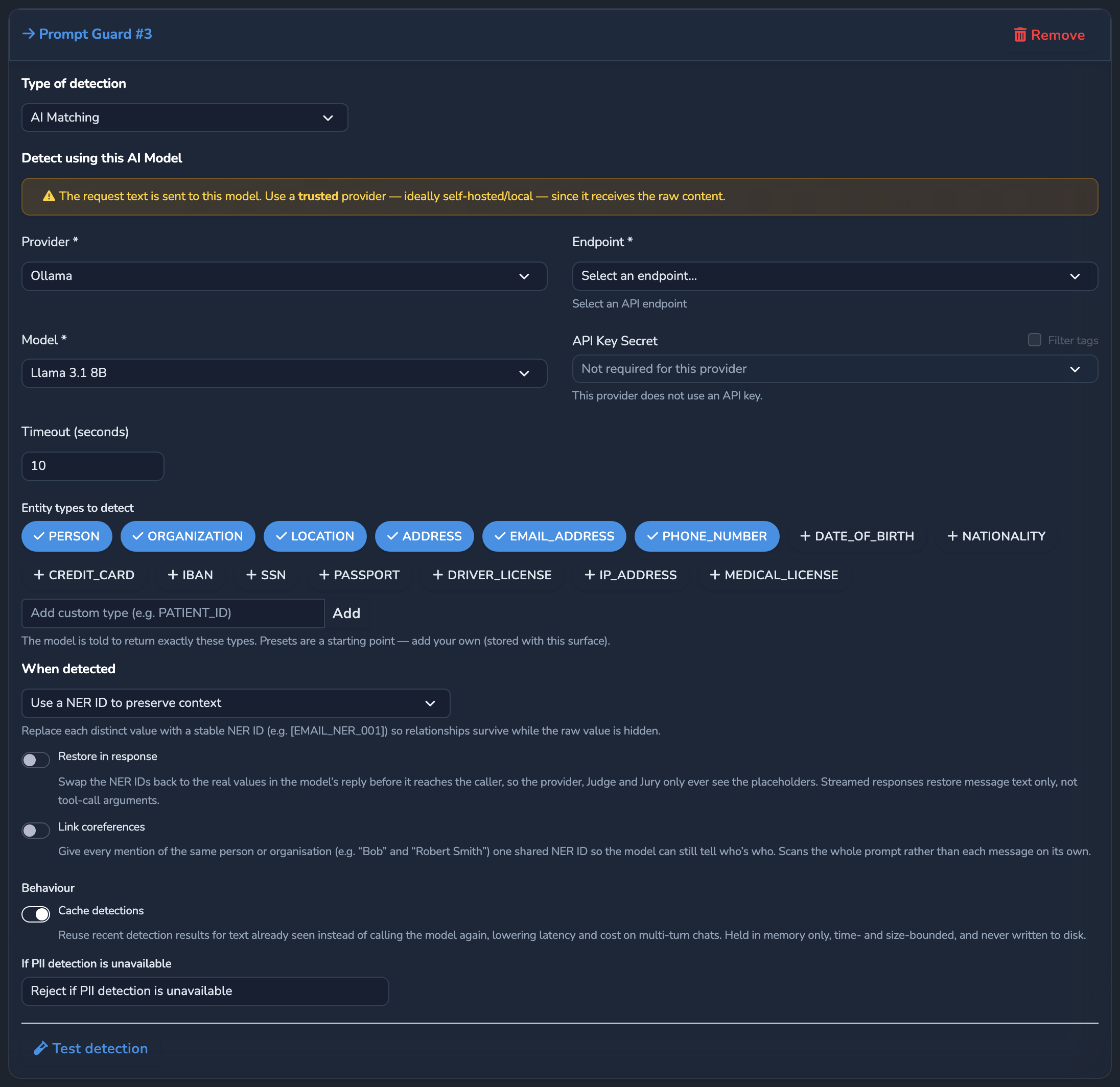
Under SURFACES in the dashboard sidebar, select LLM, open your surface, and select the request-side Prompt Guard node, to the left of the Judge. Turn on its Enabled switch, then select Edit request guards…. Select Add Prompt Guard, then set Type of detection to AI Matching. AI Matching is offered on the request side only. The response side offers Regular Expression only.
Point the detector at a trusted endpoint
Under Detect using this AI Model, select the Provider, then an Endpoint from that provider’s chat completions endpoints, then the Model from the catalogue list. If the provider requires a key, set the provider’s API key field, for example OpenAI API Key, to the secret you created in the prerequisites. If only one secret matches, it is selected for you.
Timeout (seconds) sets how long to wait for the detector, from 5 to 300 seconds. The default is 30.
Choose which entity types to detect
Under Entity types to detect, keep or adjust the default pills: PERSON, ORGANIZATION, LOCATION, ADDRESS, EMAIL_ADDRESS, PHONE_NUMBER. Remove any type that is not relevant to your surface to reduce false positives.
Set the match action
The remaining options appear once a provider and model are selected. In the When detected dropdown, choose how a match is handled: Use a NER ID to preserve context (pseudonymise, the default) keeps values distinguishable, Redact the text that matches the pattern replaces each match with a fixed token for its type, and Reject the call completely blocks the call outright.
Decide what happens if the detector is unavailable
Under Behaviour, keep Cache detections on, its default, to reuse recent results for text the detector has already seen. In If PII detection is unavailable, choose Reject if PII detection is unavailable (the default, fail-closed) to block the call when the detector errors or times out, or Continue with regex masking only to fail open and rely on pattern matching alone for that request.
Optional: restore in response and link coreferences
Turn on Restore in response to swap detected values back to their real form before the answer reaches the caller. Turn on Link coreferences only if you need aliases like “Bob” and “Robert Smith” collapsed to one NER ID. It switches detection to the whole prompt, so with Cache detections on, every turn of a growing conversation is re-scanned instead of only the newest message.
Save the surface
Optionally, select Test detection to send a sample to the detector. A working detector reports the entities it found, or that it is reachable but found none in the sample.
Select the save button (Save changes) under Manage. The change applies immediately.
Confirm
Replace <YOUR_APPLIANCE_HOST> and <YOUR_SURFACE_ROUTE> with your surface’s values.
Test 1: a name and address with no regex-matchable pattern still returns 200
curl -k -X POST "https://<YOUR_APPLIANCE_HOST><YOUR_SURFACE_ROUTE>/v1/chat/completions" \
  -H "Content-Type: application/json" \
  -d '{
    "messages": [
      { "role": "user", "content": "My name is Priya Raman and I live at 42 Baker Street. Can you confirm you have my details correct?" }
    ]
  }'
The -k flag disables TLS certificate verification. Use this for local testing only. Remove it in production.
Expected: 200 OK. Neither value matches a built-in regex pattern, so only the AI Matching detector catches them.
Test 2: the Test 1 request returns a masked detector outcome in Surface Logs
Open the surface’s Monitoring tab and scroll to Surface Logs. Find the line for the request from Test 1 that contains [STAGE:prompt_guard_model_pii]. Expected: it reads "outcome":"masked" with "entities" of 2 or more, confirming the detector found and masked the name and address before the provider call.
Troubleshooting
| Symptom | Likely cause | Fix |
|---|---|---|
Every request is rejected with a prompt_guard_violation error, even ones with no obvious PII. | If PII detection is unavailable is set to reject, and the detection endpoint is unreachable or the API key is invalid. | Confirm the endpoint is reachable and the secret in the provider’s API key field resolves to a valid key. Temporarily switch to Continue with regex masking only while you diagnose the endpoint. |
| A free-form value passes through unmasked. | The value’s type is not listed under Entity types to detect, or the detector call timed out while Continue with regex masking only is selected. | Add the missing entity type to the list, or increase Timeout (seconds). |
| Latency and cost rise sharply on longer conversations. | Cache detections is off, or Link coreferences is on. Either way, the whole conversation is re-scanned on every turn instead of only the newest message. | Turn on Cache detections. Turn off Link coreferences unless linking aliases across turns is worth the added cost for your use case. |
| The response still shows a NER ID or placeholder instead of the real value. | Restore in response is off. | Turn on Restore in response on this detector entry. |
Next steps
- Pseudonymise PII with NER IDs: Apply the same NER ID pseudonym scheme to regex-matched patterns.
- Block and re-review calls with Judge and Jury: Layer a pre-call and post-call safety review on top of Prompt Guard.
- PII protection and NER IDs: How pattern and AI matching combine, and how coreference linking works.
Related
- Guardrails: Where Prompt Guard sits alongside Expert Witnesses, Judge, and Jury.
- Guardrails reference: Every model-backed PII detector field.
- Security and access control: The SSRF protection applied to the detector endpoint, the same as any other operator-supplied endpoint.
Glad to hear it. Thanks for letting us know.
Sorry to hear that. Thanks for letting us know.