Block and re-review calls with Judge and Jury
This guide turns on the Judge on a surface’s request path, so a clearly unsafe request never reaches the main model, and the Jury on its response path, so a problem visible only in the model’s own output is caught before the caller sees it. For how these two layers fit alongside Prompt Guard and Expert Witnesses, see Guardrails →.
Prompt Guard and Expert Witnesses catch known patterns and purpose-trained categories, but neither reasons about a request or a response as a whole. Without a Judge, a request that is unsafe only in context, rather than by pattern, reaches the model and incurs its cost. Without a Jury, a response that only becomes a problem once the model has answered, such as an unsafe recommendation the request itself did not signal, reaches the caller unreviewed.
Use this guide when:
- You need a general reasoning check on a request before the cost of a model call is incurred, not just a purpose-trained classifier.
- Some responses need a second opinion after the model answers, with the option to regenerate rather than only approve or block.
- You are deploying a customer-facing surface where a single layer of content safety is not enough assurance.
You do not need Judge and Jury if Prompt Guard and Expert Witnesses already cover your risk profile; both add an extra model call’s worth of latency and cost to every request they run on.
Prerequisites
- An active LLM Surface.
- A provider, model, and endpoint the Judge and each juror can call. This can be the same model the surface already calls, or a separate, typically smaller and faster, model dedicated to review.
- A secret storing the review model’s API key, if it is a different provider than the surface’s main upstream.
Store each review model’s API key as a secret and select it in the provider’s API key field. Never hardcode the key into a policy, prompt, or configuration field, and rotate it through the secrets manager. Confirm the key value never appears in request logs or debug output before enabling logging on a surface that uses Judge or Jury.
Steps
Turn on the Judge on the request path
Under SURFACES in the dashboard sidebar, select LLM, open your surface, and select the Judge node. Every LLM Surface canvas has one, disabled by default. Turn on its Enabled switch, then select Edit judge…, which opens Judge - Pre-Processing Validation. On a buffered request whose Mode is Decide LLM based on content, the Judge runs alongside the Decider. Otherwise it runs before the main model call, including on a streamed request, where it runs before the first token.
Choose the Judge’s moderation mode

In the Moderation Mode toggle, choose Builtin Content Moderation to use the provider’s content-safety classifier, such as the OpenAI Moderations API, for a fixed set of content categories, or User-Defined LLM Judge to run a Chat Completions LLM against a custom system prompt.
Under Judge LLM Provider (Moderation Provider in builtin mode), select the Provider and the Model, and set the provider’s API key field, for example OpenAI API Key. Endpoint (auto-selected) fills in for you. Optionally adjust Timeout (seconds), which defaults to 30.
Tune the Judge’s decision criteria
For an LLM-mode Judge, set Strictness Level (Strict, Balanced, or Lenient) and any Focus Areas to emphasise. To treat a low-confidence reject decision as an approval, tick Enable next to Confidence Threshold, which starts at 70%, and adjust the threshold. Add Custom Instructions for domain-specific rules the generated system prompt should enforce.
For a builtin-mode Judge, select which Moderation Categories should trigger a rejection.
Set the Judge’s rejection response
Under Custom Rejection Response, set the Status Code (default 403), Content-Type, and Response Body returned when the Judge blocks a request. The provider is never called for a request the Judge rejects.
Turn on the Jury on the response path
Select the Jury node, which every LLM Surface canvas has and which starts disabled, and turn on its Enabled switch, which also turns on every juror. Set Execution mode to Parallel — all must approve, Serial — staged, stops on first reject, or Majority — > 50% must approve.
Add one or more jurors
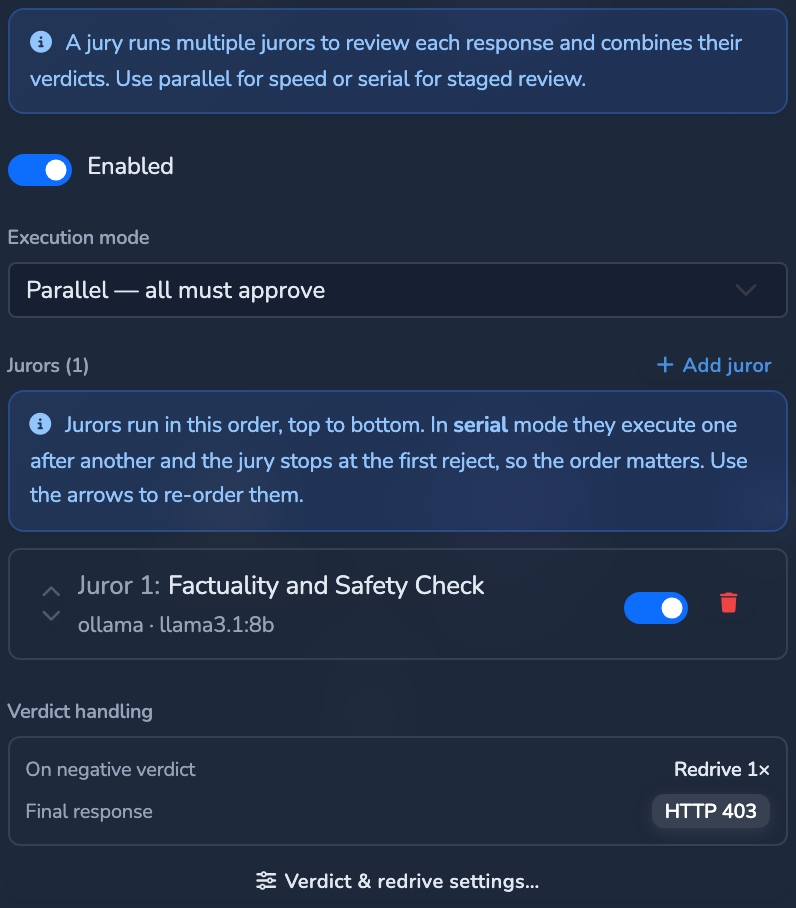
Under Jurors, select Add juror for each reviewer. A surface with an enabled Jury always returns a buffered response, because the Jury needs the full answer to review it. Select the new juror, either its row in the Jury panel or its node on the canvas, then select Configure juror…. For each juror, set its LLM Configuration (Provider, Endpoint, Model, and the provider’s API key field) and its Decision Evaluation. Under Decision Mode, JSON, the default, checks JSON Field Name against Approve Value, and Regex checks the response text against an Approve Pattern and an optional Reject Pattern. Each juror also has the same Strictness Level / Focus Areas / Confidence Threshold / Custom Instructions controls as the Judge.
Configure a redrive policy
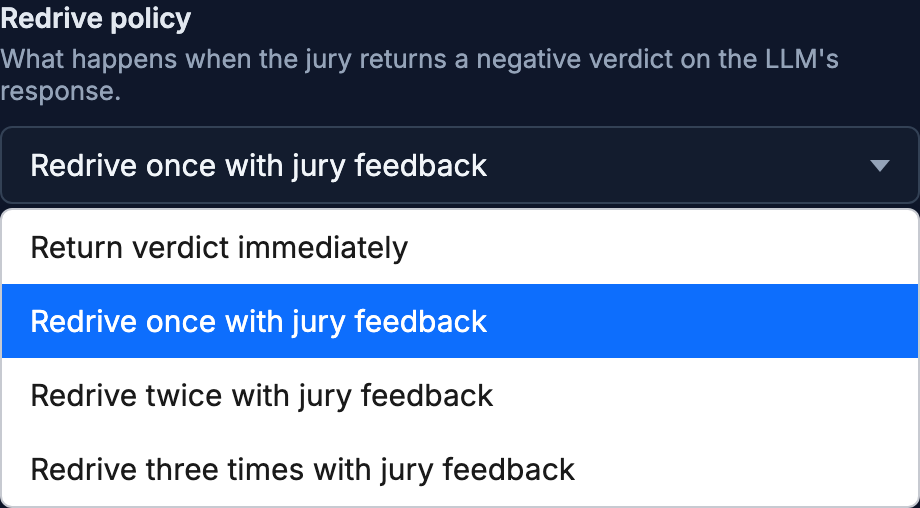
In the Jury node’s panel, select Verdict & redrive settings… to open Negative Verdict Handling. In Redrive policy, choose how many times the Jury can send the model back to try again with the Jury’s feedback appended to the conversation, instead of rejecting outright on the first negative verdict: Return verdict immediately, Redrive once with jury feedback, Redrive twice with jury feedback, or Redrive three times with jury feedback.
Set the Jury’s final rejection response
Under Final negative-verdict response, set the HTTP status code (default 403), Content-Type, and Response body returned once every retry is exhausted and the Jury still rejects the response.
Save the surface
Select the save button (Save changes) under Manage. The change applies immediately.
Confirm
Replace <YOUR_APPLIANCE_HOST> and <YOUR_SURFACE_ROUTE> with your surface’s values.
Test 1: a request that trips the Judge’s rules returns 403 (or your configured code), never the provider’s response
curl -k -X POST "https://<YOUR_APPLIANCE_HOST><YOUR_SURFACE_ROUTE>/v1/chat/completions" \
  -H "Content-Type: application/json" \
  -d '{
    "messages": [
      { "role": "user", "content": "<a prompt that matches your configured Judge rule or moderation category>" }
    ]
  }'
The -k flag disables TLS certificate verification. Use this for local testing only. Remove it in production.
Expected: the status code and body configured under Custom Rejection Response on the Judge. On the surface’s Monitoring tab, the block appears under Rejections by category (selected window). The Main LLM stage card gains no tokens from this request, because the Judge blocked it before the provider was called. With a User-Defined LLM Judge, the Judge card counts the review call’s tokens.
Test 2: a request the Judge approves still returns 200 only after the Jury also approves it
Send an ordinary request that does not trip the Judge. Expected: 200 OK with the model’s response, after it has cleared every juror’s review. If a redrive policy is configured and a juror initially rejects, the response only returns after the configured number of retries or an approval, whichever comes first.
Troubleshooting
| Symptom | Likely cause | Fix |
|---|---|---|
| Every request is blocked by the Judge, even benign ones. | Strictness Level is set too high for your use case, or Confidence Threshold is set too low. | Re-open the Judge and lower strictness, or raise the confidence threshold so only high-confidence rejections trigger. |
| A reasoning model’s Judge or juror call runs out of tokens without producing a decision. | The model is spending its token budget on chain-of-thought instead of the decision itself. | Turn on Disable Thinking / Chain-of-Thought (Judge) or Disable Thinking (juror) to suppress chain-of-thought for that call. |
| The Jury rejects a response, but the same answer returns unchanged after redrive. | The Redrive prompt template does not clearly surface the Jury’s rejection reason to the model. | Confirm the template includes the {reason} placeholder, or use the built-in default template. |
| A juror never seems to run. | The juror’s Enabled switch is off. | A disabled juror keeps its configuration but is skipped at runtime. Turn it back on with its switch in the Jury’s roster. Turning off the last enabled juror also turns off the Jury, so check the Jury’s Enabled switch too. |
Next steps
- Pseudonymise PII with NER IDs: Layer PII pseudonymisation underneath Judge and Jury on the same surface.
- Cap spend per pipeline stage: See and cap the extra spend a Judge and Jury add per request.
- Guardrails: The four guardrail layers and how they fit together.
Related
- Guardrails reference: Every Judge and Jury field, including rule condition types and decision-evaluation modes.
- OPA policies: Access-control decisions that run alongside these content guardrails.
- Cost and usage governance: How Judge and Jury spend is metered separately from the main LLM call.
Glad to hear it. Thanks for letting us know.
Sorry to hear that. Thanks for letting us know.