Cache repeated responses to cut cost and latency
This guide enables a surface’s response cache, so a repeated or near-duplicate prompt is served from the cache instead of incurring another provider call. For the conceptual model, see Resilience and caching →.
Common patterns such as FAQs, retried agent steps, and repeated tool calls send the same or a near-identical prompt to a provider many times over. Without a response cache, every one of those repeats calls the provider again, adding avoidable latency and cost on top of whatever a usage limit or budget alert is already tracking.
Use this guide when:
- Your surface receives a meaningful share of exact or near-duplicate requests, such as FAQs or repeated agent steps.
- You want to cut latency and cost on those repeats without changing anything the client sends.
- You can tolerate serving a cached answer for a bounded period, rather than always calling the provider fresh.
You do not need response caching if your surface’s traffic is already highly varied, or if every request must always reach the live provider, such as a surface answering with strictly time-sensitive information.
Prerequisites
- An active LLM Surface.
- For semantic matching only: an embeddings endpoint and model, plus a secret for its API key if required.
If the embedder requires an API key, store it as a secret and select it in API key (secret). Never hardcode the key value into a policy, prompt, or configuration field, and confirm it never appears in surface request logs or debug output.
Steps
Enable the response cache
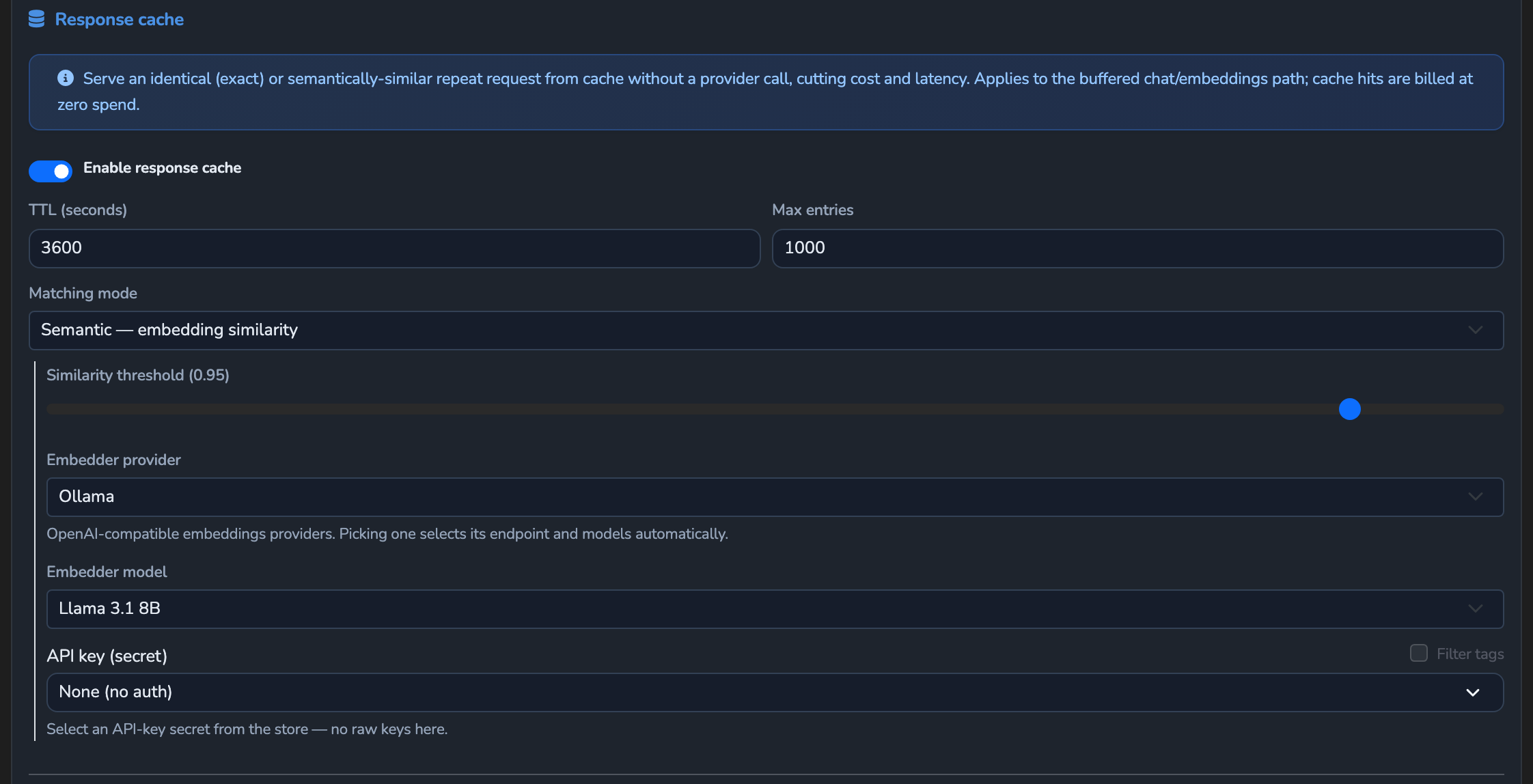
Under SURFACES in the dashboard sidebar, select LLM, open your surface, select its Surface node (the root container the rest of the pipeline sits inside), and select Configure Surface Features in its side panel. Scroll to Response cache and turn on Enable response cache.
Set the cache lifetime and size
Set TTL (seconds) for how long a cached response stays valid (default 3600), and Max entries for how many responses the cache retains before the oldest are evicted (default 1000).
Choose a matching mode
Set Matching mode to Exact — identical normalized request (the default) or Semantic — embedding similarity, which matches differently worded but equivalent requests.
Configure the embedder, if using semantic matching
If Matching mode is Semantic, adjust the Similarity threshold slider, from 0.5 to 1 with a default of 0.95, for how close two requests must be to count as a match. Select an Embedder provider and its Embedder model, or choose Custom / other and enter an Embedder endpoint URL and Embedder model directly. Select the secret in API key (secret) if the embedder requires a key, or leave it at None (no auth).
Save the surface
Select the save button (Save changes) under Manage. The change applies immediately.
Confirm
Replace <YOUR_APPLIANCE_HOST> and <YOUR_SURFACE_ROUTE> with your surface’s values.
Test 1: an identical repeated request returns a cache hit
curl -k -i -X POST "https://<YOUR_APPLIANCE_HOST><YOUR_SURFACE_ROUTE>/v1/chat/completions" \
  -H "Content-Type: application/json" \
  -d '{
    "messages": [
      { "role": "user", "content": "Say hello from the response cache test." }
    ]
  }'
The -k flag disables TLS certificate verification. Use this for local testing only. Remove it in production.
Send this exact request twice. Expected: the first response’s x-agent-stream-cache header reads miss. The second, identical request’s x-agent-stream-cache header reads hit, and it also carries x-agent-stream-cache-saved-usd, the provider spend this hit avoided.
After the first hit, the surface’s Monitoring tab also shows the Cache Savings, Cache Hits, Cache Hit Rate, and Tokens Saved cards.
Test 2: the same request sent as a stream returns a cache hit
Resend the same request with "stream": true added to the body, within the TTL. Expected: x-agent-stream-cache reads hit and x-agent-stream-cache-saved-usd is present, and the cached answer comes back as server-sent events with Content-Type: text/event-stream. The cache key ignores stream and stream_options, so the entry stored in Test 1 also answers the streamed request.
When a streamed response passes straight through from the provider, the answer is written to the cache only if the request offers no tools.
Troubleshooting
| Symptom | Likely cause | Fix |
|---|---|---|
An identical repeated request still shows miss. | The cache’s TTL expired between requests, Max entries was exceeded and the entry was evicted, or the requests differ in a field that is part of the cache key. | Confirm the requests are truly identical, increase TTL (seconds) or Max entries, and resend within the TTL window. |
| A near-duplicate request never matches in semantic mode. | Similarity threshold is set too high for the phrasing difference, or the embedder is misconfigured. | Lower Similarity threshold, and confirm the embedder endpoint and model resolve correctly. |
| Cache hits stop after a load-balanced pool routes to a different provider. | Cache entries are scoped per surface, per variant, and per effective provider target, so routing to a different pool member is a cache miss by design. | This is expected. Each provider target keeps its own cache entries. |
| A cached answer still reflects an old configuration after editing the surface. | Cache entries are purged automatically when a surface’s configuration changes, so the edit was most likely not saved, or the request reached a different surface or variant. | Confirm the surface was actually saved after the edit, and that you are testing against the intended surface and variant. |
Next steps
- Cap spend per pipeline stage: Track the spend a cache hit avoids, alongside a hard ceiling on what still reaches the provider.
- Alert on budget breaches and cost spikes: Get notified about spend that a cache cannot absorb.
- Fail over to a backup provider on error: Add resilience for the requests that do reach a provider.
Related
- Resilience and caching reference: Every response-cache field, including validation rules.
- Response headers: The
x-agent-stream-cache*headers this guide’s Confirm section checks. - Cost and usage governance: How a cache hit still counts against team quotas at zero provider spend.
Glad to hear it. Thanks for letting us know.
Sorry to hear that. Thanks for letting us know.