Add guardrails and a budget
The surface from Create your first LLM Surface forwards every prompt to OpenAI unfiltered and has no spend ceiling. This guide adds two capabilities. First, a Prompt Guard element applies PII redaction to common patterns in the request before it reaches the model. Second, a usage limit enforces a monthly USD budget that blocks a request before it reaches the provider once the ceiling is hit, rather than billing it afterwards.
By the end of this guide, your surface will redact email addresses and credit-card numbers in every request, and reject calls once the surface’s monthly spend cap is reached.
Prerequisites
- The surface from Create your first LLM Surface is active.
Steps
Enable the Prompt Guard
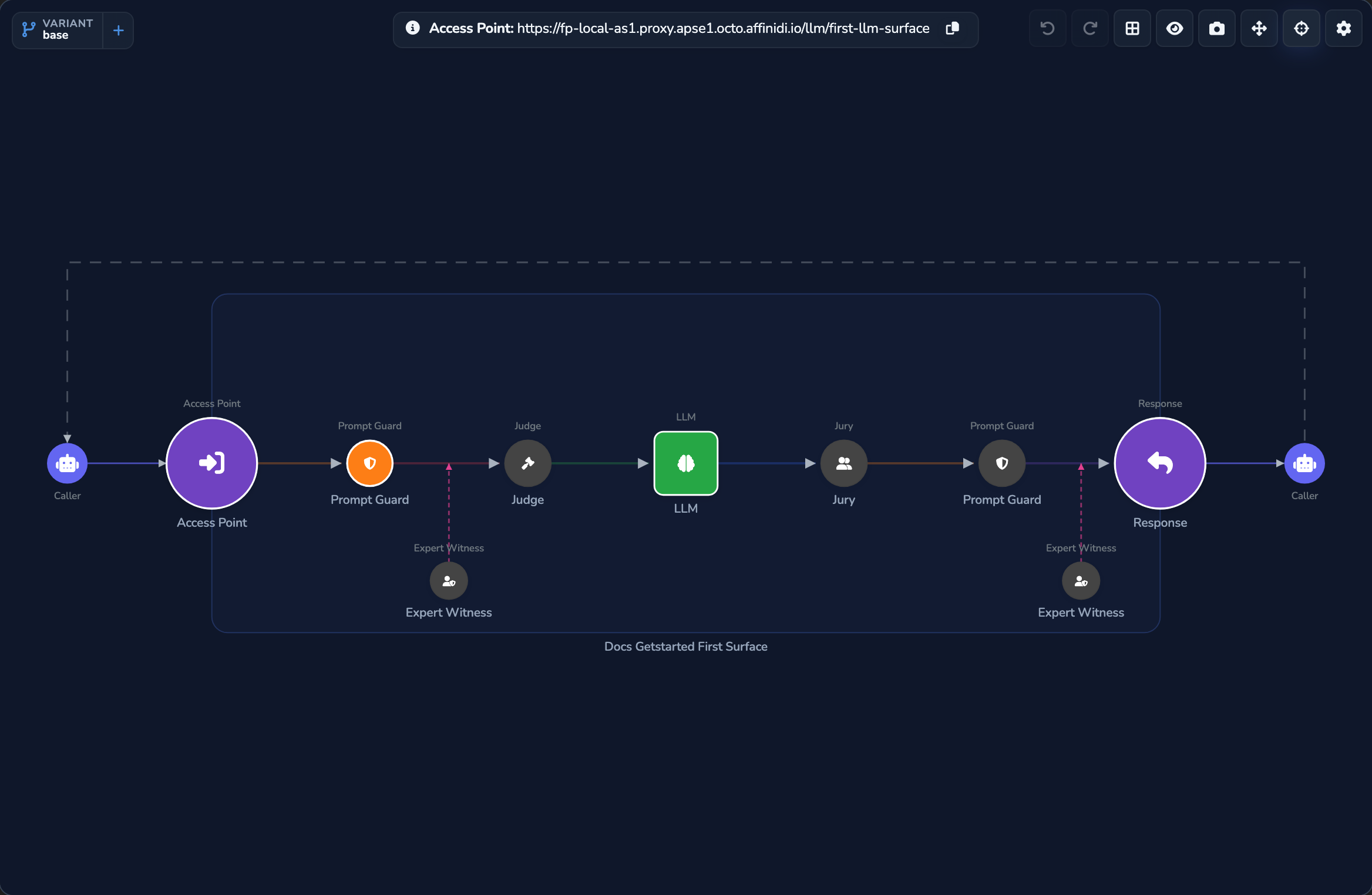
Under SURFACES in the dashboard sidebar, select LLM, then open the surface you created. The canvas already carries a Prompt Guard node on the request path, between the Access Point and the LLM node, shown greyed out until it’s configured. Select it, switch on Enabled, then select Edit request guards… to open its fullscreen editor.
In the fullscreen editor, select Add Prompt Guard and set Type of detection to Regular Expression. Select Built-in Pattern twice, then set the first rule’s pattern to Email Addresses and the second rule’s pattern to Credit Card Numbers. Each new rule starts on the next unused pattern, so pick the pattern from each rule’s list. Set When detected to Redact the text that matches the pattern.
Select the save button (Save changes) under Manage.
Send a request containing PII
Replace <YOUR_APPLIANCE_HOST> and <YOUR_SURFACE_ROUTE> with your values from Create your first LLM Surface:
curl -k -X POST "https://<YOUR_APPLIANCE_HOST><YOUR_SURFACE_ROUTE>/v1/chat/completions" \
  -H "Content-Type: application/json" \
  -d '{
    "model": "gpt-5.5",
    "messages": [
      { "role": "user", "content": "Draft a reply to jane.doe@example.com about her order." }
    ]
  }'
Replace gpt-5.5 with whichever model your surface’s LLM node is actually configured with, if different.
The -k flag disables TLS certificate verification. Use this for local testing only; remove it in production.
Prompt Guard matches the email address before the request reaches OpenAI and replaces it with a fixed token such as <EMAIL>, so the model never sees the raw value. See Guardrails → and PII protection and NER IDs → for how redaction compares to a NER ID pseudonym.
Add a monthly budget
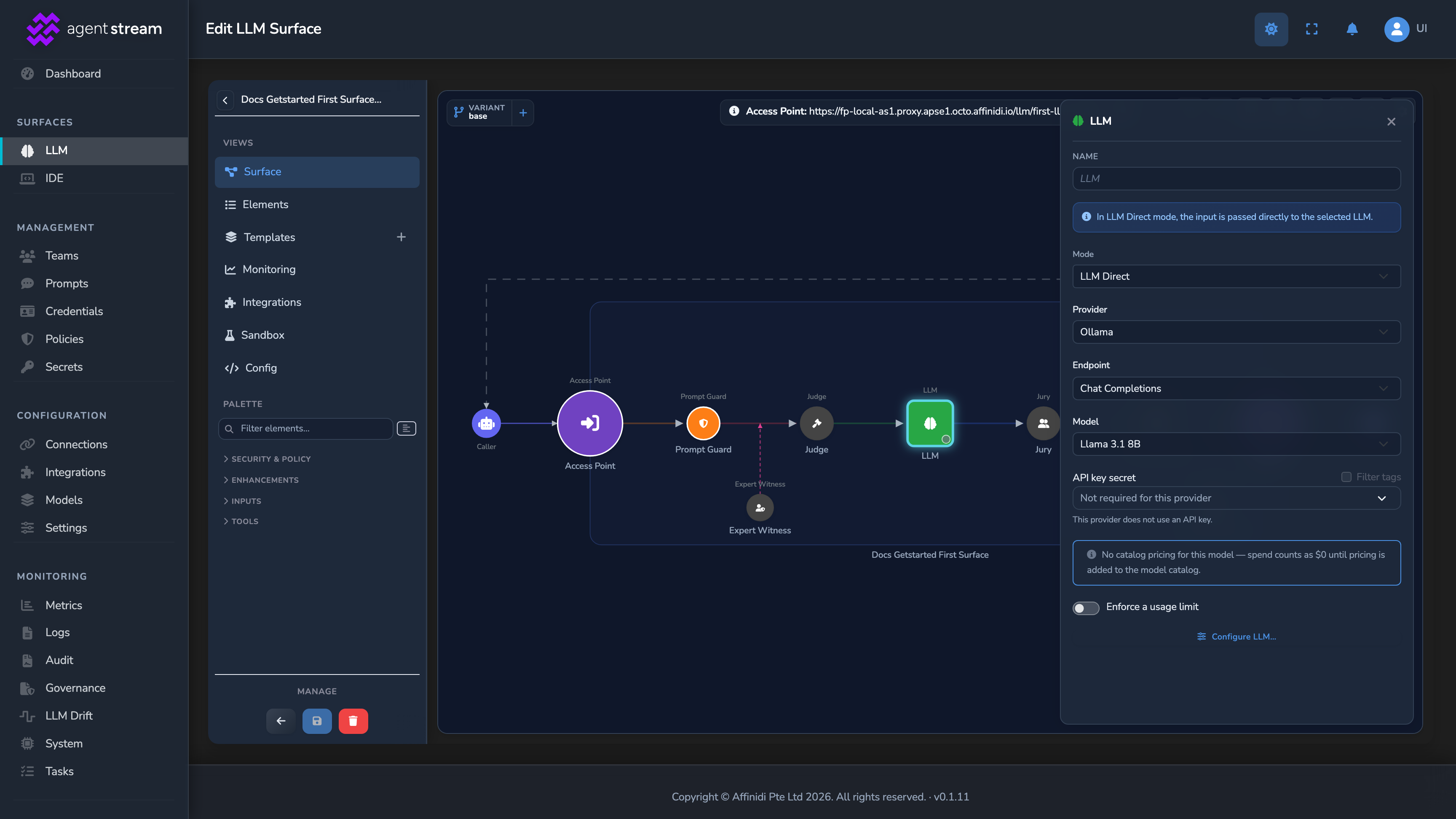
Select the LLM node on the canvas to open its settings panel, then switch on Enforce a usage limit:
| Field | Value for this guide | Notes |
|---|---|---|
| Monthly budget (USD) | 5 | A low value for this guide, so you can see the limit trigger without waiting for real usage to accumulate. |
| Monthly token cap | (leave blank) | Optional. Leave unset unless you also want a hard token ceiling. |
Select the save button (Save changes) under Manage. The limit is enforced immediately: once this surface’s month-to-date spend reaches $5, further requests are blocked with a `429` response before they reach OpenAI. The request that crosses $5 is itself allowed through.
Confirm
Open the surface’s Monitoring tab. The redacted request from step 2 is absent from the rejection breakdown, because redacting a value is not the same as rejecting the call. A rejection shows up here once Prompt Guard blocks a request outright. Once your spend reaches the $5 budget from step 3, the next request returns 429 with the error code rate_limit_exceeded. A usage-limit 429 is not a content rejection, so it stays out of the rejection breakdown.
Troubleshooting
| Symptom | Likely cause | Fix |
|---|---|---|
| The email in step 2 is not redacted in the request sent to OpenAI. | The request-side Prompt Guard is not enabled, its Email Addresses rule is missing, or When detected is set to an option other than Redact the text that matches the pattern. | Re-open the surface, confirm the request-side Prompt Guard has Enabled switched on, and that its guard has an Email Addresses rule with When detected set to Redact the text that matches the pattern. |
Every request returns 429, even the first one. | The monthly budget was set too low, or a previous test already consumed the cap. | Open the usage limit and increase Monthly budget (USD), or wait for the next monthly reset. |
| The request from step 2 doesn’t appear in the Monitoring tab rejection breakdown. | When detected is set to Redact the text that matches the pattern rather than Reject the call completely. Redaction still processes the request and is not counted as a rejection. | This is expected for redaction. To see a rejection recorded instead, temporarily set When detected to Reject the call completely and resend the request. |
Next steps
- Monitor your surface: See the requests from this guide in the surface Monitoring tab and the response headers on every call.
- Guardrails: Configure Expert Witnesses and enable the Judge and Jury for a customer-facing deployment.
- PII protection and NER IDs: How redaction compares to a NER ID pseudonym, and when to choose each.
- Cost and usage governance: Per-stage metering, breach alerts, and appliance tier limits.
Glad to hear it. Thanks for letting us know.
Sorry to hear that. Thanks for letting us know.