Cost and attribution
Nobody can answer “who spent what, on which model” when every caller shares the same provider key. Members and teams give every caller an attributable identity and virtual-key controls on every surface where attribution is turned on. Resilience and caching →
Member
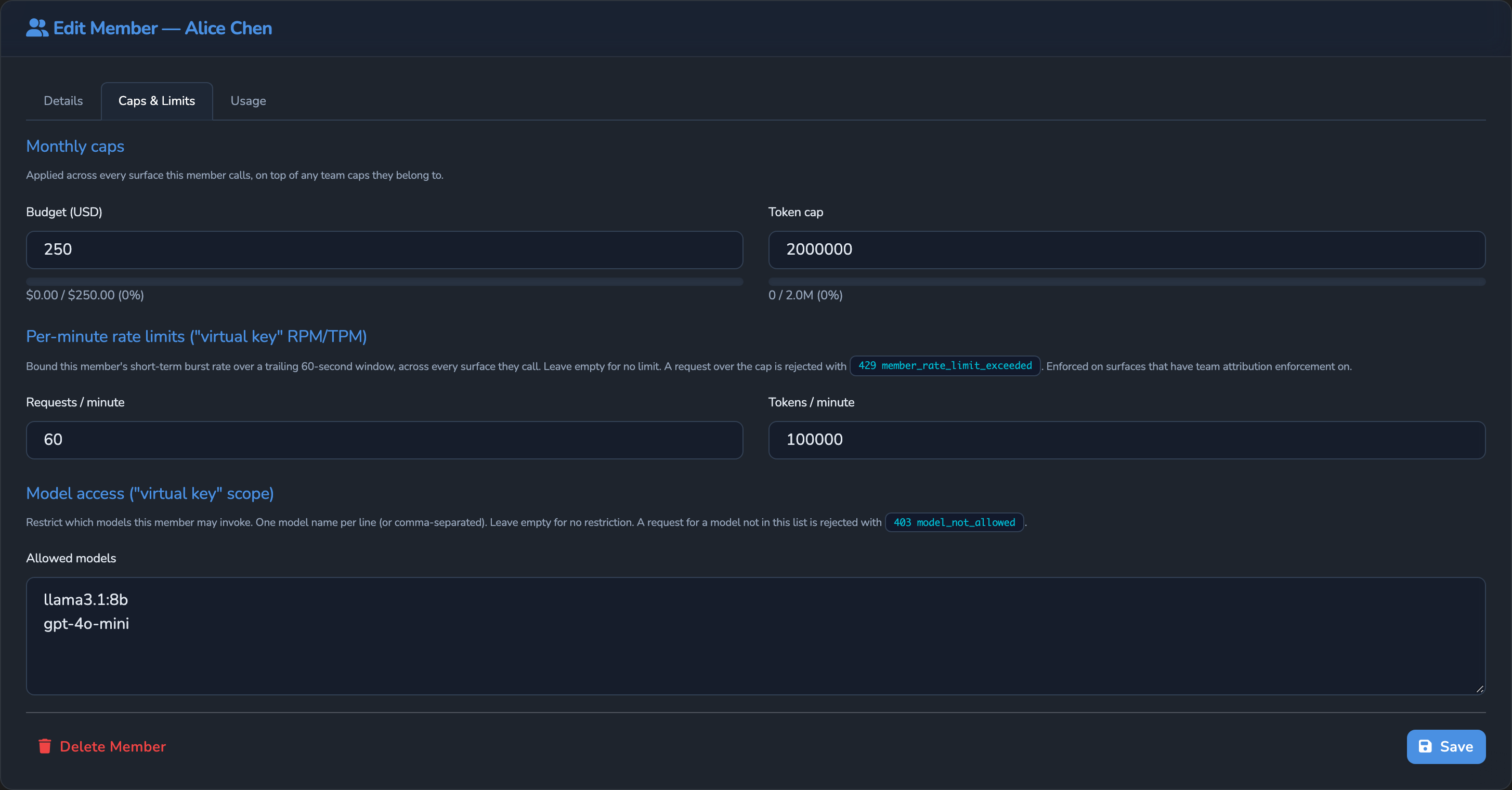
A Member is a registered caller: a person or client that reaches models through the appliance. A Member is distinct from a User, who signs in to administer the appliance. A Member acts as a virtual key, carrying a model allow-list, per-minute request and token limits, and monthly ceilings, plus stable attribution metadata across every Surface it calls.
Virtual key
A Virtual Key is the effective set of controls attached to a Member: its model allow-list, rate limits, monthly ceilings, and stable identity for attribution. Because attribution is surface-type-agnostic, a Member’s Virtual Key applies consistently across LLM and IDE Surfaces.
How spend and quotas roll up to a Team
A Team is a group of Members. Once a Surface is configured to contribute to team quotas, spend, tokens, and rate-limit activity are attributed to both the Member and its Team, aggregated across every eligible Surface the Member calls. Surfaces can be restricted to specific Teams, and Team-level ceilings apply in addition to Member-level ceilings.
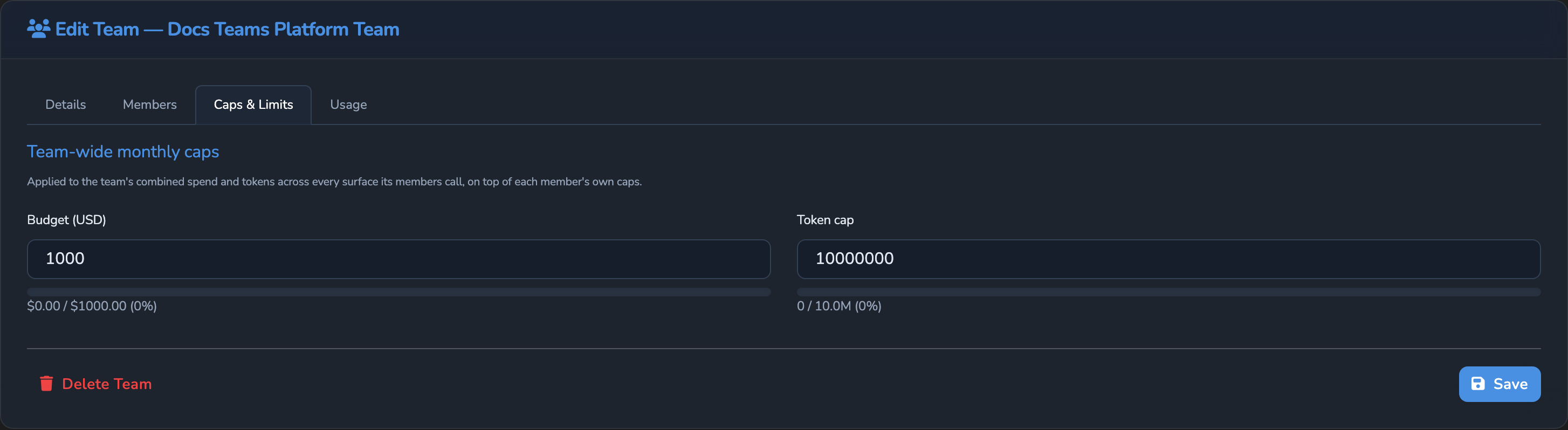
A team’s member list sits on its own Members tab; its spend and token ceilings sit on a separate Caps & Limits tab of the same page:
Restricting surfaces to teams
A surface can be restricted to specific Teams, so only their Members may call it. The built-in Anonymous Member and Anonymous Team provide open access when a Surface accepts unauthenticated traffic. An administrator can tighten that default by enabling or disabling those built-ins instead of reconfiguring every Surface.
The member and team model is surface-type-agnostic, so attribution applies the same way on every surface type.
How a request is resolved to a Member
Attribution resolves a request to a Member and its Team or Teams for spend and quota accounting. Each Surface chooses the caller-match source: a request header, JWT claim, body path, mTLS attribute, or API-key binding.
Managing Members
Administrators manage Members separately from dashboard Users. A Member is a runtime caller, not an account that signs in to operate the appliance. It can represent a person, application, or automated system and can have one or more identifiers for caller matching.
Member controls on the Caps & Limits tab include Budget (USD), Token cap, Resets monthly from, Requests / minute, Tokens / minute, and Allowed models. These controls travel with the Member across every eligible Surface it calls. The same tab shows how much of each monthly cap the Member has used in the current budget period, with that period’s start and end, and the Usage tab charts the Member’s spend and tokens by surface. Administrators can create, edit, disable, and delete Members. Disabling a Member blocks matching callers while preserving its record and usage history. Deleting a Member removes it from active listings and attribution, and removes its usage history from the usage charts. See the Members reference → for identifier matching, auto-provisioning, and field-level details.
Managing Teams
Administrators use Teams to group Members for combined spend, token usage, and access control. A Member can belong to more than one Team. Team-wide caps apply to the combined usage of the Team’s Members, while Member caps remain attached to the individual caller.
Surface participation is configured through the team-attribution controls. Surface use contributes to team quotas enables attribution for that Surface. Caller identity is read from (first match wins) defines the ordered sources used to identify the caller. Restrict surface to teams limits access to selected Teams. Enforce team / member limits (block at 429) determines whether reached limits block requests or usage is recorded for reporting only. See the Teams reference → for the team record, surface controls, and gate behaviour.
Team Gate resolution
On a Surface with team attribution enabled, the Team Gate resolves and checks each request in order:
- It reads the caller identity from the configured sources and resolves a Member.
- If verified auto-provisioning is enabled, it can create a Member for an unrecognised verified caller. Otherwise, it falls back to the built-in anonymous Member.
- It resolves the Member’s enabled Teams, falling back to the anonymous Team when no enabled Team applies.
- It checks Member and Team access, including Restrict surface to teams.
- It checks the Member’s Allowed models list.
- When enforcement is enabled, it checks per-minute Member limits and monthly Member and Team ceilings.
- After an allowed request completes, it records the request, tokens, and spend against the relevant Member and Teams.
Access failures return 403, and a model outside the Allowed models list returns 403 model_not_allowed. An enforced per-minute Member limit returns 429 member_rate_limit_exceeded, and a reached Member or Team monthly cap returns 429 team_quota_exceeded. When team attribution is off, the Team Gate skips these checks, but Allowed models still applies: an authenticated caller that matches a Member can call only that Member’s allowed models, and any other model returns 403 model_not_allowed.
How usage is broken down by stage, Member, and Team
Attributed cost, token usage, and latency can be analysed by Surface, stage, Member, and Team. Per-stage accounting covers the LLM, Judge, Jury, and Decider stages, so teams can separate model spend from governance-stage spend. Expert Witnesses and Prompt Guard sit outside these cost stages. See Cost and usage governance → and Observability →.
Monthly ceiling
A Monthly Ceiling is a USD budget or token cap enforced at the Member, Team, Surface, or pipeline-stage level. Once a ceiling is reached, further requests are rejected with 429. Surface, stage, juror, and team caps reset on the first of each calendar month (UTC). A Member’s caps reset on the monthly anniversary of its Resets monthly from date when one is set. Use calendar month clears that date, so the Member’s caps reset on the first of the month (UTC) instead.
Cost spike
A Cost Spike is a rolling anomaly: an execution whose cost is far above the recent mean for its Surface. Cost-spike alerts send notifications through configured integrations before the monthly bill arrives.
Provider-side cache tokens
Provider-side prompt-cache tokens are the vendor-reported cached-token counts, such as OpenAI cached_tokens, Anthropic cache_read_input_tokens, and DeepSeek prompt_cache_hit_tokens. Agent Stream surfaces these separately from its own response cache, so operators can distinguish provider-side cache-hit economics from responses served directly by Agent Stream.
Why this matters
Attribution is what turns cost and usage governance, described in Cost and usage governance →, into per-team and per-customer accountability rather than one shared number for the whole appliance. It is also the foundation for multi-tenant governance, where different teams or customers need separately enforced quotas on the same shared surfaces.
Related
- Cost and usage governance: The budgets and alerts that attribution figures feed into.
- OPA policies: The team gate that runs after the global and surface-level OPA policies.
- Security and access control: How a caller’s identity is established before attribution applies.
- Observability: How attributed usage and alerts are displayed and exported.
- Pipeline and stages: Where the Team gate checks Member and Team access in the stage order.
Glad to hear it. Thanks for letting us know.
Sorry to hear that. Thanks for letting us know.