Surfaces
A surface is the single configuration and runtime unit Agent Stream uses to represent one governed connection. Guardrails, budgets, resilience, attribution, and every other capability attach to a surface. Pipeline and stages →
What a surface owns
A surface owns:
- One Access Point: its front door.
- One Target: its upstream. A Target isn’t necessarily a single provider destination: it can represent failover, load balancing pools, content-aware Deciders, and aggregators.
- Variants, cache settings, guardrail chains, budgets, policy references, and integration bindings.
Administrators compose the request path visually on the surface canvas, between the Access Point and Target. Prompt Guard, Judge, Jury, and Expert Witness nodes are created automatically on every LLM Surface canvas and stay there. Prompt Guard, Judge, and Jury start disabled until you turn on the node’s Enabled switch. Elements such as Caller Context, OPA Policy, Router, and the Inputs elements are dragged onto the canvas from the palette.
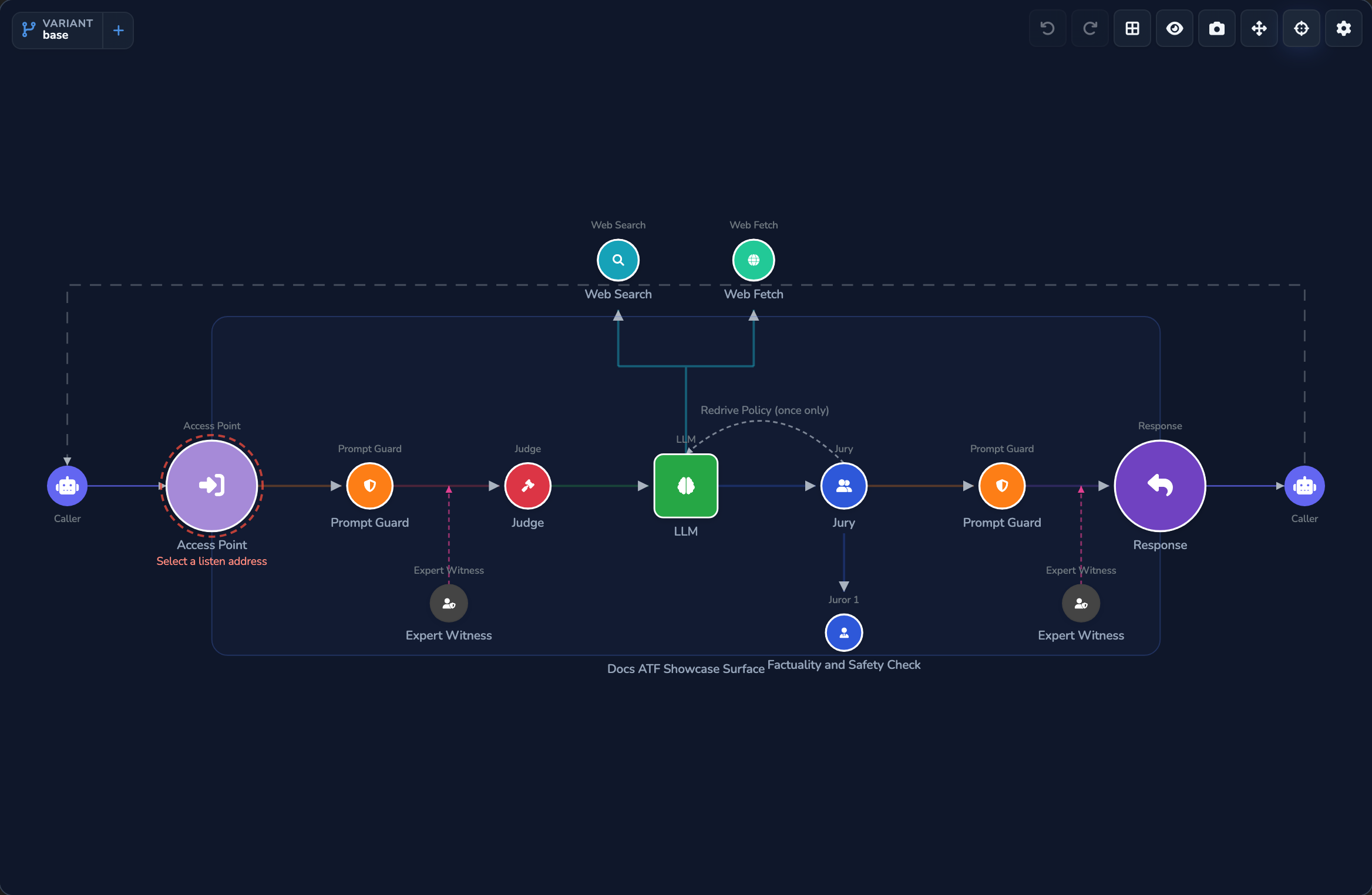
A saved change to a surface applies to new requests straight away, without a restart.
How the two surface types differ
Agent Stream manages traffic through two surface types that share the same configuration model and access-control permissions:
The dashboard’s sidebar lists them as LLM and IDE under a Surfaces heading.
LLM Surface
The LLM Surface is Agent Stream’s primary surface type: an LLM provider your application or agent calls out to, carrying the full guardrail, routing, resilience, and cost pipeline.
What it configures
An LLM Surface composes optional configuration blocks. Nothing is mandatory: a surface with none configured behaves as a thin, low-latency proxy, and adding a block switches on only that behaviour.
- Identity and access: source authentication, OPA policy, VP evidence, team attribution, identity pass-through, and secret-backed upstream headers.
- Guardrails: prompt guard, expert witnesses, judge, jury.
- Routing and resilience: decider, routing rules, canary, variants, failover, load balancing, rate limit.
- Cost and limits: usage limits, usage alerts, cost tracking, reasoning token limits.
- Inputs: client API formats, and the Audio File, Audio Stream, Image File, and Document File elements.
- Performance: cache and streaming.
- Observability and compliance: metrics and governance recording.
- Other: server tools and context management.
Server tools let the appliance itself execute web_search and web_fetch calls, instead of leaving the caller’s application to run them:
- The model emits a tool call, and the appliance runs the search or fetch under policy control, a per-surface domain allow/deny list, and an SSRF guard.
- The result is injected back into the conversation and the model is re-invoked. This runs as a bounded loop, up to a configured maximum number of iterations, not an open-ended one.
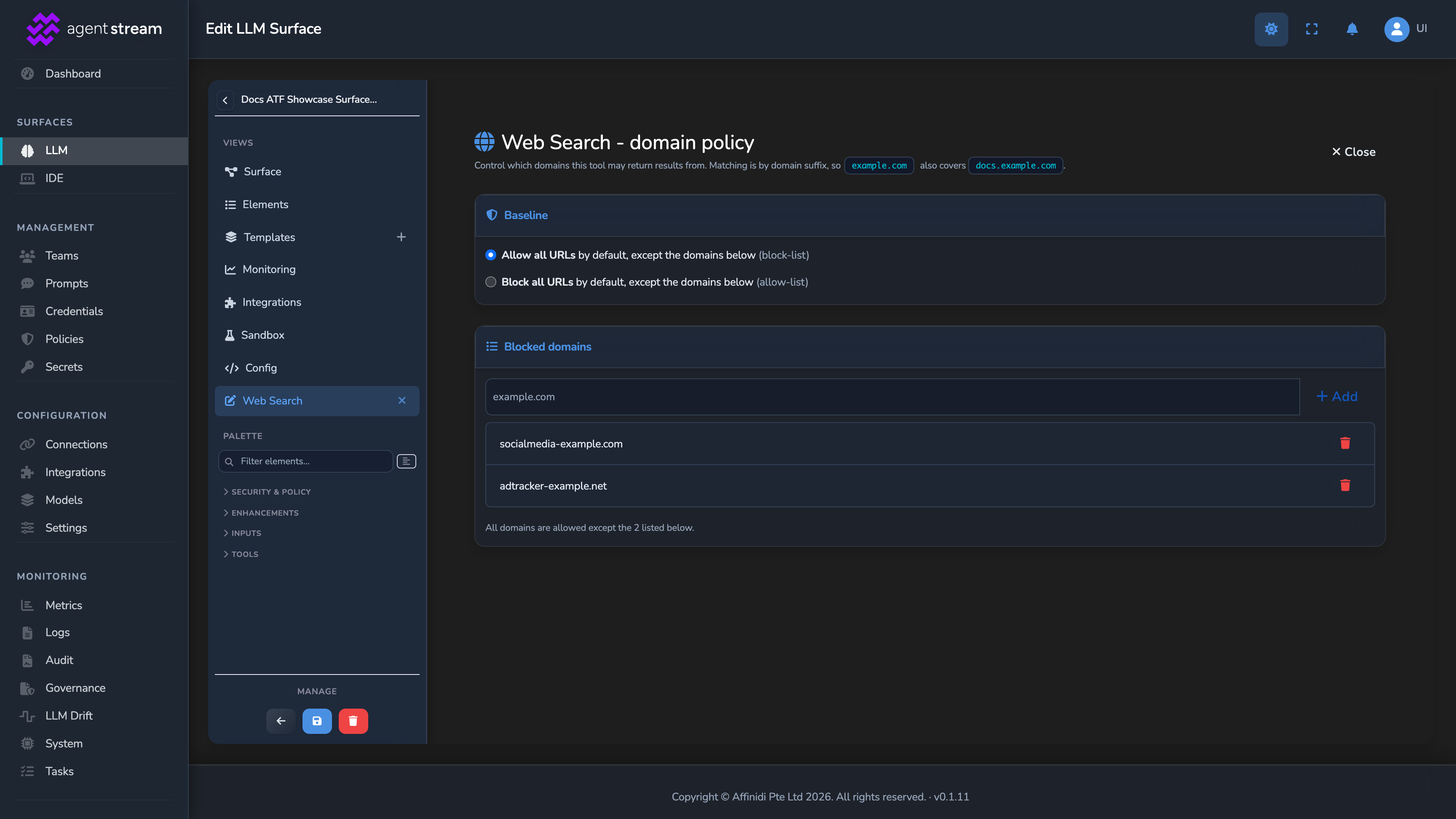
See Server tools and modalities → for the full field reference, including search engines and domain-policy configuration.
What order an LLM Surface applies its stages in
Each LLM Surface applies the configured stages of Agent Stream’s pipeline in order:
- Authenticate and gate: variant selection (an explicit
$alias, a Router rule, or the canary split), source authentication, inbound policy (appliance-wide policies, then the surface’s own OPA policy), team access and quota checks, and the surface usage limit. - Prepare and guard the request: prompt-reference expansion, document ingestion and the audio and image input gates, response-cache lookup, the surface rate limit, Prompt Guard, and request-side Expert Witnesses.
- Route and call the model: in Decider mode, the Decider selects a candidate while the Judge pre-check runs alongside it on a buffered request. In Comparer and Summariser modes, the Judge runs first and then every candidate is called. The call can use failover and load balancing.
- Review the response: Jury review (except in Comparer mode), response-side Prompt Guard, and response-side Expert Witnesses inspect the output before it returns to the caller.
- Record the execution: per-stage cost and token metering, telemetry emission, and configured integration delivery.
See Pipeline and stages → for the complete stage order and how unconfigured stages are skipped.
How requests and providers stay decoupled
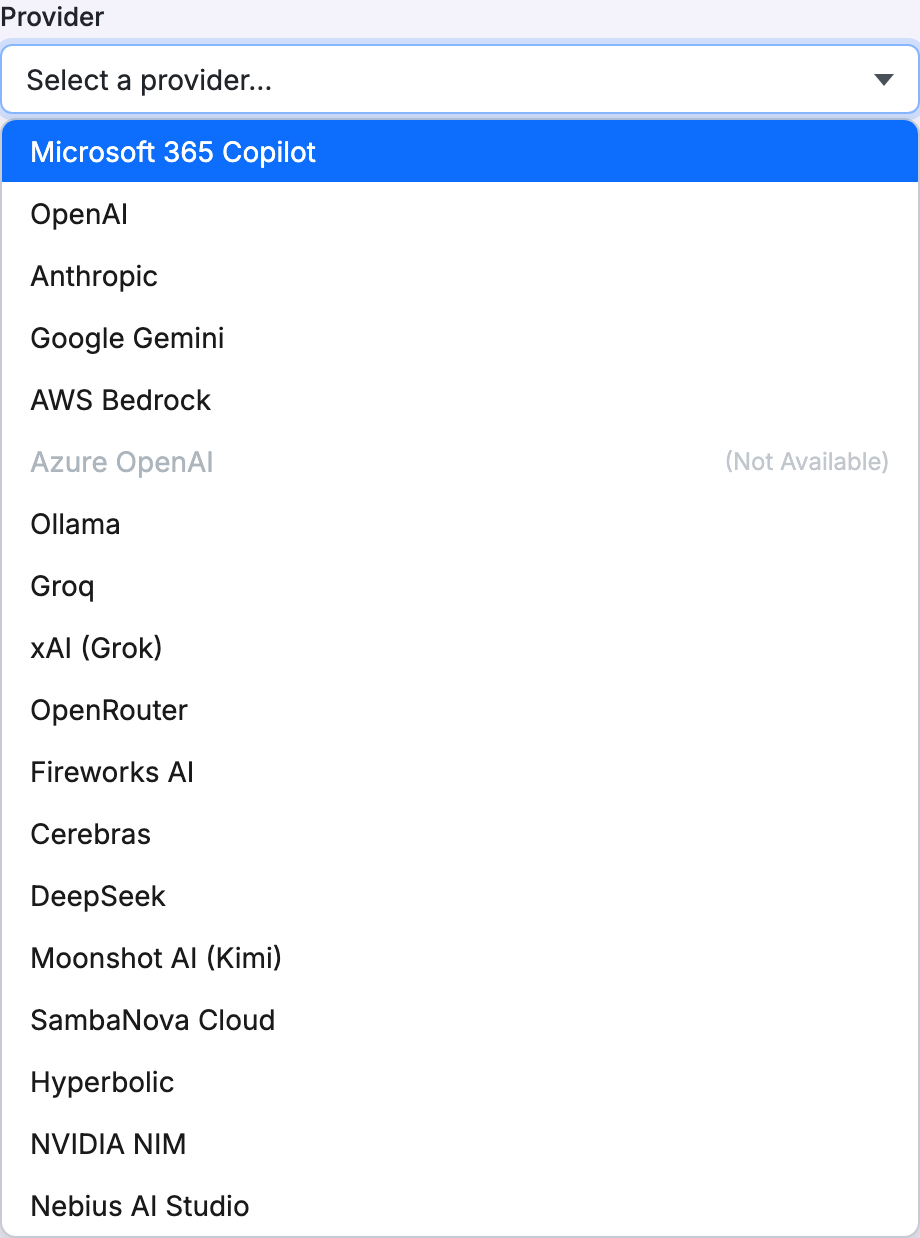
An LLM Surface reaches one configured provider: Microsoft 365 Copilot, OpenAI, Anthropic, Google Gemini, AWS Bedrock, Ollama, or an OpenAI-compatible preset (Groq, xAI (Grok), OpenRouter, Fireworks AI, Cerebras, DeepSeek, Moonshot AI (Kimi), SambaNova Cloud, Hyperbolic, NVIDIA NIM, Nebius AI Studio). Azure OpenAI is listed in the provider catalogue but isn’t available on this appliance. A provider outside the built-in catalogue can be defined as JSON on the Models page’s JSON tab and then selected as the surface’s provider. See Providers → for provider configuration.
Requests and providers are decoupled in both directions:
- Outbound: your application speaks one request shape regardless of provider. Agent Stream normalises and transforms the wire format for non-OpenAI-schema providers, such as Anthropic Messages and Gemini
generateContent. Pricing, capabilities, and request profiles come from a hot-reloadable model catalogue, so an administrator makes a new model available from the Models page, not through a code change. - Inbound: a surface accepts requests in the OpenAI Chat Completions, Anthropic Messages, or OpenAI Responses format, selected by the endpoint path a client calls, independent of the configured provider. An Anthropic SDK can call a surface backed by an OpenAI model, and an OpenAI SDK can call a surface backed by Claude, with no code change on either side. Every surface accepts all three formats by default, and its Client API formats setting can turn any of them off.
Which inputs a surface accepts
A surface accepts text by default. Audio and images are strictly opt-in: a request carrying an audio file or an image is rejected with HTTP 400 unless the surface has an enabled Audio File or Image File element, and audio also needs a model that accepts audio input. A realtime voice session needs the Audio Stream element. A Document File element can extract attached documents into prompt text, so a model without document support can read them. The Router element can send each attachment type to a variant whose model supports it. See Inputs and modalities →.
What request types ride the same governed pipeline
A surface is path-transparent: the path suffix a client sends to an OpenAI-compatible provider is forwarded as-is, so embeddings, moderation, rerank, image generation, transcription, translation, text-to-speech, batch jobs, and file operations all ride the same governed pipeline, rather than being separate integrations.
IDE Surface
An IDE Surface has no provider of its own. It consolidates one or more LLM Surfaces into a single, governed, OpenAI-compatible model-discovery menu, added through its Catalogue node’s member picker:
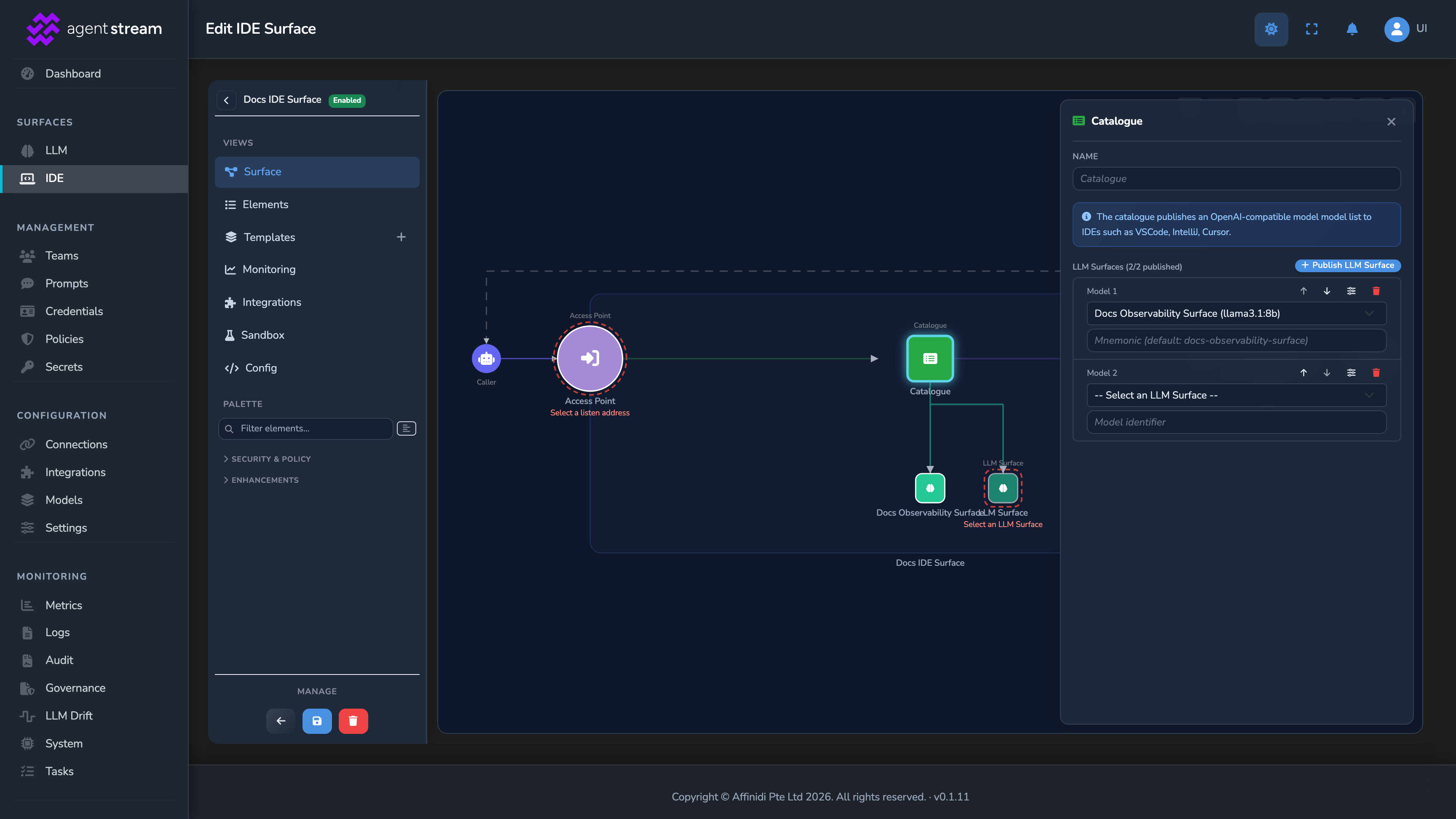
- IDE clients and OpenAI-compatible agents point to one Access Point URL, sign in with corporate SSO, and see only the models they’re entitled to use.
- Each dispatched request runs the full governance pipeline, guardrails, budgets, quotas, policies, routing rules, cache, failover, on its backing LLM Surface, and the outcome is recorded for later review.
- The IDE Surface mirrors cost, token, telemetry, and log data back for a unified per-editor view.
Besides corporate SSO, other identity-binding options are mTLS, API key, and JWT Bearer: callers present only the standard authentication material for that method, and the appliance derives the caller’s identity from the credential itself. See Security and access control → for more information.
An IDE Surface fans a single client-facing endpoint out to one or more LLM Surfaces, each still running its own full governance pipeline:
Variants: one endpoint, many behaviours
Each surface carries a catalogue of named variants, addressable at {route}$alias/.... A variant keeps its own copy of the settings it covers, such as its provider, model, guardrails, rate limit, and Inputs elements, without a separate surface record or endpoint. Identity and routing fields stay fixed, so a variant is reachable at the same base route and observed under the same metrics as its parent surface.
The Router element can route a request to a variant by header, body field, or attachment type, so one surface can send images or audio to a model that accepts them. Variants are also the substrate for progressive rollout. See Variants and progressive rollout → for how Router rules and canary splits select one automatically.
Related
- Pipeline and stages: The stage order every surface request follows.
- Variants and progressive rollout: How variants, routing rules, and canary splits change behaviour safely.
- Security and access control: Authentication methods and identity binding for both surface types.
- Providers →: Provider adapter configuration.
- Guardrails: Prompt guard, expert witnesses, Judge, and Jury, one of the configuration blocks a surface composes.
Glad to hear it. Thanks for letting us know.
Sorry to hear that. Thanks for letting us know.