Networking elements
Two canvas elements control request flow between the gateway and upstream destinations. The Networking element configures timeouts, automatic retry, circuit breaking, and traffic mirroring for a specific upstream edge. The Rate Limit element caps request volume within a rolling time window.
Drop the Networking element on a Managed Agent or Transit Point request edge. Drop the Rate Limit element on the Access Point → Managed Agent edge for inbound limiting, or on a transit point node for per-destination limiting.
The Networking panel shows the values stored for the Target or Transit Point, including settings made outside the dashboard. Saving keeps them as stored, including a 0 in Max attempts, Failure threshold, or Recovery timeout (seconds).
Timeouts
Caps request, connect, and idle durations. When a timeout fires, the gateway returns a timeout error to the caller.
| Field | Type | Required | Default | Description |
|---|---|---|---|---|
| Request timeout | integer (seconds) | No | 30 | Maximum seconds the gateway waits for a complete response from the upstream. For an A2A stream from a Direct URL Target, it limits only the wait for the stream to start. |
| Connect timeout | integer (seconds) | No | 5 | Time allowed to establish the TCP connection to the Target. The panel pre-fills 5 when you add the element, and the gateway currently uses 10 seconds. |
| Idle timeout | integer (seconds) | No | 90 | Maximum seconds the upstream can send nothing partway through a response, including an A2A stream, before the gateway ends the response with a timeout. The panel pre-fills 90 when you add the element. A surface that saves no idle timeout, such as one without a Networking element, uses 60. Only time spent waiting for the upstream counts, so a caller that reads slowly does not trigger it. |
Retry
Automatically re-issues failed requests using exponential back-off. Enable this sub-feature to reveal the configuration fields. An A2A streaming request is sent once, without retries.
| Field | Type | Required | Default | Description |
|---|---|---|---|---|
| Enable automatic retries | toggle | No | Off | Activates the retry sub-feature. |
| Max attempts | integer | No | 3 | Number of retries after the original attempt. A value of 3 means up to four sends in total before the gateway returns an error. |
| Backoff multiplier | float | No | 2 | Multiplier applied to the backoff interval on each successive retry. |
| Initial backoff | integer (ms) | No | 100 | Starting backoff duration before the first retry. |
| Max backoff | integer (ms) | No | 5000 | Upper cap for the backoff interval. |
| Retryable status codes | string | No | Gateway default | Comma-separated HTTP status codes that trigger a retry (for example 502,503,504). Leave empty to use the gateway default: 408, 429, 500, 502, 503, and 504. The dashboard blocks saving when the field holds anything other than HTTP status codes. Disabled while Retry on connection errors only is on. |
| Retry on connection errors only | switch | No | Off | When on, the gateway retries a request only when it fails before any response arrives, for example when the target is unreachable, and treats every status code as final. |
Circuit Breaker
Opens the circuit after a threshold of failures within a rolling window, protecting the upstream from cascading load. Enable this sub-feature to reveal the configuration fields.
| Field | Type | Required | Default | Description |
|---|---|---|---|---|
| Enable circuit breaker | toggle | No | Off | Activates the circuit breaker sub-feature. |
| Failure threshold | integer | No | 5 | Number of failures within the window that trips the circuit to open. |
| Success threshold (to close) | integer | No | 3 | Number of successful probe requests required to close the circuit again. |
| Recovery timeout | integer (seconds) | No | 30 | Seconds the circuit stays open before allowing probe requests through. |
| Window size | integer (seconds) | No | 60 | Rolling time window in seconds over which failures are counted. |
Traffic Mirroring
Duplicates a percentage of live requests to a shadow endpoint for testing or analysis. The gateway does not use or forward the shadow response to the caller.
| Field | Type | Required | Default | Description |
|---|---|---|---|---|
| Mirror traffic to shadow endpoint | toggle | No | Off | Activates the mirroring sub-feature. |
| Mirror endpoint | string (URL) | No | — | Full URL of the shadow endpoint (for example https://shadow.internal:3001). |
| Traffic percentage | integer (1–100) | No | 100 | Percentage of live requests to duplicate to the mirror. |
| Mirror timeout | integer (seconds) | No | 5 | Maximum seconds to wait for the mirror response before dropping it. Only applies when Fire-and-forget is off. |
| Fire-and-forget (async) | toggle | No | Off | When on, the gateway dispatches the mirrored request and continues immediately without waiting for the shadow response. When off, the gateway waits up to Mirror timeout before continuing, but ignores the shadow response body regardless. |
Rate Limit element
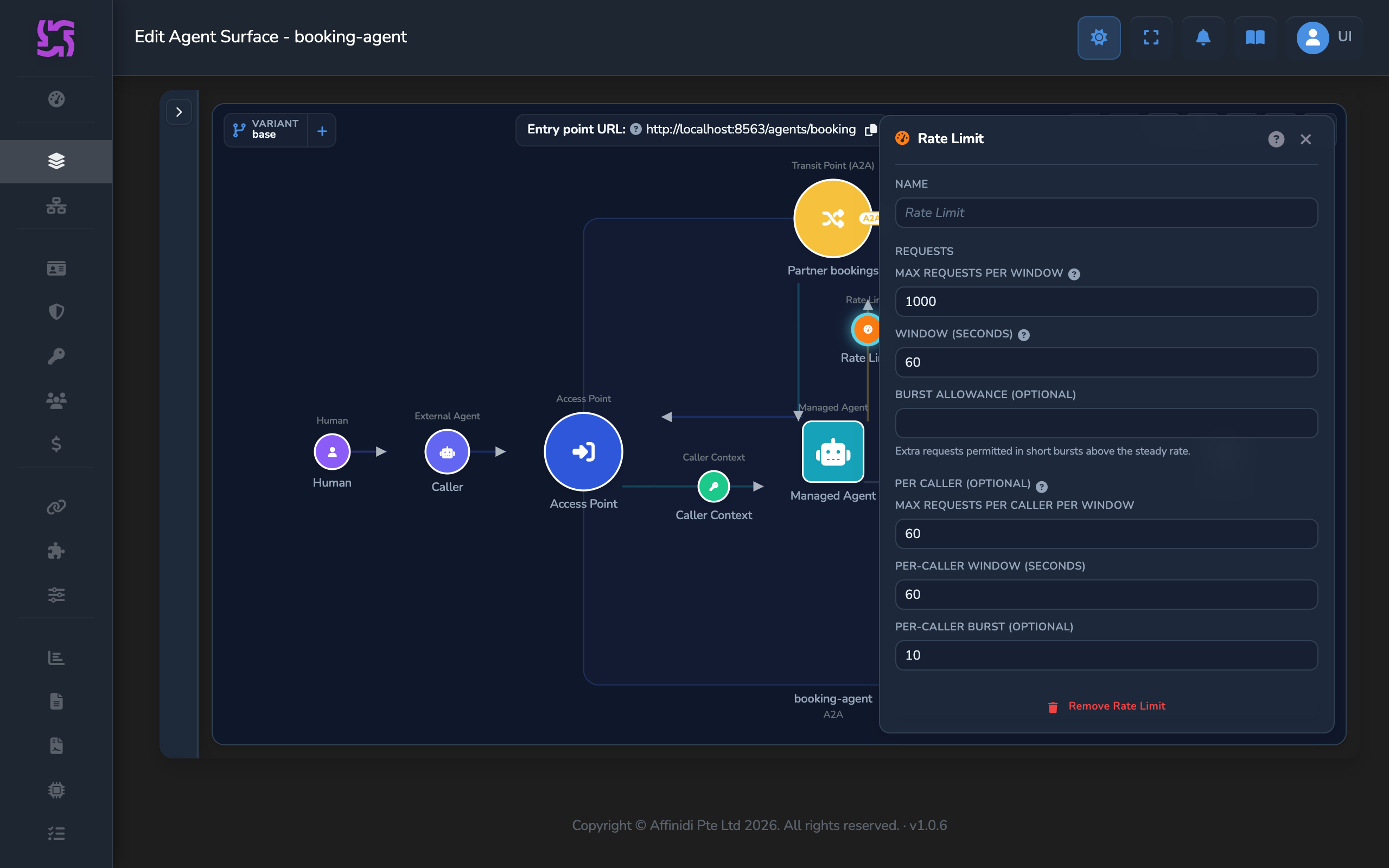
The Rate Limit element caps the number of requests that can flow through a surface within a rolling time window. When the cap is reached, the gateway answers with HTTP 429 before the request reaches the upstream. On an MCP surface the response body is a JSON-RPC error. When an Access Point rate limit or a Transit Point’s per-caller limit refuses a request, the response carries a Retry-After header giving the whole number of seconds until the caller can retry.
Drop it on the Access Point → Managed Agent edge to limit inbound surface traffic. Drop it on a Transit Point node to apply a per-destination cap on outbound traffic to that specific endpoint, and optionally a limit for each caller of that Transit Point.
| Field | Type | Required | Default | Description |
|---|---|---|---|---|
| Max requests per window | integer | Yes | 1000 | Maximum number of requests allowed within the window. |
| Window (seconds) | integer | Yes | 60 | Duration of the rolling window in seconds. |
| Burst allowance (optional) | integer | No | — | Short-spike allowance above the steady-state rate before throttling activates. |
Per caller (optional)
On a Transit Point, the Rate Limit panel adds a Per caller (optional) section. It gives each caller of the Transit Point a limit of its own, so one busy caller can’t use up the allowance of the others.
- The caller is the one the transit token names, or else the client that the Transit Point’s own Caller authentication verified.
- Requests with no identified caller share one limit between them.
- The per-caller limit applies beside the shared limit above, and the stricter of the two decides.
- Each gateway node counts requests on its own.
- On a named variant the fields are read-only, with the note “Set on the base surface; every variant uses it.” Set the limit on the base surface’s Transit Point.
A request refused by its per-caller limit gets HTTP 429 with a Retry-After header giving the whole number of seconds until the caller can retry. On an MCP Transit Point the response body is a JSON-RPC error. When the Audit Log keeps Rate Limited events, each refusal is recorded there.
| Field | Type | Required | Default | Description |
|---|---|---|---|---|
| Max requests per caller per window | integer | Yes, when any per-caller field is set | — | Maximum number of requests each caller can make within the per-caller window. Minimum 1. Leave all three fields empty for no per-caller limit. |
| Per-caller window (seconds) | integer | Yes, when any per-caller field is set | — | Duration of each caller’s rolling window in seconds. Minimum 1. |
| Per-caller burst (optional) | integer | No | — | Short-spike allowance for each caller above their steady rate. Minimum 1. |
The panel pre-fills the shared limit with 1000 requests per 60 seconds. When a per-caller limit is set, you can clear Max requests per window, Window (seconds) and Burst allowance (optional) so that the Transit Point limits each caller with no shared cap.
Related
- Managed Agent reference: the upstream destination this element attaches to.
- Transit Points reference: Networking on individual Transit Point request edges.
Glad to hear it. Thanks for letting us know.
Sorry to hear that. Thanks for letting us know.
Still stuck? Ask the community on Discord or contact us.