MCP Proxy
An MCP Proxy reads an OpenAPI 3.0 specification and generates one MCP tool per REST endpoint, making any conventional HTTP API accessible to MCP-compatible agents without modification. Use this page to create proxies, update the OpenAPI specification as the upstream API changes, and test generated tools from the built-in sandbox before connecting an agent.
Overview
An MCP proxy is a named component independent of any surface. Once created, it can be targeted by any number of MCP surfaces using the proxy:// scheme. Attaching a proxy to a surface adds authentication, OPA policies, observability, and credential injection on top of the generated tools. Without a surface, agents can call tools directly at the proxy route.
The proxy route is formed from the configured Listen Address (Host:Port), Path Prefix, and Custom Endpoint Path.
Fields
| Field | Type | Required | Default | Description |
|---|---|---|---|---|
| Name | string | Yes | — | Human-readable label shown in the dashboard proxy list and selector dropdowns. Must be unique within the gateway. |
| Description | string | No | None | Free-text notes for other administrators. Not used in routing. |
| MCP Proxy Enabled | boolean | No | Enabled | Available in edit mode only. When disabled, the proxy is stopped and not loaded at startup. |
| Listen Address (Host:Port) | string | Yes | — | The host and port the proxy listener binds to. Selected from the gateway’s configured listener addresses. |
| Path Prefix | string | Yes | — | URL prefix for this proxy’s route. Combined with Custom Endpoint Path to form the full proxy route. |
| Custom Endpoint Path | string | Yes | — | Final path segment that uniquely identifies this proxy’s route within the selected prefix. |
| Base URL | URL | Yes | — | Base address of the upstream REST API. Tool calls are forwarded to this URL with the endpoint path appended. |
| OpenAPI Specification | string (YAML) | Yes | — | OpenAPI 3.0 specification in YAML format. The gateway parses this on save and generates one MCP tool per endpoint. No manual tool mapping is required. |
| Flatten POST Parameters | boolean | No | Disabled | When enabled, POST request body parameters are lifted to the top level of the tool’s input schema. MCP clients can then send flat arguments instead of wrapping them in a request_body object. |
Proxy route
The proxy route is the full address at which MCP clients can reach the proxy directly, before any surface is involved:
https://<listen-address><path-prefix><custom-endpoint-path>The proxy route accepts POST, GET, and HEAD. A DELETE returns HTTP 405 with Allow: POST, GET, HEAD. A POST body must be a single JSON-RPC object, as described in How the gateway checks each MCP request.
The dashboard shows a live MCP Proxy Route preview during the creation wizard.
Tool generation
The gateway parses the OpenAPI specification when the proxy is saved and creates one MCP tool per endpoint. Tool names are derived from the endpoint’s operationId when present, or from the HTTP method and path pattern otherwise.
Tool definitions update immediately when the OpenAPI specification is changed and saved. MCP surfaces targeting the proxy reflect the updated tool list without reconfiguration.
The proxy serves its tools to MCP clients using either protocol revision, 2024-11-05 or 2026-07-28, with no setting to choose between them.
Saved with warnings
The gateway builds a separate tool catalog for each MCP protocol revision. When the gateway can serve the specification to 2026-07-28 clients but fails to convert it for 2024-11-05 clients, it still creates or saves the proxy and reports why:
- The creation wizard’s final screen reads MCP Proxy Created with Warnings and lists the warning, starting
OpenAPI spec is unavailable to the MCP 2024-11-05 tool catalog, followed by the converter’s error. - The proxy edit page shows a Saved with warnings. banner with the same text after you save.
Until the warning is resolved, 2026-07-28 clients can use the proxy and 2024-11-05 clients receive errors. Correct the specification on the REST API tab and save it again. The warning stops appearing once the gateway can build both catalogs.
Targeting a proxy from a surface
In the canvas editor, open the Managed Agent node, set Endpoint Type to via MCP Proxy, and select the proxy from the MCP Proxy dropdown. The dashboard sets the endpoint automatically.
See Managed Agent for full Target Endpoint URL documentation, including all supported endpoint schemes.
Sandbox
The proxy editor includes a built-in sandbox for testing tool calls directly from the dashboard without connecting an external client. Select Connect & List Tools to issue a tools/list call, then select a tool to run it with custom input parameters.
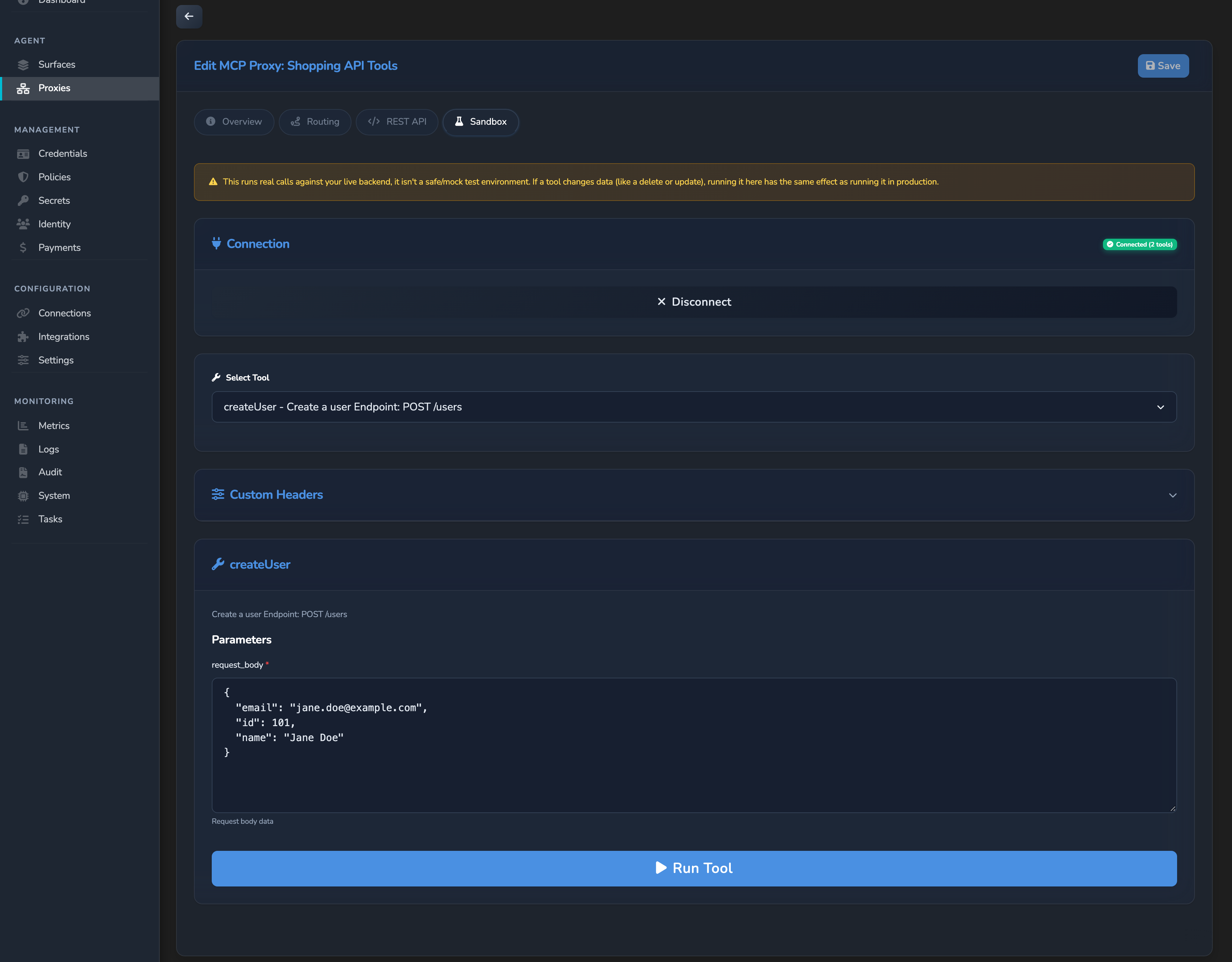
The Sandbox tab is visible only when the proxy is saved and its status is active. Save any unsaved changes before opening the sandbox.
Custom Headers
Once connected, a collapsible Custom Headers panel appears below the Connection panel. Expand it and select Add Header to add key/value header pairs. Every header you add is sent with every MCP request in the sandbox session: the initialize handshake, the tools/list call, and any tools/call you run afterwards.
- A header you add or change applies to the next Run Tool call immediately.
- To apply a new or changed header to the
initializeandtools/listcalls, select Disconnect, then Connect & List Tools again.
Related
- Expose a REST API as MCP tools: step-by-step guide to creating a proxy and attaching it to a surface.
- Managed Agent: Managed Agent field reference, including the
proxy://endpoint scheme. - MCP surface starter: create an MCP surface to attach a proxy to.
- Control MCP tool access with per-tool policies: restrict which callers can invoke specific proxy-generated tools using Rego policies.
Glad to hear it. Thanks for letting us know.
Sorry to hear that. Thanks for letting us know.