Mediator
A mediator is a DIDComm relay that accepts and forwards DIDComm v2.1 messages on behalf of this gateway. When the gateway cannot be reached directly, for example in private networks or NAT environments, a mediator acts as a publicly reachable forwarding point. Use this page to register a DIDComm relay and enable or disable it independently from any connection points that use it.
Gateway-to-gateway federation requires a mediator running v0.17.x or later. An older mediator version can’t complete the connection handshake between gateways.
For conceptual background on G2G routing and why mediators are needed, see Gateways. For step-by-step setup, see Connect two gateways.
Adding a mediator
There are two ways to register a mediator:
- The Add Mediator wizard, recommended: a four-step wizard (Enter DID, Resolve, Configure, then Complete) that resolves the mediator’s DID document and confirms its authentication endpoint is reachable before the mediator is saved. See Connect two gateways for the full walkthrough.
- Editing the mediator record directly, using the fields below: the DID is entered directly, with no resolution or reachability check performed. Use this only when you already know the DID document is valid and its authentication endpoint is reachable, for example when re-registering a mediator you’ve used before.
Fields
| Setting | Required | Editable | Description |
|---|---|---|---|
| Name | Yes | Yes | Human-readable label for this mediator. Used as a display identifier across the dashboard. |
| Description | No | Yes | Optional free-text description of the mediator’s purpose or operator. |
| DID | Yes | No (after creation) | The DID of the mediator service. The gateway uses this to resolve the mediator’s DIDComm endpoint and route outbound messages through it. Set at creation and cannot be changed. To use a different DID, create a new mediator. |
| Mediator Enabled | — | Yes | Whether this mediator is active. See Status values. |
Status values
| Status | Meaning |
|---|---|
| Active | The mediator is enabled. The gateway routes DIDComm messages through it when it is selected for an outbound connection. |
| Disabled | The mediator is disabled. Outbound routes that reference this mediator will not resolve. Existing connection points that use it stop receiving messages until the mediator is re-enabled or replaced. |
Disabling a mediator does not delete it. The record is preserved so it can be re-enabled without re-entering the DID.
Diagnostics
Diagnostics live on the Mediators list rather than the edit form.
Trust Ping
Each mediator row has an icon-only Trust Ping button (heartbeat icon), labelled by its tooltip: “Trust Ping: sends a test message to confirm this mediator is reachable, and reports the round-trip time.” Select it to send a test message to the mediator. While the ping is in flight the button shows a spinner; it then shows a checkmark on success or a cross on failure. A message reports the round-trip time in milliseconds on success, or the failure reason.
Mediator details
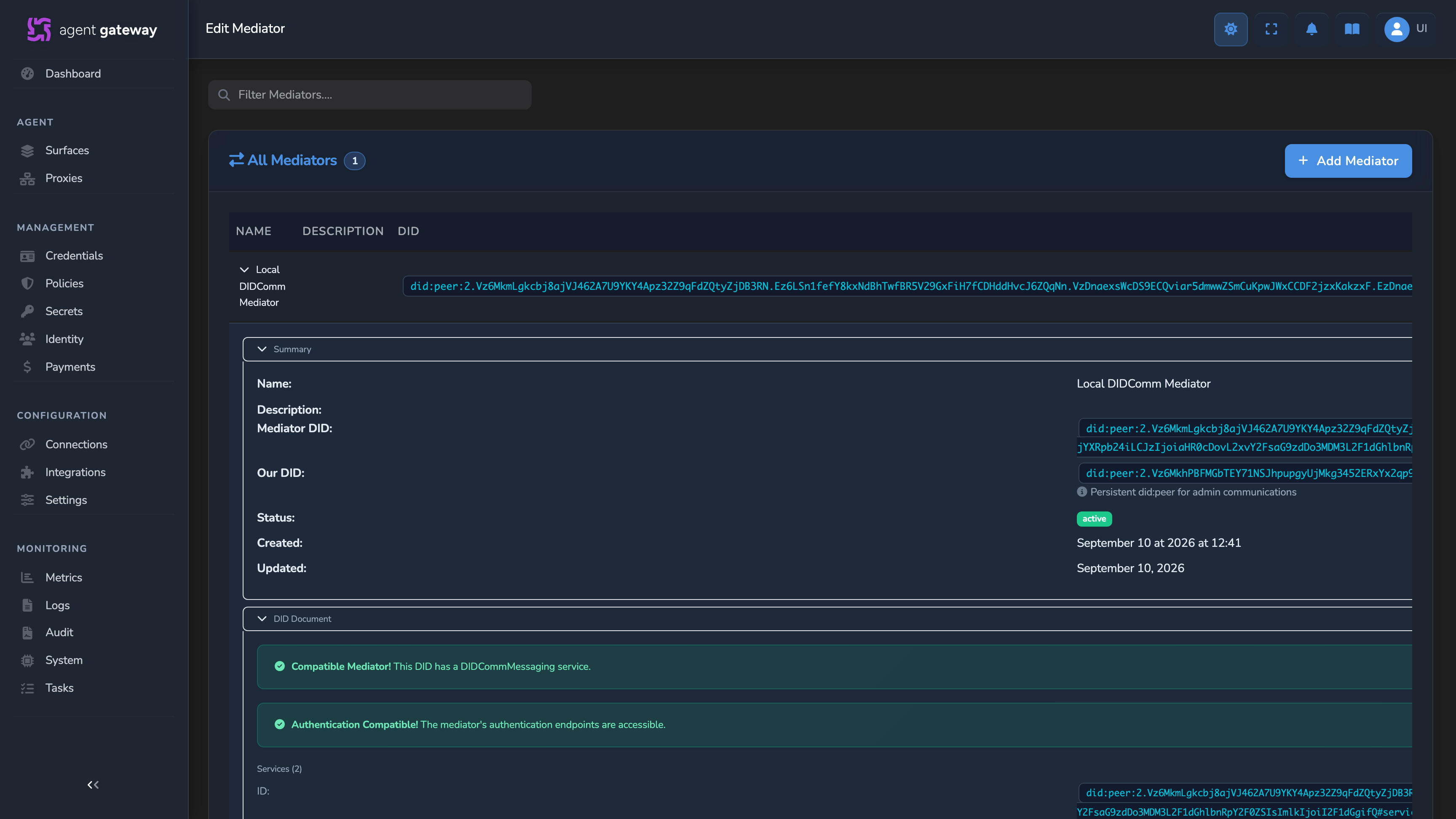
Select a mediator row to expand it. The Summary section shows the mediator’s Name, Description, Mediator DID, Status, Created, and Updated fields, plus Our DID when the mediator has one: a persistent did:peer identity this gateway uses for admin communications with that mediator.
When the mediator record includes a resolved DID document, a DID Document section also becomes available. It shows:
- A Compatible Mediator! banner when the DID document has a
DIDCommMessagingservice, or a warning banner when it doesn’t. - An automatic authentication compatibility check, run whenever the DID document has a
DIDCommMessagingservice: an Authentication Compatible! banner when the mediator’s authentication endpoints are reachable, or an Authentication Incompatible! banner with the failure details when they aren’t. An incompatible mediator can’t be used to create connection points with authenticated OOB invitations. - Services: every service entry in the DID document, with a Mediator Compatible tag on any
DIDCommMessagingservice. - Verification Methods: every verification method in the DID document.
- An expandable View full DID document section with the raw DID document, for diagnostics.
Related
- Gateway reference: Field reference for the gateway editor, including the Global Policy tab.
- Connection point: Field reference for the connection point editor.
- Gateways: Conceptual overview of gateway types, connection points, and
fabric://routing.
Glad to hear it. Thanks for letting us know.
Sorry to hear that. Thanks for letting us know.