Connection point
A connection point is the configuration entry that links this gateway to a remote gateway. It contains the invitation URL and secret shared with the remote gateway operator. Use this page to generate an OOB invitation for a remote gateway operator, view the connection secret, and check when the connection was last used.
For conceptual background, see Gateways. For step-by-step connection setup, see Connect two gateways.
Overview tab fields
| Setting | Editable | Description |
|---|---|---|
| Connection Point Link | No | The out-of-band invitation URL. Share this with the operator of the remote gateway. |
| Connection Secret | No | Shared secret used to authenticate the invitation. Shown as a masked field; reveal it with the eye toggle and copy it using the copy button. If you lose it before sharing it with the remote operator, delete this connection point and create a new one. |
| Connection Point Name | Yes | Human-readable label for this connection. |
| Description | Yes | Optional description. |
| DID Method | No | The DID method used to generate the identity for this connection point. Options: Web (did:web), WebVH (did:webvh), or Peer (did:peer). Defaults to Web (did:web). Set at creation and cannot be changed. |
| Last Used | No | When this connection point was last used. Displays as a relative time alongside the absolute timestamp. Shows Never used when the connection point has not been used yet. |
| Connection Point Enabled | Yes | When disabled, the connection point stops accepting new DIDComm messages. |
| Expiry | No | VALID or EXPIRED badge based on the expiry date and time set at creation. Expired connection points cannot be imported by remote gateways. |
| Uses | No | Total number of times this connection point has been used. |
Each invitation is single-use and pairs one gateway. After a remote gateway has used the Connection Point Link and Connection Secret to connect, the invitation is used up, even if you delete the resulting request instead of approving it. Create a new connection point for each gateway you want to pair. An invitation created on an earlier appliance version can be refused after an upgrade to 1.0.0. If a connection made with it never completes, create a new connection point.
Connection Health
Shows whether the remote gateway is currently reachable through this connection point. A failure here doesn’t affect other connection points or gateways.
The status badge is binary: CONNECTED or FAILED. There’s no separate “reconnecting” badge, a connection point that isn’t currently connected always shows FAILED while the gateway retries the link in the background. The retry schedule uses a fixed backoff that isn’t configurable from the dashboard.
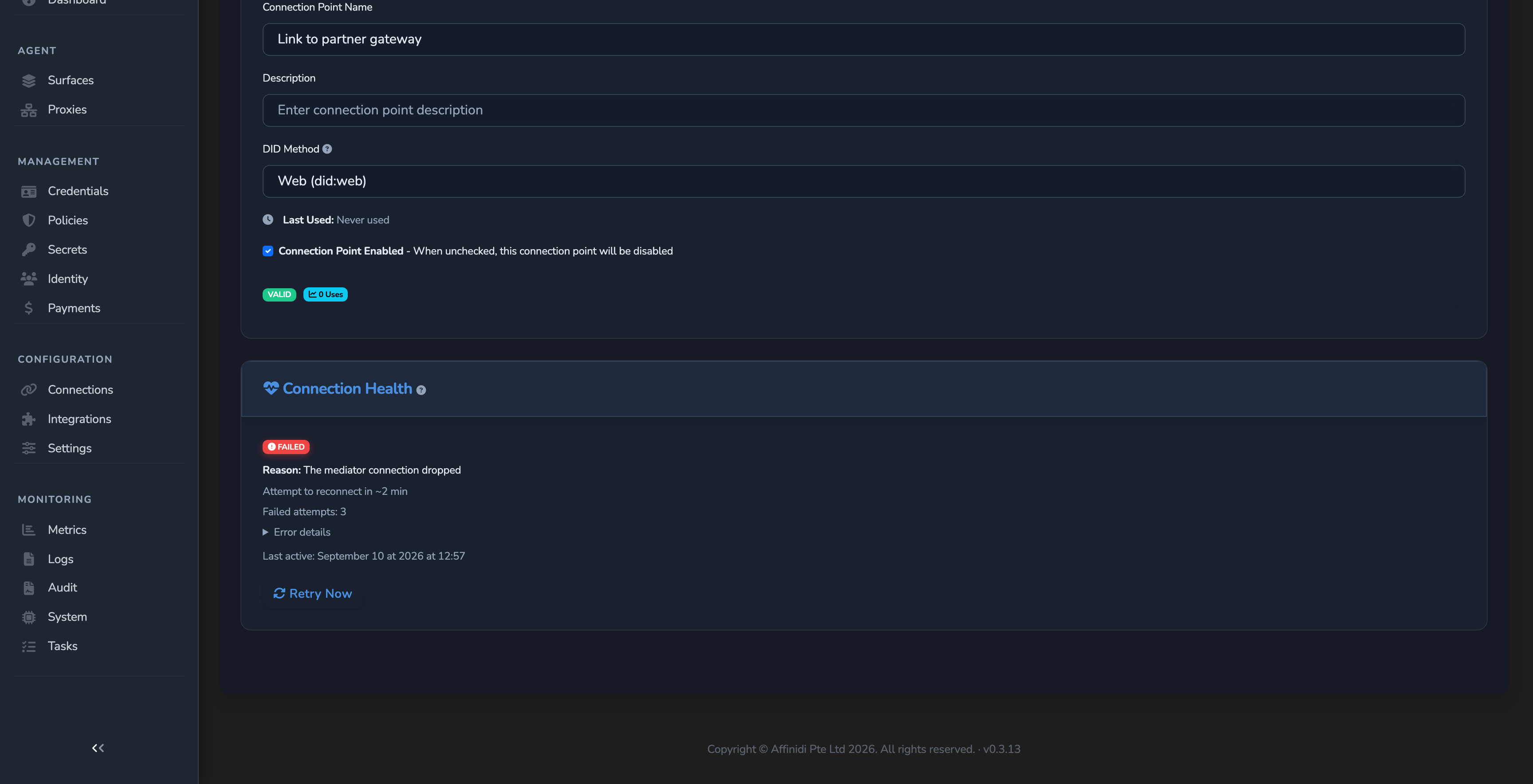
| Field | Description |
|---|---|
| Status badge | CONNECTED or FAILED. |
| Reason | Visible only while the status is FAILED: a plain-language explanation of the failure, for example “Mediator is unreachable” or “Authentication with the mediator failed”. |
| Attempt to reconnect in ~N min | Appears while the status is FAILED and an automatic retry is scheduled. Counts down to the next scheduled attempt. |
| Failed attempts | The number of consecutive failed attempts since the connection was last healthy, while the status is FAILED. |
| Error details | An expandable disclosure, present only while the status is FAILED, holding the raw underlying error for diagnostics. |
| Last active | When the connection was last healthy. Shows Never connected if it has never connected. |
Select Retry Now to retry the connection immediately instead of waiting for the next scheduled attempt. This clears the failed-attempt count and the scheduled retry, then restarts the connection.
Metadata tab fields
| Field | Description |
|---|---|
| Connection Point ID | Internal identifier for this connection point. |
| Gateway ID | The gateway this connection point is associated with. |
| Created | When the connection point was created. |
| Last Updated | When the connection point record was last modified. |
| Expires | When the invitation expires, if applicable. Shown only when an expiry is set. Expired invitations cannot be imported. |
| Mediator ID | The DIDComm mediator routing messages for this connection. Populated when a mediator is configured on the receiving gateway. |
Mediator details
When a mediator is assigned, the Metadata tab also shows:
| Field | Description |
|---|---|
| Mediator Name | Display name of the mediator. |
| Description | Optional description of the mediator. |
| DID | The DID the mediator uses for DIDComm routing. |
Related
- Gateway reference: Field reference for the gateway editor.
- Gateways: Conceptual overview of connection points and their role in routing.
- Connect two gateways: Step-by-step guide using these fields.
- Integrations reference: The Connection Point Connected event and its template variables. An integration whose event set holds it receives it for every connection point, so the connection point editor has no integrations tab.
Glad to hear it. Thanks for letting us know.
Sorry to hear that. Thanks for letting us know.