STS Clients
An STS Client is a registered agent or service allowed to call the gateway’s Security Token Service (STS) to trade a token it already holds for a different one, scoped to a specific downstream audience. This is standards-based identity chaining that follows RFC 8693 OAuth 2.0 Token Exchange. An agent that already proved who it is to one system can carry that proof into a call to another, without a fresh sign-in at every hop. Create an STS Client for each agent, or agent family, that needs to perform this exchange.
Overview
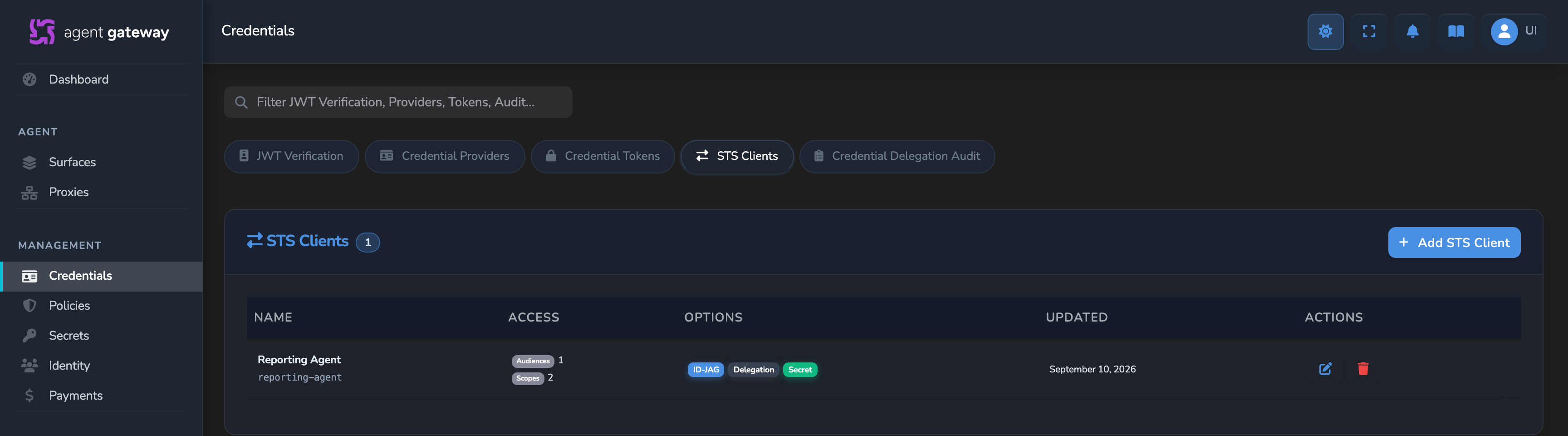
STS Clients are managed on the STS Clients tab of the Credentials page, alongside the JWT Verification, Credential Providers, and Credential Tokens tabs. The tab appears for roles with access to STS clients, which by default is Administrator only. The list shows each client’s name and Client ID, the number of allowed audiences and scopes (or any), and badges for ID-JAG issuance, Delegation or Impersonation, and Secret or No secret.
Each client is scoped by what it’s allowed to request: which audiences and scopes it can ask for, which token types it can present as proof of an existing identity, and whether it can request an ID-JAG, a short-lived grant that hands proof of identity to another service instead of a full access token.
- Leave Allowed Audiences, Allowed Scopes, and Allowed Subject Token Types empty for a client that should be free to request whatever an upstream caller is willing to grant it. Set them once you know the specific downstream services and token shapes the client legitimately needs.
- Turn on Allow issuing ID-JAG for an agent that needs to hand proof of identity to another service rather than call that service directly itself.
- Reach for Allowed Subject-Token Audiences when a subject token could plausibly have been issued for a different service, and the exchange should be rejected unless it was clearly meant for this gateway.
Adding an STS client
Before you start
| You need | Where it comes from |
|---|---|
| The Administrator role | STS clients are visible and editable to administrators by default. |
| A secret for the client to authenticate with | Create it on the Secrets page and tag it sts so the picker lists it. See Secrets. |
| A JWT verification strategy for the issuer of the agent’s tokens | Its Expected Issuer must equal the iss claim of the subject tokens the client will present. Actor tokens and JWT bearer assertions need a strategy for their own issuer in the same way. See JWT Verification Strategies. |
| The audiences the client needs | Usually the Entry point URL of each surface the agent will call with an exchanged token. |
Steps
Select Credentials in the sidebar, open the STS Clients tab, and select Add STS Client. On a gateway with no clients yet, select Add your first STS client.
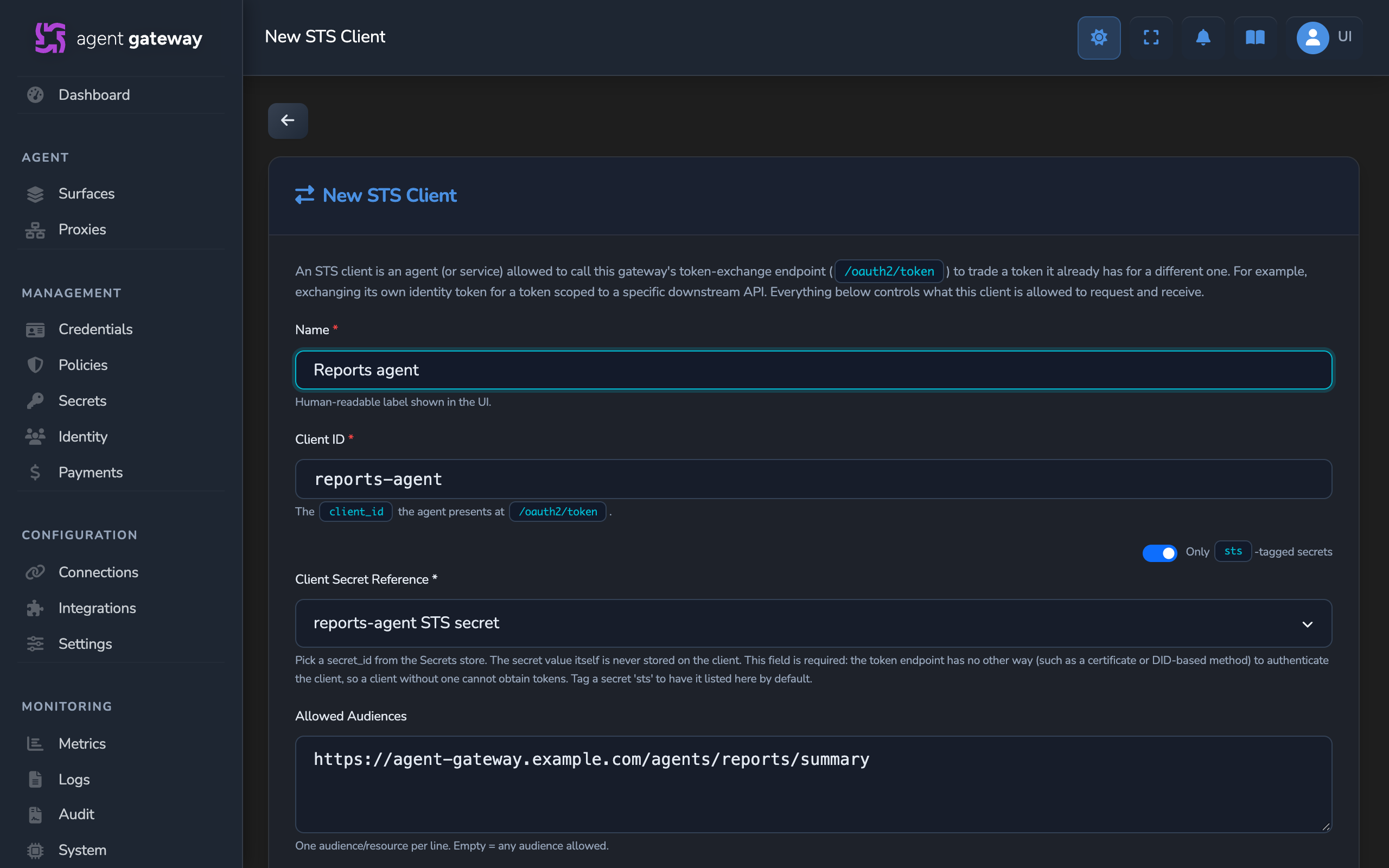
Enter a Name and a Client ID, select the Client Secret Reference, and fill in the allowed audiences, scopes, and subject token types the client needs. Select Save.
Check the client’s row on the STS Clients tab. A Secret badge means a client secret is selected. The client can authenticate while that secret exists on the Secrets page.
Save refused or No secret badge
What to do next
- Exchange an agent’s token for scoped downstream access: send a token exchange request, configure the receiving surface, and redeem an ID-JAG.
Fields
| Field | Required | Default | Description |
|---|---|---|---|
| Name | Yes | — | Human-readable label shown in the STS Clients list. |
| Client ID | Yes | — | The client_id value the agent presents when it calls the token endpoint. Must be unique. The dashboard rejects a duplicate value. |
| Client Secret Reference | Yes | — | The secret, picked from the Secrets store, that the client presents alongside its Client ID to authenticate. The secret value itself is never stored on the STS Client record, only a reference to it. Client ID and this secret are the only way the token endpoint authenticates a caller, so a client without one cannot obtain tokens. The picker shows only secrets tagged sts by default. A toggle reveals the full list. |
| Allowed Audiences | No | Any audience allowed | One resource or audience URL per line that this client may request a token for. A request for any other audience is refused with invalid_target. The gateway’s own DID is always accepted, so requesting an ID-JAG redeemable at this gateway needs no entry. |
| Allowed Scopes | No | Any requested scope allowed | One scope per line that this client may request. A request for any other scope is refused with invalid_scope. |
| Allowed Subject-Token Audiences | No | No subject-audience check | One audience per line. When set, the subject token’s own audience claim must include one of these or the exchange is rejected. A subject presented as a Verifiable Presentation is always exempt from this check. |
| Allowed Subject Token Types | No | Any supported type | Restricts which token types this client may present as the subject of an exchange, chosen from checkboxes: JWT (a general-purpose signed token), ID Token (proves who a specific end user is, from a login flow), ID-JAG (a short-lived grant proving a specific identity was already verified elsewhere, without re-running that verification), and Verifiable Presentation (a cryptographically signed proof of identity a user or agent controls directly, not issued by a login flow). |
| Max Token TTL (seconds) | No | Blank | Caps the lifetime of access tokens issued for this client. Issued tokens last 300 seconds by default, so a value below 300 shortens them and a higher value does not lengthen them. A token expires no later than the subject token it was exchanged from. An ID-JAG lasts 120 seconds, or less under this cap. |
| Allow issuing ID-JAG | No | Off | Lets this client request an ID-JAG as the token it receives from an exchange, instead of a plain access token. Independent of ID-JAG’s entry in Allowed Subject Token Types, which instead controls whether the client may present an ID-JAG it already holds as input. |
| Allow impersonation | No | Off (recommended) | When off, an exchange that doesn’t supply its own actor token records this client itself as the delegating actor, so the issued token keeps a trace of who requested it. Turning this on produces a token with no such trace for those exchanges, and also feeds the gateway’s own authorization policy, not only what gets logged afterwards. An exchange that already supplies its own actor token is unaffected either way. |
How a client authenticates and redeems a token
A client calls the gateway’s token-exchange endpoint, https://<GATEWAY_HOST>/api/oauth2/token, with its Client ID and the secret from Client Secret Reference, sent either as an HTTP Basic Authorization header or as client_id and client_secret form parameters, together with a subject token proving an existing identity. The gateway verifies that token, checks it against this client’s Allowed Subject Token Types and Allowed Subject-Token Audiences, then checks the requested audience and scope against Allowed Audiences and Allowed Scopes before issuing a new, narrower token. The exchange is also evaluated against the gateway’s own policy configuration, the same policy that governs proxied requests.
Repeated failed client authentications are throttled per Client ID and source address, and per source address. A throttled request gets 429 with a Retry-After header.
If the client requested an ID-JAG and Allow issuing ID-JAG is on, the gateway issues that instead of an access token. Redeeming an ID-JAG for an access token is a second call to the token endpoint. The gateway only accepts a redemption authenticated as the same client the ID-JAG was originally issued to, and each ID-JAG can be redeemed once.
Deleting a client
Any agent still using this client’s Client ID to exchange tokens is rejected with an invalid_client error once the client is deleted. The dashboard warns before deletion.
Related
- Exchange an agent’s token for scoped downstream access: the full exchange, from creating the client to calling a surface with the token.
- JWT Verification Strategies: a separate mechanism for validating bearer tokens presented directly to a surface, rather than exchanged at the STS.
- Caller Context element: configures how a surface authenticates inbound callers, including the JWT Bearer method that an exchanged token or redeemed ID-JAG can satisfy.
- Agent identity and DIDs: how the gateway derives and anchors the agent identity that an STS exchange carries forward.
Glad to hear it. Thanks for letting us know.
Sorry to hear that. Thanks for letting us know.
Still stuck? Ask the community on Discord or contact us.