Enable A2A communication with a Copilot Studio agent
By the end of this guide, A2A callers will be able to communicate with a Microsoft Copilot Studio agent through the gateway, with the gateway handling Direct Line protocol translation transparently.
An A2A proxy bridges a Copilot Studio agent, which communicates over the Microsoft Direct Line polling protocol, into the gateway’s A2A pipeline. The proxy synthesises an A2A agent card for the Copilot Studio agent and translates A2A SendMessage and message/send calls into Direct Line activities transparently. For background on how the gateway processes A2A traffic, see A2A protocol.
Without an A2A proxy, a Copilot Studio agent cannot be addressed by A2A callers through the gateway. Callers must implement the Direct Line polling protocol directly, and the gateway cannot apply policy or observability to those interactions.
Use this guide when:
- You have a Copilot Studio agent published to a Direct Line channel.
- You want A2A callers to reach the agent through a governed gateway surface.
Prerequisites
- A running Agent Gateway instance with the dashboard accessible.
- Administrator role on the gateway.
- A Copilot Studio agent published to the Direct Line channel, with the Direct Line channel secret available. The agent must respond correctly in the Test your agent chat panel before proceeding. See Microsoft Copilot Studio documentation for setup guidance.
- An existing A2A surface, or permission to create one. See A2A surface starter.
Steps
Store the Direct Line secret
The proxy authenticates to Copilot Studio over the Direct Line channel. Before storing the secret in the gateway, configure authentication in Copilot Studio and retrieve the channel secret.
In Copilot Studio:
- Open your agent and go to Settings → Security.
- Under Authentication, select No Authentication and save.
- On the same page, locate the Web Channel Security section, enable the Require secured access toggle, and copy the channel secret shown there.
In the Agent Gateway dashboard:
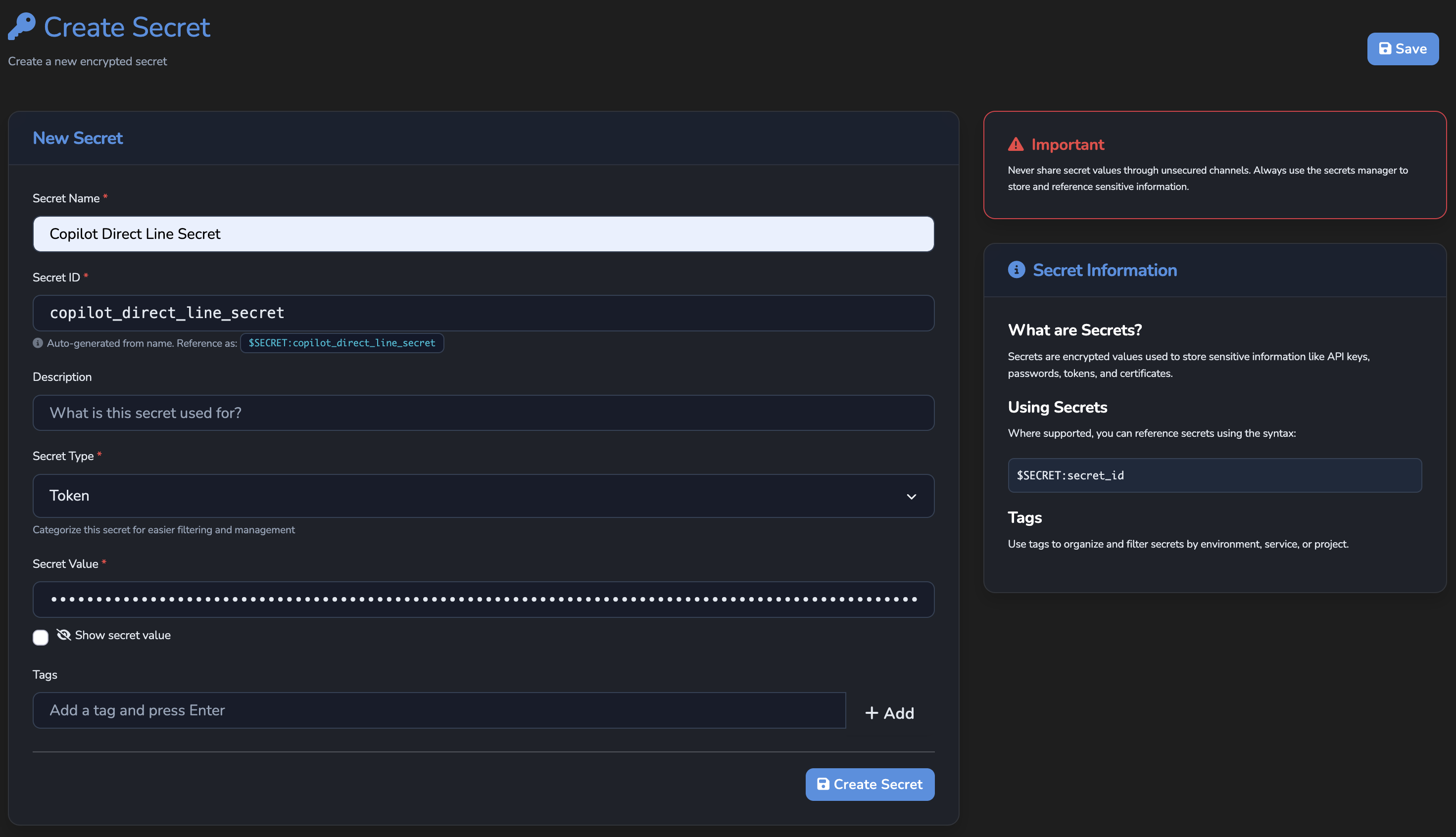
- Navigate to Management → Secrets.
- Select New Secret.
- Fill in the fields:
- Secret Name: a descriptive label, for example
Copilot Direct Line Secret. - Secret Type: select
Token. - Secret Value: paste the Direct Line channel secret you copied from Copilot Studio.
- Secret Name: a descriptive label, for example
- Select Create Secret.
Do not hardcode the secret value in any configuration, script, or source file. Rotate the secret through Management → Secrets rather than updating it directly in the proxy settings.
For details on secret types and storage, see Secrets reference.
Create the A2A proxy
- Navigate to Proxies in the sidebar.
- Select Add A2A Proxy.
The editor opens with three tabs: Overview, Backend, and Agent Card.
Overview tab
Fill in the proxy identity:
- Name: A descriptive label, for example
Copilot HR Agent. - Description: Optional context for other administrators.
- Status: Leave as Active.
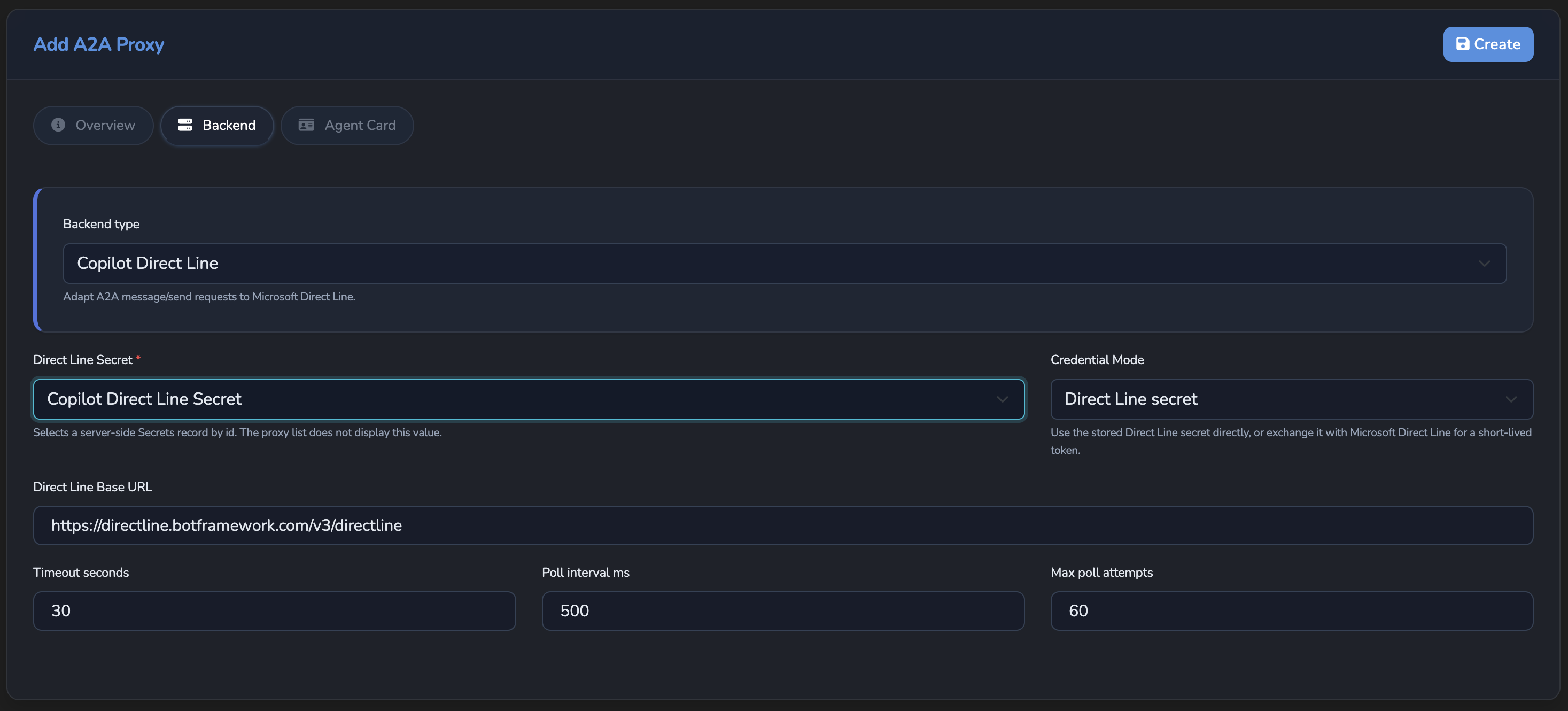
Backend tab
The backend type is Copilot Direct Line and cannot be changed. Configure the connection fields:
| Field | What to enter |
|---|---|
| Direct Line Secret | Select the secret you stored in Step 1. |
| Credential Mode | Leave as Direct Line secret, the default and simplest option. Switch to Generate Direct Line token only if your bot’s Direct Line setup specifically requires exchanging the secret for a short-lived token on each request. |
| Direct Line Base URL | Leave blank to use the default Microsoft Direct Line endpoint. |
| Timeout seconds | Increase above the default if the Copilot Studio agent takes longer to produce a first activity. Accepts values from 1 to 120. |
| Poll interval ms | How often the proxy polls Direct Line for activity responses. The default is acceptable for most deployments. Accepts values from 100 to 5,000. |
| Max poll attempts | Maximum polling retries before the proxy returns a timeout. Accepts values from 1 to 240. |
Agent Card tab
The proxy synthesises an A2A agent card for the Copilot Studio agent. By default, the card inherits the name and description of the exposing surface. Use the Card name override and Card description override fields only if the published card needs a different identity from the surface.
Under Verifiable identity, configure the Identity source:
Set Identity source to Microsoft Entra agent identity and fill in:
- Entra Agent ID: the agent ID from your Copilot Studio agent. Find it in Advanced → Metadata in Copilot Studio.
- Client Tenant ID: the client tenant ID from the same Advanced → Metadata page in Copilot Studio.
When these values match what Copilot Studio sends, the synthesised agent card and inbound Copilot calls both resolve to the same agent DID.
Select Create to save the proxy.
Attach the proxy to an A2A surface
The proxy is reachable to A2A callers only when targeted by a surface.
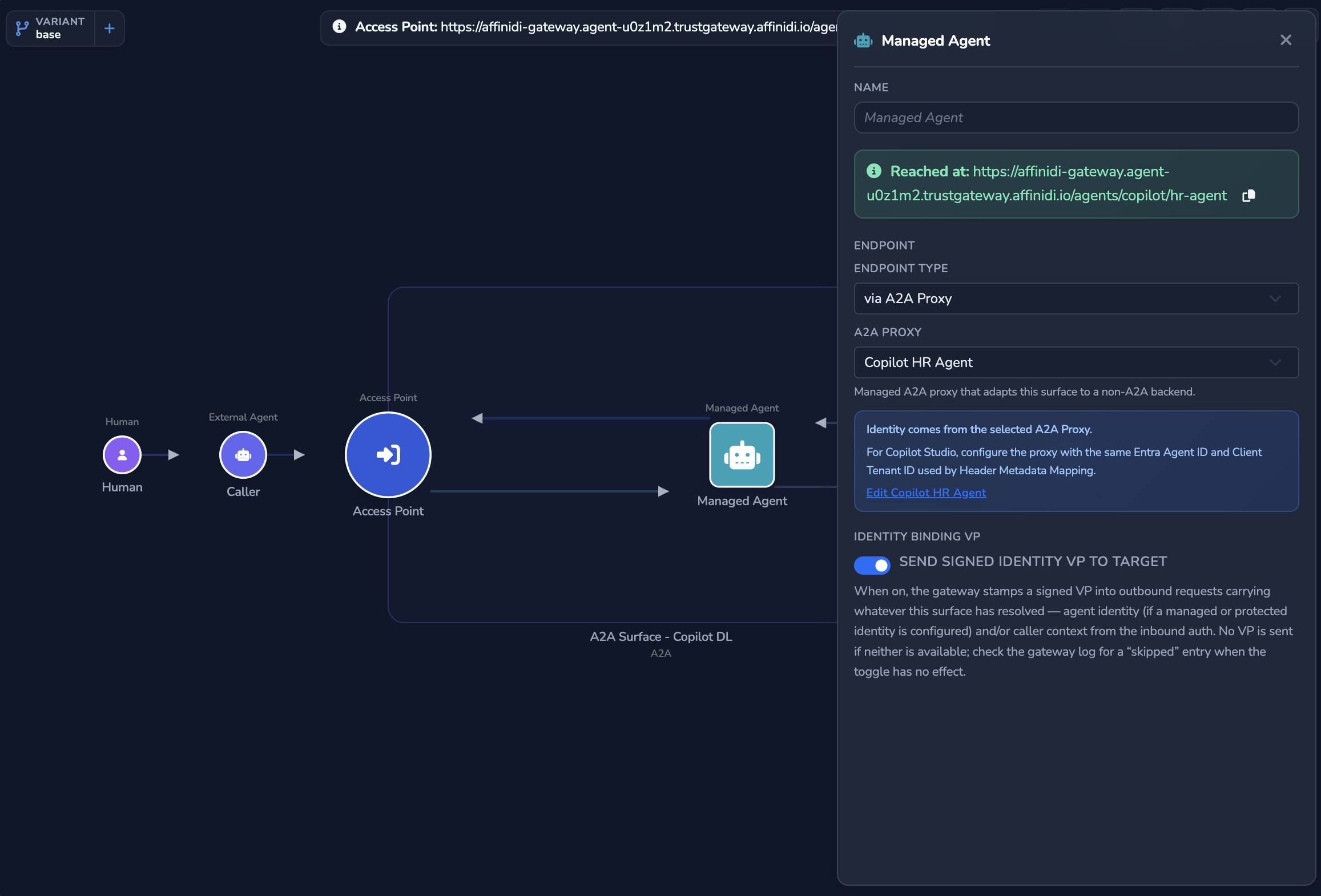
- Open the A2A surface canvas for the surface that should route to the Copilot Studio agent.
- Select the Managed Agent node to open its configuration panel.
- Under Endpoint, set Endpoint Type to via A2A Proxy.
- From the A2A Proxy dropdown, select the proxy you created in Step 2. A new surface, or one whose Target you have just changed to an A2A proxy, accepts A2A 1.0 only, so callers send
A2A-Version: 1.0. The Access Point’s A2A Protocol section shows the versions the surface accepts. - Select Save changes, the blue disk icon under Manage in the left sidebar.
The via A2A Proxy option appears in the Endpoint Type dropdown only when the surface protocol is A2A.
Confirm
Replace <ENTRY_POINT_URL> in the commands below with the Entry point URL shown at the top of the Access Point panel.
Test 1: agent card request returns the synthesised card
curl -k "<ENTRY_POINT_URL>/.well-known/agent-card.json"The -k flag disables TLS certificate verification. Use this for local testing only; remove it in production.
Expected: a JSON document containing the agent name, description, and at least one capability entry. The name should match the proxy name (or the Card name override if set).
Test 2: SendMessage request with A2A-Version 1.0 returns an agent response
curl -k -X POST "<ENTRY_POINT_URL>" \
  -H "Content-Type: application/json" \
  -H "A2A-Version: 1.0" \
  -d '{
    "jsonrpc": "2.0",
    "method": "SendMessage",
    "id": 1,
    "params": {
      "message": {
        "messageId": "test-1",
        "role": "ROLE_USER",
        "parts": [{"text": "Hello"}]
      }
    }
  }'
The -k flag disables TLS certificate verification. Use this for local testing only; remove it in production.
Expected: a JSON-RPC response in the A2A 1.0 shape, where result.message.role is ROLE_AGENT and result.message.parts contains the agent’s reply text. For example:
{
  "jsonrpc": "2.0",
  "id": 1,
  "result": {
    "message": {
      "messageId": "20e9d3d1-fa14-430f-8267-ebdf7f547c54",
      "role": "ROLE_AGENT",
      "parts": [{"text": "Hello, how can I help you today?"}]
    }
  }
}
A caller that sends the A2A 0.3 method message/send with the same A2A-Version: 1.0 header gets the reply in the A2A 0.3 shape instead, with result.kind set to message and result.role set to agent.
If the surface has authentication configured, include the required credentials in the request headers.
Troubleshooting
| Symptom | Likely cause | Fix |
|---|---|---|
| via A2A Proxy option not shown in Endpoint Type. | The surface protocol is not A2A. | Confirm the surface protocol is A2A. |
| No A2A Proxies section on the Proxies screen. | Your role lacks the a2a_proxies.view permission, granted by default to the Power User role and above. | Ask a gateway administrator to grant Power User role or above. |
| Agent card returns 404. | The surface is not saved, or the proxy is not attached. | Save the surface and confirm Endpoint Type is via A2A Proxy with the correct proxy selected. |
The request returns JSON-RPC error -32009 (Unsupported A2A protocol version). | The caller sent no A2A-Version header, which counts as version 0.3, or a version the surface does not accept. | Send the A2A-Version header with a version listed in the error’s supported field, 1.0 for a new surface. |
The request returns JSON-RPC error -32600. | The body is not a single JSON-RPC 2.0 request, for example a batch or a request without a string method. | Send one JSON-RPC request with "jsonrpc": "2.0" and a string method, as in Test 2. |
| The request returns a timeout. | Direct Line polling is taking too long. | Increase Timeout seconds and Max poll attempts in the proxy Backend tab. |
The request returns a response with LatestPublishedVersionNotFound. | The Copilot Studio agent has not been published. | In Copilot Studio, select Publish to publish the agent, then retry. |
| The request returns 401 or 403. | The Direct Line secret is incorrect, revoked, or expired. | Rotate the secret in Management → Secrets. The proxy picks up the updated value automatically. |
| DID changes between calls or mismatches the surface identity. | The Entra Agent ID or Client Tenant ID in the Agent Card tab does not match what Copilot Studio sends. | Compare the values in the proxy Agent Card tab against the x-ms-entra-agent-id and x-ms-client-tenant-id headers Copilot sends. They must match exactly. |
Next steps
- A2A surface starter: Build a full A2A surface to route traffic to the proxy.
- Configure per-caller Credential Delegation: Inject per-user OAuth tokens into outbound calls from the surface.
Related
- A2A protocol: How the gateway processes A2A traffic.
- Secrets reference: Secret types and how the gateway resolves them at runtime.
- Expose a REST API as MCP tools: The equivalent proxy pattern for MCP surfaces and REST backends.
Glad to hear it. Thanks for letting us know.
Sorry to hear that. Thanks for letting us know.