Configure per-caller Credential Delegation
By the end of this guide, your surface injects each caller’s OAuth token on every forwarded request. Callers complete a one-time OAuth consent step to authorise access. The gateway stores their token and injects it automatically on subsequent calls.
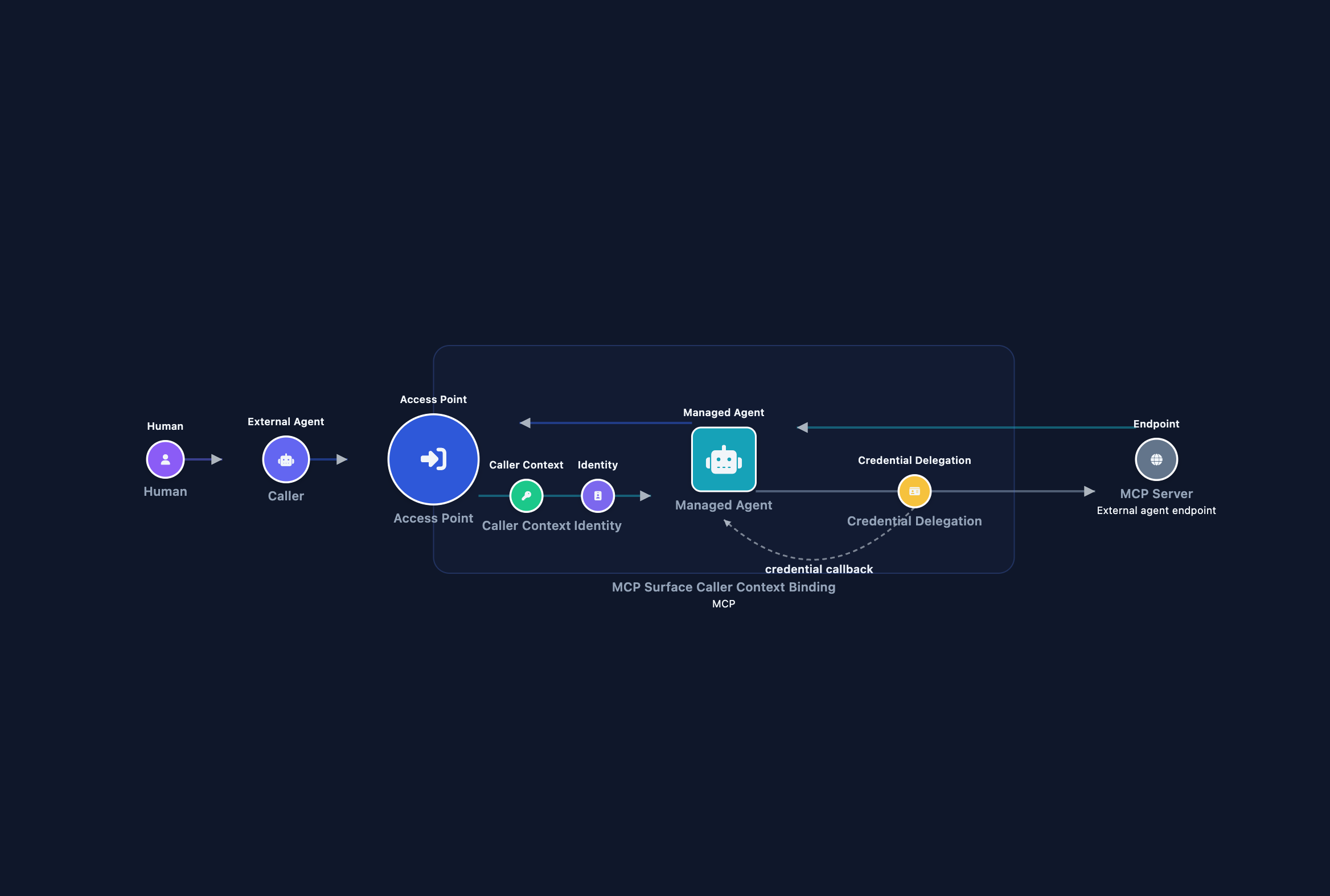
Credential Delegation stores per-caller OAuth tokens in the gateway and injects them transparently, without exposing the OAuth App credentials to callers. Without it, calls run under a shared token, masking per-caller identity in the upstream API’s audit log. See Credentials and Caller context binding.
Use this guide when callers need to access a third-party API under their own account. This pattern works on any surface type (A2A or MCP) and with any OAuth 2.0 Authorization Code API.
Prerequisites
Do these steps before opening the gateway dashboard:
Create a GitHub OAuth App at github.com/settings/developers. Enter this callback URL exactly during creation:
https://GATEWAY_HOST/v1/identity/oauth/callback/githubNote the Client ID and generate a Client Secret.
Store the credentials as gateway secrets. Follow Manage secrets to create:
- Secret ID
GITHUB_CLIENT_ID, value: your App’s Client ID. - Secret ID
GITHUB_CLIENT_SECRET, value: your App’s Client Secret.
- Secret ID
Never paste secret values directly into provider fields. Always reference them by Secret ID.
Have these ready in the gateway:
- A running gateway instance with Power User or Administrator role, and your public hostname (
GATEWAY_HOST). - An existing MCP surface open in the canvas. See MCP surface starter if you need one.
- A JWT verification strategy for your identity provider, so the gateway can validate callers’ tokens. See Validate bearer tokens on a surface to create one.
- A JWT issued by a trusted identity provider for each caller. The token must carry a unique per-user claim (
suboroid). If you use API key auth instead, issue one key per caller under the API Keys tab on the Secrets page. - VP Auditing set to keep delegation events, so Test 3 has entries to show. Under Settings › Security, on the VP Audit card, turn on Enable VP Auditing and select Consent Required, Consent Granted, and Token Injected under Events to keep, then select Save. No events are selected by default.
Steps
Create a credential provider for GitHub
- In the sidebar, select Credentials, then select the Credential Providers tab.
- Select Add Provider.
- Fill in the fields:
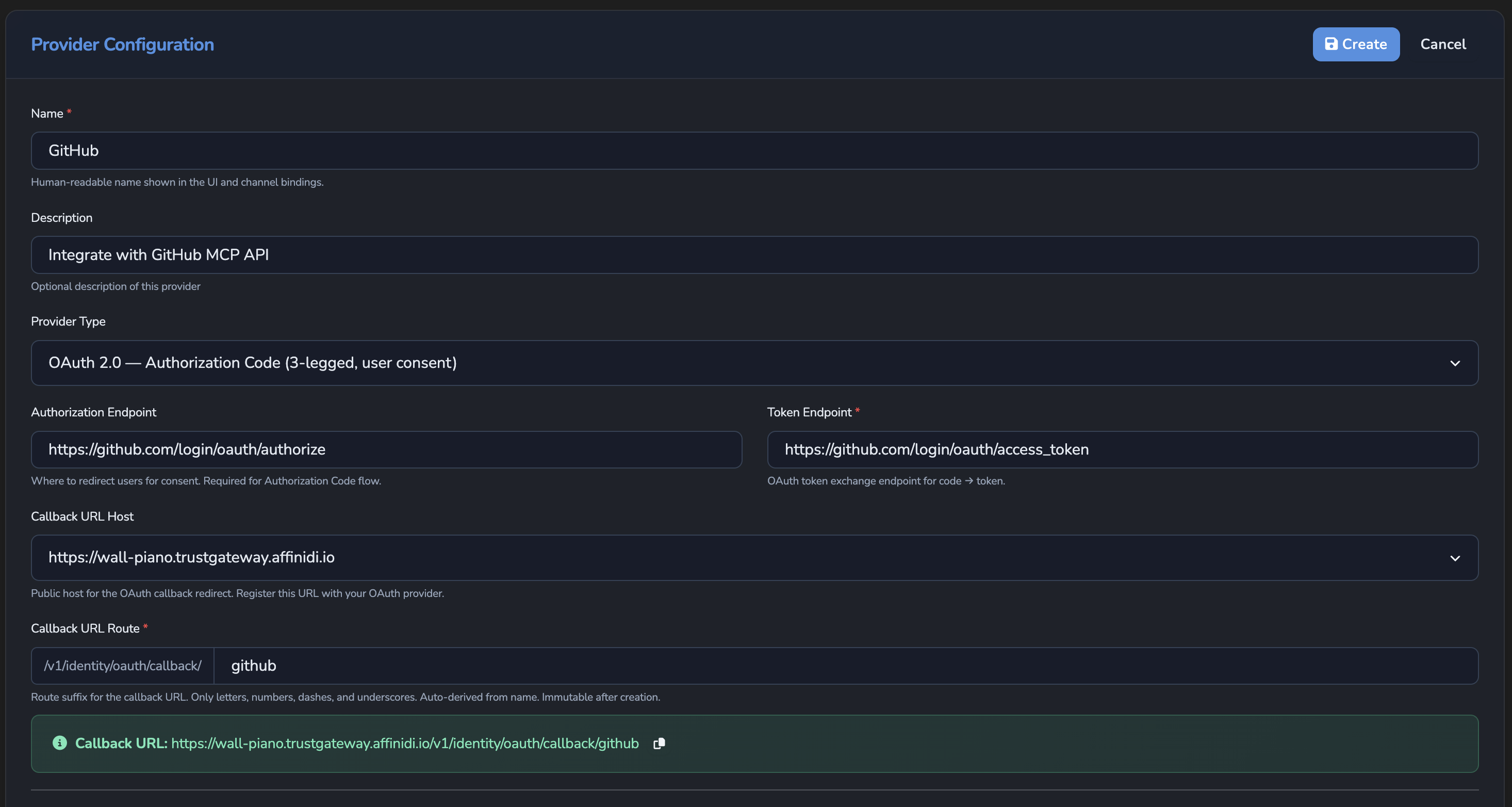
| Field | Value |
|---|---|
| Name | GitHub |
| Provider Type | OAuth 2.0, Authorization Code (3-legged, user consent) |
| Authorization Endpoint | https://github.com/login/oauth/authorize |
| Token Endpoint | https://github.com/login/oauth/access_token |
| Client ID Secret | GITHUB_CLIENT_ID |
| Client Secret | GITHUB_CLIENT_SECRET |
| Default Scopes | repo, read:user |
| Callback URL Host | Select the listen address matching https://GATEWAY_HOST. |
| Callback URL Route | github (auto-filled from Name; immutable after creation). |
Leave Enable automatic token refresh checked (its default) so the gateway can refresh the caller’s token automatically without asking them to reauthorise.
- Confirm the Callback URL shown on the form matches what you entered in your GitHub App:
https://GATEWAY_HOST/v1/identity/oauth/callback/github. - Select Create.
Set the Managed Agent target
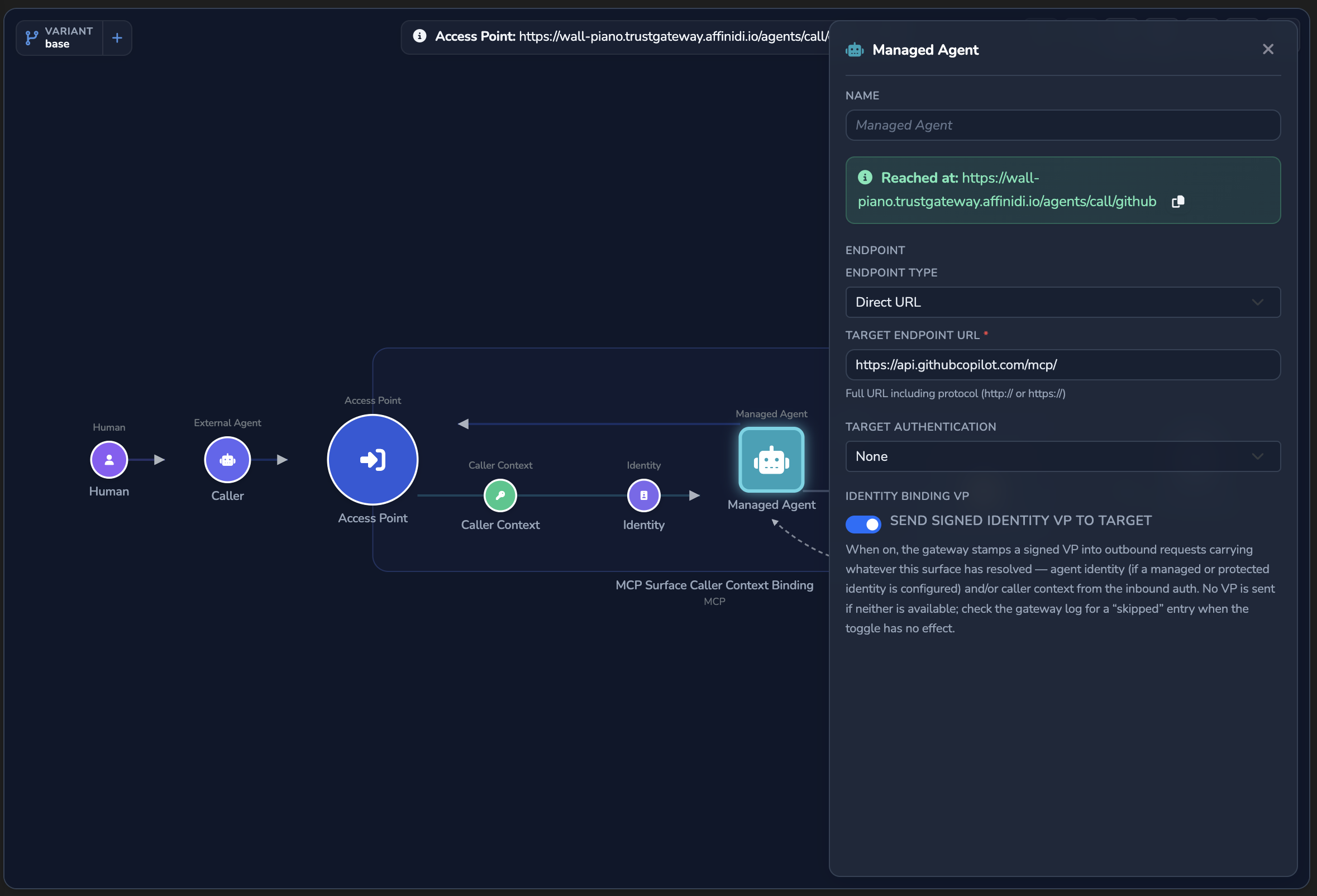
- Open your MCP surface in the canvas.
- Select the Managed Agent node.
- Set Target Endpoint URL to
https://api.githubcopilot.com/mcp/. - Close the editor.
The gateway proxies MCP calls directly to this endpoint. The GitHub Copilot MCP server handles all tool definitions and execution.
Add Caller Context
- Drag a Caller Context element from the palette onto the canvas.
- Select the Caller Context node.
- Set Authentication Method to JWT Bearer.
- Select Configure… to open the full configuration editor.
- Select your strategy from the JWT Verification Strategy dropdown. The field is required.
- Accept the default Token Header (
Authorization) and Scheme (Bearer). - Close the editor.
If your callers authenticate with API keys rather than JWTs, set Authentication Method to API Key (secret store) and set HTTP Header Name to X-API-Key. When you do, the Identity element in Step 4 must use From API Key rather than From JWT Claims. Step 4 explains why.
Add the Identity element
The Identity element derives a stable per-caller DID from the validated credential. This DID appears as the workload identity in audit records and workload binding attestations.
- Drag an Identity element from the palette onto the canvas.
- Select the Identity node.
- Set Identity Extraction Type to From JWT Claims.
- Set JWT Claim to
sub. Useoidif your identity provider is Microsoft Entra. - Close the editor.
JWT bearer auth (recommended): From JWT Claims extracts sub or oid from the validated token, deriving a stable per-caller DID for audit records and workload binding. This is separate from vault scoping: the stored token is always keyed to the JWT’s sub claim, regardless of which claim you select here. Setting oid gives Entra callers a more reliable DID for audit and workload-binding purposes, but does not change which token a caller’s requests resolve.
API key auth: An API key carries no user claims, so From API Key derives a per-caller DID from the key name instead. Each caller must have their own key. Two callers sharing a key share a stored token, because both the DID and the vault key are derived from the same key name.
Enable Credential Delegation
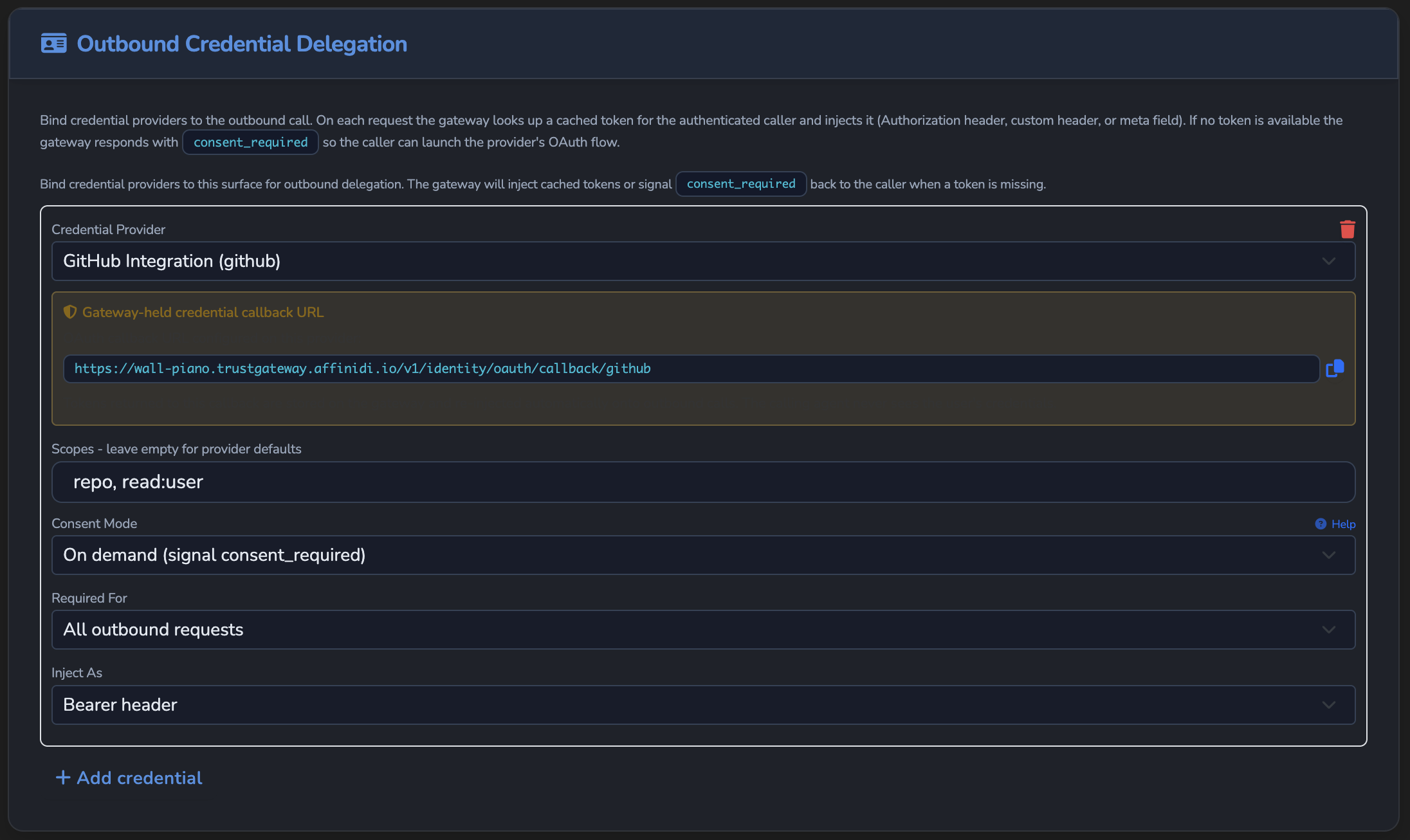
Drag a Credential Delegation element from the palette and connect it to the Managed Agent node.
Configure the credential binding:
Field Value Credential Provider GitHubScopes repo read:userConsent Mode On demand Required For All outbound requests Inject As Bearer header Consent Mode controls what the agent receives on the first call when no token is stored yet.
Mode What the agent receives When to use On demand (default) A consent_requiredresponse with the authorisation URL. The agent or client retries after the user completes OAuth.Most clients. No MCP-specific support required. Pre-authorize The session is blocked at initialisation. OAuth must complete before any tool call proceeds. Clients that can display an auth prompt before the session starts. Elicit An inline MCP elicitation prompt. The gateway holds the tool call open while OAuth completes, then resumes automatically. Clients that support MCP elicitation. No out-of-band retry required. Required For set to All outbound requests means the gateway checks for a stored GitHub token before every forwarded call, including
tools/list. Until this caller has a stored token, the gateway answers each call with aconsent_requiredresponse immediately, instead of forwarding the request.Specific MCP tools only limits the binding to a
tools/callfor the tools you list, on calls to this surface’s Target. Tool-scoped bindings stay with the Target, and each All outbound requests binding also applies on every Transit Point of the surface. See Where each binding applies.Close the editor.
If the Managed Agent’s Endpoint Type is via Gateway Connection, the remote gateway receives the caller’s token only when Send delegated credentials over Fabric is on in the Managed Agent panel. The switch is off by default. See Managed Agent.
Save the surface
Select the green checkmark (Create surface) or the disk icon (Save changes). Changes apply immediately through hot reload.
On every subsequent request the gateway:
- Authenticates the caller via
Authorization: Bearer(orX-API-Keyheader for API key auth). - Derives the caller’s unique identity from the JWT claim (or from the API key if using API key auth).
- Checks for a stored OAuth token for that identity. If none is stored, returns
consent_required. - Injects the token as
Authorization: Bearer <oauth-token>on the forwarded request toapi.githubcopilot.com/mcp/.
Restrict access by Entra group membership (optional)
If callers authenticate with Microsoft Entra, add a surface-scope OPA policy to restrict access to specific security groups.
From the surface palette, drag a Policy element onto the canvas and open the policy editor. Enter:
package surface.policy

default allow := false

allow if {
    input.source_auth.method == "jwt_bearer"
    input.source_auth.claims.iss == "https://login.microsoftonline.com/TENANT_ID/v2.0"
    "ALLOWED_GROUP_ID" in input.source_auth.claims.groups
    not "RESTRICTED_GROUP_ID" in input.source_auth.claims.groups
}
Replace TENANT_ID, ALLOWED_GROUP_ID, and RESTRICTED_GROUP_ID with values from your Entra configuration. Save and publish the policy.
Some Entra app registrations do not include the groups claim by default. If this policy rejects all requests even when group membership is correct, confirm that group claims are enabled in your app registration’s token configuration.
Confirm
Replace GATEWAY_HOST and JWT_TOKEN with your actual values. JWT_TOKEN is a valid JWT issued by the identity provider you have configured as the gateway’s trusted issuer.
The commands below call tools/list and tools/call because the sample target is an MCP server. If your target is an A2A agent, replace the request body with an A2A equivalent, for example "method": "message/send". The consent flow, consent_required response shape, and audit log behaviour are identical regardless of surface type.
If your surface uses API key authentication, replace -H "Authorization: Bearer JWT_TOKEN" with -H "X-API-Key: YOUR_KEY" in all commands below.
Test 1: first call should return consent_required
curl -X POST "https://GATEWAY_HOST/agents/call/github" \
  -H "Authorization: Bearer JWT_TOKEN" \
  -H "Content-Type: application/json" \
  -d '{"jsonrpc":"2.0","id":"1","method":"tools/list","params":{}}'
Because Required For is set to All outbound requests, the gateway checks for a stored OAuth token before forwarding. When no token is stored for this caller:
{
  "type": "https://affinidi.com/atg/errors/consent-required",
  "title": "Credential Delegation Consent Required",
  "status": 401,
  "detail": "This channel requires delegated credentials. The user must authorize access via the provided URLs.",
  "consent_required": [
    {
      "provider_name": "GitHub",
      "authorization_url": "https://github.com/login/oauth/authorize?response_type=code&client_id=...&redirect_uri=...&scope=repo+read%3Auser&state=...",
      "scopes": ["repo", "read:user"]
    }
  ]
}
Open the authorization_url in a browser, sign in to GitHub, and grant access. The gateway stores the token, scoped to this caller’s identity. Run the same command again. Expected: a JSON-RPC result listing the GitHub Copilot tools (get_me, list_repositories, create_issue, and others).
Test 2: tools/call should return data from the caller’s GitHub account
curl -X POST "https://GATEWAY_HOST/agents/call/github" \
  -H "Authorization: Bearer JWT_TOKEN" \
  -H "Content-Type: application/json" \
  -d '{"jsonrpc":"2.0","id":"2","method":"tools/call","params":{"name":"get_me","arguments":{}}}'
Expected: the gateway injects Authorization: Bearer <oauth-token> and the tool returns the caller’s GitHub profile. Each caller sees only their own GitHub data.
Test 3: audit log should show delegation events for this caller
- In the dashboard, navigate to Credentials and select the Credential Delegation Audit tab.
- Use the search field to filter entries by
github.
Look for these event types produced during your test:
| Event badge | When it appears |
|---|---|
| Consent Required | The gateway returned consent_required on the first call; no token was stored yet. |
| Consent Granted | The user completed the OAuth flow and the gateway stored the token. |
| Injected | The stored token was injected into a forwarded request on a subsequent call. |
Each entry shows the provider name and the caller’s identity hash. Confirm that the Injected entries show github as the provider, confirming the token is stored per caller and is not shared.
Troubleshooting
| Symptom | Likely cause | Fix |
|---|---|---|
consent_required on every call, even after completing OAuth | The OAuth callback did not reach the gateway, or the token was not stored. | Check Credentials → Credential Delegation Audit for a consent_granted event with provider_id = github. Confirm the callback URL is publicly reachable from GitHub’s servers. |
GitHub returns redirect_uri_mismatch | The callback URL in the GitHub App does not match the gateway’s. | Copy the full callback URL from the credential provider form and paste it into the GitHub App Authorization callback URL field. Check for trailing slash differences. |
401 Unauthorized with no consent_required body | Unlikely to come from Caller Context alone: a missing or invalid caller credential does not block the request by itself. A 401 here more likely means a server-side fault, for example a deleted JWT Verification Strategy. | Confirm your JWT Verification Strategy still exists and is attached to the surface, or that the API key is active and the Caller Context reads from X-API-Key. If a Policy element is attached to this surface, also confirm it allows the request. A policy denial returns 403 rather than 401. |
tools/list returns consent_required | Required For is set to All outbound requests. The gateway checks for a stored OAuth token before every forwarded call, not just tools/call. | This is expected behaviour. Complete the OAuth flow first, then retry. |
| All callers trigger the same consent flow, or share each other’s tokens | The Identity element is missing or misconfigured. | Confirm the Identity element is present and its Type matches the auth method: From JWT claim for JWT bearer, From API key for API key auth. Without the correct type, all callers share the same stored token. |
Gateway returns 502 Bad Gateway | The gateway cannot reach api.githubcopilot.com/mcp/. | Confirm the gateway has outbound HTTPS access and the Target Endpoint is exactly https://api.githubcopilot.com/mcp/. |
| Stored token expired and calls start failing | GitHub OAuth Apps do not issue long-lived refresh tokens by default. | The caller must re-authorise by visiting the authorization_url again. For persistent access, consider a GitHub App (which supports refresh tokens) instead. |
| OPA policy rejects all calls even when credentials appear correct | Issuer claim mismatch, or groups claim absent from the JWT. | Confirm the iss value in the Rego policy matches the token’s iss exactly, including any trailing slash. Verify that group claims are enabled in the IdP app registration’s token configuration. |
| Delegation audit log shows no entries | VP Auditing is off or keeps no delegation events, or the Identity element is not configured. | Under Settings › Security › VP Audit, turn on Enable VP Auditing and select the delegation events under Events to keep. Then confirm the Identity element is present and its Type matches the auth method. The gateway records delegation events only when it can scope them to a valid per-caller identity. |
Next steps
- Apply policy to outbound calls: add an OPA policy to restrict which GitHub Copilot tools each caller can invoke.
- Caller context binding: understand how the gateway binds caller identity to a verifiable audit record on every delegated call.
Related
- Credentials: conceptual model for credential providers, OAuth flows, consent modes, and per-user token isolation.
- Secrets reference: how to store and reference secret material safely.
Glad to hear it. Thanks for letting us know.
Sorry to hear that. Thanks for letting us know.