A2A surface starter
This guide uses the A2A Vertex AI sample agent, a currency exchange agent built with Google ADK and deployed to Vertex AI Agent Engine. Routing it through an Agent Gateway A2A surface establishes a governed control point for all A2A messaging.
By the end, you will have:
- A deployed Vertex AI A2A agent with a live messaging endpoint.
- An Agent Gateway A2A surface configured to route traffic to it.
- A validated A2A client call path both directly to Vertex AI and through Agent Gateway.
Prerequisites
- Python 3.10 or higher.
- Google Cloud account with billing enabled.
gcloudCLI installed and configured.gitinstalled.- Access to the Agent Gateway dashboard with permission to create and edit surfaces.
Steps
Clone the sample project
git clone https://github.com/affinidi/affinidi-labs-tgw-get-started.git
cd affinidi-labs-tgw-get-started/a2a-vertex-agent
The a2a-vertex-agent directory contains a currency exchange agent built with Google ADK, along with the deployment scripts and A2A client used throughout this guide.
Set up the Python environment
python -m venv venv
source venv/bin/activate  # macOS/Linux — use venv\Scripts\activate on Windows
pip install -r requirements.txt
Configure environment variables
Copy the environment template:
cp .env.example .envEdit .env and set your values:
GOOGLE_CLOUD_PROJECT=your-project-id
GOOGLE_CLOUD_LOCATION=us-central1
STAGING_BUCKET=gs://your-project-id-staging
AGENT_MODEL=gemini-2.0-flashGOOGLE_CLOUD_PROJECT: your real project ID.STAGING_BUCKET: created automatically during deployment if it does not exist.GOOGLE_CLOUD_LOCATION: keepus-central1unless you have a specific regional requirement.
Authenticate with Google Cloud
# Login to Google Cloud
gcloud auth login

# Set default project
gcloud config set project your-project-id

# Setup application default credentials for local development
gcloud auth application-default login
Run local tests
./run.shThe script sets up the environment if needed and runs two tests: agent card validation and a message send test. A successful run confirms the agent is correctly wired before you deploy.
Expected output:
============================================================
TEST 1: handle_authenticated_agent_card
============================================================
Agent Card:
  Name: Currency Exchange Agent
  Description: An agent that can provide currency exchange rates
  Skills: get_exchange_rate

============================================================
TEST 2: on_message_send
Query: What is the exchange rate from USD to EUR today?
============================================================
Response: The current exchange rate from USD to EUR is...
Enable required Google Cloud APIs
gcloud services enable aiplatform.googleapis.com
gcloud services enable storage-api.googleapis.com
gcloud services enable cloudbuild.googleapis.com
Billing must be active on your project before deployment. If you have not yet enabled billing, see Enable billing for a project. Free trial credits are consumed first if available.
To enable the APIs through the browser instead, open APIs & Services in the Google Cloud Console and search for each API name.
Deploy the agent to Vertex AI
Recommended:
./deploy.shDirect:
python deploy.py deployDeployment flow performs:
- Vertex AI initialization with your project settings.
- Code/dependency packaging.
- Staging bucket creation if missing.
- Agent Engine deployment (typically around 5 minutes).
- Persisted deployed resource name in
.deployed_resource_name.
Expected output shape:
Initialized Vertex AI  project=your-project-id  location=us-central1
Staging bucket: gs://your-project-id-staging

Deploying 'a2a-currency-exchange-agent' via A2aAgent (~5 minutes)...

Deployed successfully!
Resource name: projects/.../locations/us-central1/reasoningEngines/...
Saved to: .deployed_resource_name

A2A Endpoints:
Agent Card URL : https://us-central1-aiplatform.googleapis.com/v1beta1/projects/your-project-id/locations/us-central1/reasoningEngines/.../a2a/v1/card
Messaging URL  : https://us-central1-aiplatform.googleapis.com/v1beta1/projects/your-project-id/locations/us-central1/reasoningEngines/.../a2a/v1/message:send
Copy the Messaging URL. You will paste it into the Agent Gateway surface in the next step.
Lifecycle helpers:
# List deployments
./deploy.sh list
python deploy.py list

# Delete deployed agent
./deploy.sh delete
python deploy.py delete
Create an Agent Gateway A2A surface
Have the Messaging URL from the deployment output ready. You will paste it into this step.
- Open Surfaces in the Agent Gateway dashboard.
- Select Add Surface.
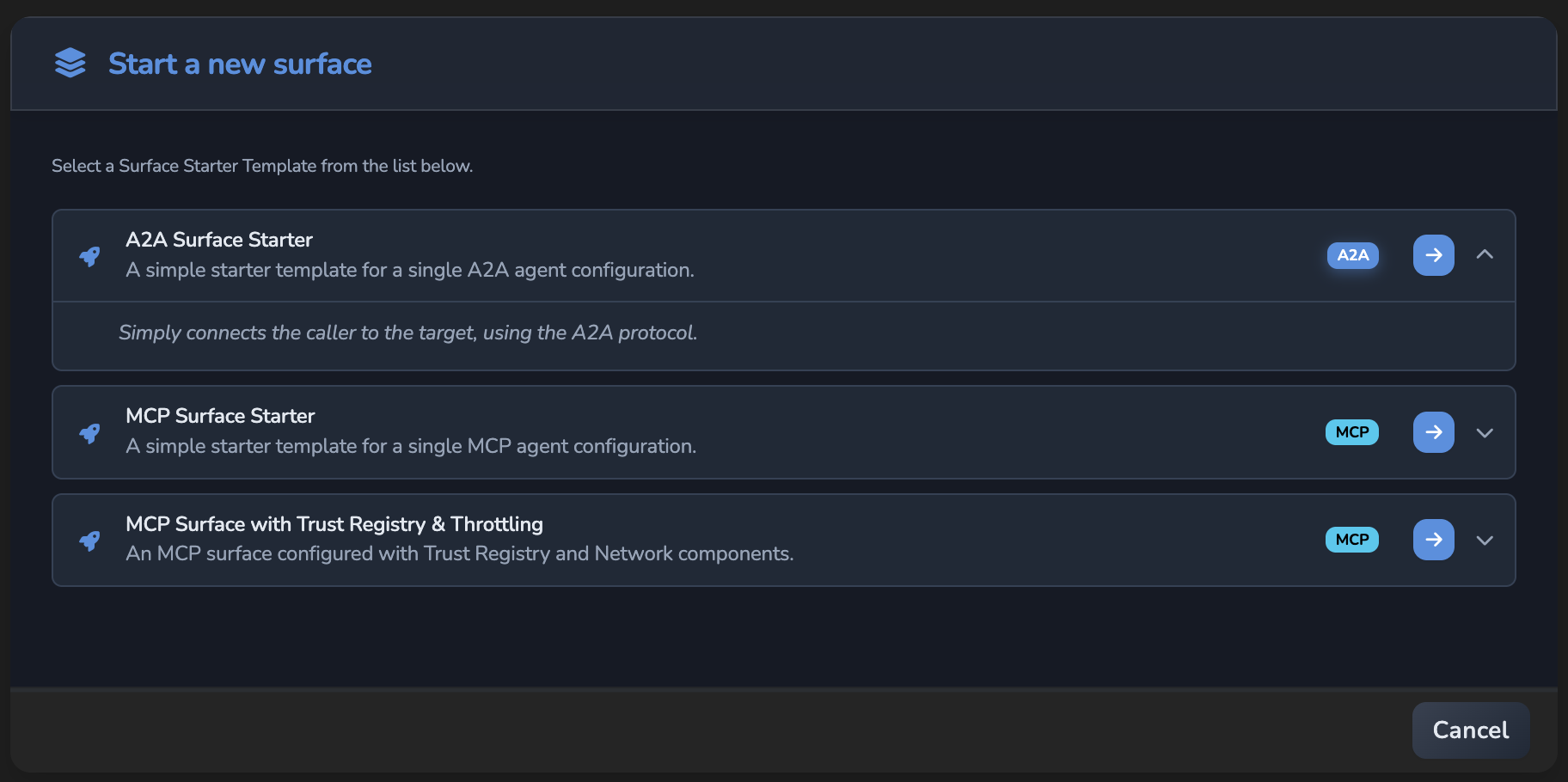
- In Start a new surface, select the A2A Surface Starter template.
- Update the generated Name in the Surface tab if needed.
The canvas opens with a Surface container, a Managed Agent node, and an Access Point node. Elements with red outlines still require configuration.
- Select the Managed Agent node and set Target Endpoint URL to the Messaging URL from the deployment output:
https://us-central1-aiplatform.googleapis.com/v1beta1/projects/your-project-id/locations/us-central1/reasoningEngines/<ENGINE_ID>/a2a/v1/message:send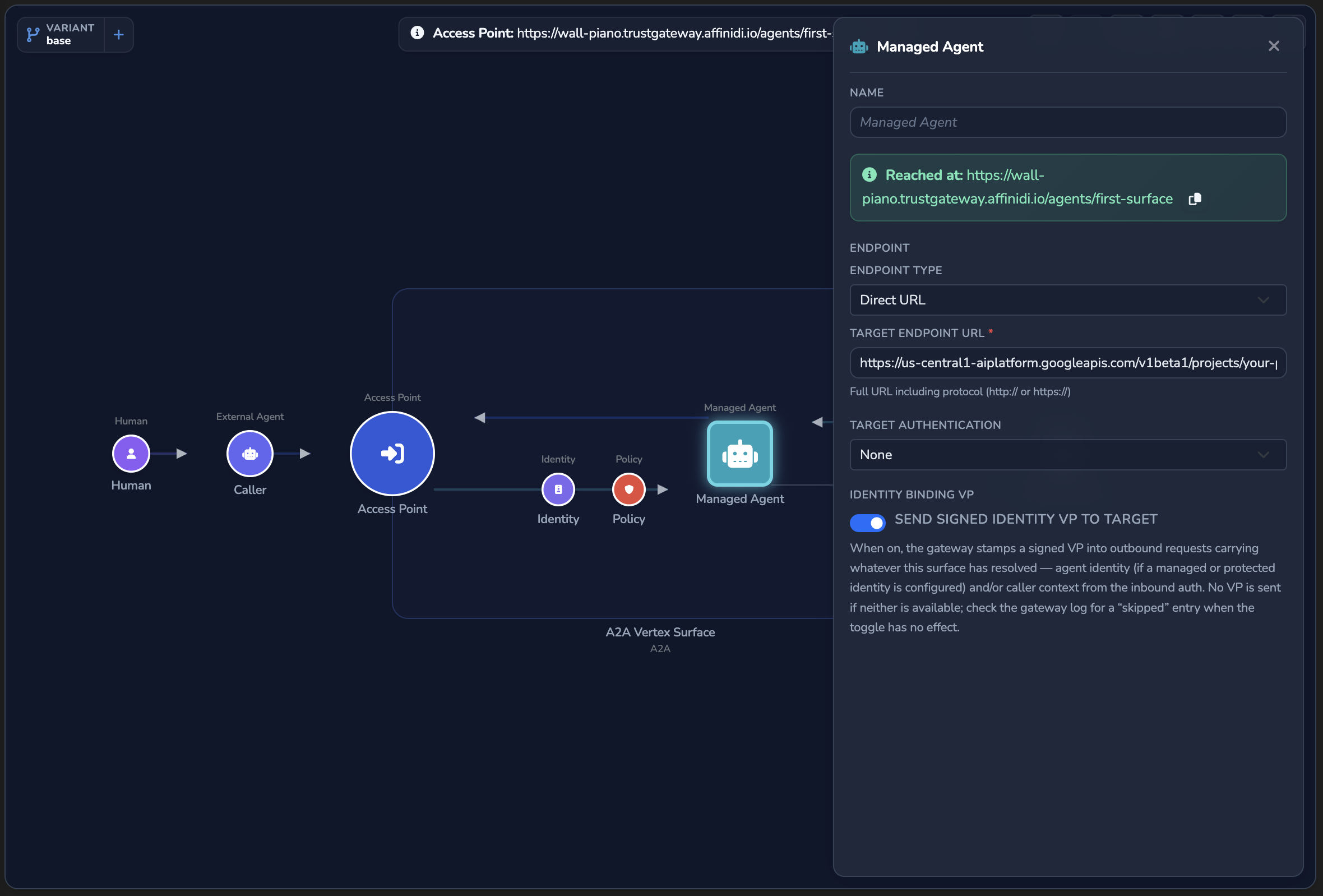
- Select the Access Point node and copy the Entry point URL shown at the top of the panel. You will pass this URL to
test.shin the next step. The A2A Protocol section lower in the panel accepts both A2A 0.3 and A2A 1.0 by default, so leave it as it is for this guide. - Open the Elements tab and confirm no red outlines remain on any node.
- Select the green checkmark button (tooltip: Create surface) to save.
Test end-to-end
First, test a direct call to Vertex AI to confirm the deployment is working:
./test.shThen, route traffic through Agent Gateway using the Entry point URL copied in the previous step:
./test.sh <ENTRY_POINT_URL>The base_url override routes only A2A messaging traffic through Agent Gateway. The management API call (agent_engines.get) continues going directly to Vertex AI, keeping deployment metadata authoritative.
Expected output (via Agent Gateway):
============================================================
  A2A SDK Client — Currency Exchange Agent
============================================================
  Base URL : <ENTRY_POINT_URL>

[1] Fetching remote agent card...
  Name   : Currency Exchange Agent
  URL    : https://us-central1-aiplatform.googleapis.com/v1beta1/projects/.../a2a/v1
  URL (override) : <ENTRY_POINT_URL>

[2] Building A2A SDK client...
  A2A client ready.

[4] Sending messages via A2A SDK
  You   : What is the USD to INR exchange rate?
  Agent : The current USD to INR exchange rate is approximately 84.5.
Production operating guidance
Use this pattern when customers need one or more of the following:
- Consistent policy and identity controls across multiple agent backends.
- A single operational control point for A2A traffic.
- Observability and troubleshooting at the gateway boundary.
Recommended topology
- Caller agent/client sends A2A message to Agent Gateway surface route.
- Access point validates and routes the request.
- Target endpoint forwards to the deployed Vertex A2A agent.
- Response path returns through the same gateway route for consistent telemetry and policy enforcement.
Production readiness checklist
- Separate projects/environments for dev, stage, and prod.
- Surface-level source authentication configured for your trust boundary.
- OPA policy controls enabled for route-level governance.
- Logging/metrics exported from the gateway and monitored.
- Clear rollback path for both deployment (
deploy.py delete) and surface config updates.
Common operating model
- Keep agent implementation lifecycle in Vertex AI.
- Keep runtime access/policy/routing controls in Agent Gateway.
- Use A2A client
base_urloverride to switch between direct and governed path for testing, canaries, and incident triage.
Troubleshooting
| Symptom | Likely cause | Fix |
|---|---|---|
403 or auth errors when routing through Agent Gateway | Surface authentication or policy is denying the call. | Check surface source authentication settings and policy rules, then retry with required credentials. |
404 when routing through Agent Gateway | The Entry point URL in the Access Point node does not match the URL passed to test.sh. | Open the surface in the dashboard, copy the Entry point URL from the Access Point panel, and use that exact URL. |
JSON-RPC error -32009 when routing through Agent Gateway | The client’s A2A version is not selected under Supported versions in the Access Point’s A2A Protocol section. | Select the version the client uses, or have the client send an A2A-Version header with a version the surface accepts. See Control which A2A versions and messages a surface accepts. |
| Deployment fails before Agent Engine creation | Billing not enabled or required APIs are disabled. | Enable billing and confirm Vertex AI, Cloud Storage, and Cloud Build APIs are enabled. |
| Local tests pass but remote tests fail | .deployed_resource_name missing or stale. | Re-run deployment and confirm resource name file is updated. |
| Runtime cannot reach target | Incorrect target endpoint or network reachability issue. | Validate target endpoint URL from the gateway runtime environment and confirm DNS/TLS reachability. |
Glad to hear it. Thanks for letting us know.
Sorry to hear that. Thanks for letting us know.