Verify agents across organisations with a trust registry
This guide connects two organisations through a shared trust registry, so one organisation’s gateway accepts only the agents that the other has registered. For how a gateway queries a trust registry, see Trust registries.
Organisation A (Org A) runs a managed agent that calls a surface run by Organisation B (Org B). Org A records its agent in the trust registry under its own Issuer. Org B trusts that Issuer as an Authority, and its Trust Check asks the registry about every caller before the request reaches its managed agent.
Without a shared registry, Org B can check only what a caller says about itself. With one, Org B relies on a record that Org A wrote and the registry holds.
Use this guide when:
- Agents from another organisation call your surfaces, and you want to accept only the ones that organisation has registered.
- Your organisation’s agents call partners that check them against a trust registry.
Prerequisites
| You need | Where it comes from |
|---|---|
| An Affinidi Trust Registry, and access to its admin UI | An Affinidi Trust Registry appliance deployed through Affinidi Portal, in the Affinidi Radix Early Access Programme: get early access. If a partner runs the registry, its administrator does the registry steps for you. |
| Two Agent Gateways, one for each organisation | Agent Gateway appliances deployed through Affinidi Portal, with the Administrator role on each, by default. |
| On Org A, an A2A surface whose managed agent has an identity | A surface with an Identity element that derives each agent’s DID from its identity metadata. The managed agent includes that metadata in its responses and in the calls it makes through the Transit Point. See From Payload (identity metadata) and Limit surface access by agent identity. |
| On Org B, an A2A surface that Org A’s agent calls | Any A2A surface. See the A2A surface starter. |
Steps
Connect both gateways to the trust registry
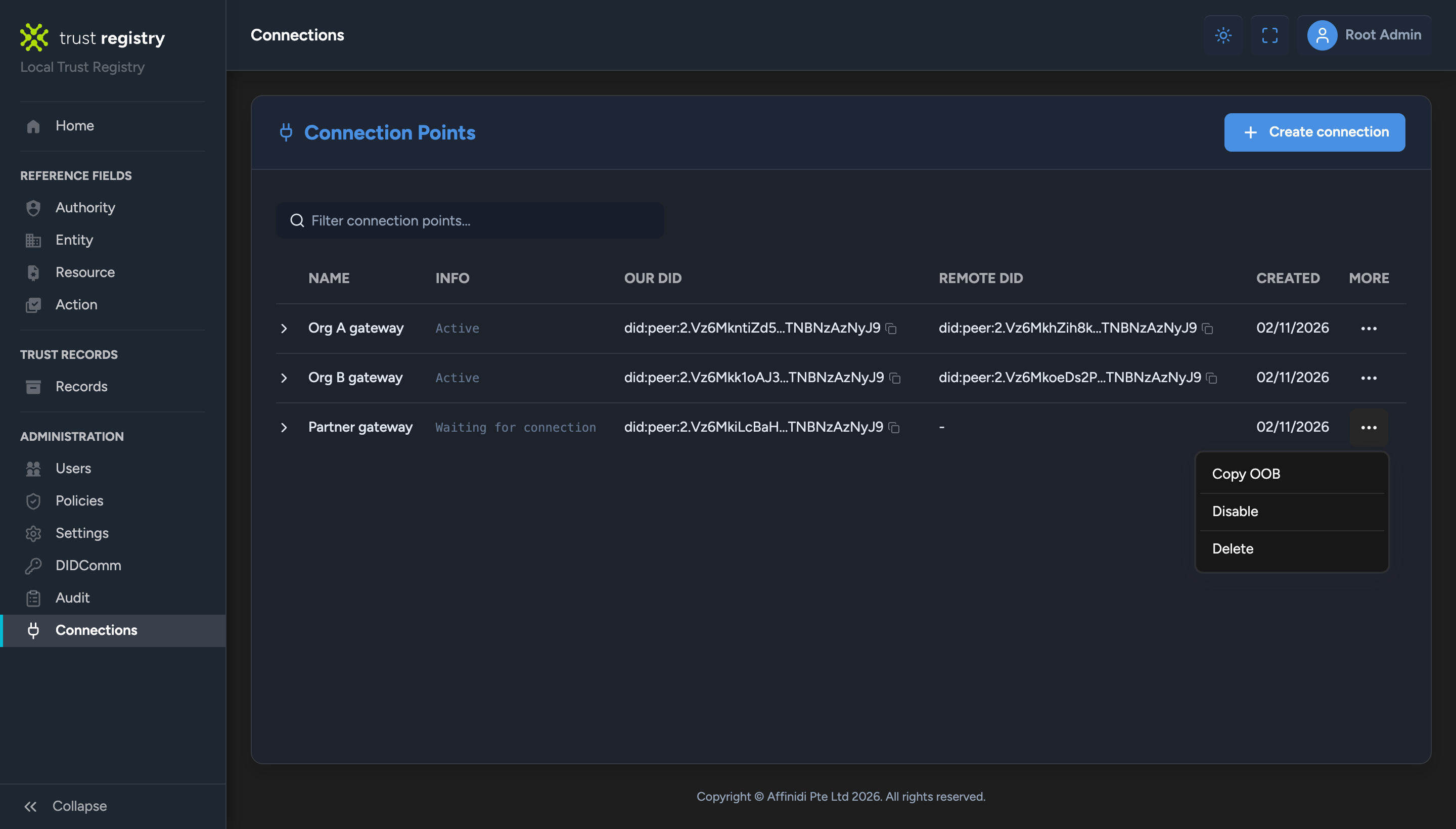
Create a connection point for each gateway
In the trust registry’s admin UI, select Connections, then Create connection. Enter a Name, such as “Org A gateway”, a Description, and the Mediator DID the registry connects through, then select Create.
Open the new row’s More menu and select Copy OOB to copy its OOB invitation URL. Repeat for Org B’s gateway, so each gateway has its own connection point.
Add the trust registry on each gateway
On each gateway, add the registry with its own OOB invitation URL, as described in Adding a trust registry. Each connection waits in AWAITING APPROVAL.
Approve each gateway and allow its actions
In the admin UI, open each connection point’s More menu and select Approve. Each gateway’s status changes to CONNECTED.
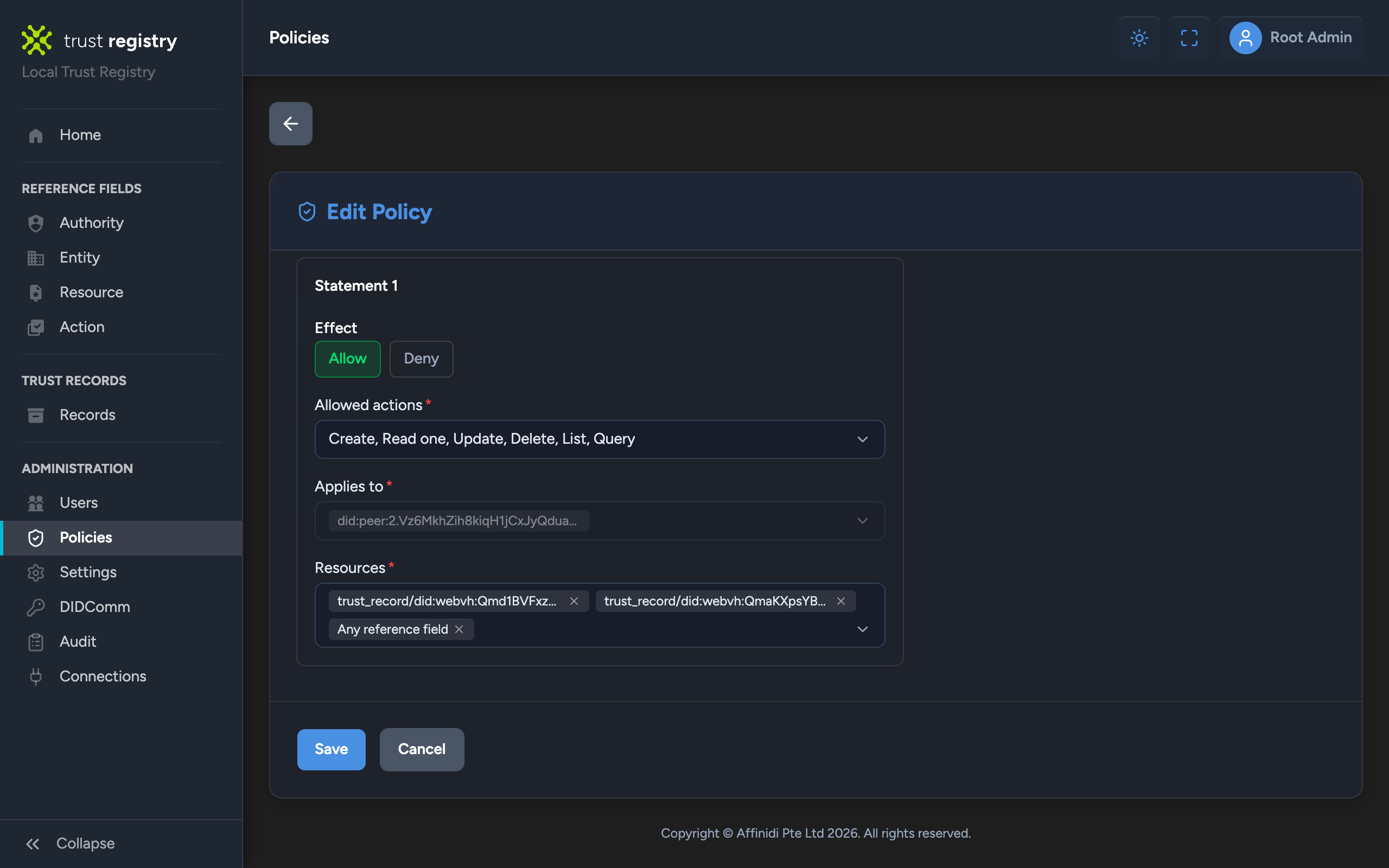
Approving a connection point also creates a policy for that gateway, named after the connection point, that denies every action. To change a gateway’s policy, select Policies, open the More menu of the policy, and select Edit.
- Org A writes records. Set Effect to Allow, keep the gateway’s DID in Applies to, and allow Create, Read one, Update, Delete, List, and Query. In Resources, type one pattern for each DID that Org A writes records under, plus reference fields, then select Save:
trust_record/<Org A gateway DID>/*, for registering its Issuers.trust_record/<Org A Issuer DID>/*, for recording its agents. Add this pattern after you register the Issuer in the next part.reference_field/*, for the names the gateway publishes. The list offers it as Any reference field.
- Org B only queries. While Settings › TRQP query access is Open access, its default, queries bypass policies, so keep Org B’s deny-all policy as it is. If it is Controlled access, set Effect to Allow and allow only Query, then select Save.
Limit each gateway to its own records
Choosing Everything in Resources lets a gateway write records under any DID, including another organisation’s Issuer. In a registry that several organisations share, limit each gateway to records under its own DIDs, so that only Org A can record agents under Org A’s Issuer.
These patterns limit trust records only. reference_field/* still lets a gateway publish display names for any DID, because the gateway names its agents, whose DIDs are not known in advance.
Record Org A’s agent
Register an Issuer
On Org A’s gateway, add an Issuer registered with the trust registry, as described in Adding an Issuer. Its Trust Registry Status reads Registered.
Copy the Issuer’s DID from the Issuers tab. Org B needs it in a later step.
Record the surface’s agents
Open Org A’s surface:
- Select the surface’s container and set Issuer to the Issuer you registered.
- Drop a Trust Recorder on the Managed Agent → Access Point edge. In its entry, select the Trust Registry, set Issuer to the Issuer you registered, set Authority to Use surface Issuer, and keep [Authority] Agent DID is
ownedAgentturned on. - Save the surface.
The recorder records each managed agent when it responds. See Trust Recorder for every entry field.
Confirm the agent is recorded
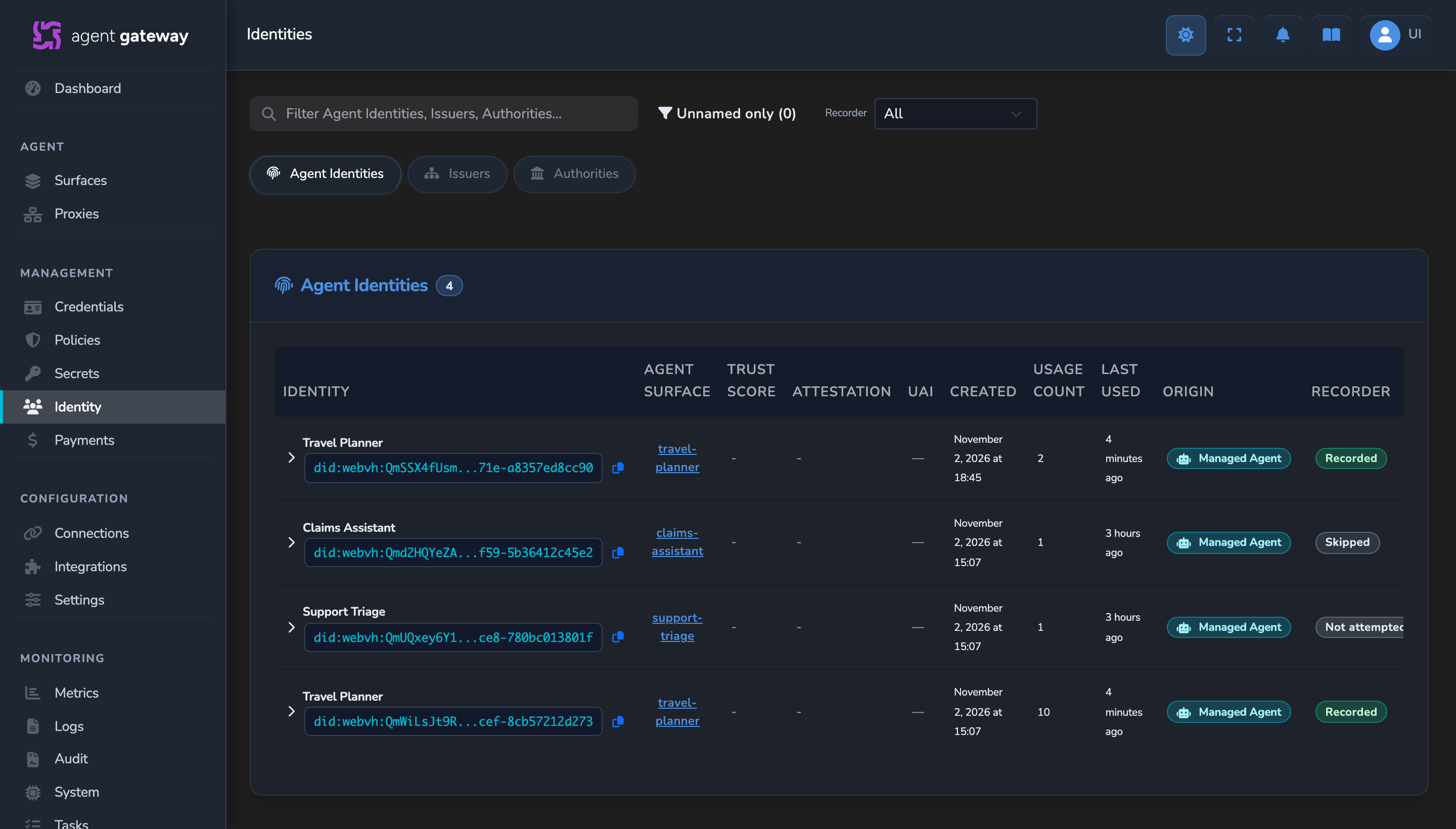
Send a request to Org A’s surface. Then select Identity in the sidebar: on the Agent Identities tab, the agent’s Recorder chip reads Recorded.
Sign the agent’s identity on calls to Org B
On Org A’s surface, add a Transit Point as described in Apply policy to outbound calls. Set Endpoint Type to Direct URL, and set Target Endpoint to the Entry point URL of Org B’s surface, which Org B copies from its Access Point panel. The call reaches Org B over HTTPS, so this works without a connection between the two gateways. Drop an Identity element on its Managed Agent → Transit Point edge, configured the same way as the surface’s own Identity element, so the agent keeps the DID the recorder recorded.
Org A’s gateway then signs the agent’s identity on every call through that Transit Point, and Org B verifies it.
Check Org A’s agents on Org B
Add Org A’s Issuer as an Authority
On Org B’s gateway, add an Authority whose Authority DID is the Issuer DID you copied from Org A, as described in Adding an Authority.
Add a Trust Check for callers
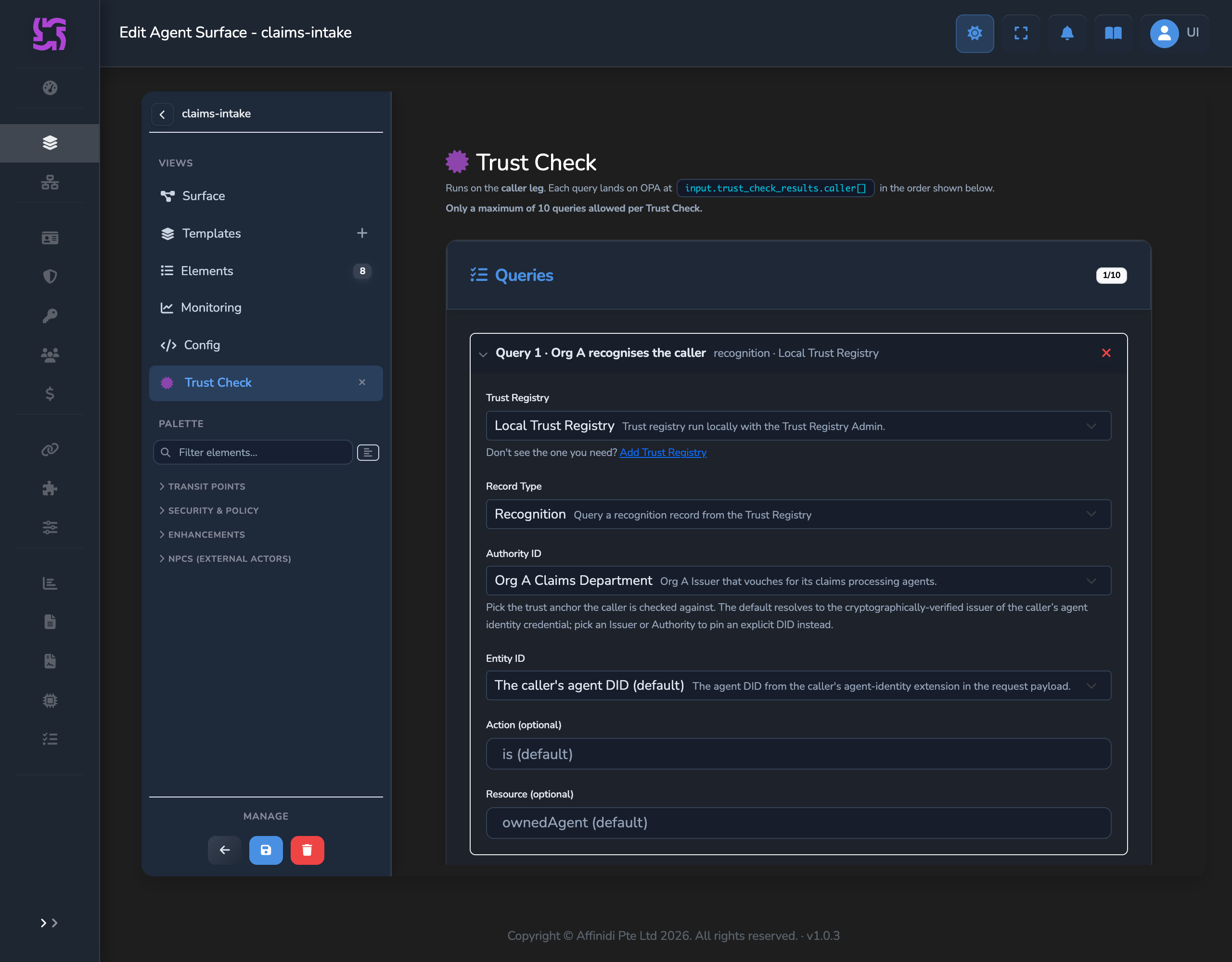
Open Org B’s surface and drop a Trust Check on the Access Point → Managed Agent edge. Add a query:
- Trust Registry: the registry.
- Record Type: Recognition.
- Authority ID: the Authority you added for Org A.
- Entity ID: keep The caller’s agent DID (default).
This asks the registry whether Org A’s Issuer owns the calling agent. See Which DID goes in which field.
Refuse callers that fail the check
A Trust Check reports its result to policy and does not refuse a request by itself. Drop a Policy element on the same edge with a rule that requires the check to have run and passed:
package surface.policy

default allow = false

allow if {
    count(input.trust_check_results.caller) > 0
    every r in input.trust_check_results.caller { r.ok }
}
Save the surface. See Apply OPA policies for creating the policy definition.
Confirm
Test 1: a call from Org A’s recorded agent returns 200
Send a request to Org A’s surface that makes its agent call Org B, for example on an A2A surface:
curl -X POST "<ORG_A_ENTRY_POINT_URL>" \
  -H "Content-Type: application/json" \
  -H "A2A-Version: 0.3" \
  -d '{"jsonrpc":"2.0","method":"message/send","id":1,"params":{"message":{"messageId":"cross-org-1","role":"user","parts":[{"kind":"text","text":"Hello"}]}}}'
Expected: Org B’s managed agent’s response, returned through Org A’s agent.
On Org B’s Audit page, with Enable VP Auditing on and the Trust Check event selected in Settings › Security, the request’s record reads Trust check passed, with the caller leg and Result Passed. On the Logs page, the request shows Trust Check Consolidated Result with ok=1.
Test 2: a call from an unrecorded agent returns 403
Call Org B’s surface from an agent missing from Org A’s records, such as the managed agent of another Org A surface that has a Transit Point to Org B with an Identity element but no Trust Recorder. Org B answers 403, and its Audit record reads Trust check failed, with “Failed because NOT_RECOGNIZED”. An agent that presents no identity is also refused, with TRUST_REGISTRY_METADATA_UNAVAILABLE in the logs and “the caller’s request payload is missing the trust registry metadata extension” on the Audit page.
Troubleshooting
| Symptom | Cause | Fix |
|---|---|---|
| The Issuers list shows Registration failed for the Issuer. | The gateway’s policy on the registry still denies record writes. | Allow Org A’s actions in the registry’s policy, then open the Issuer, whose TR Registration Status reads Failed, and select Retry TR Registration. |
| The Recorder chip shows Failed with “Registry rejected the record”. | Same as above: the registry refused the record. | Allow Org A’s actions in the registry’s policy. The next response records the agent. |
| The Recorder chip shows Skipped with “Surface has no Issuer”. | The recorder’s Authority is Use surface Issuer, and the surface has no Issuer. | Set the surface’s Issuer. |
Org B’s Trust Check returns NOT_RECOGNIZED for Org A’s agent. | The Authority ID is not Org A’s Issuer DID, or the agent calls with a different DID from the one recorded. | Use the Issuer DID as the Authority, not Org A’s gateway DID. Configure the Transit Point’s Identity element the same way as the surface’s. |
Org B’s Trust Check returns TRUST_REGISTRY_UNREACHABLE. | Org B’s gateway is not connected to the registry. | On Org B’s Registries tab, check that the registry is CONNECTED. |
For every Trust Check code, see Troubleshoot Trust Check denials.
Next steps
- Check a Transit Point’s destination: Check the agents your own agents call, on the target leg.
- Connect two gateways: Route the same calls over an encrypted connection between the two gateways instead of HTTPS.
Related
- Trust registries: How trust registries, Issuers, and Authorities fit together.
- Agent validation via a trust registry: Trust Check queries on either leg, and the policy that enforces them.
- Authority reference: Fields and actions of an Authority.
Glad to hear it. Thanks for letting us know.
Sorry to hear that. Thanks for letting us know.
Still stuck? Ask the community on Discord or contact us.