Troubleshoot Trust Check denials
This guide finds why a request that a Trust Check policy refused got a 403, using the result code each Trust Check records. For how Trust Check results reach policy, see Trust registries.
A refused request has one of two causes. Either the trust registry answered that it does not recognise or authorise the agent, which is a real “not trusted” result, or the check could not complete, which points to a configuration or connection problem. The fix is different for each, so find the code before changing anything.
Use this guide when:
- A surface with a Trust Check returns
403to an agent you expected it to accept. - A partner’s surface refuses your agent, and you want to know whether your records or their configuration is the cause.
Prerequisites
- A surface with a Trust Check and a Policy element that enforces it. See Agent validation via a trust registry.
- A request that was refused, and roughly when it was sent.
- The Administrator role, by default, to read the Audit page. Any role can read the Logs page.
Steps
Find the result code
Use either place:
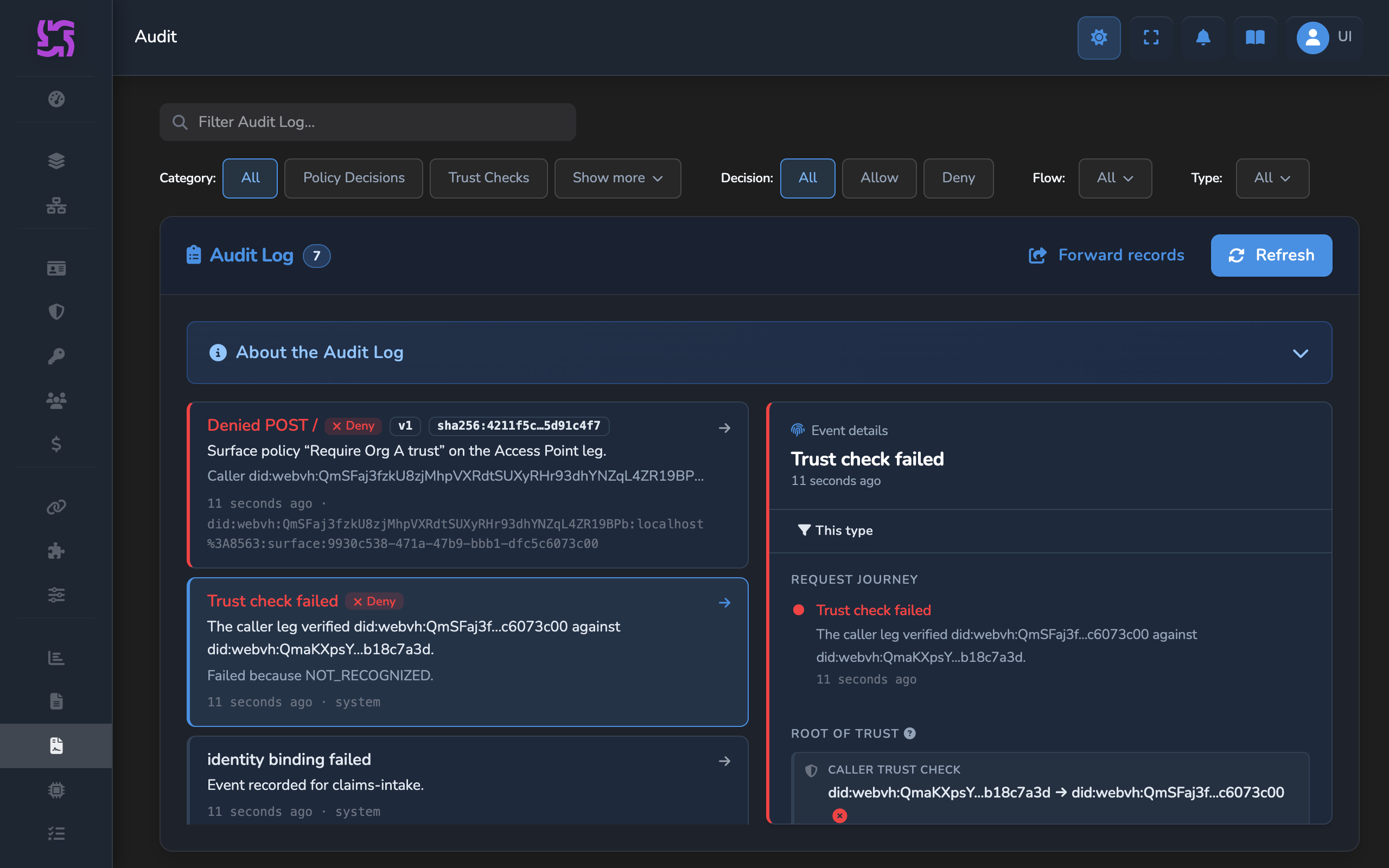
- Audit page: with Enable VP Auditing on and the Trust Check event selected in Settings › Security, select Trust Checks in Category. A refused check reads Trust check failed, followed by “Failed because” and the reason. For
NOT_RECOGNIZEDandNOT_AUTHORIZEDthe reason is the code itself. For the other codes it is a short description, listed in the Audit page shows column below. Select the record to see the leg, the Authority, the Entity, and the same reason under Failure. - Logs page: a check that fails or is denied is logged at
WARNastrust check: deniedortrust check: error, with the code inerror_code. The Logs page always shows the code.
Read the log sequence
A refused request usually leaves three lines. This one is for a caller whose agent the trust registry does not recognise:
2026-11-02T07:31:05.907Z  INFO Received response: https://affinidi.com/didcomm/protocols/trqp/1.0/query-recognition/response
2026-11-02T07:31:05.912Z  WARN trust check: denied surface_id="b96cff84-1bab-42dd-a923-cfc7cd46390e" transit_point="" leg="caller" element_id="trust-check-caller" element_name="Verify caller" trust_registry_id="7c1d2e4f-5a6b-4c8d-9e0f-1a2b3c4d5e6f" query_type="recognition" result="denied" ok=false error_code="NOT_RECOGNIZED" latency_ms=84
2026-11-02T07:31:05.931Z WARN policy decision: deny policy_scope="surface" policy_flow="access_point" policy_decision="deny" policy_id="surface.policy" deny_reason="Caller is not a recognised agent" surface_id="b96cff84-1bab-42dd-a923-cfc7cd46390e" trace_id="4dfcbc74-9697-4e21-9434-d1a5045cdf80"- The
Received responseline confirms the trust registry answered. - The
trust checkline names the leg, the query type, and the result.result="denied"is the registry’s answer.result="error"means the query could not complete. - The
policy decisionline names the policy that refused the request and itsdeny_reason. - On a request through a Transit Point,
leg="target"andtransit_pointnames the Transit Point.
Passing checks and allowed decisions are logged at debug level, so at the default log level a successful request shows only the registry’s responses. To see every outcome, use the Audit page with the Trust Check and Policy Decision events selected.
Match the code to its cause
Look the code up in the tables below and make the fix it points to.
The registry answered
| Code | What it means | What to check |
|---|---|---|
NOT_RECOGNIZED | The registry has no record that the Authority recognises the Entity. | That the Authority ID and Entity ID are the DIDs you intend. See Which DID goes in which field. That the agent’s own gateway recorded it: its Identities page shows Recorded. |
NOT_AUTHORIZED | The registry has no record that the Authority authorises the Entity for the Action on the Resource. | The Action and Resource values, and the same DIDs as above. |
When the DIDs and values are right, these codes are the answer you asked for: the agent is not trusted for that query.
The check did not complete
| Code | Audit page shows | What it means | What to check |
|---|---|---|---|
TRUST_REGISTRY_UNREACHABLE | the trust registry was unreachable | The gateway has no working connection to the registry. | Connections › Registries: the registry is CONNECTED. Use Reconnect if it is not. |
QUERY_TIMEOUT, QUERY_FAILED | QUERY_TIMEOUT: the registry query timed outQUERY_FAILED: the registry query failed | The query was sent but no usable answer came back in time. | That the registry is running. Try the request again. |
TRUST_REGISTRY_PROBLEM_REPORT | the registry returned a problem report | The registry refused the query. Its own code is in error.message. | That code, with the registry’s administrator. |
TRUST_REGISTRY_PARSE_ERROR | the registry response could not be parsed | The registry answered in a format the gateway did not expect. | The registry’s version, with its administrator. |
TEMPLATE_RESOLUTION_FAILED, TRUST_REGISTRY_METADATA_UNAVAILABLE | TEMPLATE_RESOLUTION_FAILED: a query template could not be resolvedTRUST_REGISTRY_METADATA_UNAVAILABLE, caller leg: the caller’s request payload is missing the trust registry metadata extensionTRUST_REGISTRY_METADATA_UNAVAILABLE, target leg: the target’s agent card is missing the trust registry metadata extension | The query names a value the request does not carry, such as the issuer of an agent identity credential the caller did not present, or an agent DID from a caller that sent no identity. | That callers present what the query relies on, or pick a fixed Issuer or Authority as the Authority ID. |
AGENT_CARD_UNAVAILABLE, TARGET_AGENT_IDENTITY_UNAVAILABLE, IDENTITY_VP_VERIFICATION_FAILED | AGENT_CARD_UNAVAILABLE: the target’s agent card was unavailableTARGET_AGENT_IDENTITY_UNAVAILABLE: the target’s agent card carries no agent identity credentialIDENTITY_VP_VERIFICATION_FAILED: the target’s agent identity credential could not be verified | Target leg only: the destination’s agent card, or the identity credential in it, could not be fetched or verified. | The destination’s agent card and its agent identity credential. |
No code
- No results at all: no Trust Check ran for this request, for example on a Transit Point without one. A policy that only looks for failures allows the request. See Check a Transit Point’s destination.
- Every check passed but the request is refused: another rule in the policy denied it. The
policy decision: denylog line names the policy and itsdeny_reason.
For every code and the fields each result carries, see Trust Check result fields.
Confirm
Send the refused request again after each change. For an agent that calls your surface from another gateway, send it to the calling surface, whose managed agent forwards it to yours:
curl -X POST "<CALLER_ENTRY_POINT_URL>" \
  -H "Content-Type: application/json" \
  -H "A2A-Version: 0.3" \
  -d '{"jsonrpc":"2.0","method":"message/send","id":1,"params":{"message":{"messageId":"trust-check-1","role":"user","parts":[{"kind":"text","text":"Hello"}]}}}'
Test 1: request sent again after a configuration fix returns 200
Expected: your managed agent’s response, returned through the calling agent. On the Audit page, the request’s record reads Trust check passed, and its Result is Passed.
Test 2: request from an agent the registry does not trust still returns 403
When the DIDs and values are right but the agent has no matching record, the request stays refused, and that is the intended outcome.
Expected: your surface refuses the forwarded request with 403. The curl output depends on how the calling agent reports the refusal, so check the result on your Audit page: the record reads Trust check failed with “Failed because NOT_RECOGNIZED” or “Failed because NOT_AUTHORIZED”, and no description from the The check did not complete table appears.
Related
- Agent validation via a trust registry: Configure Trust Check queries and the policy that enforces them.
- Record your agents in a trust registry: Write the records a
NOT_RECOGNIZEDresult is missing. - Trust elements reference: Every Trust Check error code.
- Observability: Request tracing and policy decision logs.
Glad to hear it. Thanks for letting us know.
Sorry to hear that. Thanks for letting us know.
Still stuck? Ask the community on Discord or contact us.