Bind caller identity to your agent's outbound calls
This guide adds a Workload Binding element to an outbound edge of a surface, so the signed Verifiable Presentation (VP) your gateway attaches to the request also names the caller your managed agent acts for. For background, see Workload binding.
The receiving Agent Gateway checks the VP and gives its policies the managed agent’s identity and the caller claims you choose, as input.identity_binding. Without the binding, the receiving gateway sees a request from your gateway and your agent only. Caller details sent in ordinary headers or in the message body carry no signature, so its policies have nothing they can rely on.
Use this guide when:
- Your managed agent calls a surface on a connected gateway, through a Transit Point or as its target.
- The receiving gateway decides access based on who the original caller is, such as their organisation or role.
- You want both gateways’ audit records to tie the call back to one caller.
When the destination is a service that accepts OAuth tokens rather than an Agent Gateway, token exchange fits better.
Prerequisites
| Requirement | Details |
|---|---|
| Dashboard access | Permission to edit surfaces on your gateway. To complete Steps 7 and 8, you also need access to the receiving gateway’s dashboard, or someone who has it. |
| Connected gateway | An active connection to the receiving gateway. See Connect two gateways. |
| Authenticated callers | A Caller Context element on the surface, with a policy that refuses callers whose authentication failed. Use JWT Bearer to bind token claims, as in Validate bearer tokens on a surface, or DID Auth to bind the caller’s DID. |
| Route to the receiving gateway | A Transit Point, or the Managed Agent itself, with Endpoint Type set to via Gateway Connection. See Transit Points and Managed Agent. |
| Managed agent behaviour, Transit Point only | Your managed agent sends back the X-Transit-Token header on each Transit Point call, and includes the identity metadata that the Transit Point’s Identity element reads (Step 2). See Surface routing model: the transit token. |
| Audit on the receiving gateway | Under Settings › Security, on the VP Audit card, Enable VP Auditing is on and Events to keep includes Identity Binding Verified, Identity Binding Failed, and Policy Decision. The Confirm tests read these records. |
Steps
Choose the edge
Workload Binding attaches to one outbound edge. Each edge carries its own binding.
| Edge | Use it when | Identity element it needs | Caller context sources offered |
|---|---|---|---|
| Managed Agent → Transit Point | Your managed agent makes its own calls to the receiving gateway while it handles a request. | Identity on the same Managed Agent → Transit Point edge, set to From Payload (identity metadata). | Transit token, Authorization bearer JWT, DID authentication |
| Managed Agent → External (the target leg) | The Managed Agent’s own target is a surface on the receiving gateway. | Identity on the request side of the Access Point → Managed Agent edge, for example From JWT Claims. | Authorization bearer JWT, DID authentication |
Add the Identity element
The gateway signs the VP with the identity this element resolves, so the binding has nothing to attach to without it.
- Open the surface on the canvas.
- From the Enhancements section of the palette, drag Identity onto the edge from Step 1.
- Select the node and set Identity Extraction Type. On a Managed Agent → Transit Point edge, only From Payload (identity metadata) is available.
- Configure the fields for that type, as described in the Identity element reference.
Skip this step when the edge already has an Identity element.
Add Workload Binding to the edge
- From the Enhancements section of the palette, drag Workload Binding onto the same edge.
- Select the Workload Binding node.
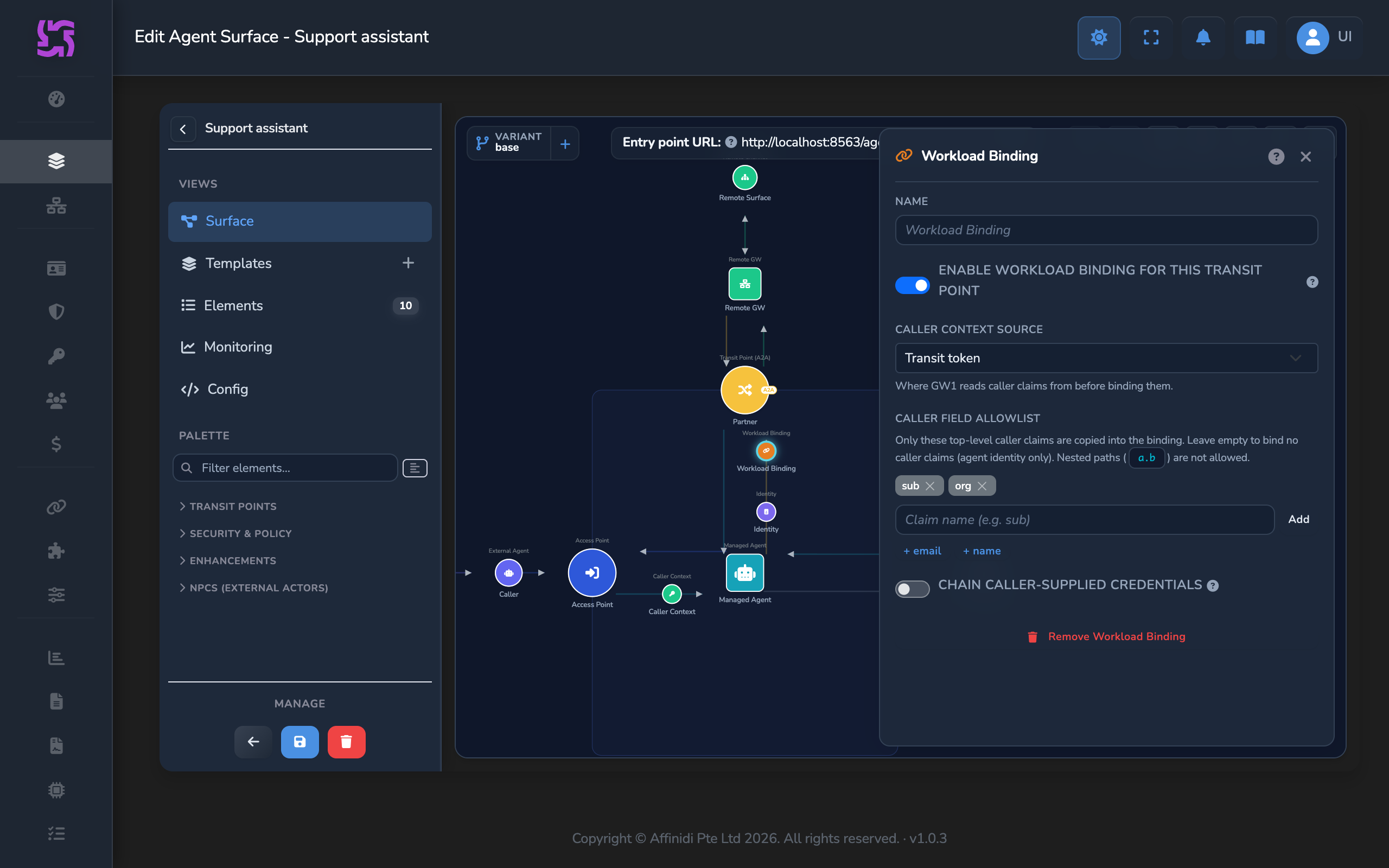
- Check that the switch below the panel’s Name field is on. It reads Enable workload binding for this Transit Point on a Transit Point edge, and Enable workload binding for this target (MA → External) on the target leg. A new element starts with it on.
Choose where caller claims come from
In Caller context source, select the source that matches your edge and how callers sign in:
| Source | Choose it when | What the binding carries |
|---|---|---|
| Transit token | The edge is a Transit Point and callers sign in with JWT Bearer. This is the default on a Transit Point. | Allowlisted claims from the caller’s token, which your gateway validated at the Access Point and carried to your managed agent in the transit token. Also a one-way hash that identifies the caller, user_hash. |
| Authorization bearer JWT | The edge is the target leg and callers sign in with JWT Bearer. | Allowlisted claims from the Authorization header of the request. On the target leg, that is the caller’s own token. |
| DID authentication | The edge is the target leg and callers sign in with DID Auth. | The caller’s DID as the did field, when you allowlist did. Also user_hash. |
For Authorization bearer JWT on a Transit Point, the claims come from the token your managed agent sends on its Transit Point call, so the receiving gateway relies on your agent to send the caller’s real token. Use Transit token there instead, because your gateway captured those claims itself.
For callers who sign in with DID Auth and reach a Transit Point, use Transit token. The binding then carries user_hash without other claims.
Allowlist the caller claims to share
Under Caller field allowlist, add each top-level claim name the receiving gateway’s policy needs. Type the name and press Enter or select Add, or select a suggestion such as + sub or + org.
- Only listed claims cross to the receiving gateway, with their values copied exactly as they appear in the token.
- A listed claim that the caller’s token does not carry is left out.
- Names are top level only. A nested path such as
org.idis refused.
Leave the list empty to share no caller claims. With Transit token or DID authentication, the binding still carries user_hash.
Save the surface
Leave Chain caller-supplied credentials off. The binding then carries gateway_attested assurance: the receiving gateway relies on your gateway’s attestation of the caller.
Close the panel and select the save icon (tooltip: Save changes) on the canvas.
Check that the receiving gateway trusts your gateway’s issuer
On the receiving gateway’s dashboard:
- Select Connections in the sidebar, then open the Gateways tab.
- In the Agent Gateways table, find your gateway’s row and select the edit icon button (tooltip “Edit Gateway”).
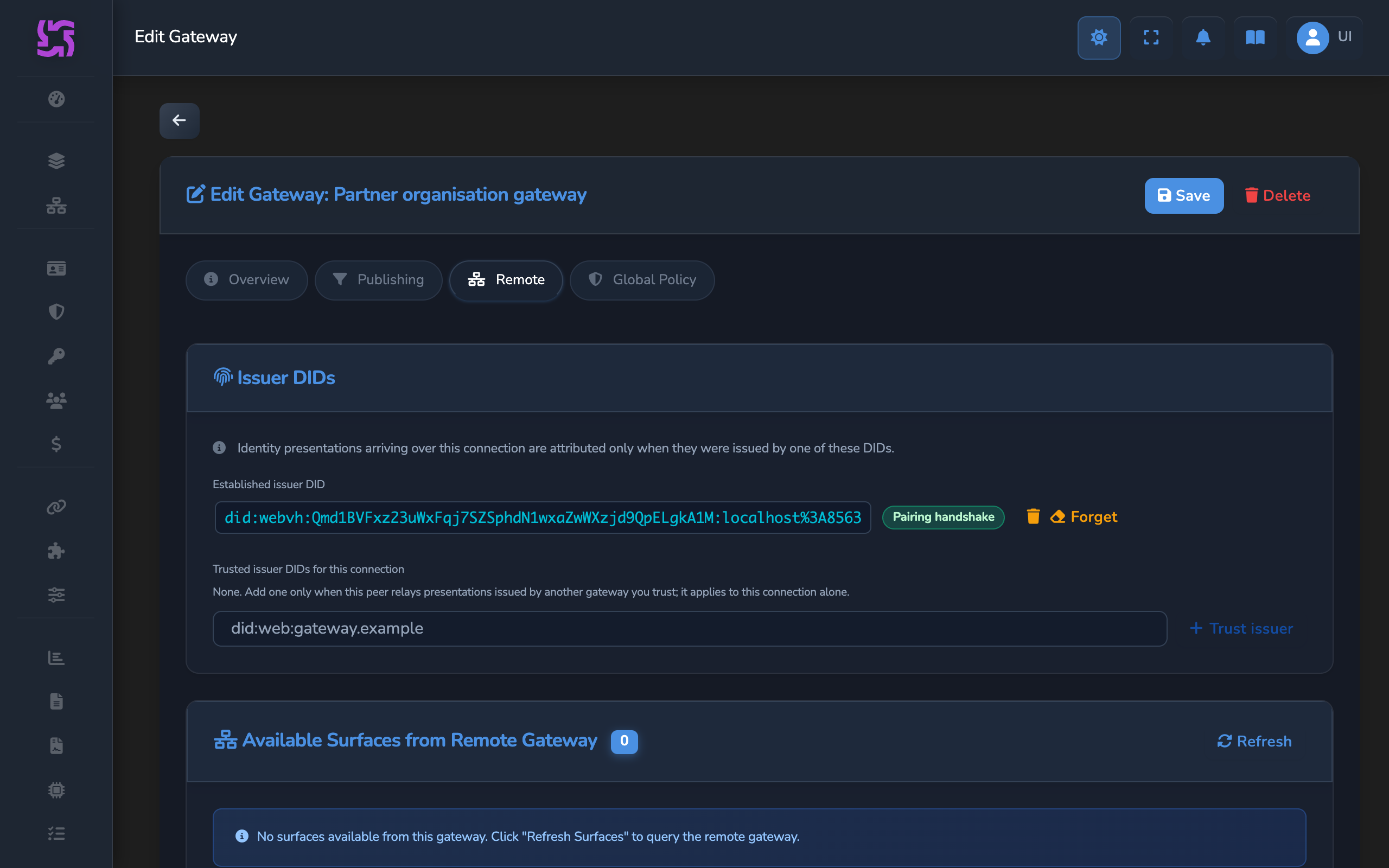
- Open the Remote tab. On the Issuer DIDs card, check that Established issuer DID shows a DID.
If it shows Not established, select Request from peer. The receiving gateway accepts a binding only when its issuer is one of the connection’s issuer DIDs.
Check the binding in a policy on the receiving gateway
On the receiving gateway, create a surface policy and attach it to the receiving surface with a Policy element, as in Use JWT claims to control access to a surface. This example allows only requests whose binding verified and whose caller belongs to one organisation:
package surface.policy

default allow := false

allow if {
    input.identity_binding.verified == true
    input.identity_binding.caller.fields.org == "acme-finance"
}

deny_reason := "caller is not in an allowed organisation" if {
    not allow
}
Replace org and acme-finance with a claim from your allowlist and the value to accept. A request with no binding, or with a binding the gateway could not verify, has no verified value of true, so the policy denies it.
Other values a policy can read:
| Input | Holds |
|---|---|
input.identity_binding.agent.did | The DID the edge’s Identity element resolves: the managed agent’s DID on a Transit Point edge, or the DID taken from the caller’s token with From JWT Claims on the target leg. |
input.identity_binding.caller.fields | The allowlisted caller claims. |
input.identity_binding.caller.user_hash | A one-way hash that identifies the caller, for the Transit token and DID authentication sources. It depends on how the caller was identified (method, issuer and principal), not on the name alone. |
input.identity_binding.caller.identity_source | transit_token, jwt_bearer, or did_auth. |
input.identity_binding.issuer_gateway | The DID of the gateway that signed the VP. |
Match on caller.fields for access decisions, and use user_hash to correlate requests from the same caller. The full list is in Workload binding.
Confirm
Use two caller tokens from your identity provider: <ALLOWED_TOKEN>, whose org claim is acme-finance, and <OTHER_TOKEN>, with a different org. Replace <ENTRY_POINT_URL> with your surface’s Entry point URL.
For a Transit Point binding, send a request that makes your managed agent call the Transit Point while it handles it. For a target-leg binding, any request your surface accepts reaches the receiving gateway.
Test 1: request from an allowed caller returns Allowed on the receiving gateway
curl -X POST "<ENTRY_POINT_URL>" \
  -H "Authorization: Bearer <ALLOWED_TOKEN>" \
  -H "Content-Type: application/json" \
  -H "Accept: application/json, text/event-stream" \
  -d '{"jsonrpc":"2.0","id":1,"method":"initialize","params":{"protocolVersion":"2025-06-18","capabilities":{},"clientInfo":{"name":"curl","version":"1.0"}}}'
curl -X POST "<ENTRY_POINT_URL>" \
-H "Authorization: Bearer <ALLOWED_TOKEN>" \
-H "Content-Type: application/json" \
-H "A2A-Version: 0.3" \
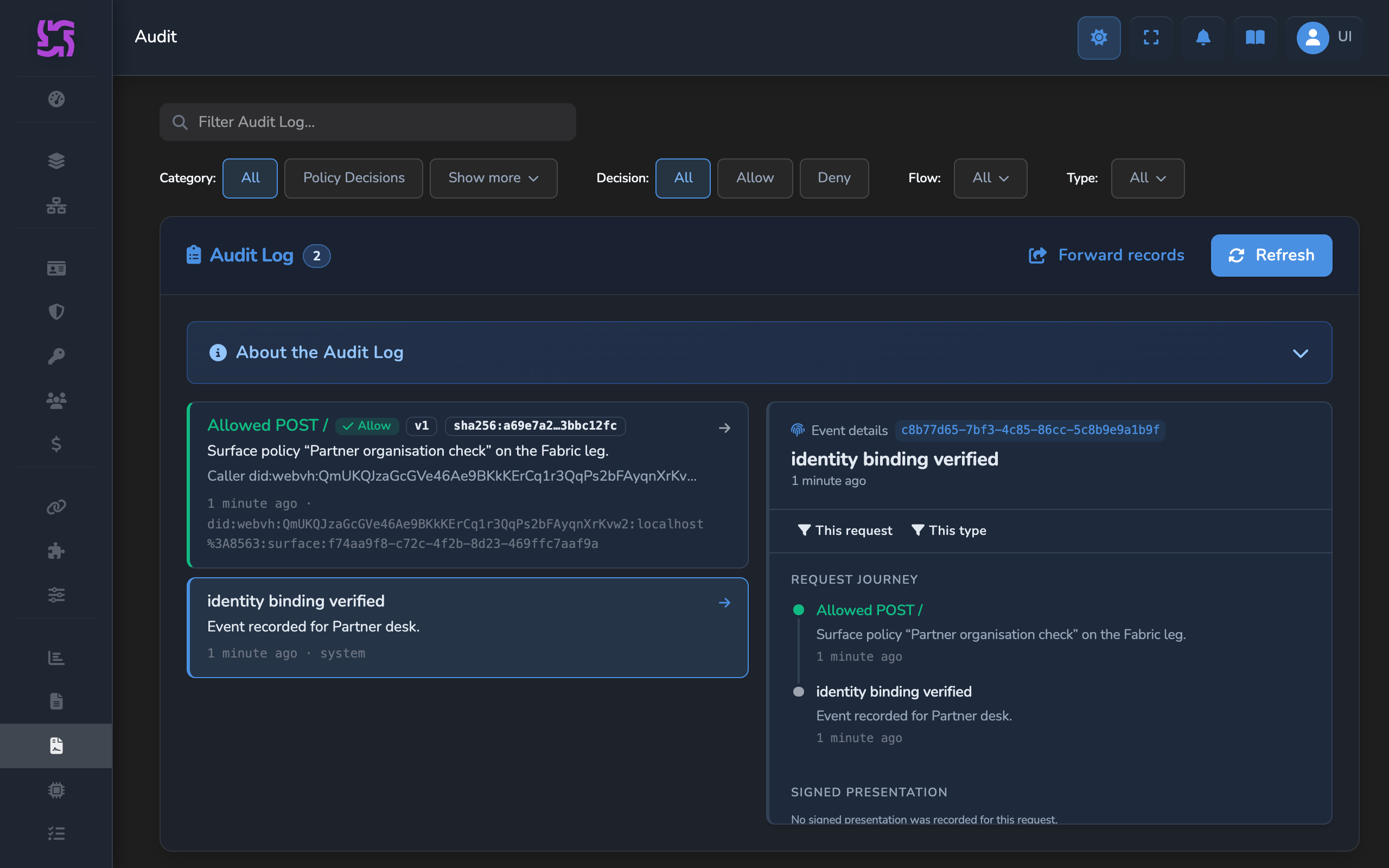
-d '{"jsonrpc":"2.0","method":"message/send","id":1,"params":{"message":{"messageId":"test-1","role":"user","parts":[{"kind":"text","text":"Hello"}]}}}'Expected: on the receiving gateway, select Audit in the sidebar. The newest entries for the receiving surface include one titled identity binding verified, and a policy decision titled Allowed followed by the request method and path, for example Allowed POST /. The policy decision names your policy and shows your managed agent’s DID as the caller.
Test 2: request from a caller outside the organisation returns Denied on the receiving gateway
Repeat Test 1 with <OTHER_TOKEN>.
Expected: the receiving gateway refuses the request. Its Audit page shows an identity binding verified entry and a policy decision titled Denied followed by the request method and path, whose detail ends with caller is not in an allowed organisation.
Test 3: request without caller context returns Denied on the receiving gateway
On your gateway, turn off the Workload Binding element’s enable switch, save the surface, and repeat Test 1. Turn the switch back on and save when you finish.
Expected: no caller context reaches the receiving gateway, so its policy denies the request. Its Audit page shows a policy decision titled Denied followed by the request method and path.
Troubleshooting
| Symptom | Likely cause | Fix |
|---|---|---|
| Save is refused with a message that Workload Binding is enabled but the surface has no managed identity source to sign the VP. | The surface has no Identity element. | Add the Identity element where Step 1 places it for your edge: on the Managed Agent → Transit Point edge for a Transit Point, or on the Access Point → Managed Agent edge for the target leg. |
The Workload Binding node is marked on the canvas with a message that caller_source=did requires a Caller Context element using DID Auth. | Caller context source is DID authentication, and the surface’s Caller Context has no DID Auth method. | Select the Caller Context node, select Add method, then DID Auth. Alternatively, choose another source. |
The managed agent’s Transit Point call returns 422. | The request carries no identity metadata for the Transit Point’s Identity element to read. | Have the managed agent include the identity metadata the element reads, under its configured field name. |
| The receiving gateway’s Audit page shows identity binding failed. | The binding was absent, failed verification, or came from an issuer the connection does not trust. | Check that the Identity element sits where Step 1 places it for your edge, and that the Issuer DIDs card for your gateway shows an Established issuer DID. |
input.identity_binding.caller.fields is empty or missing a claim. | The claim is not on the allowlist, the caller’s token does not carry it, or the caller did not sign in with JWT Bearer. | Add the claim name under Caller field allowlist, and check the caller’s token. Claims come from JWT Bearer tokens only. |
| A target-leg binding carries no caller claims. | The caller’s token is not in the Authorization header, so Authorization bearer JWT has nothing to read. | Set the Caller Context’s Token Header to Authorization, or have callers send their token there. |
| A Transit Point binding set to DID authentication carries no caller. | A Transit Point call comes from your managed agent, so the caller’s DID session is not on that request. | Set Caller context source to Transit token. |
input.identity_binding.verified is false. | The request reached the receiving surface directly over HTTP rather than through the gateway connection, so no connection vouches for the issuer. | Set Endpoint Type to via Gateway Connection on the Transit Point or Managed Agent. |
Next steps
- Carry caller claims through your managed agent: read the allowlisted claims in your managed agent and choose which ones each Transit Point passes on.
- Configure GW-to-GW authentication and routing: check authentication on both sides of the connection.
Related
- Outbound binding elements: every Workload Binding field.
- Identity element: extraction types and where each Identity slot sits.
- Transit Points: outbound routes and the transit token requirement.
- Audit log: what identity binding records hold.
Glad to hear it. Thanks for letting us know.
Sorry to hear that. Thanks for letting us know.
Still stuck? Ask the community on Discord or contact us.