Validate bearer tokens on a surface
By the end of this guide, you will have a JWT verification strategy configured and attached to a surface so that the gateway validates bearer tokens on every inbound request.
A JWT verification strategy is a reusable configuration that names a trusted issuer and points to that issuer’s signing keys. Surfaces reference the strategy rather than holding issuer details directly. For background on how strategies fit the gateway’s credential model, see Credentials.
Without a strategy, the surface cannot validate bearer tokens issued by your identity provider.
Use this guide when:
- You need a surface to accept bearer tokens from an identity provider.
- You want multiple surfaces to share the same issuer configuration.
Prerequisites
- A running Agent Gateway instance with the dashboard accessible.
- Power User or Administrator role on the gateway.
- The
issuerURL of the identity provider that issues the JWTs, for examplehttps://auth.example.com. - Either the JWKS URI of the identity provider, or the static JWKS JSON if the provider does not publish a discovery endpoint.
- A surface to attach the strategy to.
Steps
Create a JWT verification strategy
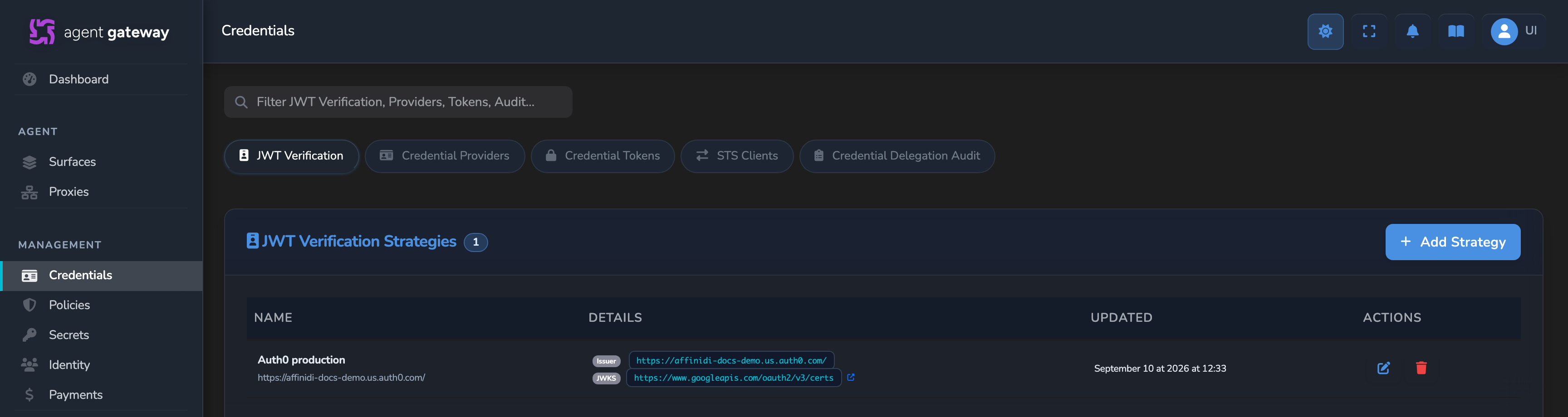
In the sidebar, select Credentials, then select the JWT Verification tab. Select Add Strategy.
Fill in the strategy fields:
Field Required Description Name Yes A descriptive label, for example Auth0 production.Expected Issuer Yes The exact issclaim value the JWT must contain. Must match precisely, including the trailing slash if present.JWKS Source Yes How the gateway obtains the public keys. Select Remote URL or Static Keys. For the Remote URL option, enter the JWKS URI, for example
https://auth.example.com/.well-known/jwks.json. The gateway validates the URI is reachable when you save. A green indicator confirms the URI resolved successfully.For the Static Keys option, paste the JWKS JSON directly into the editor. Use this when the identity provider does not expose a JWKS endpoint.
Select Create Strategy.
Reference the strategy on a surface
- Open the surface you want to protect on the canvas.
- From the left-hand palette, drag a Caller Context element onto the surface and drop it between the Access Point and Managed Agent nodes.
- Select the Caller Context node to open its config panel.
- Set Authentication Method to JWT Bearer.
- Select Configure… to open the full configuration editor.
- Select your strategy from the JWT Verification Strategy dropdown.
- Optionally, add Accepted Audiences to restrict which tokens are accepted. Type an audience value and press Enter. The JWT must contain at least one of the accepted values in its
audclaim. Leave empty to accept any audience. - Close the editor and select the save icon (tooltip: Save changes) on the canvas.
The strategy validates a token when one is present, but a missing or invalid token does not block the request by itself. Add a Policy element in the next step so the surface actually denies those callers.
Deny requests that fail authentication
A missing or invalid bearer token is handed to policy rather than rejected automatically. Add a Policy element so the surface denies a caller whose token did not validate.
In the left palette, find the Policy element under the Security & Policy category.
Drag Policy onto the canvas and drop it on the same edge as the Caller Context element.
Select the Policy node to open its config panel.
In Policy Definition, select or create a policy with the following rule.
package surface.policy

default allow = false

allow if {
  input.source_auth.method == "jwt_bearer"
}
This allows the request only when the bearer token validated successfully. Any other outcome, including a missing or invalid token (
input.source_auth.method == "failed"), falls through todefault allow = falseand the request is denied. See OPA policies reference for the fullinput.source_authschema.Close the editor and select the save icon (tooltip: Save changes) on the canvas.
Confirm
Replace <ENTRY_POINT_URL> in the commands below with the Entry point URL shown at the top of the surface canvas.
Test 1: valid token is accepted
Send a request with a valid JWT bearer token to the surface:
curl -k -X POST "<ENTRY_POINT_URL>" \
  -H "Authorization: Bearer <YOUR_JWT_TOKEN>" \
  -H "Content-Type: application/json" \
  -d '{"jsonrpc":"2.0","method":"message/send","id":1,"params":{}}'
Expected: the gateway accepts the request and forwards it to the surface.
The -k flag disables TLS certificate verification. Use this for local testing only. Remove it in production.
Test 2: missing token returns 403
Send the same request without the Authorization header:
curl -k -X POST "<ENTRY_POINT_URL>" \
  -H "Content-Type: application/json" \
  -d '{"jsonrpc":"2.0","method":"message/send","id":1,"params":{}}'
Expected: 403 Forbidden. The strategy recorded the missing token as a failed authentication and the Policy element denied the request.
The -k flag disables TLS certificate verification. Use this for local testing only. Remove it in production.
Troubleshooting
| Symptom | Likely cause | Fix |
|---|---|---|
A request without a token returns 200 instead of 403. | No Policy element is attached to the Caller Context edge, or the attached policy does not check input.source_auth.method, so a failed validation is forwarded rather than denied. | Add the Policy element from the Deny requests step, with a rule that only allows when input.source_auth.method == "jwt_bearer". |
| JWKS URI validation fails on save | The URI is unreachable from the gateway’s network. | Confirm the URI is publicly accessible and the gateway has outbound HTTP access to it. |
| Valid tokens return 403 | The iss claim in the token does not match Expected Issuer exactly. | Compare the token’s iss claim (decode at jwt.io) against the strategy’s expected issuer value. Check for trailing slash differences. |
| Token accepted but audience fails | The token’s aud claim does not match the configured accepted values. | Either update the accepted audiences list or remove it to accept any audience. |
| No strategies appear in the JWT Verification Strategy dropdown | No strategies have been created yet. | Create at least one strategy first, then return to the surface and open the Caller Context fullscreen editor again. |
Next steps
- Apply OPA policies to your gateway and surfaces: write OPA Rego rules that use verified JWT claims as enforcement conditions.
- Limit surface access by agent identity: derive a stable agent DID from the authenticated identity.
Related
- Credentials: conceptual overview of JWT verification strategies and how they fit the credential model.
- Secrets: store credentials for upstream services.
Glad to hear it. Thanks for letting us know.
Sorry to hear that. Thanks for letting us know.