Exchange an agent's token for scoped downstream access
This guide registers an agent as an STS client, exchanges a token it already holds for a gateway-issued token scoped to one downstream surface, and configures that surface to accept the token.
The gateway’s Security Token Service (STS) implements RFC 8693 OAuth 2.0 Token Exchange at its /oauth2/token endpoint. An STS client authenticates with its Client ID and secret, presents a subject token that proves an identity already verified elsewhere, and receives a new token narrowed to one audience and the scopes it asked for. For background, see Token exchange and ID-JAG.
Without an exchange, an agent either forwards its original token to every downstream service, which then accepts a token minted for someone else, or each service needs its own sign-in that a headless agent cannot complete.
Use this guide when:
- An agent holds a JWT or ID token from your identity provider and needs to call a surface that should accept only tokens issued for it.
- You want every downstream token to record which agent requested it, through the
act(actor) claim. - An agent needs a single-use ID-JAG (Identity Assertion JWT Authorization Grant) that it redeems later for an access token.
If your callers are people using off-the-shelf MCP clients that sign in at your identity provider, enable authorization server discovery for MCP clients instead.
Once everything is set up, the agent exchanges its token (step 5), then calls the surface with the result (step 6) until the token expires.
Prerequisites
| You need | Where it comes from |
|---|---|
| The Administrator role on the gateway | STS clients are visible and editable to administrators by default. Without the role, the STS Clients tab does not appear on the Credentials page. |
| A JWT verification strategy for the identity provider that issues your agent’s tokens | Its Expected Issuer must equal the iss claim of the token the agent will exchange. The gateway verifies subject tokens, actor tokens, and JWT bearer assertions the same way, each with the strategy for its own issuer. Create it as in Validate bearer tokens on a surface, step 1. |
| Room for two JWT verification strategies | This guide uses one for your identity provider and one for the tokens the gateway issues. Settings › Limits shows your plan’s limit for JWT Verification Strategies. |
| A subject token | A JWT or OIDC ID token, issued by that identity provider, that the agent already holds. It must carry the claim its JWT verification strategy names callers by, sub by default, and must not have expired. |
| A receiving surface | The surface the agent will call with the exchanged token. Note its Entry point URL, shown at the top of the surface canvas. This guide uses that URL as the token audience. |
| The host name of your gateway | The host of your Agent Gateway Dashboard URL in Affinidi Portal, written as <GATEWAY_HOST> below. |
curl | To send the token requests. |
Steps
Create the client secret
- Select Secrets in the sidebar, then select New Secret.
- Enter a Secret Name, such as
reports-agent STS secret, and choose any Secret Type. - Select Generate to create a random Secret Value, and copy it into your agent’s own secrets manager.
- In Tags, add
sts, then select Create Secret.
The sts tag makes the secret appear by default in the STS client’s secret picker. See Secrets for every field.
Store the client secret only in your agent’s secrets manager and inject it at runtime. Keep it out of source code, surface configuration, and logs. To rotate it, update the secret’s value on the Secrets page, then update the agent.
Add the STS client
Select Credentials in the sidebar, open the STS Clients tab, and select Add STS Client. On a gateway with no clients yet, select Add your first STS client.
Fill in the form:
Field Value Name A label for the agent, for example Reports agent.Client ID The client_idthe agent sends, for examplereports-agent. Leave out the:character, because the client sends its ID and secret asid:secret.Client Secret Reference The secret from the previous step. Allowed Audiences The receiving surface’s Entry point URL. Allowed Scopes The scopes the agent may request, one per line, for example reports.read. Leave empty to allow any scope.Allowed Subject Token Types JWT and, if your agent holds OIDC ID tokens, ID Token. Leave Allow issuing ID-JAG and Allow impersonation off, and select Save.
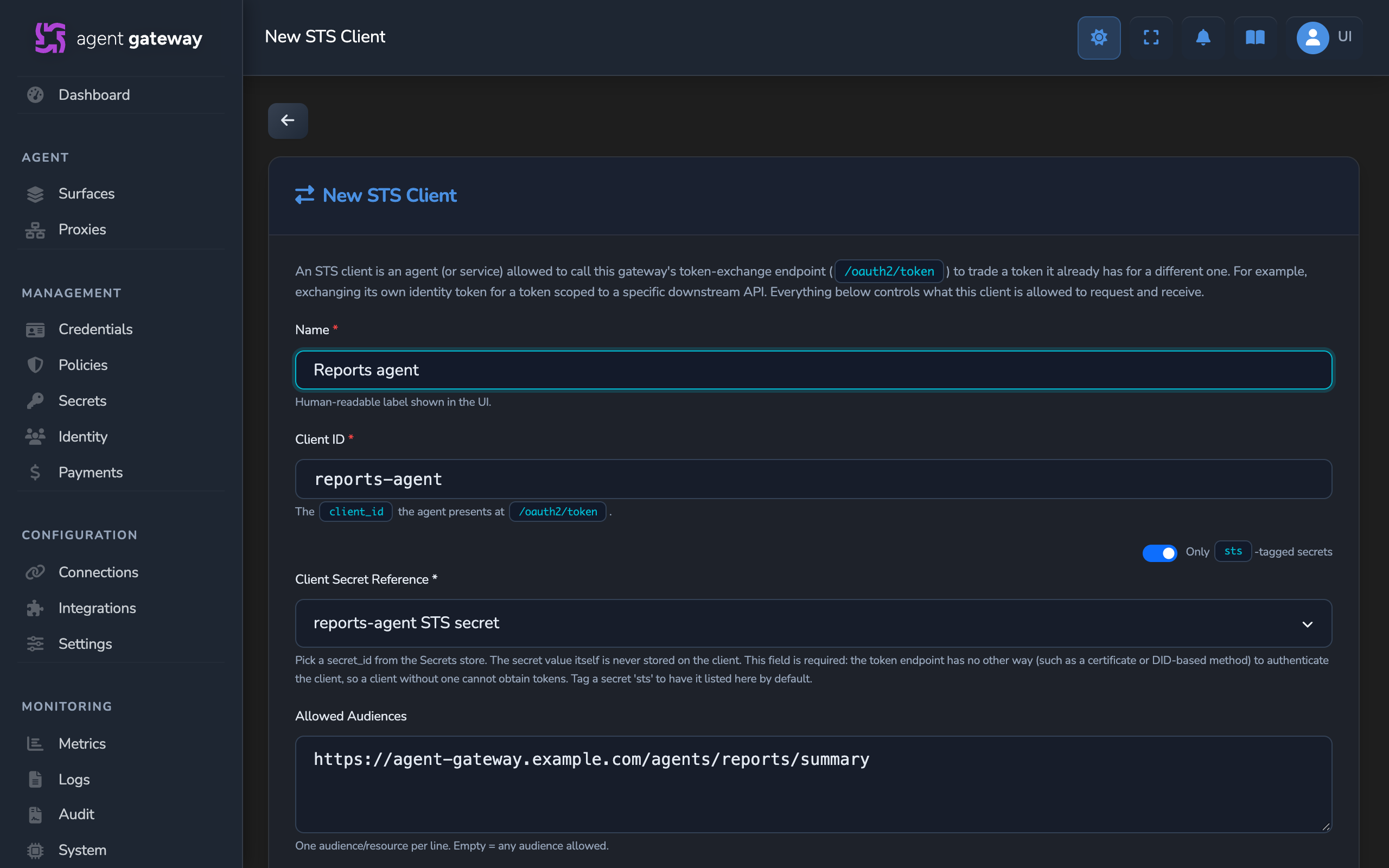
The new client appears in the STS Clients list with a Delegation badge and a Secret badge. Every field is described in STS Clients.
Look up the gateway’s issuer and keys
Request the gateway’s authorization server metadata:
curl "https://<GATEWAY_HOST>/api/.well-known/oauth-authorization-server"The response names the gateway as the token issuer and lists where its keys are published, for example:
{
  "issuer": "<GATEWAY_DID>",
  "token_endpoint": "https://<GATEWAY_HOST>/api/oauth2/token",
  "jwks_uri": "https://<GATEWAY_HOST>/api/oauth2/jwks.json",
  "grant_types_supported": [
    "urn:ietf:params:oauth:grant-type:token-exchange",
    "urn:ietf:params:oauth:grant-type:jwt-bearer"
  ],
  "token_endpoint_auth_methods_supported": ["client_secret_basic", "client_secret_post"],
  "subject_token_types_supported": [
    "urn:ietf:params:oauth:token-type:jwt",
    "urn:ietf:params:oauth:token-type:id_token",
    "urn:ietf:params:oauth:token-type:id-jag",
    "urn:affinidi:params:oauth:token-type:vp"
  ],
  "requested_token_types_supported": [
    "urn:ietf:params:oauth:token-type:access_token",
    "urn:ietf:params:oauth:token-type:jwt",
    "urn:ietf:params:oauth:token-type:id-jag"
  ]
}
Copy the issuer value, which is the gateway’s DID, and the jwks_uri. Use the token_endpoint value in the requests below.
Trust the gateway’s tokens on the receiving surface
- On the Credentials page, open the JWT Verification tab and select Add Strategy.
- Set Expected Issuer to the
issuervalue exactly. Under JWKS Source, select Remote URL, set JWKS URI to thejwks_urivalue, and select Check URI. Select Create Strategy. - Open the receiving surface on the canvas. Add or select its Caller Context element. On the method row, select Configure ↗, and check that Authentication Method is JWT Bearer, the default for a new Caller Context.
- In JWT Verification Strategy, select the new strategy. In Accepted Audiences, add the surface’s Entry point URL and press Enter.
- Add a Policy element that allows only callers whose token validated, as in Validate bearer tokens on a surface, step 3.
- Select the save icon (tooltip: Save changes) on the canvas.
Any other service can accept the same tokens by checking the signature against the jwks_uri keys, the iss claim against the gateway’s DID, and the aud claim against its own identifier.
Exchange the agent’s token
Have the agent send its subject token to the token endpoint, authenticating with its Client ID and secret. The secret is read from an environment variable that your secrets manager sets:
curl -X POST "https://<GATEWAY_HOST>/api/oauth2/token" \
  -u "reports-agent:${STS_CLIENT_SECRET}" \
  --data-urlencode "grant_type=urn:ietf:params:oauth:grant-type:token-exchange" \
  --data-urlencode "subject_token=<SUBJECT_TOKEN>" \
  --data-urlencode "subject_token_type=urn:ietf:params:oauth:token-type:jwt" \
  --data-urlencode "audience=<ENTRY_POINT_URL>" \
  --data-urlencode "scope=reports.read"
For an OIDC ID token, set subject_token_type to urn:ietf:params:oauth:token-type:id_token. The token endpoint also accepts the credentials as client_id and client_secret form parameters instead of the -u header.
The gateway answers with HTTP 200 and the exchanged token:
{
  "access_token": "eyJhbGciOiJFZERTQSIs...",
  "issued_token_type": "urn:ietf:params:oauth:token-type:access_token",
  "token_type": "Bearer",
  "expires_in": 300,
  "scope": "reports.read"
}
The token lasts 300 seconds, or less when Max Token TTL (seconds) is lower or the subject token expires sooner. Request a new one when it expires.
Call the surface with the exchanged token
Send the access_token value as a bearer token to the receiving surface, with the request below for the surface’s protocol.
curl -X POST "<ENTRY_POINT_URL>" \
  -H "Authorization: Bearer <ACCESS_TOKEN>" \
  -H "Content-Type: application/json" \
  -H "Accept: application/json, text/event-stream" \
  -d '{"jsonrpc":"2.0","id":1,"method":"initialize","params":{"protocolVersion":"2025-06-18","capabilities":{},"clientInfo":{"name":"curl","version":"1.0"}}}'
curl -X POST "<ENTRY_POINT_URL>" \
-H "Authorization: Bearer <ACCESS_TOKEN>" \
-H "Content-Type: application/json" \
-H "A2A-Version: 0.3" \
-d '{"jsonrpc":"2.0","method":"message/send","id":1,"params":{"message":{"messageId":"test-1","role":"user","parts":[{"kind":"text","text":"Hello"}]}}}'Expected: the surface forwards the request and returns your managed agent’s response.
Optional: hand off identity with an ID-JAG
An ID-JAG is a short-lived, single-use grant that asserts the subject was already verified. The agent requests one from the gateway and redeems it later, as the same STS client, for an access token. Redeeming can only narrow the grant’s scopes. In the commands below, <TOKEN_ENDPOINT> is the token_endpoint from step 3.
Allow the client to obtain ID-JAGs
On the STS Clients tab, open the client, turn on Allow issuing ID-JAG, and select Save. The client’s row then shows an ID-JAG badge.
Request an ID-JAG
Send the token exchange request with requested_token_type set to ID-JAG and the gateway’s DID, the issuer from step 3, as the audience. The gateway always accepts its own DID as an audience, so it needs no entry in Allowed Audiences.
curl -X POST "<TOKEN_ENDPOINT>" \
  -u "reports-agent:${STS_CLIENT_SECRET}" \
  --data-urlencode "grant_type=urn:ietf:params:oauth:grant-type:token-exchange" \
  --data-urlencode "subject_token=<SUBJECT_TOKEN>" \
  --data-urlencode "subject_token_type=urn:ietf:params:oauth:token-type:jwt" \
  --data-urlencode "requested_token_type=urn:ietf:params:oauth:token-type:id-jag" \
  --data-urlencode "audience=<GATEWAY_DID>" \
  --data-urlencode "scope=reports.read"
Expected: HTTP 200 with the grant in access_token:
{
  "access_token": "eyJhbGciOiJFZERTQSIs...",
  "issued_token_type": "urn:ietf:params:oauth:token-type:id-jag",
  "token_type": "N_A",
  "expires_in": 120,
  "scope": "reports.read"
}
Redeem the ID-JAG for an access token
Within its lifetime, send the ID-JAG as the assertion of a JWT bearer grant, with the same client credentials and the receiving surface as the audience:
curl -X POST "<TOKEN_ENDPOINT>" \
  -u "reports-agent:${STS_CLIENT_SECRET}" \
  --data-urlencode "grant_type=urn:ietf:params:oauth:grant-type:jwt-bearer" \
  --data-urlencode "assertion=<ID_JAG>" \
  --data-urlencode "audience=<ENTRY_POINT_URL>"
Expected: HTTP 200 with an access token shaped like the one in step 5, carrying the scopes of the grant. It expires no later than the ID-JAG would have, so expires_in is at most 120 seconds. Call the surface with it as in step 6.
Confirm
In the commands below, <TOKEN_ENDPOINT> is the token_endpoint from step 3.
Test 1: token exchange returns a token that names the agent as the actor
Decode the payload of the access_token from step 5 with a JWT decoder that runs locally. Expected claims, with your own values:
{
  "iss": "<GATEWAY_DID>",
  "sub": "<SUBJECT_FROM_YOUR_TOKEN>",
  "aud": "<ENTRY_POINT_URL>",
  "client_id": "reports-agent",
  "scope": "reports.read",
  "act": { "sub": "reports-agent" }
}
The payload also carries iat, exp, and jti. The act claim records the STS client as the party that acted for the subject, because Allow impersonation is off.
Test 2: exchange for an unlisted audience returns invalid_target
curl -X POST "<TOKEN_ENDPOINT>" \
  -u "reports-agent:${STS_CLIENT_SECRET}" \
  --data-urlencode "grant_type=urn:ietf:params:oauth:grant-type:token-exchange" \
  --data-urlencode "subject_token=<SUBJECT_TOKEN>" \
  --data-urlencode "subject_token_type=urn:ietf:params:oauth:token-type:jwt" \
  --data-urlencode "audience=https://payroll.example.com"
Expected: HTTP 400 with this body:
{
  "error": "invalid_target",
  "error_description": "audience not allowed: https://payroll.example.com"
}
Test 3: request to the surface without a token returns 401
Repeat the step 6 request without the Authorization header.
Expected: HTTP 401 with “Caller credential missing or invalid”, because the surface refuses a missing credential before its policy runs. On a surface with Public access on, or one created before version 1.0.4 that hasn’t been closed with Close Access Point, the policy refuses the request with 403 instead.
Test 4: second redemption of the same ID-JAG returns invalid_grant
If you issued an ID-JAG, repeat the redemption request with the same <ID_JAG>.
Expected: HTTP 400 with "error": "invalid_grant" and "error_description": "ID-JAG has already been redeemed".
Troubleshooting
Each refusal from the token endpoint is a JSON body with an error code and an error_description. The table lists the descriptions the gateway returns.
| Symptom | Likely cause | Fix |
|---|---|---|
401 invalid_client: client authentication required. | The request carries no Client ID. | Send the credentials with -u, or as client_id and client_secret form parameters. |
401 invalid_client: unknown client or invalid client credentials. | The Client ID matches no STS client, the client was deleted, or the secret is wrong. | Check the Client ID on the STS Clients tab, and check that the agent holds the current value of the referenced secret. |
429 temporarily_unavailable: too many token requests; retry later. | Repeated failed client authentications from this Client ID at one source address, or from that address. | Wait for the number of seconds in the Retry-After header, then retry with correct credentials. |
500 server_error. | The secret named in Client Secret Reference no longer exists. | Create the secret again, or edit the client and select an existing one. |
400 invalid_request: cannot verify token of type …. | subject_token_type is a type the gateway cannot verify, such as urn:ietf:params:oauth:token-type:access_token. | Send a JWT access token as urn:ietf:params:oauth:token-type:jwt, or an ID token as urn:ietf:params:oauth:token-type:id_token. |
400 unauthorized_client: client may not present subject_token_type …. | Allowed Subject Token Types does not include the type sent. | Tick the type on the client, or send a token of a type it allows. |
400 invalid_grant: no verification strategy for issuer …. | No JWT verification strategy has an Expected Issuer equal to the iss of the subject token, actor token, or assertion. | Add a strategy for that issuer, written exactly as the token’s iss, including any trailing slash. |
400 invalid_grant: assertion verification failed: …. | The subject token’s signature does not match the strategy’s keys, or the token has expired. | Check the strategy’s JWKS URI or keys, and request a fresh subject token. |
400 invalid_grant: subject_token audience is not accepted by this connection. | Allowed Subject-Token Audiences is set, and the subject token’s aud names none of its entries. | Add the subject token’s audience to the list, or clear the list. |
400 invalid_target: audience not allowed: … or audience or resource is required. | The requested audience is not in Allowed Audiences, or the request names no audience while the list is set. | Send an audience that matches an entry exactly, or add it to the client. |
400 invalid_scope: scope not permitted: …. | A requested scope is not in Allowed Scopes. | Request only listed scopes, or add the scope to the client. |
400 unauthorized_client with a policy reason, or issuance blocked by gateway policy. | The gateway’s own OPA policy denies the exchange. STS requests reach that policy with their details under input.sts. | Allow the exchange in the gateway policy. See OPA policies. |
400 unauthorized_client: client is not permitted to obtain an ID-JAG. | Allow issuing ID-JAG is off on the client. | Turn it on and save the client. |
400 unauthorized_client: client may not present subject_token_type urn:ietf:params:oauth:token-type:id-jag, or invalid_request: a subject token issued by this gateway must be one of its access tokens; redeem an ID-JAG through jwt-bearer. | The agent sent a gateway-issued ID-JAG as a token exchange subject. | Redeem the ID-JAG with the jwt-bearer grant instead. |
400 invalid_grant: ID-JAG was not issued to this client, ID-JAG has expired, or ID-JAG has already been redeemed. | Another client tried to redeem the grant, its 120 seconds passed, or it was already used. | Redeem each ID-JAG once, as the client that requested it, soon after issuing it. Request a new one when needed. |
Check URI does not confirm the gateway’s jwks_uri. | The URI was mistyped, or the gateway cannot reach it. | Copy jwks_uri exactly from the metadata. Otherwise select Static Keys and paste the keys array from the jwks_uri response, and update it if the gateway’s key changes. |
The surface returns 401 for a freshly exchanged token. | The strategy’s Expected Issuer is not the gateway DID exactly, the surface’s Accepted Audiences does not list the token’s aud, or the token expired. A surface with Public access on, or one created before version 1.0.4 that is still open, returns 403 instead. | Copy issuer from the metadata into the strategy, add the audience you requested to Accepted Audiences, and exchange a new token. |
The surface returns 403 for a valid exchanged token. | The surface’s policy denies the token’s claims, for example its scopes. | Check the Policy element’s rules against the token’s claims. |
Next steps
- Use JWT claims to control access to a surface: allow or deny callers based on the exchanged token’s subject, scopes, or other claims.
- Token exchange and ID-JAG: how delegation chains and ID-JAG redemption work.
Related
- STS Clients: every STS client field and how a client authenticates.
- JWT Verification Strategies: the checks a strategy runs on every token.
- Caller Context element: the JWT Bearer settings on the receiving surface.
- Secrets: creating, tagging, and rotating the client secret.
Glad to hear it. Thanks for letting us know.
Sorry to hear that. Thanks for letting us know.
Still stuck? Ask the community on Discord or contact us.