Enable authorization server discovery for MCP clients
This guide turns on authorization server discovery for an MCP surface whose Caller Context validates JWT bearer tokens from your identity provider.
With discovery on, the gateway publishes protected resource metadata (RFC 9728) that names your authorization server, and answers a request without a valid token with HTTP 401 and a challenge that points at that metadata. An MCP client that supports MCP authorization follows the challenge, signs the user in at your authorization server, and retries with a token issued for the surface. The MCP client and your authorization server handle the sign-in, and the gateway advertises the server and checks the token on each request. For background, see How MCP clients find where to sign in.
Without discovery, a standard MCP client has no way to learn which authorization server issues tokens for the surface, so each user has to obtain a token separately and paste it into the client. A closed Access Point already refuses a missing or invalid token with 401, but without discovery that refusal names no authorization server.
Use this guide when:
- Callers connect to an MCP surface with off-the-shelf MCP clients rather than your own code.
- Users sign in at an authorization server you run, such as your corporate identity provider.
- You want a refused caller’s MCP client to learn where to get a token, from the
401challenge and the metadata it points to.
When every caller is a service that already holds a token for the surface, validating bearer tokens on the surface is enough.
Prerequisites
- You are signed in to the Agent Gateway dashboard with permission to edit surfaces.
- An MCP surface whose Entry point URL is an
httpsURL. To create one, follow the MCP surface starter. - A JWT verification strategy whose Expected Issuer is your authorization server’s issuer, with that server’s signing keys. Create it as in Validate bearer tokens on a surface.
- An authorization server that issues JWT access tokens whose
audclaim is the resource the MCP client asks for: the surface’s Entry point URL. MCP clients name it in theresourceparameter of the token request (RFC 8707), and some servers need extra configuration to copy that value intoaud. - An MCP client that supports MCP authorization, registered with your authorization server if the server requires it.
Steps
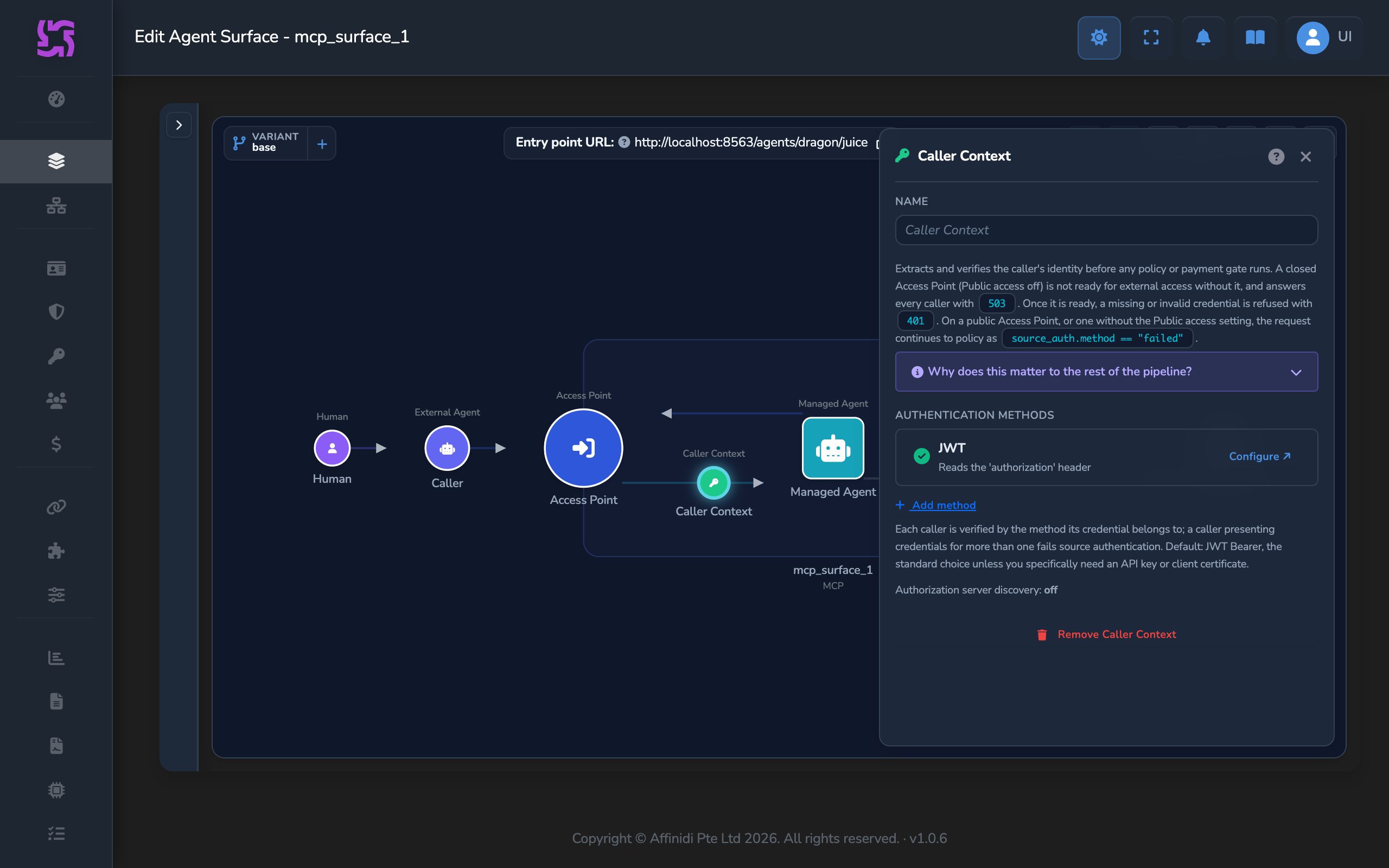
Open the Caller Context editor
- Open the MCP surface on the canvas.
- If the surface has no Caller Context element yet, drag one from the palette onto the surface.
- Select the Caller Context node. Under Authentication methods, on the first method row, select Configure ↗ to open the fullscreen editor on that method.
- In Authentication Method, check that JWT Bearer is selected. A new Caller Context starts with one JWT Bearer method.
- In JWT Verification Strategy, select the strategy for your authorization server.
Turn on authorization server discovery
Turn on the Authorization server discovery switch. It appears in the settings of the first method only.
If the Caller Context has more than one method, the first method stays primary while discovery is on, and the other methods use another kind of credential, such as an API key.
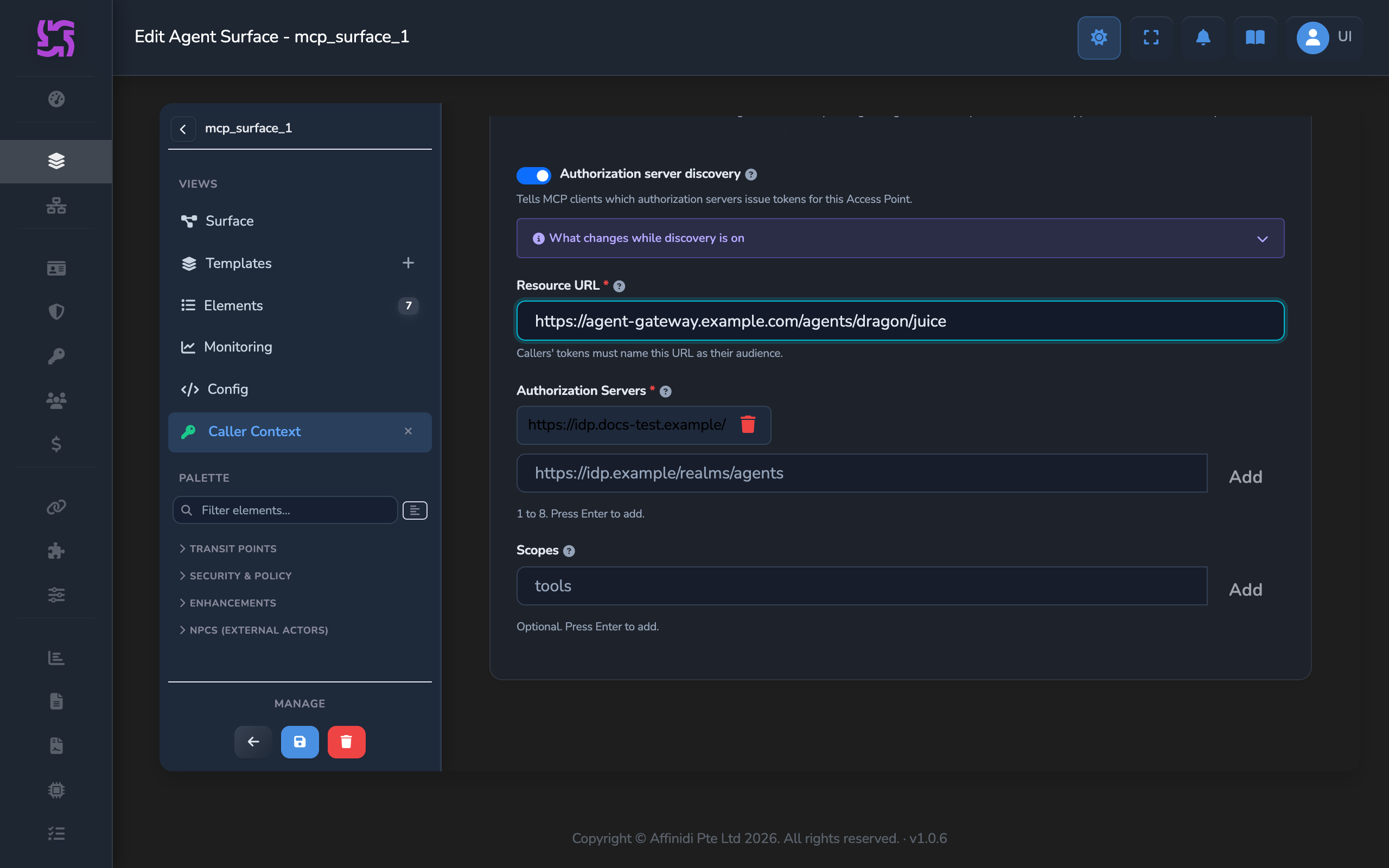
The editor then empties Accepted Audiences, fixes Token Header to Authorization and Scheme to Bearer, and turns off Forward token header to managed agent. These controls stay locked while discovery is on, because the token’s audience must be the resource URL and MCP forbids passing the caller’s token to the managed agent.
Set the resource URL
Check that Resource URL holds the surface’s Entry point URL. The editor fills it in from the Access Point’s listener and route. If you changed it, select Use listener URL to restore that value.
The path of the resource URL must be the Access Point route exactly, with no extra path, query, or fragment.
Confirm the authorization server
Check that Authorization Servers lists one entry: the Expected Issuer of the selected strategy, exactly as the strategy shows it. The editor adds it when you turn discovery on.
The strategy accepts tokens from that issuer only, so the save is refused when the list names any other server.
Add scopes
Optionally, type each OAuth scope your MCP clients should request in Scopes and press Enter. The gateway advertises the scopes to clients but does not check them in the token.
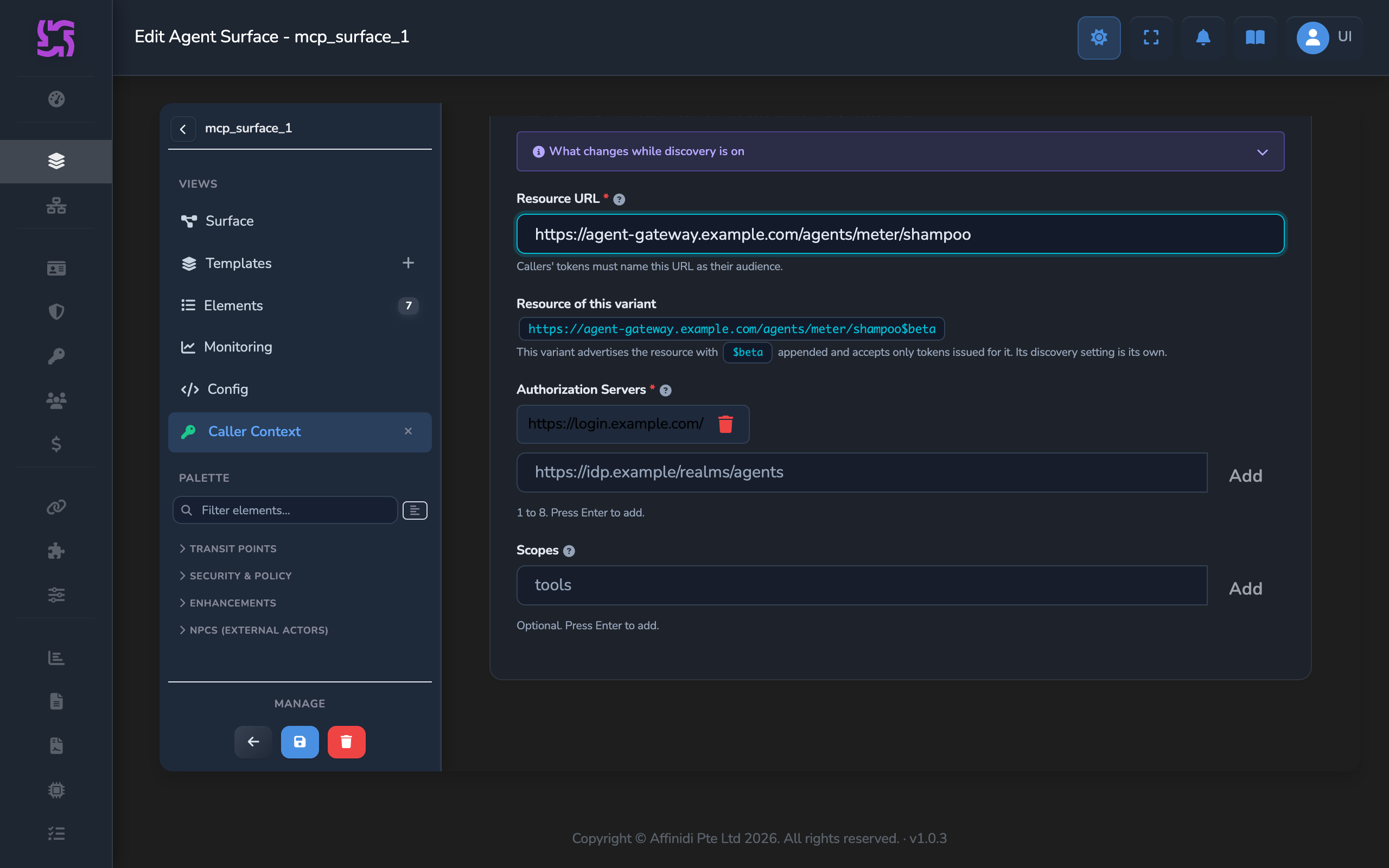
Repeat for each variant
If the surface has variants that callers reach through MCP clients, switch to each one with the variants widget and repeat these steps in that variant’s Caller Context. Each variant advertises its own resource, shown under Resource of this variant: the Resource URL with $<alias> appended. Tokens for a variant must name that resource as their audience. See Variants.
Save the surface
Close the editor and select the save icon (tooltip: Save changes) on the canvas.
Confirm
In the commands below, replace <ENTRY_POINT_URL> with the surface’s Entry point URL, and <GATEWAY_ORIGIN> and <ROUTE> with its origin and path. For https://gateway.example/mcp/alpha, the origin is https://gateway.example and the route is /mcp/alpha.
Test 1: metadata request returns the protected resource document
curl "<GATEWAY_ORIGIN>/.well-known/oauth-protected-resource<ROUTE>"Expected: HTTP 200 with a JSON document that names your resource and authorization server, for example:
{
  "resource": "https://gateway.example/mcp/alpha",
  "authorization_servers": ["https://idp.example/realms/agents"],
  "bearer_methods_supported": ["header"],
  "scopes_supported": ["tools"]
}
scopes_supported appears only when you added scopes.
Test 2: request without a token returns 401 with a challenge
curl -i -X POST "<ENTRY_POINT_URL>" \
  -H "Content-Type: application/json" \
  -H "Accept: application/json, text/event-stream" \
  -d '{"jsonrpc":"2.0","id":1,"method":"initialize","params":{"protocolVersion":"2025-06-18","capabilities":{},"clientInfo":{"name":"curl","version":"1.0"}}}'
Expected: HTTP 401 with a header like the following, where scope appears only when you added scopes:
WWW-Authenticate: Bearer resource_metadata="https://gateway.example/.well-known/oauth-protected-resource/mcp/alpha", scope="tools"Test 3: MCP client signs in and lists tools
Add the Entry point URL to an MCP client that supports MCP authorization, such as MCP Inspector, and connect.
Expected: the client opens your authorization server’s sign-in page. After you sign in, the client connects and lists the surface’s tools.
Troubleshooting
| Symptom | Likely cause | Fix |
|---|---|---|
| Save is refused with a message to list only one issuer, the one the JWT verification strategy trusts. | Authorization Servers names a server other than the strategy’s Expected Issuer, or names more than one. | Remove every entry except the strategy’s Expected Issuer, written exactly as the strategy shows it. |
| Save is refused because the resource path must be the Access Point route. | Resource URL has a different path from the Access Point route. | Select Use listener URL, or correct the path so it matches the route exactly. |
| Save is refused because the MCP resource is already served by another endpoint. | Another surface or MCP Proxy already serves the same resource URL. | Set Resource URL to this surface’s own Entry point URL. |
| Resource URL is empty when you turn discovery on. | The Access Point’s listener is not an https URL, so the editor has no URL to suggest. | Use an Access Point on an https listener, then enter its Entry point URL. |
The client signs in, but every request still returns 401 with error="invalid_token". | The token’s aud claim is not the resource URL advertised for the route called, or the token’s issuer or signature does not match the strategy. | Configure your authorization server to issue tokens whose aud is the resource URL, including $<alias> for a variant. Check that the strategy’s Expected Issuer and keys match the server. |
| A freshly issued token is refused, then accepted a minute or two later. | The token’s nbf (not before) time is more than 60 seconds ahead of the gateway’s clock. | Correct the authorization server’s clock, or have it set nbf to the issue time. |
The metadata request returns 404. | The path does not match the route, the surface is not active, or the variant is disabled. | Copy the route from the Entry point URL, append $<alias> for a variant, and check that the surface and variant are enabled. |
A caller reaching the surface through a connected gateway gets 401 with no resource_metadata. | Over Fabric, the sending gateway removes the caller’s own token, so the receiving surface has no token to check and nothing for the client to sign in to. | Point MCP clients at a surface on the gateway they connect to directly, and configure discovery there. |
Next steps
- Use JWT claims to control access to a surface: allow or deny signed-in users based on their group, tenant, or other token claims.
- Control MCP tool access with per-tool policies: restrict which tools each signed-in user can call.
Related
- Caller Context element: every authorization server discovery field and rule.
- JWT Verification Strategies: the checks every token passes.
- Variants: the resource each variant advertises.
- MCP protocol: how the gateway handles MCP traffic.
Glad to hear it. Thanks for letting us know.
Sorry to hear that. Thanks for letting us know.
Still stuck? Ask the community on Discord or contact us.