Surfaces
An Agent Surface, referred to simply as a surface, is the single top-level configuration and runtime unit that represents one managed agent in Agent Gateway.
It brings together every concern the gateway manages for that agent: how callers reach it, where traffic is forwarded, what identity the agent carries, which policies govern flow, and what outbound capability the agent has.
What surfaces are
A single managed backend can be exposed through one or more surfaces, depending on the security, policy, and routing posture you need.
Each surface owns and defines:
- Exactly one Access Point: the inbound entry point for callers.
- Exactly one External Target: where the gateway forwards requests.
- Zero or more Transit Points: outbound routes initiated by the managed agent.
- Identity slots evaluated during request and response processing.
- An optional set of Surface Variants.
Surface structure at runtime
Surfaces are pre-resolved at write time into immutable in-memory snapshots. This means request handling does not pay per-request configuration resolution overhead for routing decisions.
When a surface configuration changes, the gateway applies updates through hot reload, without restarting internal request-serving processes.
Visual composition and request flow
You build surfaces on a canvas in the surface builder. The canvas represents the full lifecycle of a request: from the caller arriving at the Access Point, through identity and policy processing, to forwarding at the External Target.
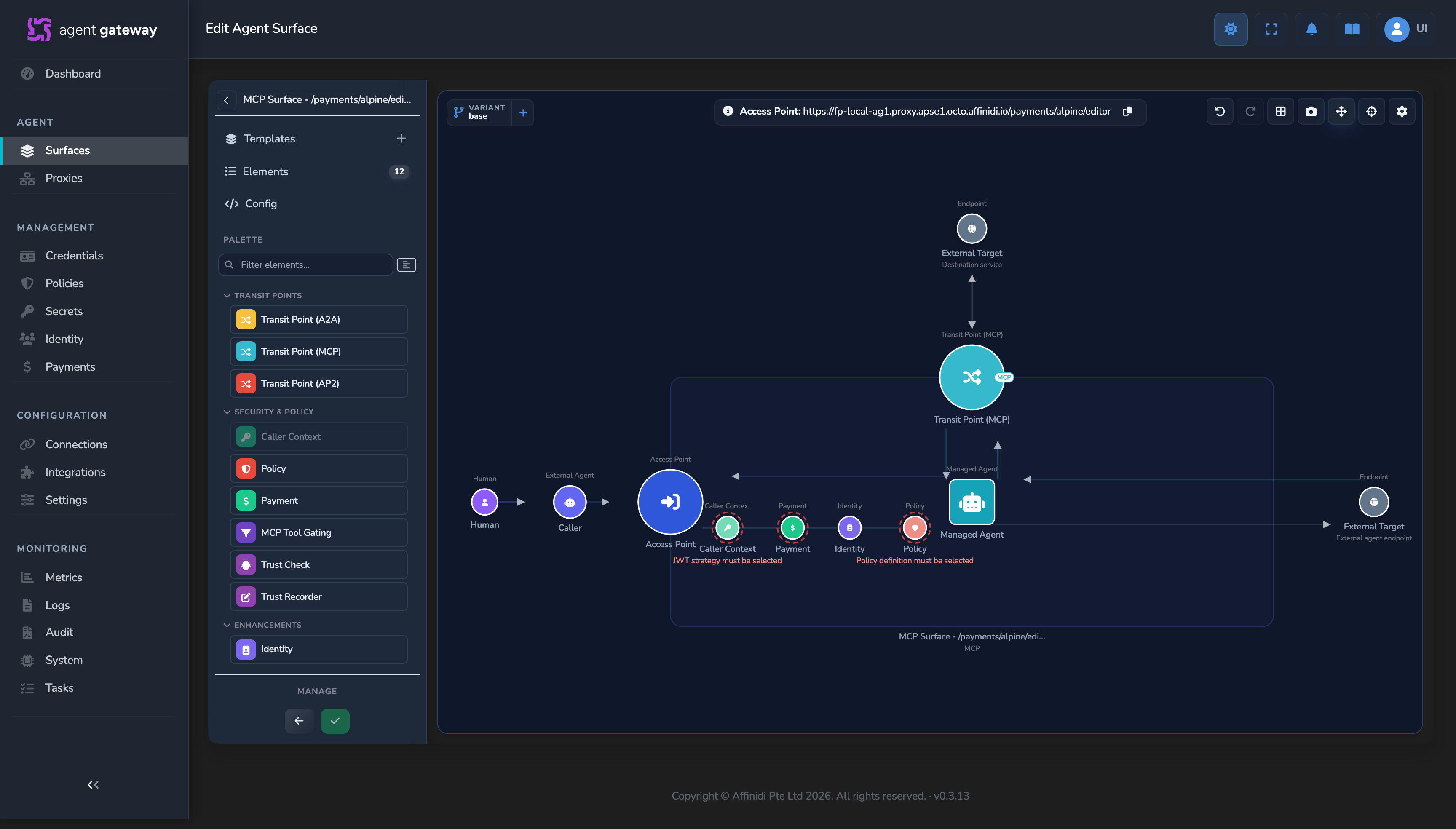
Each inbound request follows this sequence:
- A caller sends traffic to the surface Access Point.
- Caller context extracts user claims from the configured IdP context and makes them available to the pipeline.
- Identity processing derives or resolves the managed agent identity for policy and trust decisions.
- Policy controls evaluate request context, identity attributes, and governance rules.
- The request is forwarded to the External Target, which can be another agent, an MCP server, or a REST backend.
When surfaces are connected through gateway-to-gateway routing, identity context can transit across trust boundaries, enabling remote policy enforcement based on verifiable identity claims and issuer root-of-trust context.
Elements with missing configuration are highlighted on the canvas so you can identify what still needs to be completed.
Palette-driven capabilities
The surface builder provides a palette of prebuilt components in the left-hand sidebar. Drag an item onto the canvas to add a capability without hand-authoring configuration. You can also save a selection of elements as a partial template using Create template from canvas, and apply it to another surface without replacing its full configuration.
Protocol support
The gateway supports multiple communication protocols. When you create a new surface, you choose from the available starter templates. The protocols available at surface creation are A2A and MCP.
When you add a Transit Point to a surface from the palette, additional protocols become available for the outbound route.
A surface can use one protocol for its inbound Access Point and a different protocol for outbound Transit Points.
Templates and reuse
A configured surface can be saved as a reusable template, carrying its canvas configuration plus metadata (name, description, and priority) forward so it is available as a starting point when creating a new surface. A new surface can start from a prebuilt template, a saved custom template, or from scratch.
Editing and controls
Beyond adding and configuring elements, the canvas exposes a few supporting controls: an auto-layout function that realigns and organises every element, an undo action that reverts to the last saved state, an elements list that flags any element with missing configuration, and a config view that shows the surface as editable JSON kept in sync with the canvas.
Surface Variants
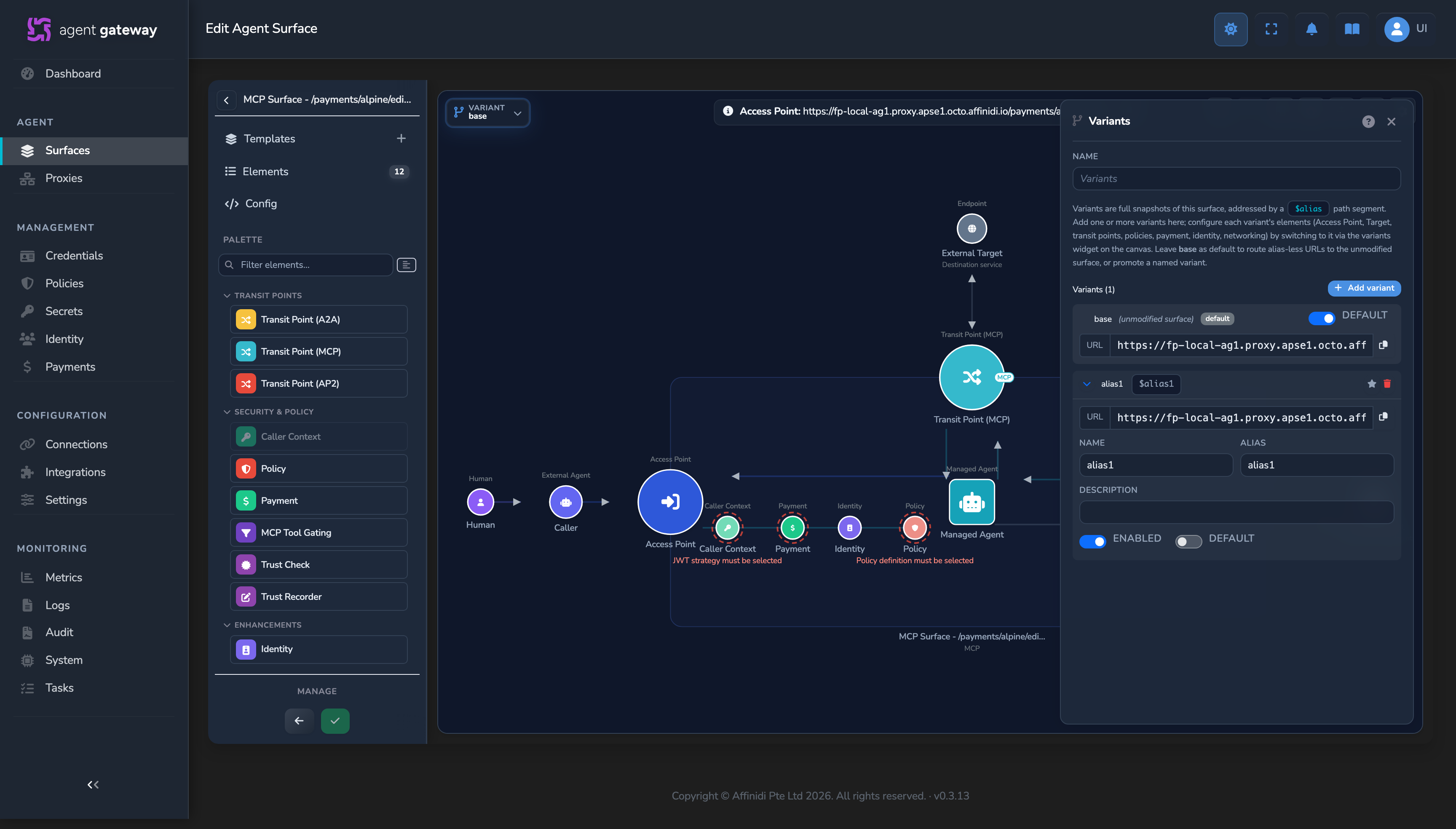
A Surface Variant is a named snapshot of a surface, selected at request time through a route-level alias, without creating a separate surface record. Variants let you test different configurations against the same Access Point listener: policy, identity, target endpoints, networking, and any other canvas element can differ between variants.
This keeps related postures in one surface lifecycle instead of duplicating records. You can maintain multiple variants, switch defaults, and preserve a single audit trail for the underlying surface.
For implementation workflow, see the surfaces guides and the surface builder variant controls.
How listener URLs are formed
Every Access Point is addressed by its Entry point URL, which the gateway assembles from three fields set in the surface canvas.
| Field | UI control | Example |
|---|---|---|
| Listen Address (Host:Port) | Dropdown: one of the gateway’s configured external URLs. Hidden when the gateway has a single address, as on Affinidi-hosted gateways. | https://gateway.example.com |
| Surface Prefix | Dropdown: one of the gateway’s configured route prefixes, for example /agents, /routes | /agents |
| Custom Path | Free-text field appended after the prefix. | sales-agent |
The route stored on the Access Point is {prefix}/{custom_path}, and the Entry point URL the caller dials is {listen_address}{route}. The surface builder shows it at the top of the Access Point panel and in a banner on the canvas:
https://gateway.example.com/agents/sales-agentWhen a Surface Variant is configured, its alias is appended directly to the route with no separator slash:
https://gateway.example.com/agents/sales-agent$stagingCallers choose a variant by including the $ALIAS suffix. Requests without a suffix go to the base surface, or to the variant promoted as the default when one is set. All variants share the same listener. Only the routing behaviour differs.
The per-variant copy-ready URL is shown in the variant panel on the surface canvas.
Related
- Surface routing model: Detailed explanation of Access Point, External Target, Transit Point, and Listener responsibilities.
- Create your first surface: Build a surface and send a test request.
- Protocols: Understand communication patterns supported by the gateway.
- Agent identity and DIDs: Learn how identity derivation works within request flows.
Glad to hear it. Thanks for letting us know.
Sorry to hear that. Thanks for letting us know.