OPA policies
Policies are the gateway’s decision engine for request access. They define who may do what, and under which conditions, and determine whether traffic is allowed, denied, or subjected to extra checks.
What a policy is
A policy is a rule set written in Rego and evaluated by the gateway’s built-in policy engine. Agent Gateway embeds regorus (Rust-native OPA) in-process, so policy decisions run directly in the request path with no external OPA service.
Every meaningful request is evaluated against applicable policies before processing continues.
A policy can be enabled or disabled at any time. An enabled policy is evaluated on all matching requests. A disabled policy is skipped entirely without deleting the rule.
Policy scopes
OPA policy is organised into two scopes, each presented as its own tab in the Policies page.
| Scope | What it controls | Runs | Effect of denial |
|---|---|---|---|
| Gateway | Cluster-wide rules applying to all traffic. | First, after authentication. | Final. Cannot be overridden by surface policy. |
| Agent Surface | Rules attached to a specific surface: inbound requests, outbound target behaviour, and responses. | After gateway policy. | Denies the request for that surface only. |
Use gateway scope for non-negotiable organisation guardrails. Use surface scope for surface-specific refinements.
The Policies page has a third tab, Paywall, for payment policy. It is a separate concern from the Gateway/Agent Surface OPA scope model described here; see Payments.
A Gateway or Agent Surface policy can also be enforced appliance-wide: switched on for every gateway or every surface at once from the Policies list, instead of, or in addition to, being attached to one object at a time. See How appliance-wide enforcement extends a scope’s reach below.
How appliance-wide enforcement extends a scope’s reach
Any Gateway or Agent Surface policy definition can be enforced appliance-wide, on every gateway or every surface at once, from the Policies list rather than attaching it to each object individually. Turning this on for a definition does not change its package or the shape of input it evaluates: an appliance-wide Gateway policy still uses package gateway.policy, and an appliance-wide Agent Surface policy still uses package surface.policy. What changes is reach and evaluation order. Appliance-wide enforcement runs first within its plane, deny-overrides, ahead of the individual gateway’s or surface’s own policy, so a gateway or surface cannot opt out of an appliance-wide deny through its own configuration.
Appliance-wide enforcement supports a monitor mode. A monitored assignment is evaluated and its would-be decision is recorded, but it never blocks a request, which makes it a safe way to observe what a new organisation-wide rule would deny before switching it on for real. An assignment that is fully enforced, not monitor-only, and can no longer be resolved, because its underlying policy was disabled, deleted, or no longer compiles, fails its entire plane closed: every gateway or every surface in that plane denies matching traffic until the assignment is fixed or removed.
For the exact steps, see Apply OPA policies to your gateway and surfaces. For field-level detail, see OPA policies reference.
What a policy can inspect
When a policy runs, it receives structured context in the input document.
| Context | What it contains |
|---|---|
| HTTP details | Method, path, and request headers. |
| Direction and parties | Inbound or outbound. Source and target gateway node IDs (source_id, target_id), used to identify which gateway or endpoint originated and is receiving the request. |
| Surface context | Surface identifier, name, and active variant when relevant. |
| Caller identity | Authenticated caller context. The method field identifies the auth variant: jwt_bearer (subject and claims), api_key (key name), did_auth (DID), or mtls (principal and certificate fields). |
| Protocol context | MCP method, tool name, resource URI, and prompt name on MCP surfaces. A2A message and method on A2A surfaces. |
| Agent context | Agent card and trust registry result, when Extract Trust Registry Data is enabled. |
| Payment context | Payment gate state and metadata, when a Payment element is configured. |
See the OPA policies reference for the complete input document schema and all namespace paths.
Policies in the UI
Within each scope tab, policies are listed with their name, description, a preview of the first rule line, status (Enabled or Disabled), and timestamps. Policy edits take effect on subsequent requests immediately, with no gateway restart required.
Where policies fit in the gateway
Policy evaluation is woven through the request pipeline.
Standard evaluation order
On inbound flows, gateway scope is evaluated first, after authentication. Surface scope is evaluated later, before forwarding. A denial at either stage is final.
This layered model lets you enforce non-negotiable controls at gateway scope while delegating surface-specific refinements to individual surfaces.
MCP tool policies
MCP surfaces routed through an MCP Proxy support an additional inline policy mechanism called MCP Tool Policies: each entry binds one tool_name to a policy_definition_id, and you can add multiple entries. A Default Tool Policy field evaluates any tool the list does not cover, instead of denying it outright. For where this is configured in the dashboard, see Per-tool policy bindings.
| Scenario | Behaviour |
|---|---|
Non-tools/call method (for example initialize, tools/list) | Not gated. Passes through regardless of the tool policy list. |
tools/call for a tool with no matching entry | Evaluated against Default Tool Policy if one is set. Denied if no default is set and the entry list is non-empty. Allowed if neither a default nor any entry is configured. |
tools/call for a tool with one or more matching entries | Each matching entry is evaluated in declaration order. Entries whose policy definition is disabled are skipped. The first enabled entry returning false denies the request. If all matching entries are skipped (all definitions disabled), the request is allowed. |
This behaviour is identical on the direct surface path and the Gateway Connection path.
MCP Tool Policies are distinct from MCP Tool Gating, a separate firewall element that matches tool names by regular expression rather than binding one policy to one exact tool.
How policy definitions are versioned, tested, and evidenced
Every policy definition the gateway stores is a sequence of immutable versions, not a single record you overwrite. Saving a change to a policy’s Rego body appends a new version and keeps every earlier one. Saving only its name, description, or enabled state updates the current version without creating a new one. Each version is stamped with a content hash, a SHA-256 digest of the policy’s scope and Rego body together, a timestamp, and the username of whoever saved it. A decision made under an earlier version can always be traced back to the exact bytes that were enforced at the time, even after the policy has since been edited.
Before saving a change, you can dry-run the policy currently in the editor, including unsaved edits, against a sample JSON input. The dry run compiles and evaluates the draft in an isolated engine: it never touches the policy engine handling live traffic, and it works whether or not the policy has been attached to a gateway or surface yet. The result shows whether the sample input is allowed or denied, and the version or content hash the dry run evaluated, so you can confirm a change behaves as intended before it goes live.
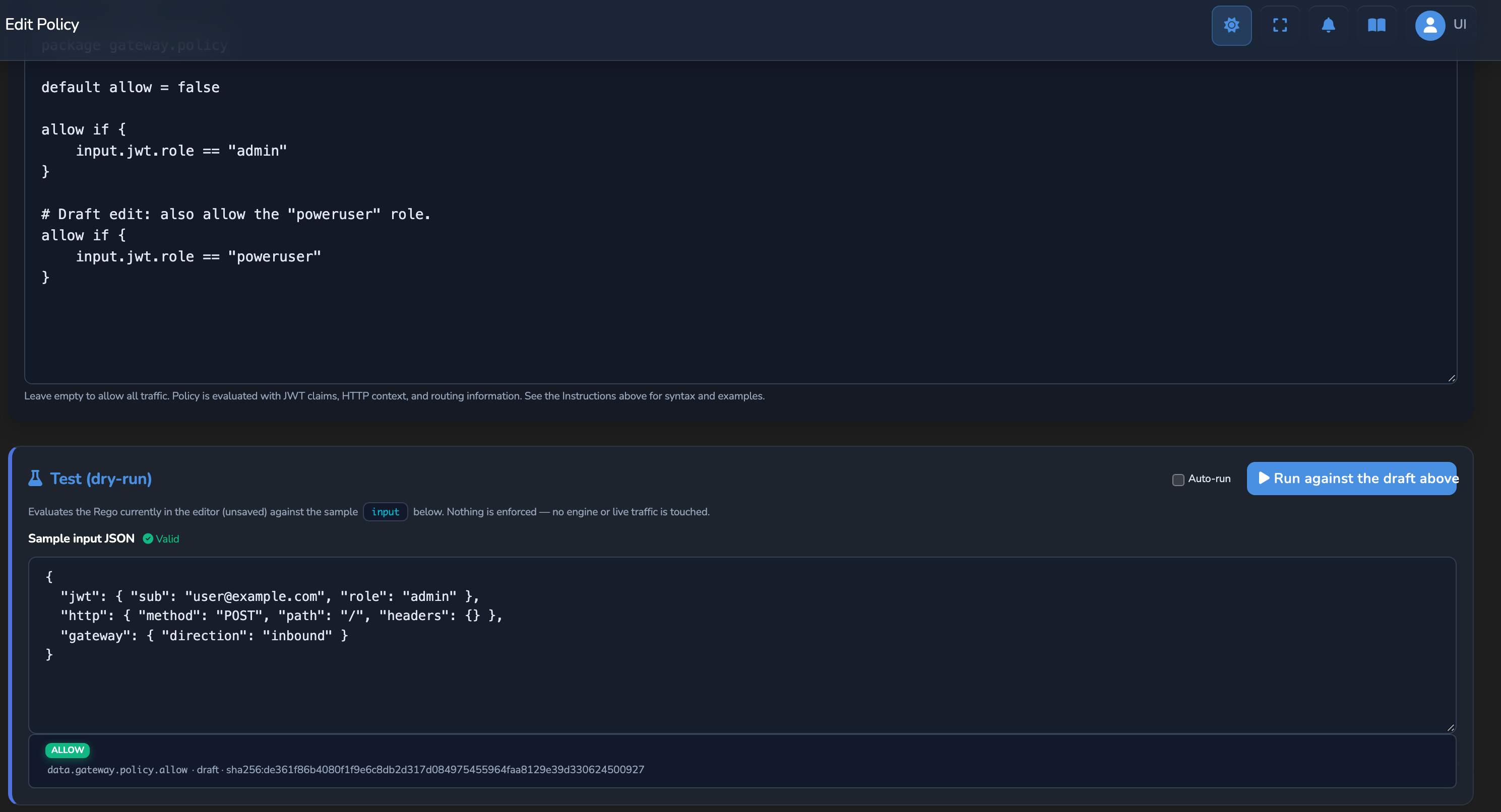
Deleting a policy definition, or turning on appliance-wide enforcement for one, shows a confirmation naming how many gateways or surfaces reference it, so you can judge the impact before committing to a change that removes an access control other objects rely on. A gateway or surface does not fail open when a policy it references disappears. It fails closed, denying the traffic that policy used to evaluate.
The audit trail carries the same version and content-hash evidence for every policy decision it records, gateway, surface, MCP Tool Policies, and response alike, so an auditor can confirm precisely which Rego bytes produced a given allow or deny, as well as which policy was named. This covers a Policy element’s decisions and MCP Tool Policies (the entries above). MCP Tool Gating decisions are also recorded as Policy Decision events, under the policy ID mcp_tool_gating, but their events omit the Rego version and content hash, because the gateway evaluates gates directly rather than as OPA policy decisions. See Audit log for how this evidence appears on the Audit page. For the exact steps to test and delete a policy, see Apply OPA policies to your gateway and surfaces; for field-level detail, see OPA policies reference.
How Rego policies work
A Rego policy is a text file containing a package declaration, an optional default rule, and one or more conditional rules.
package surface.policy            # Package name must match the layer (see above)

default allow = false             # Deny unless a rule explicitly returns true

allow if {                        # Rule: allow when all conditions in the block are true
    input.source_auth.subject     # Condition: authenticated subject must be present
    input.mcp.tool_name           # Condition: a tool name must be present in the request
}
Rego evaluates rules by trying every block that uses the same rule name. If any block evaluates to true, the overall rule is true. Rules are evaluated against the structured input document described below.
Default allow vs default deny
default allow = false    # Safe default: deny all unless explicitly permitted
default allow = true     # Permissive default: allow all unless explicitly denied
Starting with default allow = false and explicitly allowing what you need is safer for production use.
Use cases
MCP surface: restrict tool access by role
A surface serving an MCP tool server needs to give admin users full access and limit all other authenticated users to a safe subset of tools.
The surface-level policy (package surface.policy) checks the JWT role claim and the requested tool name. The gateway populates input.source_auth from a validated bearer token and input.mcp.tool_name from the parsed MCP request body.
package surface.policy

default allow = false

# Admin users can call any tool.
allow if {
    input.source_auth.claims.role == "admin"
    input.mcp.method == "tools/call"
}

# Authenticated users can call safe tools only.
allow if {
    input.source_auth.subject
    input.mcp.method == "tools/call"
    safe_tool(input.mcp.tool_name)
}

# All authenticated users can use non-tool MCP methods.
allow if {
    input.source_auth.subject
    input.mcp.method != "tools/call"
}

safe_tool("search") := true
safe_tool("summarise") := true
safe_tool("translate") := true
A2A surface: require trusted agents
A payment surface only accepts A2A requests from agents that are verified in the trust registry and have a resolvable DID.
The surface-level policy (package surface.policy) accesses input.agent.*, which the gateway builds from the agent card and trust registry lookups when Extract Trust Registry Data is enabled on the surface. If a field referenced in a rule condition is absent from input.agent, that condition evaluates to undefined and the request is denied.
package surface.policy

default allow = false

allow if {
    input.agent.did
    input.agent.trust_verification == true
}
Further reading
For deep dives into Rego syntax, operators, and built-in functions, see the official OPA documentation:
- Rego policy language: Operators, sets, comprehensions, imports, and rule types.
- Rego built-in functions: String, numeric, object, set, time, and HTTP functions available in any rule.
- OPA Playground: Interactive environment for testing policies against JSON input before deploying.
- Policy testing: How to write unit tests for Rego policies using the
rego_test.regoconvention.
Related
- OPA policies reference: Complete
inputfield reference, covering all namespaces, availability by evaluation path,source_authvariants, and theMcpPolicyContextschema for MCP tool policies. - Agent identity and DIDs: How agent identity is resolved and made available in surface-level policies.
- Trust registries: How the gateway queries trust registry records to populate
input.agent.trust_verification. - Surfaces: The full request processing pipeline, including where policy evaluation sits.
- Audit log: How policy decision evidence, including policy version and content hash, appears in the audit trail.
Glad to hear it. Thanks for letting us know.
Sorry to hear that. Thanks for letting us know.