Trust registries
A Trust Registry is a directory of identities and an authorisation service for a trust network. It publishes and resolves DIDs, and it answers authorisation questions, for example whether a given agent is permitted to perform a particular action on a particular resource.
The Agent Gateway queries trust registries using a standard query protocol during its trust checks. Connecting to a trust registry enables the gateway to:
- Publish its own identity so peers can discover it.
- Resolve peers’ identities and confirm they are genuine.
- Check authorisations as part of deciding whether a request may proceed.
The gateway connects to a trust registry via a DIDComm handshake and queries it using TRQP. The registry responds with a boolean verdict indicating whether the queried entity is recognised or authorised.
Connecting a trust registry
A trust registry is added in the same way as a gateway, by accepting an out-of-band invitation. The form asks for:
- Name: Human-readable label for this registry connection.
- Description (optional): Notes on the registry’s purpose or environment.
- OOB URL: The out-of-band invitation URL from the registry.
- DID Method (optional): Preferred DID method for this connection (
did:web,did:webvh, ordid:peer).
On submission the gateway begins a handshake and the connection progresses through its states.
Trust registry connection status
Each trust registry connection has a status that reflects the current handshake and operational state:
A connection attempt that does not complete transitions to Failed from either Connecting or Awaiting Approval.
| Status | Meaning |
|---|---|
| Connecting | The handshake is in progress. |
| Awaiting Approval | Setup has been sent and the registry’s administrator must approve. |
| Connected | Fully established; identity lookups and authorisation checks can flow. |
| Disconnected | Previously connected but now offline; reconnection is available. |
| Failed | The connection attempt did not succeed and needs attention. |
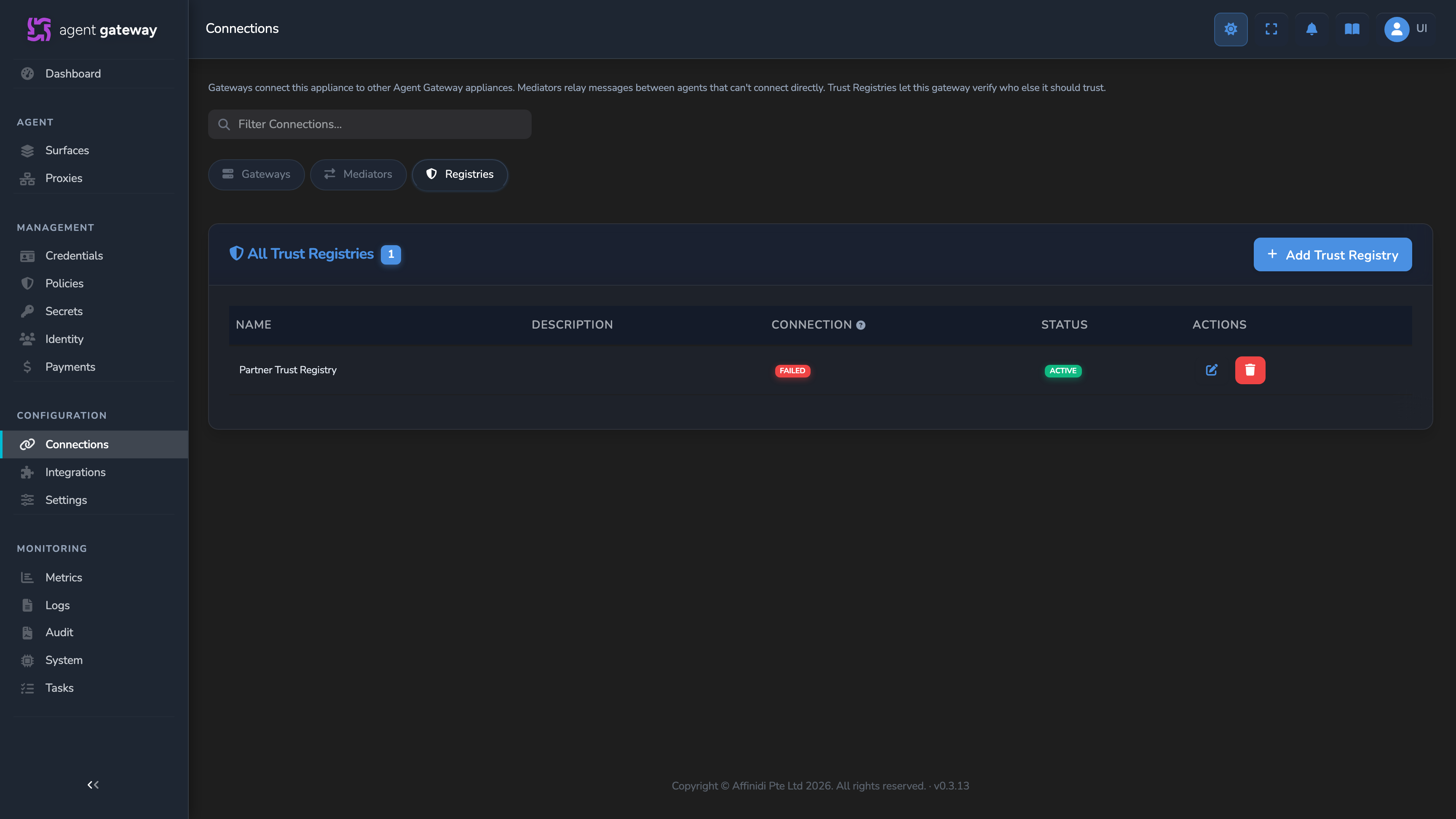
The screenshot above shows a Failed connection. A Connected registry would additionally show a heartbeat button in this row, per the description above.
What you can do
For each trust registry you can:
- View its records: the recognition and authorisation entries it holds.
- Reconnect: if it has dropped or failed to re-establish the connection.
- Delete the connection: when the registry is no longer needed.
How the gateway connects to a trust registry
The gateway establishes a live DIDComm connection to each trust registry using an OOB (Out-of-Band) invitation URL. The trust registry administrator provides this URL from the registry’s connection point. When you add a trust registry in the dashboard, the gateway parses the OOB invitation to discover the registry’s DIDComm endpoint and mediator, creates a per-registry identity (a did:web, did:webvh, or did:peer DID specific to this connection), sends a setup message and waits for the registry administrator to approve the connection, then transitions to Connected status once the registry accepts the handshake.
Once the connection status is Connected, the registry is available for use in surface configuration and the gateway can issue TRQP queries to it.
How the registry lookup works
The trust registry holds authoritative records. Each record is identified by the combination of four fields:
| Field | Description |
|---|---|
authority_id | The DID of the organisation (authority) that grants permission. |
entity_id | The DID of the entity being checked. |
action | The action the entity is requesting permission to perform. |
resource | The resource the action applies to. |
The gateway sends a TRQP query containing these four fields to the connected trust registry over DIDComm. The registry evaluates the query and responds with a boolean verdict: recognized: true/false for a recognition query, or authorized: true/false for an authorisation query. The gateway writes the result into input.trust_check_results for OPA evaluation; OPA then decides whether the request may proceed.
The gateway supports two TRQP query types:
- Recognition: asks whether
authority_idrecognisesentity_idas belonging to its trust network. Whenactionandresourceare not configured on the element, the gateway fills in wire defaults ("is"and"ownedAgent") so 4-tuple-indexed registries still match the record. - Authorization: asks whether
entity_idis authorised to performactiononresource. Both fields must be set explicitly on the element, because the gateway supplies no defaults for authorisation queries.
A query can fail before it reaches the registry at all. The most common cause is missing trust-registry metadata: when the caller’s request payload or the target’s agent card doesn’t populate the fields a query template references, the result carries TRUST_REGISTRY_METADATA_UNAVAILABLE instead of a verdict. See Trust elements reference for the complete list of stage-failure codes.
Trust extension fields in the message
When an agent sends a message that carries trust registry metadata, the trust extension is identified by the URI https://fabric.affinidi.io/extensions/trust-registry. The extension includes four fields that identify the parties involved.
| Field | Description |
|---|---|
trust_registry_did | The DID of the trust registry to query. Surfaces as input.agent.trust_registry_did in OPA policy input. |
agent_did | The DID of the agent making the request. Surfaces as input.agent.did and maps to entity_id in Trust Check queries. |
provider_did | The DID of the organisation that authorises the agent. Surfaces as input.agent.provider_did. On the caller leg, an operator can select it as an explicit Authority override; it is not the default. The caller leg instead defaults to the cryptographically-verified agent-identity-credential issuer DID. |
authority_did | An optional additional authority DID. Surfaces as input.agent.authority_did. |
For a complete field reference, see Trust registry reference.
How it is used
When a message arrives at an access point of the managed agent with Trust Check elements configured, the gateway follows this sequence:
Extract
The gateway builds request context from the incoming message body. When the caller includes a trust-registry extension, it populates input.agent.provider_did, input.agent.trust_registry_did, and input.agent.did. These values are then available for template resolution in the Trust Check element’s configured query parameters.
Query
The gateway resolves the configured query templates against the request context and sends a TRQP query to the named trust registry over the established DIDComm connection, using the resolved authority_id, entity_id, action, and resource values. All configured Trust Check elements fire in parallel.
Evaluate
The registry responds with a boolean verdict (recognized or authorized). The gateway writes each result into input.trust_check_results and emits a structured audit event. OPA then evaluates the policy with those results in scope. OPA decides whether to allow or reject the request, and the Trust Check stage supplies the results it decides on.
Issuers and how trust registries link to managed agents
The trust registry connection alone does not activate trust verification on a surface. The link between a connected trust registry and a surface is established through an Issuer.
An Issuer is a gateway entity with its own auto-generated DID. When you create an Issuer, you optionally link it to a connected trust registry and provide an Authority DID (the parent organisation DID that vouches for the issuer). The gateway registers the issuer in the selected trust registry via DIDComm.
Once an Issuer is created and registered:
- Open the surface in the canvas and click the Surface element (the blue container) to open its configuration panel.
- Select the Issuer from the Issuer dropdown. This assigns the owning issuer to the surface.
- Add a Trust Recorder element to the canvas. Select the Trust Registry to register against, then choose the Issuer and the Authority. The entry’s Issuer is recorded only as the Entity of custom records whose Entity Target is Issuer DID, and it does not sign records. An authority is required: a record with no distinct authority degenerates to self-assertion. The Authority list offers your Authorities and your Issuers. Choosing an Issuer there records that Issuer’s own DID as the authority.
- Keep [Authority] Agent DID is ownedAgent enabled to also register the surface’s own agent DID as owned by that authority. It is on for each new entry.
If the Issuer’s trust registry registration status is Failed, use the Retry TR Registration button on the Issuer record to re-attempt registration before assigning the Issuer to a surface.
Where it appears in the dashboard
Trust registry configuration touches three areas of the dashboard:
- Trust Registries section: Add and manage trust registry connections. Each entry shows the connection status badge and a heartbeat button (when connected).
- Identities → Issuers: Create Issuers, link them to a connected trust registry, and check their TR Registration Status.
- Surface canvas → Surface element: Assign an Issuer to the surface.
- Surface canvas → Trust Check element: Configure verification queries against a connected trust registry, on either the caller leg or the target leg.
- Surface canvas → Trust Recorder element: Configure a Trust Registry, an Issuer, and an Authority to register the surface’s agent identity in that registry.
Trust registry results feed the policy input, and the Identities page shows each identity the same way whatever those results are. The VERIFIED badge there marks an external caller whose identity presentation the gateway verified.
How names reach the trust registry
Alongside DIDs, the gateway publishes human-readable names to trust registries as reference fields, so a registry can show a name next to each DID:
- Issuers: the Issuer’s name, together with the name of its Authority, when you create, edit, or retry registration for the Issuer.
- Authorities: the Authority’s name when you edit it, sent to every registry that one of its Issuers uses.
- Managed agents: the surface name, sent by the Trust Recorder and again when you rename the surface. The gateway publishes this name only for a DID managed on a single surface.
The Trust Recorder also names the authority of each record it writes, using the matching Authority or Issuer. When the DID is managed on a single surface, the Trust Recorder attaches that managed agent’s display name to each new record as context. Publishing runs in the background, so requests and record creation proceed independently of it.
Verification modes
Surfaces support two verification modes, depending on which leg of the surface a Trust Check element is placed on.
Caller-leg verification (the default) validates the incoming agent. The gateway extracts trust registry metadata from the sender’s message and queries the registry to verify the sender’s authorisation.
Target-leg verification validates against the receiving agent’s card. The gateway fetches the target agent’s card, extracts its trust registry data, and verifies that the sender is authorised in that registry.
Related
- Add a trust registry: Step-by-step guide to connecting a trust registry via OOB invitation and assigning it to a surface.
- Enable agent identity on a surface: Configure inbound identity that trust registries can verify.
- Trust registry reference: Complete field definitions for the trust registry object.
- Agent identity and DIDs: How agent DIDs are assigned and verified.
Glad to hear it. Thanks for letting us know.
Sorry to hear that. Thanks for letting us know.