Gateways
Agent Gateway instances route agent traffic between each other over encrypted DIDComm tunnels. Each gateway has a stable Decentralised Identifier that acts as its cryptographic identity. Traffic is encrypted at each hop, and no VPN or shared network segment is required. Connect two gateways →
What a gateway is
A gateway is a configuration object representing either:
- This gateway (self): the running Agent Gateway instance. There is exactly one self gateway per deployment. Its DID is generated at initialisation and cannot be changed.
- A remote gateway: a record for a remote Agent Gateway instance that this deployment communicates with. A remote gateway record holds the remote DID and transport endpoint.
Gateways are managed in the Gateways section of the dashboard.
For a complete field reference for the gateway editor, see Gateway object.
Connection points
A connection point is a configuration object that establishes a link between your gateway and a remote gateway. It contains an out-of-band (OOB) invitation URL that the remote gateway imports to create its side of the connection.
After the remote gateway imports the invitation, the initiating gateway operator approves the pending connection request. Each invitation pairs a single gateway, once, so pairing another gateway takes a new invitation. Once paired, the remote gateway can route to the local surfaces you expose to it, using the fabric:// URL scheme.
For a complete field reference for connection points, see Connection point object.
What a remote gateway can reach
Each remote gateway record carries a Fabric exposure setting that decides which of your local surfaces that gateway can reach over Fabric. You choose it in the Fabric Exposure panel on the record’s Publishing tab:
- No surfaces: the remote gateway reaches no local surface. Every newly paired remote gateway starts here.
- Selected surfaces: the remote gateway reaches only the surfaces you select.
- All surfaces: the remote gateway reaches every active local surface.
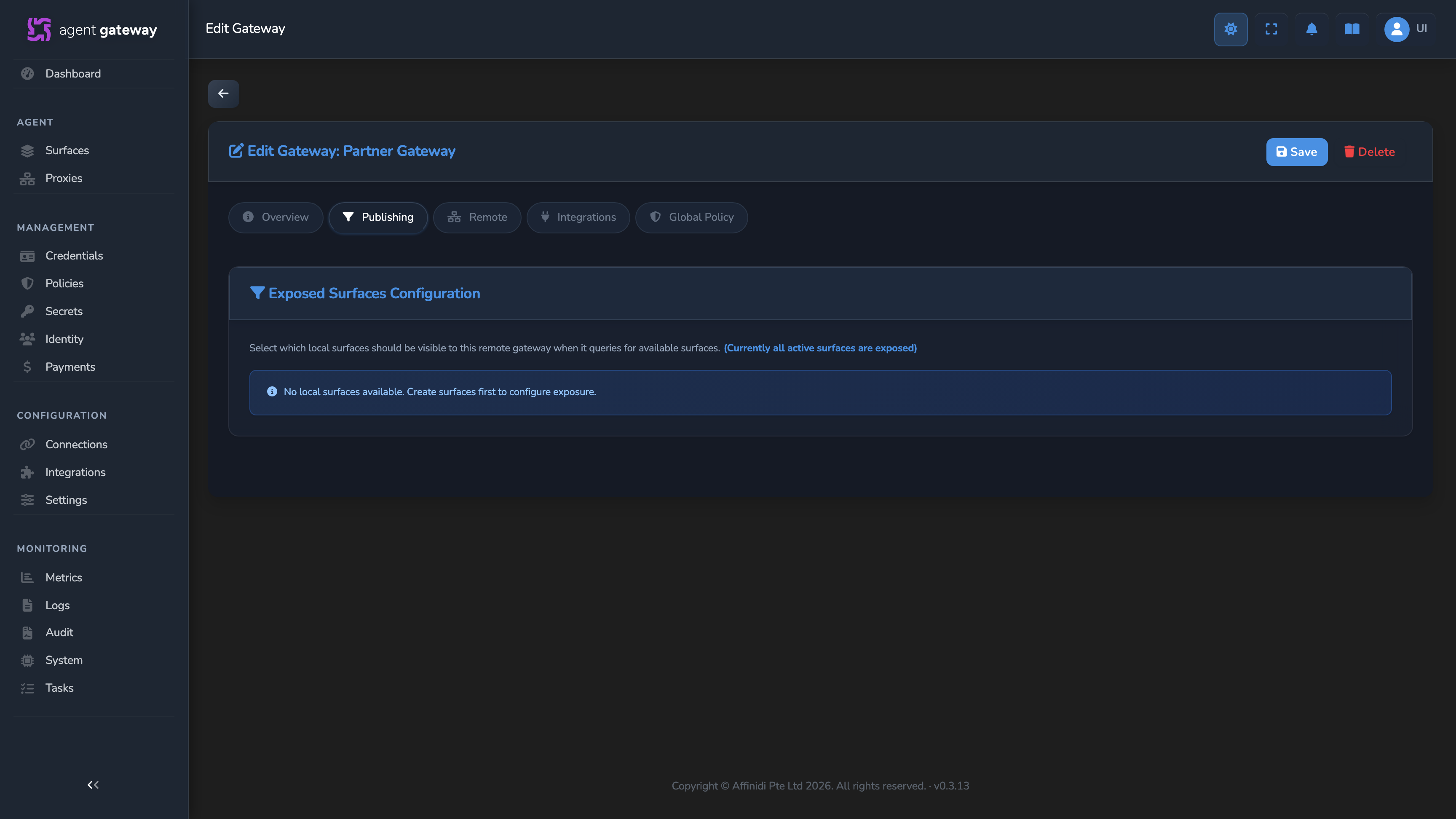
The same setting decides what the remote gateway sees when it lists the surfaces on your gateway: the list holds only the surfaces it can reach. A newly paired gateway therefore reaches and lists nothing on your gateway until you expose at least one surface to it.
Gateway-to-gateway connections
A gateway-to-gateway (G2G) connection is a bidirectional, encrypted tunnel between two Agent Gateway instances. Each side of the tunnel is a connection point.
In a multi-hop flow, an agent sends a request to Gateway 1 over A2A, MCP, or another supported protocol. Gateway 1 receives it on an Agent Surface Access Point configured with an external target using fabric://... to represent a destination on Gateway 2. Instead of forwarding this as a normal HTTP request, Gateway 1 wraps the request in a DIDComm v2.1 encrypted message and sends it to Gateway 2.
Gateway 2 receives the DIDComm v2.1 message, decrypts it, validates the sender DID, confirms that Gateway 1 may reach the requested surface, unwraps the original request, and forwards it to the backend service behind the target Access Point. The backend can be another agent, an MCP proxy, or a REST API. In this flow, caller identity context can transit to Gateway 2 so it can verify identity and intent, while neither agent needs to be aware of the inter-gateway transport details.
The fabric:// scheme
A fabric:// target endpoint identifies a destination on a remote gateway:
fabric://GATEWAY_ID/SURFACE_ID| Segment | Description |
|---|---|
GATEWAY_ID | The ID of the remote gateway’s record on this gateway, shown as Gateway Id on the record’s Overview tab. |
SURFACE_ID | The ID of the destination surface on the remote gateway, shown as Surface ID on the record’s Remote tab. |
The dashboard assembles this URL for you. When you select the via Gateway Connection endpoint type, it builds the fabric:// target from the selected gateway and remote surface.
When the gateway sees a fabric:// target, it looks up the remote gateway record, encrypts the request payload using DIDComm messaging, and transmits it to the remote gateway. The remote gateway decrypts the message, checks that the sending gateway may reach the named surface, and routes the request to that surface.
How a connection is established
Both gateways must run a DIDComm mediator on v0.17.x or later. An older mediator can’t complete the connection handshake.
- The initiating gateway generates a connection invitation from the Gateways section. This produces an OOB invitation URL and a Connection Secret.
- The receiving gateway imports the invitation URL and secret through its dashboard, creating a connection point entry on the receiving side.
- The initiating gateway approves the pending connection request from the receiving gateway.
- Both gateways show the connection as active. Each remote gateway record starts with No surfaces exposed.
- Each operator exposes the local surfaces the other gateway may reach, on the remote gateway record’s Publishing tab. Traffic can then flow to those surfaces.
An invitation pairs one gateway, once. After a gateway has used it, the invitation is used up, even if you delete the resulting request instead of approving it. Create a new invitation for each gateway you pair, including when you pair a gateway again after deleting its request.
For step-by-step instructions, see Connect two gateways.
Multi-hop routing use cases
- Cross-organization agent communication: Company A agents can communicate with Company B services through linked Agent Gateways, while each organization maintains independent policy enforcement and observability.
- Network boundary traversal: Agents in a private network can route through an Agent Gateway in a DMZ and onward to another Agent Gateway in a public cloud while preserving encrypted transport and identity verification at each hop.
When to use G2G routing
Use G2G routing when two agent services are owned by different organisations and neither can expose internal addresses, or when your deployment spans network boundaries such as different VPCs or cloud providers without VPN connectivity.
For services within the same network, use a direct URL target. It is simpler and has lower latency than G2G routing.
Trust verification in G2G
When a request arrives at the remote gateway over a DIDComm tunnel, the receiving Agent Surface can verify the sender DID against a trust registry. Add a Trust Check element to the caller leg (the Access Point → Managed Agent edge) of the receiving surface to configure this verification.
Identities that arrive from a remote gateway are listed on the receiving gateway’s Identities page, with an External Caller badge in the Origin column. When the receiving gateway has verified the caller’s identity presentation, a VERIFIED badge appears next to it. Trust registry results go into the policy input instead of these badges, and a Policy element there decides whether the request proceeds.
How a broken connection recovers
Each connection point continuously tracks whether its DIDComm link to the mediator is healthy. When a link breaks, the affected gateway retries automatically on a backoff schedule that starts short and lengthens with each consecutive failure up to a fixed maximum, then keeps retrying at that maximum interval. No operator action is required unless the underlying cause, such as an unreachable mediator or a decommissioned peer gateway, needs fixing at the source. A failure on one connection point doesn’t affect any other connection point or gateway.
For the full status vocabulary and how to trigger a retry manually, see Connection Health.
Related
- Connect two gateways: Step-by-step instructions for generating an invitation and establishing a connection.
- Gateway reference: Field-level reference for the gateway and connection point editors.
Glad to hear it. Thanks for letting us know.
Sorry to hear that. Thanks for letting us know.