Audit log
Policy decisions, trust registry checks, and credential delegation events appear on the Logs page as short-lived, unsigned entries. An auditor or a security information and event management (SIEM) system needs a durable record of what the gateway allowed, refused, or delegated.
The gateway produces a governance audit record for each audit event you select: policy decisions, trust checks, refused requests, identity binding checks, credential delegation, and payments. The VP Audit Log keeps the events selected for it on the appliance and shows them on the Audit page, and each Governance Audit integration delivers the events selected for it to an external system.
You can show what was allowed or denied, for which caller, under which policy version, and tie each record to the signed Verifiable Presentation (VP) the gateway issued for the same request. Send audit events to an external system →
Audit log vs. the Logs page
The gateway produces two distinct output streams. Both carry a trace ID, but they serve different purposes.
| Logs page | Audit log | |
|---|---|---|
| What it records | All gateway activity: every routing decision, policy outcome, and error. | The governance events you select: policy decisions, trust checks, refused requests, identity binding checks, credential operations, and payments. |
| Persistence | Retained for operational diagnosis; configurable retention period. | The VP Audit Log is a persistent file on the appliance. Governance Audit integrations deliver records to your own systems. |
| Integrity | Structured log entries. | Records carry a trace ID, and records written since 1.0.0 also carry a unique event ID. Records tied to a signed VP carry the VP or its fingerprint. |
| Designed for | Real-time diagnosis during active incidents. | Compliance reporting, post-incident review, and credential delegation tracing. |
Use the Logs page to understand what happened on a specific request. Use the Audit page, or the system your Governance Audit integrations deliver to, when you need durable, attributable evidence of governance decisions.
How audit events are selected
Every audit record belongs to one audit event, such as Policy Decision or Authentication Failed. The events are grouped by area: Policies, Trust, Trace, Identity, Delegation, Payments, Auth, and Requests.
Audit records go to two kinds of destination, and each one has its own event selection:
- VP Audit Log: keeps the events selected under Events to keep in Settings › Security, and only while Enable VP Auditing is on. These are the records the Audit page shows.
- Governance Audit integrations: each integration whose event set holds audit events receives those events, independently of what the VP Audit Log keeps and of the Enable VP Auditing setting. An event set can mix audit events with other events.
Each destination starts with an empty selection and receives records only for the events selected for it. The gateway builds a record only when at least one destination selects its event, and a changed selection takes effect on the running gateway.
Credential delegation, payment, and trace-termination records reach the VP Audit Log only when those events are selected. After an upgrade, review Events to keep in Settings › Security and the audit events in each integration’s event set.
See Settings reference: Audit events for every event with its group and description.
What each audit event records
Policy Decision
A gateway, surface, MCP-tool, or response OPA policy allowed or denied the request. Each record carries the policy scope, the flow direction (Access Point, Transit Point, or Fabric), the caller identity, and the denial reason from the policy rule where one was provided.
When MCP tool gating removes tools from a tools/list response, a Policy Decision record with the scope mcp_tool_list names the removed tools. When policy evaluation ends without a decision, for example because it raised an error, the gateway denies the request and records the decision as error.
With Policy Decision selected, policy denials appear in the audit log regardless of how the Logs page is filtered, making the audit log the authoritative record of what was blocked and why.
Trust Check
A per-leg TRQP (Trust Registry Query Protocol) recognition or authorisation query to a connected trust registry returned a result passed to OPA as trust_check_results. The record carries the authority queried, the entity checked, and whether the outcome was ok. Records from the Access Point, Fabric, and MCP proxy paths also carry the surface ID, the request’s trace ID, and the authenticated caller, so each outcome ties back to the request that triggered it.
When a trust check fails due to a network or protocol error, the record includes an error code such as TRUST_REGISTRY_UNREACHABLE, AGENT_CARD_UNAVAILABLE, or TRUST_REGISTRY_METADATA_UNAVAILABLE. On the latter two codes specifically, the record leaves out the authority and entity fields rather than showing an unresolved template string.
Trace Terminated
When a request crosses an organisational boundary, forwarding the caller’s trace ID to the downstream system would expose internal tracing details to an external party. The gateway keeps its own trace for the inbound leg and generates a fresh trace identifier for the outbound leg. The trace_terminated record holds the own and downstream trace ID mapping at the point of termination.
This mapping is the single record that links the two trace IDs. For requests that cross gateway boundaries, it shows which downstream trace corresponds to which inbound call, while the original trace ID stays on its own side of the boundary.
Identity events
VP Injected records the gateway placing a Verifiable Presentation carrying the managed agent’s identity into a proxied request or response. Every VP Injected record carries the agent identity DID, the agent endpoint used as the vault namespace, the request’s trace ID, a detail naming the injection point (such as request_path, response_path, or backend_response), a SHA-256 fingerprint of the VP JWT, and the caller when known. A record for a VP sent over a gateway-to-gateway connection is marked as sent over Fabric.
Identity Binding Verified and Identity Binding Failed record the gateway checking an identity binding VP that a request carries. A verified record carries the agent DID and the issuing gateway. A failed record also says whether the presentation was absent, invalid, or from an untrusted issuer.
Credential delegation events
Token Injected records a delegated credential from the vault being injected on the caller’s behalf. The record carries the credential provider and the caller identity. This is the outward side of credential delegation: a token_injected record shows a per-caller OAuth token was substituted for the shared application credential. See Credentials for how delegation tokens are stored and managed.
Consent Granted records a user completing the OAuth consent flow and a delegation token being stored in the vault. Combined with Token Injected records, it traces the full lifecycle from initial consent to per-request token injection.
The Delegation group also covers token refreshes and refresh failures, consent requests, token revocations, failed token lookups, and the MCP elicitation lifecycle. Delegation records raised during a request wait for the gateway to issue the request’s identity VP and then carry it. When the request ends before a VP is issued, they are kept without one.
Payment Event
An x402 or MPP payment lifecycle event, such as a challenge, verification, or settlement.
Authentication and request events
These record requests the Access Point refused, including refusals over a gateway-to-gateway connection:
- Authentication Failed: the gateway refused the caller’s authentication, for example because a credential was missing or invalid. The record carries the authentication scheme and the reason, and always excludes the credential itself.
- Rate Limited: a rate limit or capacity limit refused the request. The record carries the limit’s scope and the retry delay given to the caller.
- Request Rejected: the request was refused at routing, admission, or forwarding. The record carries the stage, the reason, the HTTP status, and the JSON-RPC error code where there is one. A request refused before any surface matched is recorded against the surface
unknown.
These events are recorded once for every refused request, so an unauthenticated or misdirected client can produce many records. An integration with an email or Slack endpoint whose event set holds them sends one message per record.
How audit records reach integrations
The gateway writes each audit record to a durable journal on the appliance before any destination receives it. Each destination reads the journal from its own position, so a slow or unreachable integration falls behind instead of losing records, and delivery resumes after a restart. Every new record carries a unique event_id.
- At-least-once delivery: a Governance Audit integration can receive the same record more than once, for example after a restart, so receivers deduplicate on
event_id. The VP Audit Log writes each record once. - Independent selection: each integration receives the audit events its event set holds, independently of the VP Audit Log and of the Enable VP Auditing setting.
- Retries and limits: a failed delivery is retried, and the records after it wait until it succeeds. An integration can set a number of attempts after which it skips the record, and an age after which it skips old records. With both limits left empty, a record is retried until it is delivered. A destination that stays behind for long enough has its oldest records skipped once the backlog grows past its cap.
- Pausing: disabling a Governance Audit integration or its endpoint, or removing the audit events from its event set, pauses it. It lets go of its undelivered records, and once active again it receives only the records produced after that, so records from the paused period are skipped for it.
- Any endpoint type: email, Slack, webhook, and stream endpoints can all receive audit records. Every record is one delivery, so stream and webhook endpoints suit busy appliances.
- Who can see the destination: every user who can open the Integrations page sees each endpoint’s destination, including where audit records go. Stored credentials are never shown, and only administrators can change integrations.
The Audit page shows where records go. Its Forwarding to N integrations button counts the active integrations, with an active endpoint, whose event set holds audit events, and opens the Integrations page. When some integrations whose event set holds audit events are disabled, or their endpoints are, the button shows a warning icon, and its tooltip names how many receive nothing. When VP Auditing is off, the tooltip says the VP Audit Log keeps nothing while integrations still receive the audit events of their event sets. With no integration receiving audit records, an administrator sees Forward records in its place, which starts a new event set of every audit event.
The About the Audit Log panel on the same page summarises this: the log keeps the events selected in Settings › Security, each integration receives the audit events of its event set independently of the log, and delivery is at least once, so receivers deduplicate on event_id.
How records tie to signed presentations
VP Injected records carry the signed VP JWT the gateway injected, together with its SHA-256 fingerprint, and credential delegation records carry the request’s signed VP when one was issued. Every record carries the request’s trace ID, so on the Audit page a record that lacks its own VP is shown with the signed VP of another record from the same request. The fingerprint lets you match a specific presentation, for example the VP a downstream agent received, to the audit records of the request it came from.
Policy outcomes are kept as Policy Decision records rather than inside the VP, so the audit selection has no effect on what the gateway sends to another gateway.
Policy decision evidence
A Policy Decision entry can carry the exact version number and content hash of the Rego that produced it, as well as the policy’s name. This is byte-exact evidence: it identifies the specific Rego bytes that were enforced. A later edit to the same policy definition appends a new version and keeps the old one, so a historical decision keeps its original meaning. See OPA policies for how versioning and content hashes work.
This evidence is visible directly in the dashboard. Each Policy Decision row in the Audit list, listed under the Policy Decisions filter, shows a version chip (vN) and a truncated content-hash chip when they are present, with the full hash on hover. Selecting the entry shows the same detail, labelled Policy version and Policy SHA, in the event detail panel’s field list, alongside the policy’s name and, where the decision came from a stored definition, the Policy definition it resolves to.
Version and content hash are normally captured at the moment the policy runs. Where an older entry lacks them, the gateway reads them from a signed VP recorded for the same request when that VP carries the policy decision, matched by trace ID and policy scope. This applies to gateway, surface, MCP-tool, and response policy decisions alike, including decisions made by an appliance-wide (global) policy assignment.
Entry fields
Every audit entry carries a common set of fields regardless of event category.
| Field | Description |
|---|---|
| Event ID | A unique identifier (UUID) for the record. Receivers of a Governance Audit integration use it to recognise a record delivered more than once. Older records can lack it. |
| Timestamp | Precise time the event was recorded. |
| Event | The audit event identifier, for example policy_decision, trust_check, auth_failed, or token_injected. |
| Surface identifier | The identifier of the surface the request traversed. |
| Channel name | Human-readable surface name. |
| Caller | The authenticated caller’s DID, authentication method, and name or email where available. |
| Protocol | The surface protocol: a2a or mcp. |
| MCP tool name | For MCP requests, the specific tool that was called. |
| Trace ID | Links this entry to its distributed trace and all related log entries for the same request. |
| VP JWT | The signed Verifiable Presentation. Present on VP Injected records, and on credential delegation records when the request’s VP was issued. |
| VP fingerprint | SHA-256 fingerprint of the VP JWT. Present when the full VP is not stored inline. |
Filtering
The Audit page supports four independent filter dimensions that can be combined with a free-text search.
| Filter | Options |
|---|---|
| Category | All / Policy Decisions / Trust Checks / Trace Terminated / VP Injected / Token Injected / Consent Granted |
| Decision | All / Allow / Deny |
| Flow | All / Access Point / Transit Point / Fabric |
| Type | All / Gateway / Surface / MCP Tool / Response |
Records of the other audit events, such as Authentication Failed or Request Rejected, appear under All. The free-text search matches caller DID, surface identifier, channel name, and denial reason. Filters apply across the full dataset and entries are paginated in sets of 50.
Event detail panel
Selecting an entry opens a detail panel with a plain-language summary of the event, such as “Denied POST /tools/call to surface-name” or “VP injected for did:webvh:…”. The panel includes four correlated sections derived from all audit events that share the same trace_id.
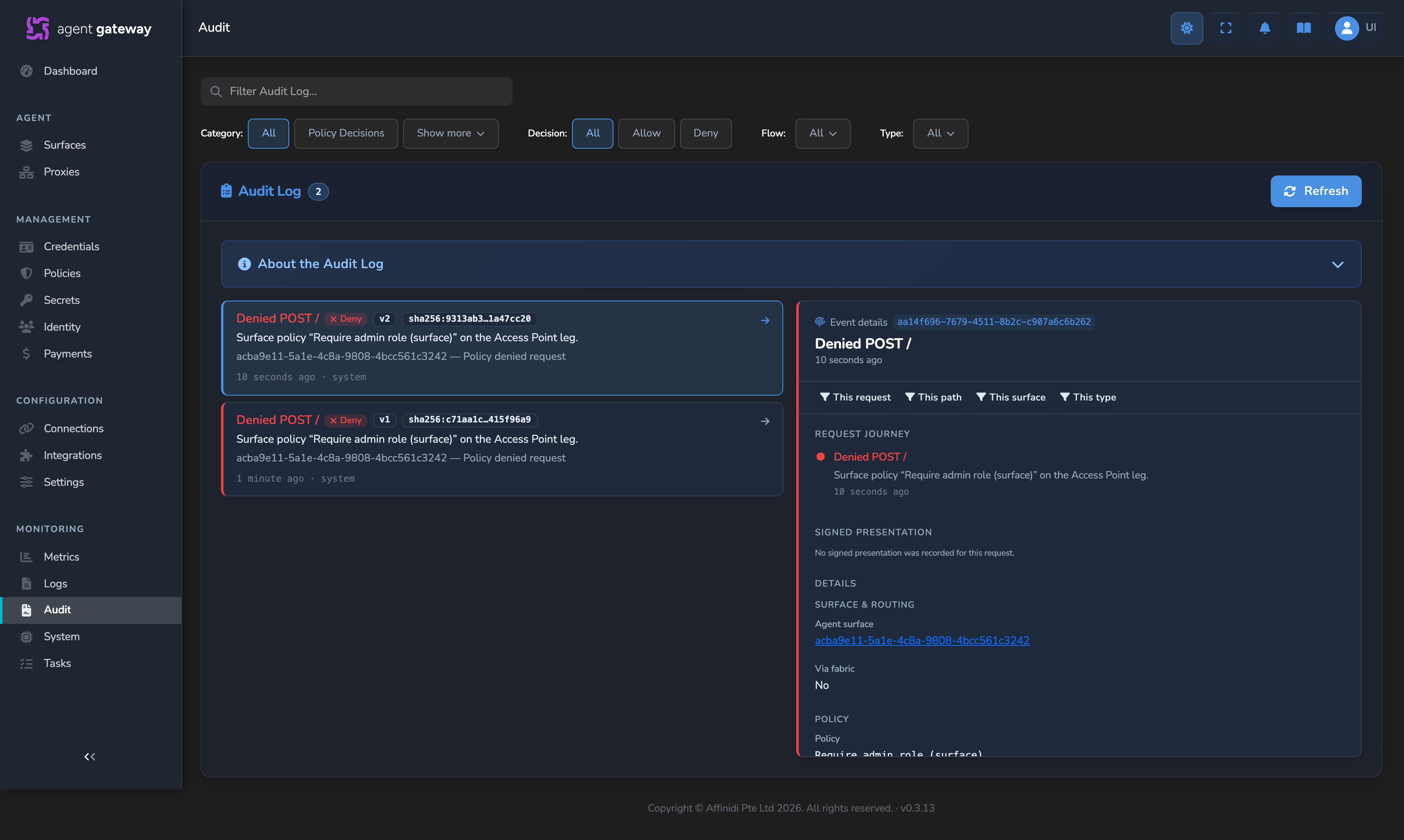
The two entries above are for the same policy: the older denial shows v1 with its original content hash, and a later denial shows v2 with a different hash after the policy was edited. Editing a policy does not change how earlier decisions are attributed.
Credential delegation audit
Credential delegation activity appears in three places, serving different needs. The first two read the VP Audit Log, so they show delegation events only when those events are selected under Events to keep.
Related
- Send audit events to an external system: Select events for the VP Audit Log and a Governance Audit integration, and confirm records arrive.
- Settings reference: Security tab: Enable VP Auditing and select the events the VP Audit Log keeps.
- Integrations reference: Governance Audit delivery limits and audit template variables.
- Credentials: How credential delegation works and where tokens are stored.
- OPA policies: How the gateway evaluates Rego policies and what request context each policy receives.
Glad to hear it. Thanks for letting us know.
Sorry to hear that. Thanks for letting us know.