Wallets
Wallet is an essential component that allows you to sign and issue Verifiable Credentials that users can claim and store in their Affinidi Vault. Each wallet is created with a unique Decentralised Identifier (DID) value that is used to represent a particular subject. It is used to sign the credentials to prevent tampering with information and allow the verifier to validate its authenticity cryptographically.
The Decentralised Identifier (DID) could represent a user, a company, or a device/machine.
Example: did:key:z6MkhaXgBZDvotDkL5257faiztiGiC2QtKLGpbnnEGta2doK.
Supported DID methods
Every Decentralised Identifier (DID) is prefixed with a DID method that defines the mechanism to resolve and get the associated DID document used for verifying the credential.
The Affinidi Trust Network supports the following DID methods when creating a wallet:
did:key
The did:key method represents individuals.
One of the key benefits of did:key is the implementation of “the right to be forgotten” to stay compliant with privacy policies like GDPR, which is impossible with the methods that rely on blockchains.
It is a scalable DID method that doesn’t require a lot of surrounding infrastructure and blockchains. The challenges with did:key arise when you start looking into concerns like key management, which is why relying solely on did:key for all interactions, especially business, is not advisable.
The Affinidi Vault assigns did:key to users when they register for an account. Read more about the did:key method here.
Example: did:key:z6MkhaXgBZDvotDkL5257faiztiGiC2QtKLGpbnnEGta2doK
did:web
The did:web method represents a host or a fully qualified domain name.
It requires the implementation of TLS/SSL certificate on the domain that hosts the DID document and allows rotation of the verification key while keeping the same DID value, making it more secure.
Additionally, credentials signed by did:web is traceable back to the source, like a website, making this method suitable to represent a business entity that owns the domain, enabling verifiers to validate the credential’s authenticity.
Domain Verification service uses did:web to represent the domain when verifying the domain ownership and display a verified checkmark in the Affinidi Vault consent screen. Read more about the did:web method here.
Example: did:web:mywebsite.com
Multi-key support
did:web wallets support multiple cryptographic keys within the same DID document. You can add keys using the secp256k1, ed25519, or p256 algorithms and assign each key specific verification relationships:
| Verification relationship | Purpose |
|---|---|
authentication | Authenticate as the DID subject. |
assertionMethod | Sign Verifiable Credentials. |
keyAgreement | Key agreement protocols, such as encrypted messaging. |
capabilityInvocation | Invoke a cryptographic capability. |
capabilityDelegation | Delegate a cryptographic capability to another key. |
Use the Affinidi TDK to add, list, update, and remove keys from a did:web wallet. See the Add keys to a did:web wallet section below for code examples.
Use the tool DIF Universal Resolver to view the DID document associated with the DID value after creating a wallet.
Supported signature schemes
The signature scheme sets the key algorithm a wallet uses to sign Verifiable Credentials. You choose it when you create the wallet. After that, the Affinidi Portal shows it read-only.
| Signature scheme | Type | DID methods | Credential formats | Works with |
|---|---|---|---|---|
| Secp256k1 (default) | Elliptic curve. Widely supported. | did:key, did:web | Any supported format | Credential Issuance, Iota Framework |
| ML-DSA-44 | Post-quantum. Larger keys and signatures. | did:web only | ldp_vc only | Credential Issuance |
ML-DSA-44 is the smallest parameter set of the Module-Lattice-Based Digital Signature Algorithm (ML-DSA), standardised by NIST in FIPS 204. It is designed to resist attacks by quantum computers, which could break elliptic-curve signatures such as Secp256k1. Choose it when credentials you issue today need to stay verifiable over a long period, and your verifiers support ML-DSA-44 signatures on ldp_vc credentials.
Keep the following limits in mind before creating an ML-DSA-44 wallet:
- Use it with the
did:webmethod. The Affinidi Portal disables the ML-DSA-44 option whendid:keyis selected. - Issue
ldp_vccredentials with it. When you select an ML-DSA-44 wallet as the Issuing Wallet in a Credential Issuance configuration, the Affinidi Portal shows the warning ML-DSA-44 wallets can only issue ldp_vc credentials. - Use a Secp256k1 wallet for Iota Framework configurations. The Iota Framework wallet list leaves out ML-DSA-44 wallets.
- Create ML-DSA-44 wallets in the Affinidi Portal. The Affinidi TDK Wallets client offers
secp256k1,ed25519, andp256as key algorithms, but not ML-DSA-44.
Create a wallet using Affinidi Portal
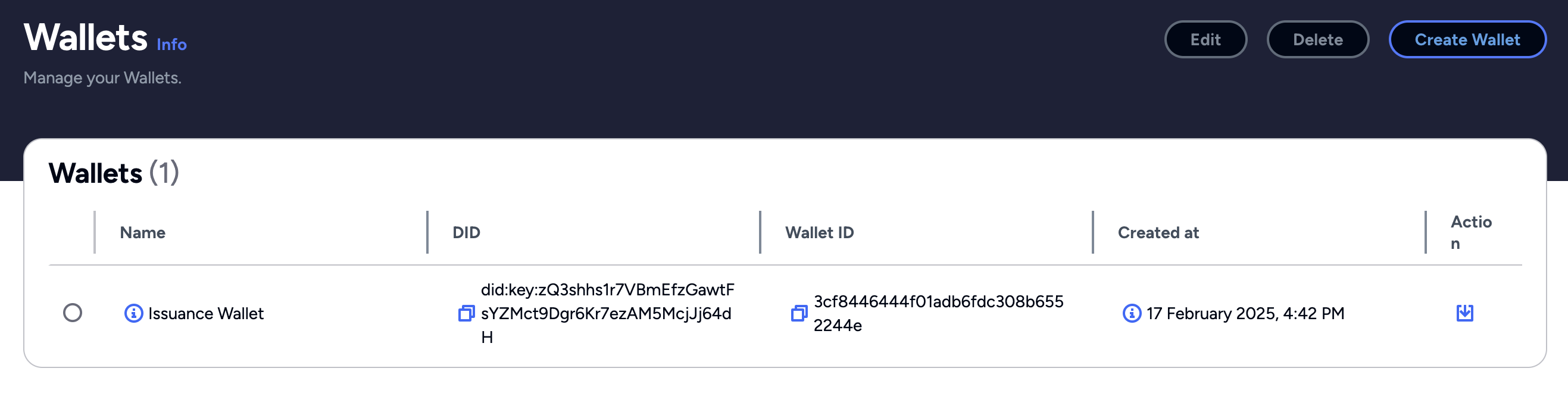
To create a wallet, go to Wallets in the Affinidi Elements section of the Affinidi Portal sidebar.
Multi-key support is not available to configure using Affinidi Portal. Use Affinidi TDK to create a multi-key for did:web method.
- On the Wallets page, click Create Wallet.
Enter a Name of wallet and a Description of wallet - optional to help you identify its purpose.
Select the DID method of wallet. If you select
did:web, enter the DID web URL: an HTTPS URL that hosts the DID document, for examplehttps://www.website.com.Select the Signature scheme: Secp256k1 or ML-DSA-44. See Supported signature schemes to choose between them.
The Signature scheme field appears only when ML-DSA-44 is enabled for your project. Without it, the Affinidi Portal creates the wallet with Secp256k1.
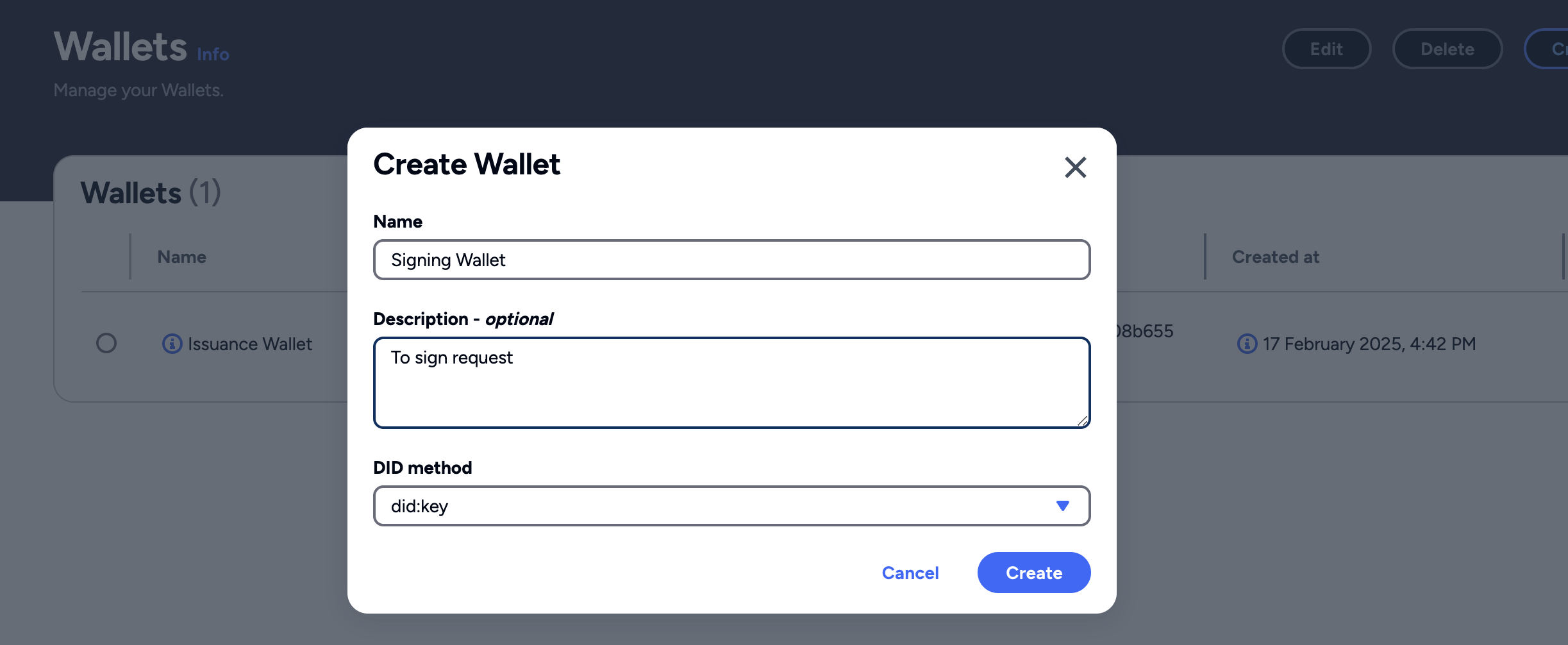
- Click Create. The Affinidi Portal creates the wallet with its DID and lists it on the Wallets page.
When ML-DSA-44 is enabled for your project, the Wallets page shows each wallet’s Signature scheme in its own column. To check an existing wallet’s scheme, select it and click Edit. The scheme is shown read-only.
You can also create a wallet, including an ML-DSA-44 one, from the Issuing Wallet field when you set up a Credential Issuance configuration.
Wallet is used to sign the Verifiable Credentials in Credential Issuance and claim the credential into the Affinidi Vault.
Create a wallet using the Affinidi TDK
In addition to the Affinidi Portal, you can create and manage wallets programmatically using the Wallets Client of the Affinidi TDK.
For the full list of available methods, see the Wallets Client reference for TypeScript, Python, Java, Dart, .NET, or PHP.
Prerequisites
Generate a Personal Access Token (PAT) using the Affinidi CLI Token command.
Install the libraries
Install the Wallets client and Auth Provider.
npm install @affinidi-tdk/auth-provider @affinidi-tdk/wallets-clientpip install affinidi_tdk_auth_provider affinidi_tdk_wallets_client<dependency>
<groupId>com.affinidi.tdk</groupId>
<artifactId>wallets.client</artifactId>
<version><version_number></version>
</dependency>dart pub add affinidi_tdk_auth_provider affinidi_tdk_wallets_clientdotnet add package AffinidiTdk.AuthProvider
dotnet add package AffinidiTdk.WalletsClientcomposer require affinidi-tdk/affinidi-tdk-phpCreate a wallet
Initialise the Auth Provider using your PAT credentials, then create a wallet. The example below creates a did:web wallet.
import { WalletApi, Configuration } from '@affinidi-tdk/wallets-client'
import { AuthProvider } from '@affinidi-tdk/auth-provider'

const authProvider = new AuthProvider({
    privateKey: "<PAT_PRIVATE_KEY_STRING>",
    passphrase: "<PAT_KEY_PAIR_PASSPHRASE>",
    tokenId: "<PAT_ID>",
    projectId: "<PROJECT_ID>"
})

const walletApi = new WalletApi(new Configuration({
    apiKey: authProvider.fetchProjectScopedToken.bind(authProvider)
}))

// Create a did:web wallet — didWebUrl is required
const { data } = await walletApi.createWallet({
    name: "My did:web Wallet",
    description: "Wallet for credential signing",
    didMethod: "web",
    didWebUrl: "https://<DOMAIN>"
})

console.log(data.wallet?.did)
import affinidi_tdk_auth_provider
import affinidi_tdk_wallets_client
stats = {
"privateKey": "<PAT_PRIVATE_KEY_STRING>",
"passphrase": "<PAT_KEY_PAIR_PASSPHRASE>",
"tokenId": "<PAT_ID>",
"projectId": "<PROJECT_ID>"
}
auth_provider = affinidi_tdk_auth_provider.AuthProvider(stats)
project_scoped_token = auth_provider.fetch_project_scoped_token()
configuration = affinidi_tdk_wallets_client.Configuration()
configuration.api_key['ProjectTokenAuth'] = project_scoped_token
with affinidi_tdk_wallets_client.ApiClient(configuration) as api_client:
api_instance = affinidi_tdk_wallets_client.WalletApi(api_client)
# Create a did:web wallet — didWebUrl is required
new_wallet_json = {
"name": "My did:web Wallet",
"description": "Wallet for credential signing",
"didMethod": "web",
"didWebUrl": "https://<DOMAIN>"
}
create_wallet_input = affinidi_tdk_wallets_client.CreateWalletInput.from_dict(new_wallet_json)
api_response = api_instance.create_wallet(create_wallet_input=create_wallet_input)
print(api_response)import com.affinidi.tdk.authProvider.AuthProvider;
import com.affinidi.tdk.wallets.client.Configuration;
import com.affinidi.tdk.wallets.client.ApiClient;
import com.affinidi.tdk.wallets.client.apis.WalletApi;
import com.affinidi.tdk.wallets.client.auth.ApiKeyAuth;
import com.affinidi.tdk.wallets.client.models.CreateWalletInput;
import com.affinidi.tdk.wallets.client.models.CreateWalletResponse;
import com.affinidi.tdk.wallets.client.models.CreateWalletInput.DidMethodEnum;
try {
AuthProvider authProvider = new AuthProvider.Configurations()
.projectId("<PROJECT_ID>")
.privateKey("<PAT_PRIVATE_KEY_STRING>")
.passphrase("<PAT_KEY_PAIR_PASSPHRASE>")
.tokenId("<PAT_ID>")
.build();
ApiClient defaultClient = Configuration.getDefaultApiClient();
ApiKeyAuth ProjectTokenAuth = (ApiKeyAuth) defaultClient.getAuthentication("ProjectTokenAuth");
ProjectTokenAuth.setApiKey(authProvider.fetchProjectScopedToken());
WalletApi apiInstance = new WalletApi(defaultClient);
// Create a did:web wallet — didWebUrl is required
CreateWalletInput requestInput = new CreateWalletInput()
.name("My did:web Wallet")
.description("Wallet for credential signing")
.didMethod(DidMethodEnum.WEB)
.didWebUrl("https://<DOMAIN>");
CreateWalletResponse result = apiInstance.createWallet(requestInput);
System.out.println(result.toString());
} catch (Exception e) {
e.printStackTrace();
}import 'package:dio/dio.dart';
import 'package:affinidi_tdk_auth_provider/affinidi_tdk_auth_provider.dart';
import 'package:affinidi_tdk_wallets_client/affinidi_tdk_wallets_client.dart';
void main(List<String> arguments) async {
try {
final authProvider = AuthProvider(
privateKey: "<PAT_PRIVATE_KEY_STRING>",
passphrase: "<PAT_KEY_PAIR_PASSPHRASE>",
tokenId: "<PAT_ID>",
projectId: "<PROJECT_ID>",
);
final dio = Dio(
BaseOptions(
baseUrl: AffinidiTdkWalletsClient.basePath,
connectTimeout: const Duration(seconds: 5),
receiveTimeout: const Duration(seconds: 5),
),
);
final apiClient = AffinidiTdkWalletsClient(
dio: dio,
authTokenHook: authProvider.fetchProjectScopedToken,
);
final walletApi = apiClient.getWalletApi();
// Create a did:web wallet — didWebUrl is required
final walletInputBuilder = CreateWalletInputBuilder()
..name = "My did:web Wallet"
..description = "Wallet for credential signing"
..didMethod = CreateWalletInputDidMethodEnum.web
..didWebUrl = "https://<DOMAIN>";
final createdWallet = (await walletApi.createWallet(
createWalletInput: walletInputBuilder.build(),
)).data;
print(createdWallet);
} catch (e) {
print('Error: $e');
}
}using AffinidiTdk.AuthProvider;
using AffinidiTdk.WalletsClient.Api;
using AffinidiTdk.WalletsClient.Client;
using AffinidiTdk.WalletsClient.Model;
AuthProvider authProvider = new AuthProvider(new AuthProviderParams
{
ProjectId = "<PROJECT_ID>",
TokenId = "<PAT_ID>",
PrivateKey = "<PAT_PRIVATE_KEY_STRING>",
Passphrase = "<PAT_KEY_PAIR_PASSPHRASE>"
});
string projectScopedToken = await authProvider.FetchProjectScopedTokenAsync();
Configuration config = new Configuration();
config.AddApiKey("authorization", projectScopedToken);
WalletApi walletApi = new WalletApi(config);
// Create a did:web wallet — didWebUrl is required
CreateWalletInput input = new CreateWalletInput(
name: "My did:web Wallet",
description: "Wallet for credential signing",
didMethod: CreateWalletInput.DidMethodEnum.Web,
didWebUrl: "https://<DOMAIN>"
);
CreateWalletResponse wallet = walletApi.CreateWallet(input);
Console.WriteLine(wallet.Did);require_once 'vendor/autoload.php';
use AffinidiTdk\AuthProvider\AuthProvider;
use AffinidiTdk\Clients\WalletsClient;
use AffinidiTdk\Clients\WalletsClient\Model\CreateWalletInput;
$authProvider = new AuthProvider([
'privateKey' => '<PAT_PRIVATE_KEY_STRING>',
'passphrase' => '<PAT_KEY_PAIR_PASSPHRASE>',
'tokenId' => '<PAT_ID>',
'projectId' => '<PROJECT_ID>',
]);
$tokenCallback = [$authProvider, 'fetchProjectScopedToken'];
$config = WalletsClient\Configuration::getDefaultConfiguration()->setApiKey('authorization', '', $tokenCallback);
$apiInstance = new WalletsClient\Api\WalletApi(new GuzzleHttp\Client(), $config);
// Create a did:web wallet — did_web_url is required
$input = new CreateWalletInput([
'name' => 'My did:web Wallet',
'description' => 'Wallet for credential signing',
'did_method' => 'web',
'did_web_url' => 'https://<DOMAIN>'
]);
$wallet = $apiInstance->createWallet($input);
echo $wallet->getDid();Add keys to a did:web wallet
did:web wallets support multiple cryptographic keys. Use the createWalletKey method to add a key to an existing wallet and define its verification relationships.
import { WalletApi, Configuration, CreateWalletKeyInput } from '@affinidi-tdk/wallets-client'
import { AuthProvider } from '@affinidi-tdk/auth-provider'

const authProvider = new AuthProvider({
    privateKey: "<PAT_PRIVATE_KEY_STRING>",
    passphrase: "<PAT_KEY_PAIR_PASSPHRASE>",
    tokenId: "<PAT_ID>",
    projectId: "<PROJECT_ID>"
})

const walletApi = new WalletApi(new Configuration({
    apiKey: authProvider.fetchProjectScopedToken.bind(authProvider)
}))

const keyRequest: CreateWalletKeyInput = {
    keyType: "ed25519",
    relationships: ["authentication", "assertionMethod"]
}

const { data: newKey } = await walletApi.createWalletKey("<WALLET_ID>", keyRequest)
console.log(newKey.keyId)
import affinidi_tdk_auth_provider
import affinidi_tdk_wallets_client
stats = {
"privateKey": "<PAT_PRIVATE_KEY_STRING>",
"passphrase": "<PAT_KEY_PAIR_PASSPHRASE>",
"tokenId": "<PAT_ID>",
"projectId": "<PROJECT_ID>"
}
auth_provider = affinidi_tdk_auth_provider.AuthProvider(stats)
project_scoped_token = auth_provider.fetch_project_scoped_token()
configuration = affinidi_tdk_wallets_client.Configuration()
configuration.api_key['ProjectTokenAuth'] = project_scoped_token
with affinidi_tdk_wallets_client.ApiClient(configuration) as api_client:
api_instance = affinidi_tdk_wallets_client.WalletApi(api_client)
wallet_id = "<WALLET_ID>"
create_key_json = {
"keyType": "ed25519",
"relationships": ["authentication", "assertionMethod"]
}
create_wallet_key_input = affinidi_tdk_wallets_client.CreateWalletKeyInput.from_dict(create_key_json)
api_response = api_instance.create_wallet_key(wallet_id, create_wallet_key_input=create_wallet_key_input)
print(api_response)import com.affinidi.tdk.authProvider.AuthProvider;
import com.affinidi.tdk.wallets.client.Configuration;
import com.affinidi.tdk.wallets.client.ApiClient;
import com.affinidi.tdk.wallets.client.apis.WalletApi;
import com.affinidi.tdk.wallets.client.auth.ApiKeyAuth;
import java.util.List;
import com.affinidi.tdk.wallets.client.models.CreateWalletKeyInput;
import com.affinidi.tdk.wallets.client.models.WalletKeyDto;
import com.affinidi.tdk.wallets.client.models.VerificationRelationship;
import com.affinidi.tdk.wallets.client.models.CreateWalletKeyInput.KeyTypeEnum;
try {
AuthProvider authProvider = new AuthProvider.Configurations()
.projectId("<PROJECT_ID>")
.privateKey("<PAT_PRIVATE_KEY_STRING>")
.passphrase("<PAT_KEY_PAIR_PASSPHRASE>")
.tokenId("<PAT_ID>")
.build();
ApiClient defaultClient = Configuration.getDefaultApiClient();
ApiKeyAuth ProjectTokenAuth = (ApiKeyAuth) defaultClient.getAuthentication("ProjectTokenAuth");
ProjectTokenAuth.setApiKey(authProvider.fetchProjectScopedToken());
WalletApi apiInstance = new WalletApi(defaultClient);
String walletId = "<WALLET_ID>";
CreateWalletKeyInput requestInput = new CreateWalletKeyInput()
.keyType(KeyTypeEnum.ED25519)
.relationships(List.of(
VerificationRelationship.AUTHENTICATION,
VerificationRelationship.ASSERTION_METHOD
));
WalletKeyDto result = apiInstance.createWalletKey(walletId, requestInput);
System.out.println(result.toString());
} catch (Exception e) {
e.printStackTrace();
}import 'package:built_collection/built_collection.dart';
import 'package:dio/dio.dart';
import 'package:affinidi_tdk_auth_provider/affinidi_tdk_auth_provider.dart';
import 'package:affinidi_tdk_wallets_client/affinidi_tdk_wallets_client.dart';
void main(List<String> arguments) async {
try {
final authProvider = AuthProvider(
privateKey: "<PAT_PRIVATE_KEY_STRING>",
passphrase: "<PAT_KEY_PAIR_PASSPHRASE>",
tokenId: "<PAT_ID>",
projectId: "<PROJECT_ID>",
);
final dio = Dio(
BaseOptions(
baseUrl: AffinidiTdkWalletsClient.basePath,
connectTimeout: const Duration(seconds: 5),
receiveTimeout: const Duration(seconds: 5),
),
);
final apiClient = AffinidiTdkWalletsClient(
dio: dio,
authTokenHook: authProvider.fetchProjectScopedToken,
);
final walletApi = apiClient.getWalletApi();
final walletId = "<WALLET_ID>";
final createWalletKeyInputBuilder = CreateWalletKeyInputBuilder()
..keyType = CreateWalletKeyInputKeyTypeEnum.ed25519
..relationships.replace([
VerificationRelationship.authentication,
VerificationRelationship.assertionMethod,
]);
final result = (await walletApi.createWalletKey(
walletId: walletId,
createWalletKeyInput: createWalletKeyInputBuilder.build(),
)).data;
print(result);
} catch (e) {
print('Error: $e');
}
}using AffinidiTdk.AuthProvider;
using AffinidiTdk.WalletsClient.Api;
using AffinidiTdk.WalletsClient.Client;
using AffinidiTdk.WalletsClient.Model;
AuthProvider authProvider = new AuthProvider(new AuthProviderParams
{
ProjectId = "<PROJECT_ID>",
TokenId = "<PAT_ID>",
PrivateKey = "<PAT_PRIVATE_KEY_STRING>",
Passphrase = "<PAT_KEY_PAIR_PASSPHRASE>"
});
string projectScopedToken = await authProvider.FetchProjectScopedTokenAsync();
Configuration config = new Configuration();
config.AddApiKey("authorization", projectScopedToken);
WalletApi walletApi = new WalletApi(config);
CreateWalletKeyInput keyInput = new CreateWalletKeyInput
{
KeyType = "ed25519",
Relationships = new List<VerificationRelationship>
{
VerificationRelationship.Authentication,
VerificationRelationship.AssertionMethod
}
};
WalletKeyDto newKey = walletApi.CreateWalletKey("<WALLET_ID>", keyInput);
Console.WriteLine(newKey.KeyId);require_once 'vendor/autoload.php';
use AffinidiTdk\AuthProvider\AuthProvider;
use AffinidiTdk\Clients\WalletsClient;
use AffinidiTdk\Clients\WalletsClient\Model\CreateWalletKeyInput;
use AffinidiTdk\Clients\WalletsClient\Model\VerificationRelationship;
$authProvider = new AuthProvider([
'privateKey' => '<PAT_PRIVATE_KEY_STRING>',
'passphrase' => '<PAT_KEY_PAIR_PASSPHRASE>',
'tokenId' => '<PAT_ID>',
'projectId' => '<PROJECT_ID>',
]);
$tokenCallback = [$authProvider, 'fetchProjectScopedToken'];
$config = WalletsClient\Configuration::getDefaultConfiguration()->setApiKey('authorization', '', $tokenCallback);
$apiInstance = new WalletsClient\Api\WalletApi(new GuzzleHttp\Client(), $config);
$input = new CreateWalletKeyInput([
'key_type' => CreateWalletKeyInput::KEY_TYPE_ED25519,
'relationships' => [
VerificationRelationship::AUTHENTICATION,
VerificationRelationship::ASSERTION_METHOD
]
]);
$newKey = $apiInstance->createWalletKey('<WALLET_ID>', $input);
echo $newKey->getKeyId();Glad to hear it! Please tell us how we can improve more.
Sorry to hear that. Please tell us how we can improve.
Thank you for sharing your feedback so we can improve your experience.