Affinidi Iota Framework overview
The Affinidi Iota Framework uses OpenID for Verifiable Presentation (OID4VP) - a standard built on OAuth 2.0 - to request and receive data from Affinidi Vault. OID4VP enables secure and simple credential presentation.
Through the OID4VP standard, the request includes a query based on the Presentation Exchange (PEX Query) protocol, which introduces the Presentation Definition parameter. This parameter provides a syntax for defining the required presentation of Verifiable Credentials (VCs) stored in the user’s Affinidi Vault.
Once the user consents to share their data, Affinidi Vault generates the Verifiable Presentation token (VP token) containing the requested VCs.
With the Affinidi Iota Framework:
- Users share data they already hold in Affinidi Vault, so they fill in fewer forms.
- Users review and consent to each request before any data is shared.
- You can start a query from a template in Affinidi Portal and change it to request the data you need.
Data-sharing flow overview
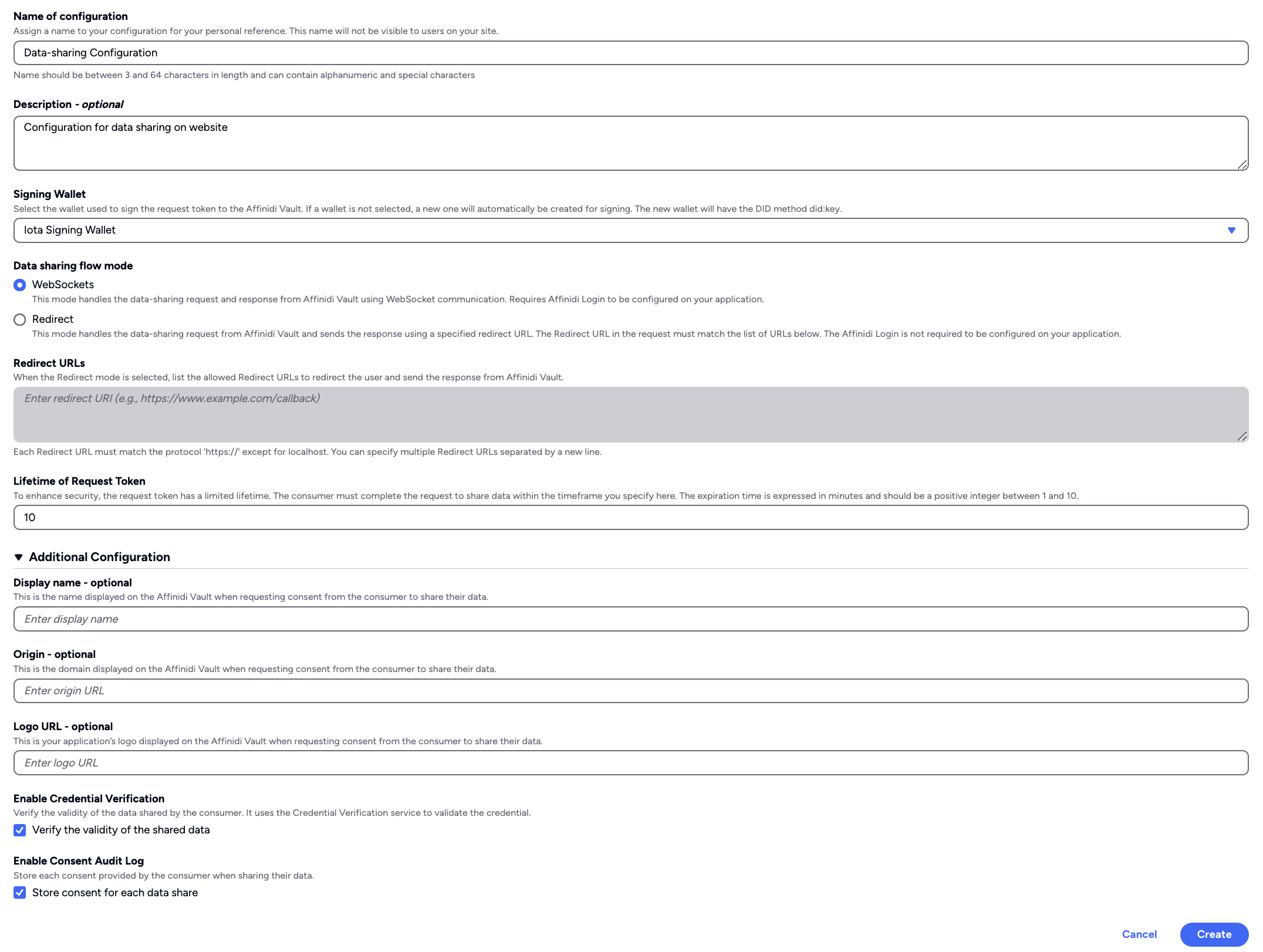
Enabling your website to request user data begins with creating an Affinidi Iota Framework configuration. This setup defines the signing wallet, sets the request token expiration, and specifies the presentation definitions needed to query data from the user’s Affinidi Vault.
Once the configuration is in place, you can integrate the Affinidi Iota Framework into your website using the Affinidi TDK. This integration allows your site to request and receive user data with consent.
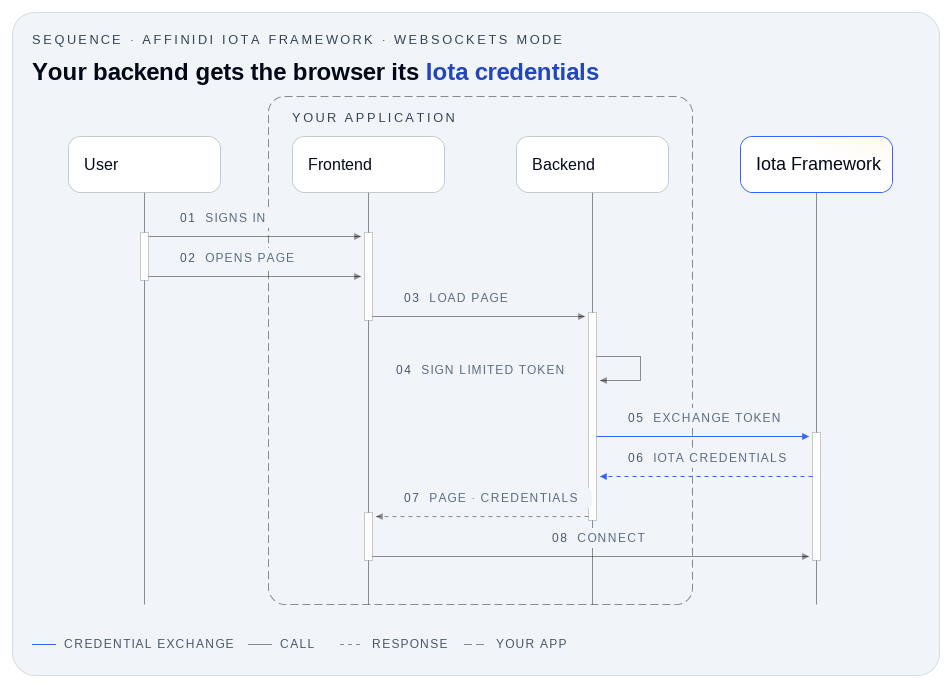
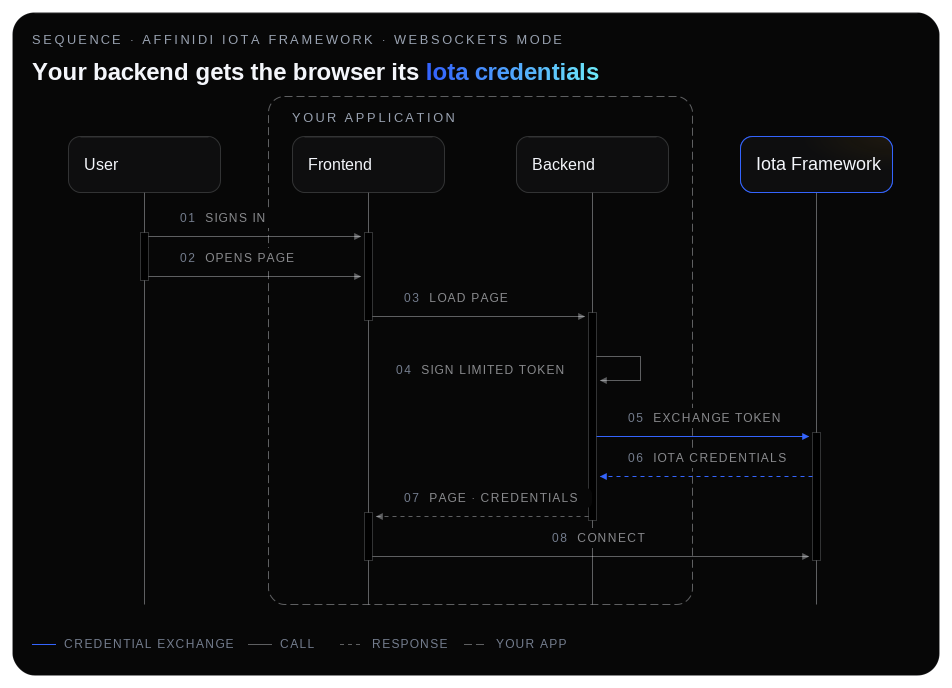
The diagrams below show a data-sharing request in WebSockets mode. First, your backend gets the browser the credentials it needs to connect to Affinidi Iota Framework:
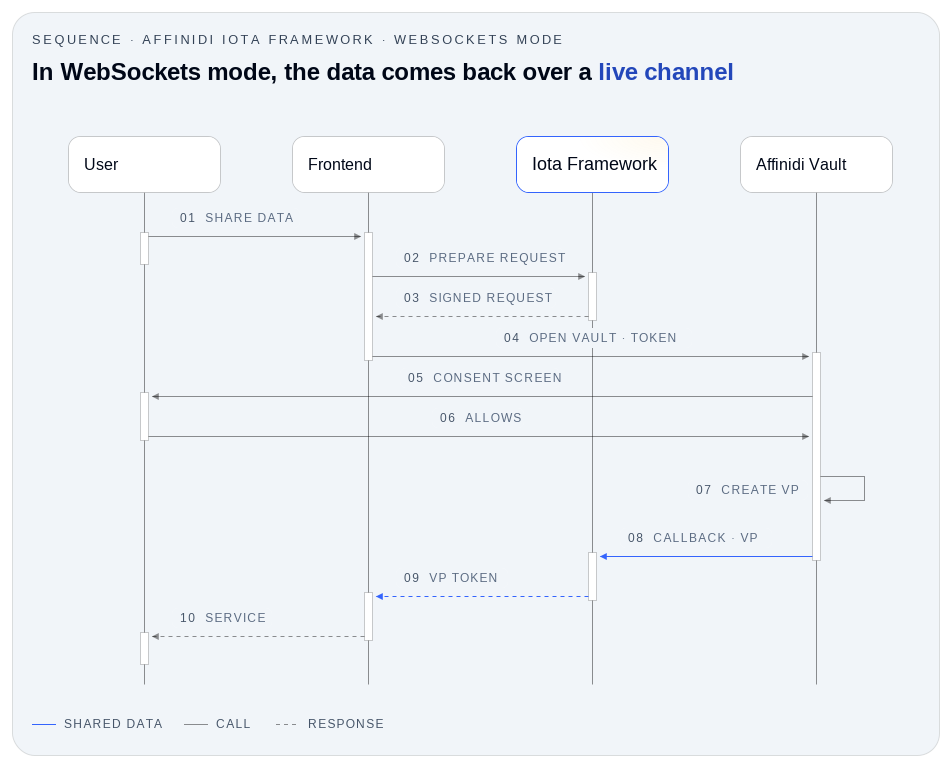
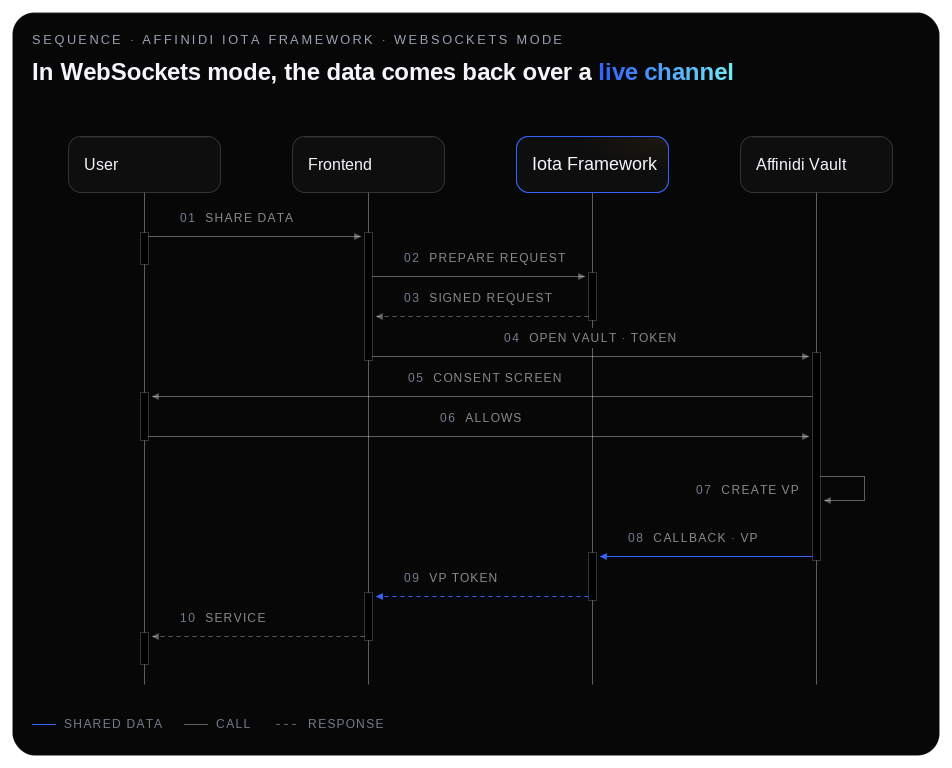
With the connection open, the user can share data whenever your page asks for it:
You can provide different context-based data-sharing requests for your users at every touchpoint within your website, requesting different data sets while giving users value in return.
Affinidi Iota Framework configuration
In the Affinidi Iota Framework configuration, you define the wallet responsible for signing the request token, set the token’s expiration to enhance security, and specify the presentation definitions used to query data from the user’s Affinidi Vault.
You also need to select a data-sharing flow mode which determines how the request will be handled.
Optionally, you can enable verification of the credentials shared by the user. You can also store the user’s consent for future reference.
Data-sharing mode
To integrate with the Affinidi Iota Framework, your app must define how to handle the data-sharing request, including how the response is returned to your website.
The framework supports two modes: WebSockets and Redirect.
WebSockets
In this mode, the browser keeps a live connection to Affinidi Iota Framework. It sends the data-sharing request over the connection, receives the signed request token, and after the user responds, receives either a Verifiable Presentation token (VP token) or an error message.
WebSockets mode requires Affinidi Login, because your backend needs the user’s Decentralised Identifier (DID) to create the limited token it exchanges for the browser’s Iota credentials. It supports both Popup and New Tab options when opening Affinidi Vault - a secure store for user credentials.
Redirect
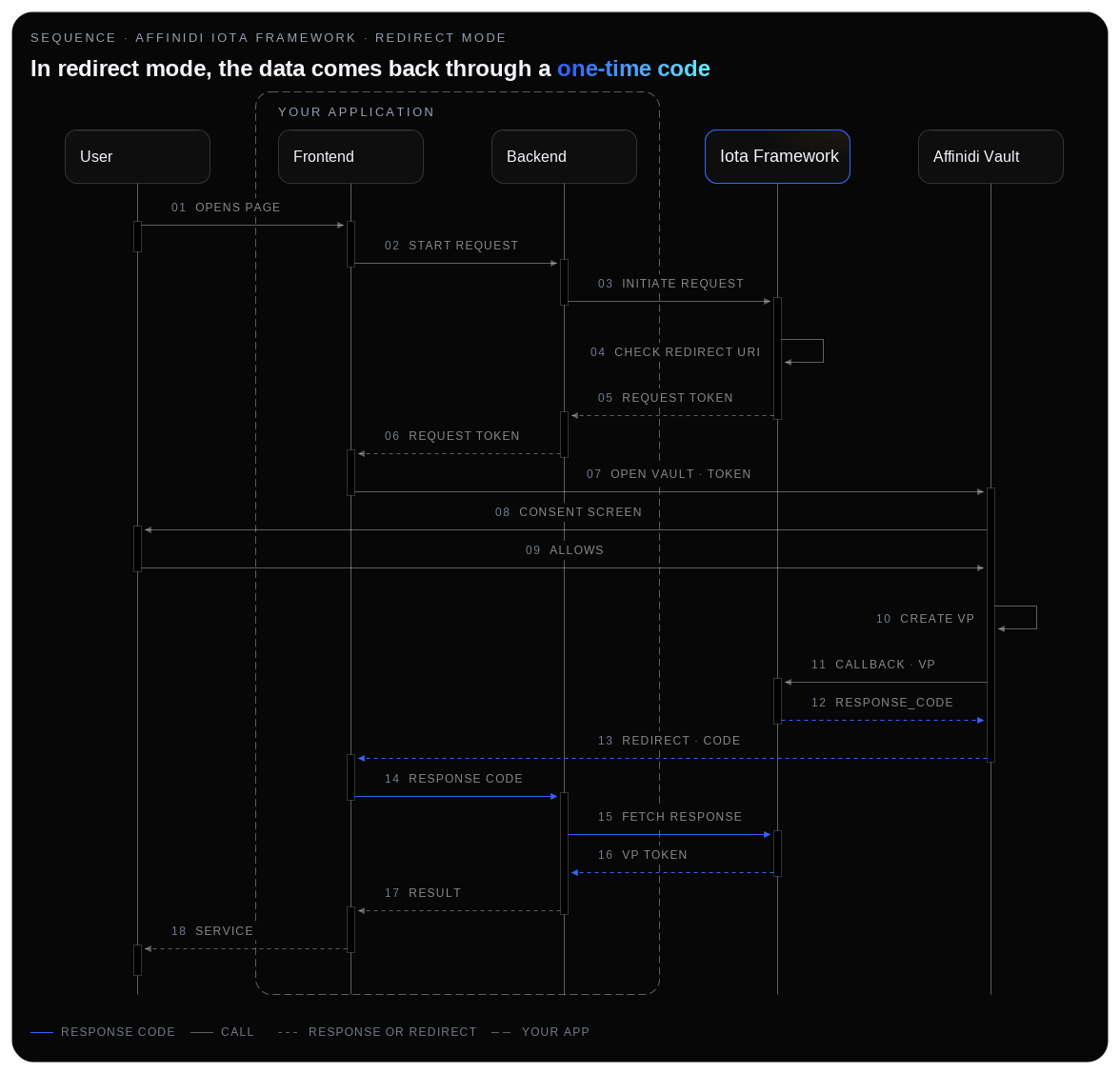
Redirect mode doesn’t require Affinidi Login. Your backend starts the request with a redirect URL, which must be one of the redirect URLs in your configuration. After the user responds to the Affinidi Vault consent screen, they are redirected to that URL with a response code. Your backend uses the code to fetch the response, which contains either the VP token or an error message. The code works only once and expires shortly after, so fetch the response as soon as the user returns.
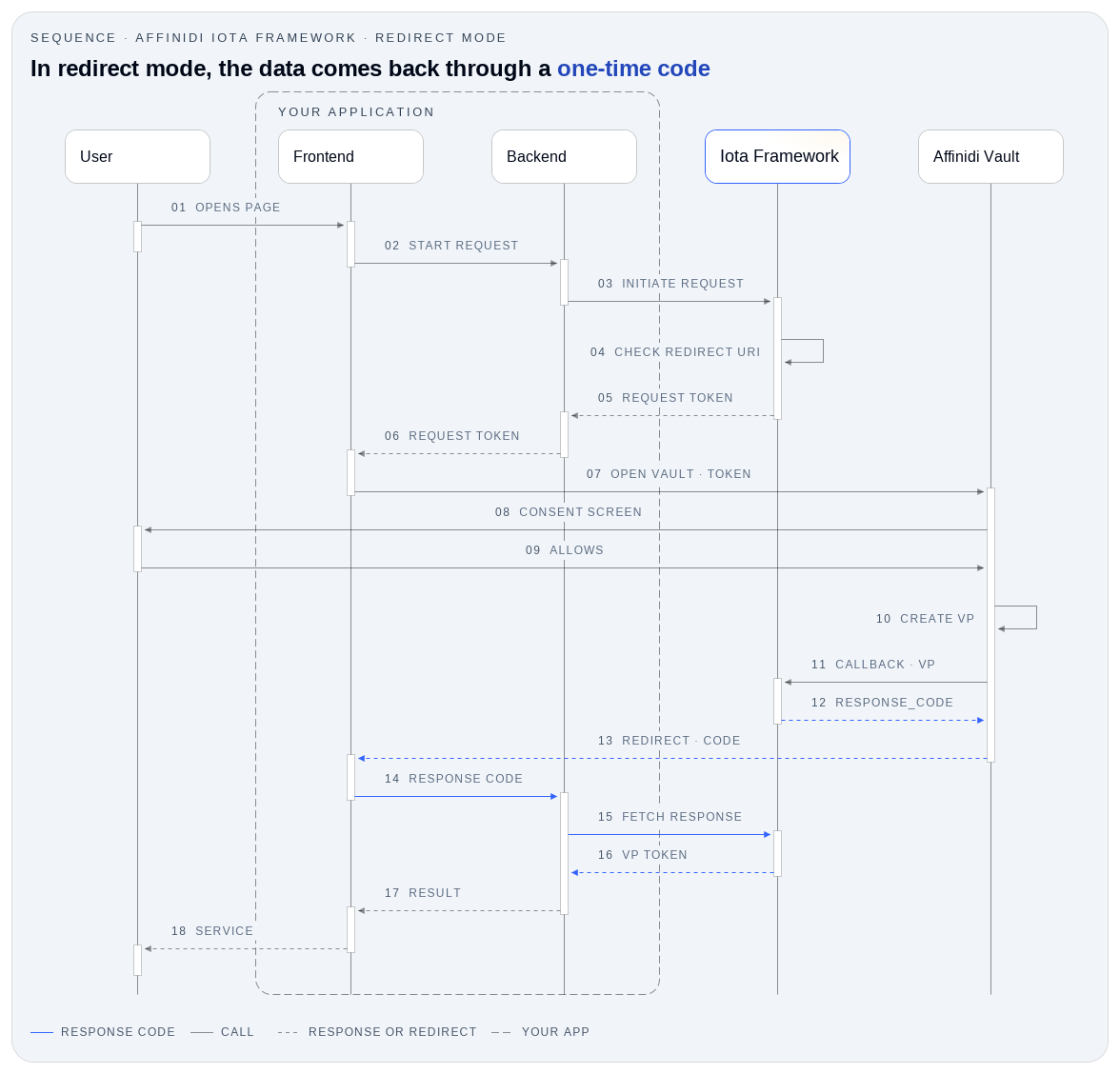
Updating the data sharing mode of the Affinidi Iota Framework with an existing implementation will fail any ongoing request at the time of change. In this case, the user will have to restart their data-sharing flow.
Credential verification
The Affinidi Iota Framework allows you to enable credential verification, sending a VP token shared by the user to the credential verification service. This service checks the digital signature to confirm the credential is authentic and tamper-evident.
Consent logs
You can enable Consent Logging to store the consent given by the user in Affinidi Vault when they agree to share their data. When enabled, it records the user’s Decentralised Identifier (DID), the type of Verifiable Credential shared, the date of consent, and the consent status.
This feature gives you proof that the user has agreed to share their data. It also provides an overview of how many consents have been given and which credentials were shared.
You can view Consent Logs on the Affinidi Iota Configuration page of Affinidi Portal . This page lets you download and filter logs by the user’s DID.
To access the logs, scroll to the bottom of the page and open the Consents panel.

What’s next
Works with
Glad to hear it. Thanks for letting us know.
Sorry to hear that. Thanks for letting us know.
Still stuck? Ask the community on Discord or contact us.