Affinidi Vault overview
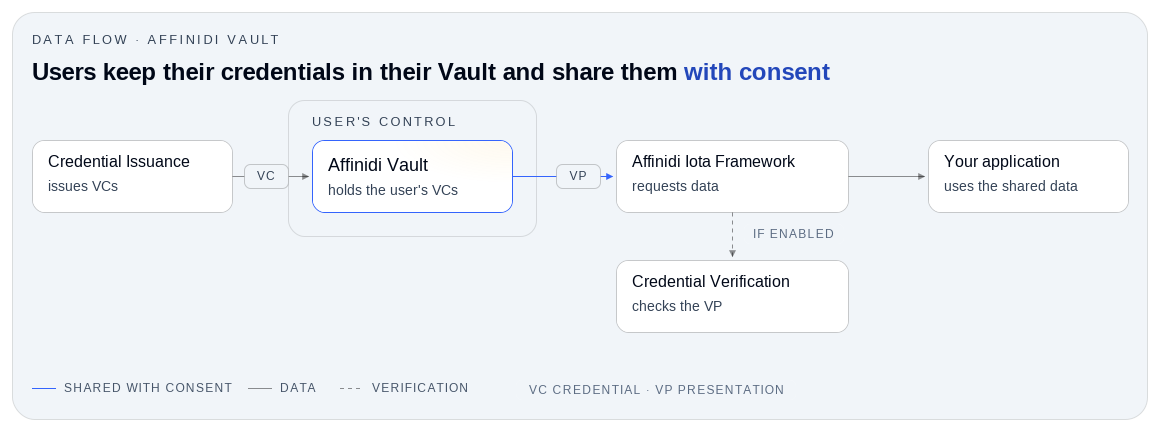
Affinidi Vault lets users discover, collect, store and share their data across different applications while keeping control of it. When an application requests data from your Affinidi Vault, it displays a consent page to review the requested data and request your consent to allow access to that data.
Users run Affinidi Vault as a web app or a mobile app, and store their data on their device (edge) or in the cloud. To set up an account, follow the Affinidi Vault user guide.
Decentralised Identifier (DID)
Setting up your Affinidi Vault generates a Decentralised Identifier (DID) using the did:key method. This globally unique identifier represents your digital identity, and one DID serves every profile in the Vault. Its key pair lets the Vault sign the presentations it shares, so the receiving application can check them.
The private key associated with the DID signs the generated Verifiable Presentations (VPs) when sharing the data from your Affinidi Vault.
A DID has three parts, separated by colons:
| Part | In the example below | What it is |
|---|---|---|
| Scheme | did | Always did. |
| DID method | key | How the DID is created and resolved. Affinidi Vault uses did:key. |
| Method-specific identifier | zQ3shUUDPVKe… | Unique within the method. For did:key, it encodes the public key. |
Resolving the DID returns the DID document containing information such as the public key used to verify the signature on the Verifiable Presentations the user shares from their Affinidi Vault. Each Verifiable Credential inside a presentation is verified with its own issuer’s DID.
DID resolution to retrieve the DID document differs depending on the method used. Below is an example of a valid DID using did:key method:
did:key:zQ3shUUDPVKeLREtiKeg2C6YiPBiqkEQkakDEvfUyoCbkV7pjTo view the corresponding DID document, you can use the did:key above to resolve the value using the DIF Universal Resolver tool online.
How user data is stored and protected
Affinidi Vault stores a profile’s data either on the user’s device (edge profile) or in the cloud (cloud profile).
- Edge profiles are stored encrypted on the user’s device, and the user’s passphrase unlocks them.
- Cloud profiles are stored by Affinidi, so they’re available on the user’s other devices. Affinidi processes the documents in a cloud profile to provide document scanning and data extraction.
The data collected from authoritative or trusted sources, including self-attested data, is stored and managed within the Affinidi Vault.
Each piece of data in Affinidi Vault is associated with a profile, which allows you to categorise your data based on different purposes or contexts, such as travel, shopping, or work data.
How to request data from user
The Affinidi Vault uses the presentation definition or PEX query, introduced by the Presentation Exchange protocol, to query the user’s data. This JSON-structured query allows you to define the data requirement the user must share with consent from their Affinidi Vault.
You can request several data points stored in the user’s Affinidi Vault that your application requires to complete a process, such as the user onboarding process.
See the sample PEX query that requests the user’s basic information from their Affinidi Vault:
{
  "id": "token_with_identity_fullname_vc",
  "input_descriptors": [
    {
      "id": "profile_name",
      "name": "Profile Name",
      "purpose": "Check if data contains necessary fields",
      "constraints": {
        "fields": [
          {
            "path": [
              "$.@context"
            ],
            "purpose": "Verify VC Context",
            "filter": {
              "type": "array",
              "contains": {
                "type": "string",
                "pattern": "^https://schema.affinidi.io/profile-template/context.jsonld$"
              }
            }
          },
          {
            "path": [
              "$.type"
            ],
            "purpose": "Verify VC Type",
            "filter": {
              "type": "array",
              "contains": {
                "type": "string",
                "pattern": "^ProfileTemplate$"
              }
            }
          },
          {
            "path": [
              "$.credentialSubject.person.givenName"
            ],
            "purpose": "Require first name"
          },
          {
            "path": [
              "$.credentialSubject.person.familyName"
            ],
            "purpose": "Require last name"
          },
          {
            "path": [
              "$.credentialSubject.person.birthdate"
            ],
            "purpose": "Require birthdate"
          }
        ]
      }
    }
  ]
}
With the above presentation definition, we request specific data points depending on your application’s requirement from the user with their consent to complete your application’s workflow, like onboarding the user or providing a more personalised experience.
How to share data with consent
At the core of the data-sharing flow, the Affinidi Vault requests consent from the user before sharing the data with the application requesting their data.
The Affinidi Vault queries the user data based on the presentation definition (PEX query) configured in the request and displays the consent screen, which shows the requested data.
The user must consent for your application to access this data or decline the request. If the user has more than one profile, they choose which profile to share the data from.

Once the user consents to share their data, the Affinidi Vault generates the Verifiable Presentation token (VP Token) and shares it with your application to continue a particular flow on your application.
The user can also select Allow access automatically next time, so the Vault shares the same data with your application without asking again.
Any change to the presentation definition, or a request from a different client, makes the Vault ask for consent again.
How to manage your Affinidi Vault
Affinidi Vault provides the following features to securely manage, store, and access your data.
Multi-profile management
Affinidi Vault allows you to create different representations of yourself and categorise your data based on various contexts. It enables you to create different profiles containing different data sets that you can use to claim third-party credentials and share this data, depending on who you interact with.
For example, users may represent themselves differently on social platforms than on other platforms, such as e-commerce or online learning sites.

Settings
The Settings page lets users manage their Affinidi Vault, including biometrics, backups, their passphrase and passphrase reset, and deleting the Vault. A few behaviours matter when your application relies on the Vault:
- Backups cover the Vault’s edge profiles and its keys. Cloud profile data stays in the cloud.
- Deleting the Vault removes the data stored on that device. Cloud profile data and cloud backups aren’t removed by it.
- Cloud backup needs a verified email address in the default profile.

History
Sharing data from your Affinidi Vault records your consent to various websites, giving you a clear overview and helping you manage your consent.
It contains information like the URL of who requested the data, which profile the data was shared from your Affinidi Vault, the last time you consented to share the data and the details of the shared data with the requester.

What’s next
Works with
Glad to hear it. Thanks for letting us know.
Sorry to hear that. Thanks for letting us know.
Still stuck? Ask the community on Discord or contact us.