Claimed credentials
The Claimed Credentials page shows all VCs you accepted from trusted third-party issuers.
When requested by your app, these credentials are shared with user consent. They contain attested data that can simplify onboarding or streamline workflows.
Example:
If a user completes a course, the training provider can issue a VC certifying completion. Your app can request this VC to verify and onboard the user.

How claimed credential works
When an issuer wants to attest a claim (e.g., course completion), they create a credential offer.
The offer includes details about the claim and a link for the user to claim the credential in Affinidi Vault.
When the user visits the link:
- They are redirected to Affinidi Vault’s Claim Credential page.
- Affinidi Vault exchanges
pre-authorisationandtransaction code(if TX_CODE mode is selected) to get the access token required to retrieve the credential.
If the credential offer includes a holderDid, the Credential Issuance service accepts the claim only from the Affinidi Vault with that DID. A claim from any other Vault fails with a DID mismatch error.
Below is the diagram of the claimed credential flow:
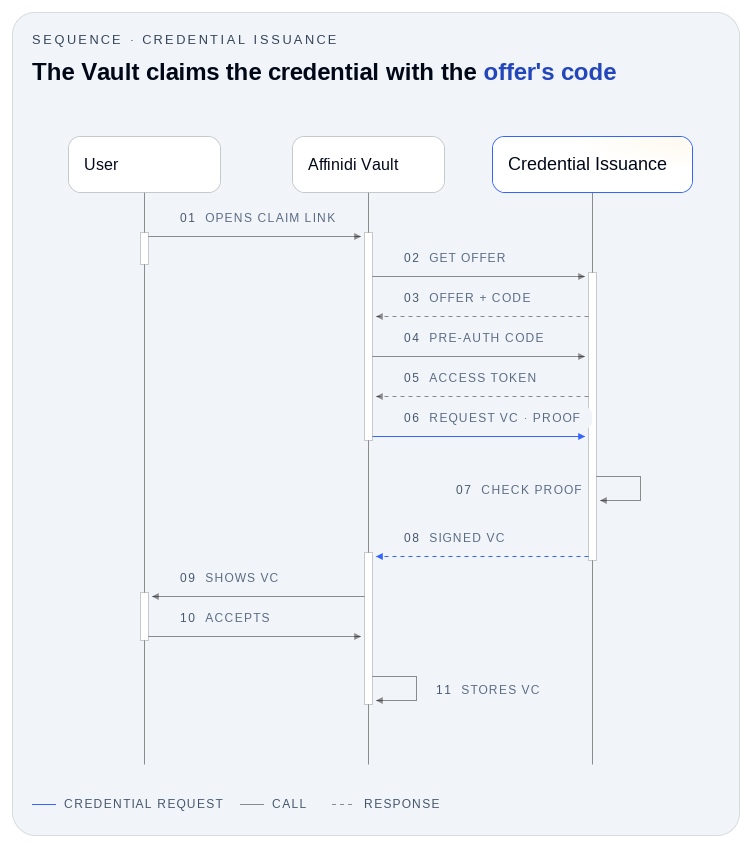
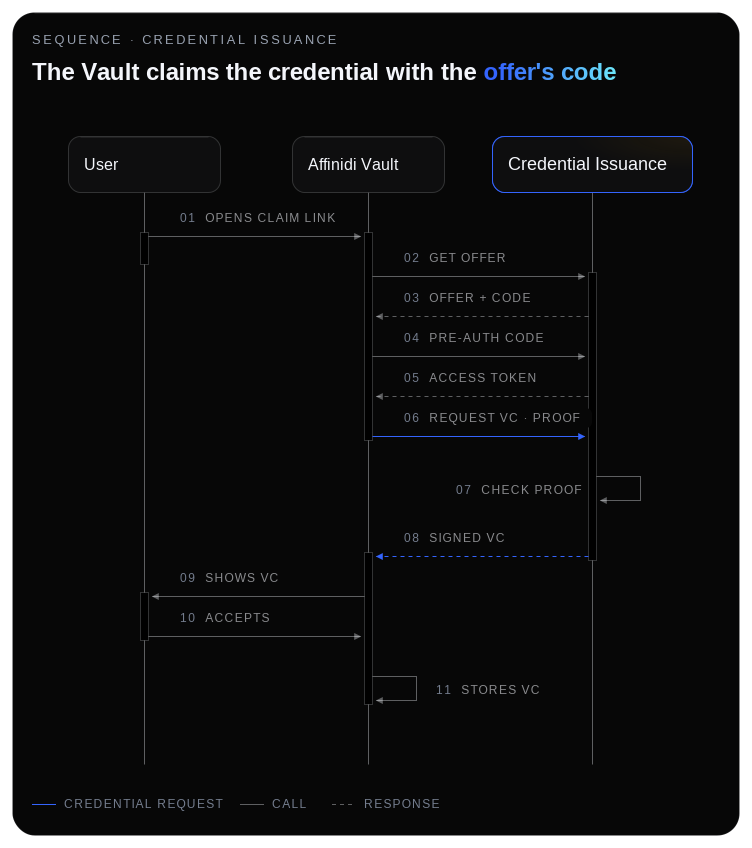
How a user can claim a credential offer
After creating the credential offer:
- It returns an
offer_urithat the issuer must securely send to the user. - The issuer can share the link via email or embed it in a QR code.
If TX_CODE mode is selected: The issuer must also send the transaction code securely.
If FIXED_HOLDER mode is used: only the Affinidi Vault whose DID matches the offer’s holderDid can claim it.
The claim link format includes the URL encoded <OFFER_URI> value.
https://vault.affinidi.com/claim?credential_offer_uri=<OFFER_URI>When the user opens the link, Affinidi Vault loads the offer and, if the offer needs one, asks for the transaction code. If the user has more than one profile, they choose which profile stores the credential, then select Save. The credential then appears on that profile’s Claimed credentials tab. For the user’s steps, see Claim credentials.
Affinidi Vault titles the credential with the last value in its type array, in sentence case (for example, Membership). For an identity document, it uses the document type instead.
Users can also copy a claimed credential to another profile, from the credential’s menu.

Credential Offer are valid only for the lifetime configured in Credential Issuance.
If the user does not claim within this time, the issuer must create a new offer.
How to request claimed credentials from the user
To request claimed credentials:
- Define a Presentation Definition to query and ask for user consent.
Example:
If the Membership is added in Credential Issuance configuration:
- You can use it to create a credential offer.
- Users claim and store it in their Affinidi Vault.

Once VCs are available in the user’s Vault:
- Request them using Affinidi Iota Framework.
- Define a Presentation Definition specifying the credential type (e.g., Membership).
{
  "id": "membership_vc",
  "input_descriptors": [
    {
      "id": "membership_vc",
      "name": "Membership VC",
      "purpose": "Check if Vault contains the required VC.",
      "constraints": {
        "fields": [
          {
            "path": [
              "$.type"
            ],
            "purpose": "Check if VC type is correct",
            "filter": {
              "type": "array",
              "contains": {
                "type": "string",
                "pattern": "^Membership$"
              }
            }
          }
        ]
      }
    }
  ]
}
In this Presentation Definition, you query the Membership VC stored in the user’s Affinidi Vault by specifying the credential type Membership in the filter.
This type matches the Credential Type ID configured in the Credential Issuance configuration.
When the user consents:
- Affinidi Vault generates a Verifiable Presentation (vp_token) containing the VC.
- The vp_token is shared with your application.
What’s next
Glad to hear it. Thanks for letting us know.
Sorry to hear that. Thanks for letting us know.
Still stuck? Ask the community on Discord or contact us.