AWS Marketplace (self-hosted)
Deploy the DIDComm Mediator in your own AWS account from AWS Marketplace. A CloudFormation template creates the network, the domain records, and the mediator service on Amazon Elastic Container Service (ECS), and you keep control of the account, the scaling, and the costs.
Running the mediator in your own account keeps its keys, its messages and its network inside infrastructure you control and audit. Use this guide when you want a mediator that runs in your own AWS account rather than one hosted by Affinidi, and you prefer a ready-made template to building and running the open-source mediator yourself.
The template runs mediator release 0.33.1. You provide the mediator’s identity: an administrator DID, the mediator’s own DID and its DID document, and two secret values. One program on this page generates all of them on your machine and sends nothing anywhere.
Prerequisites
- An AWS account with permission to create CloudFormation stacks and the resources they contain: Amazon ECS, Elastic Load Balancing, Amazon VPC networking with NAT gateways and Elastic IP addresses, Route 53 hosted zones and records, AWS Certificate Manager certificates, AWS Secrets Manager secrets, Systems Manager parameters, CloudWatch Logs log groups, and IAM roles.
- A Route 53 public hosted zone in that account for the base domain that will host the mediator, such as
goodcompany.com, and its hosted zone ID. - Rust 1.95.0 or later, to run the identity generator.
The DIDComm Mediator listing on AWS Marketplace is free. You pay for the AWS resources the stack runs, including the load balancer and two NAT gateways, which are charged by the hour while the stack exists.
Step 1: Create the identity generator
Create the project
cargo new mediator-identity
cd mediator-identity
Replace the contents of Cargo.toml with the following. didwebvh-rs is pinned to the release that mediator 0.33.1 reads did:webvh log entries with, and the other libraries write keys in formats it reads.
[package]
name = "mediator-identity"
version = "0.1.0"
edition = "2024"

[dependencies]
affinidi-secrets-resolver = "0.5"
affinidi-tdk = { version = "0.36", default-features = false, features = ["did-peer"] }
base64 = "0.22"
clap = { version = "4", features = ["derive"] }
didwebvh-rs = { version = "=0.7.0", default-features = false }
ring = "0.17"
serde = { version = "1", features = ["derive"] }
serde_json = "1"
tokio = { version = "1", features = ["macros", "rt"] }
Add the program
Replace the contents of src/main.rs with the following code.
//! Generates the identities for a DIDComm mediator deployed from AWS Marketplace: the administrator
//! DID (`did:peer`) with a profile file holding its private keys, and, with `--host`, the mediator's
//! own DID (`did:web` or `did:webvh`), its DID document or log entry, and the two secret values
//! the template asks for.
//!
//! Everything runs on your machine. Nothing is sent anywhere.

use std::{
    fs::{self, OpenOptions},
    io::Write,
    path::{Path, PathBuf},
    sync::Arc,
};

use affinidi_secrets_resolver::secrets::Secret;
use affinidi_tdk::dids::{DID, KeyType, PeerKeyRole};
use base64::{Engine, engine::general_purpose::URL_SAFE_NO_PAD};
use clap::{Parser, ValueEnum};
use didwebvh_rs::{
    DIDWebVHState,
    create::{CreateDIDConfig, create_did},
    log_entry::{LogEntry, LogEntryMethods},
    parameters::Parameters,
};
use ring::{rand::SystemRandom, signature::Ed25519KeyPair};
use serde_json::{Value, json};

type Result<T> = std::result::Result<T, Box<dyn std::error::Error>>;

/// CloudFormation parameter values are limited to 4 KB.
const MAX_PARAMETER_BYTES: usize = 4096;
/// Placeholder that didwebvh-rs replaces with the DID once it is known.
const WEBVH_DID: &str = "{DID}";

#[derive(Clone, Copy, PartialEq, Eq, ValueEnum)]
enum DidMethod {
    Web,
    Webvh,
}

#[derive(Parser)]
#[command(about = "Generates the identities for a DIDComm mediator on AWS Marketplace")]
struct Args {
    /// Mediator host name, for example mediator.goodcompany.com, to generate the mediator's DID
    /// and secrets.
    #[arg(long)]
    host: Option<String>,

    /// DID method of the mediator's DID.
    #[arg(long, value_enum, default_value = "web", requires = "host")]
    did_method: DidMethod,

    /// Directory to write the files to. It must not exist yet.
    #[arg(long, default_value = "mediator-secrets")]
    out: PathBuf,
}

/// The mediator's identity: its DID, private keys, and the `MediatorDIDDoc` value.
struct MediatorIdentity {
    did: String,
    secrets: Vec<Secret>,
    /// The DID document (did:web) or the first log entry (did:webvh), on one line.
    did_doc: String,
    /// did:webvh only: the key that can update the DID, and the key that replaces it.
    update_keys: Option<Vec<Secret>>,
}

/// A secret value in the format the mediator reads from AWS Secrets Manager.
fn seal(kind: &str, data: impl serde::Serialize) -> Result<String> {
    let envelope = json!({ "version": 1, "kind": kind, "data": data });
    Ok(URL_SAFE_NO_PAD.encode(serde_json::to_vec(&envelope)?))
}

fn validate_host(host: &str) -> Result<()> {
    let (name, port) = match host.split_once(':') {
        Some((name, port)) => (name, Some(port)),
        None => (host, None),
    };
    let valid_name = !name.is_empty()
        && name.split('.').all(|label| {
            !label.is_empty()
                && !label.starts_with('-')
                && !label.ends_with('-')
                && label.chars().all(|c| c.is_ascii_alphanumeric() || c == '-')
        });
    if valid_name && port.is_none_or(|p| p.parse::<u16>().is_ok()) {
        Ok(())
    } else {
        Err(format!("'{host}' is not a host name, for example mediator.goodcompany.com").into())
    }
}

/// The mediator's keys, each marked `true` for signing or `false` for key agreement.
fn generate_keys(method: DidMethod) -> Result<Vec<(Secret, bool)>> {
    let ed25519 = Secret::generate_ed25519(None, None);
    let x25519 = ed25519.to_x25519()?;
    Ok(match method {
        DidMethod::Web => vec![
            (ed25519, true),
            (Secret::generate_p256(None, None)?, true),
            (x25519, false),
            (Secret::generate_p256(None, None)?, false),
            (Secret::generate_secp256k1(None, None)?, false),
        ],
        // Fewer keys: each one repeats the long did:webvh DID, and the entry must fit in 4 KB.
        DidMethod::Webvh => vec![(ed25519, true), (x25519, false)],
    })
}

fn build_did_document(did: &str, host: &str, keys: &[(Secret, bool)]) -> Result<Value> {
    let ids = |signing: bool| {
        (0..keys.len())
            .filter(|&i| keys[i].1 == signing)
            .map(|i| format!("{did}#key-{i}"))
            .collect::<Vec<_>>()
    };
    let verification_method = keys
        .iter()
        .enumerate()
        .map(|(i, (secret, _))| {
            Ok(json!({
                "id": format!("{did}#key-{i}"),
                "type": "Multikey",
                "controller": did,
                "publicKeyMultibase": secret.get_public_keymultibase()?,
            }))
        })
        .collect::<Result<Vec<_>>>()?;
    Ok(json!({
        "@context": ["https://www.w3.org/ns/did/v1", "https://www.w3.org/ns/cid/v1"],
        "id": did,
        "verificationMethod": verification_method,
        "authentication": ids(true),
        "assertionMethod": ids(true),
        "keyAgreement": ids(false),
        "service": [
            {
                "id": format!("{did}#service"),
                "type": "DIDCommMessaging",
                "serviceEndpoint": [
                    { "uri": format!("https://{host}"), "accept": ["didcomm/v2"] },
                    { "uri": format!("wss://{host}/ws"), "accept": ["didcomm/v2"] },
                ],
            },
            {
                "id": format!("{did}#auth"),
                "type": "Authentication",
                "serviceEndpoint": format!("https://{host}/authenticate"),
            },
        ],
    }))
}

fn with_key_ids(keys: Vec<(Secret, bool)>, did: &str) -> Vec<Secret> {
    keys.into_iter()
        .enumerate()
        .map(|(i, (mut secret, _))| {
            secret.id = format!("{did}#key-{i}");
            secret
        })
        .collect()
}

fn create_did_web(host: &str) -> Result<MediatorIdentity> {
    let did = format!("did:web:{}", host.replace(':', "%3A"));
    let keys = generate_keys(DidMethod::Web)?;
    let document = build_did_document(&did, host, &keys)?;
    Ok(MediatorIdentity {
        secrets: with_key_ids(keys, &did),
        did,
        did_doc: serde_json::to_string(&document)?,
        update_keys: None,
    })
}

async fn create_did_webvh(host: &str) -> Result<MediatorIdentity> {
    let keys = generate_keys(DidMethod::Webvh)?;
    let mut document = build_did_document(WEBVH_DID, host, &keys)?;
    // The document is bound to the DID, so the mediator cannot add its TSP service itself.
    document["service"]
        .as_array_mut()
        .ok_or("the DID document has no services")?
        .push(json!({
            "id": format!("{WEBVH_DID}#tsp"),
            "type": ["TSPTransport"],
            "serviceEndpoint": format!("https://{host}"),
        }));

    let update_key = did_key(Secret::generate_ed25519(None, None))?;
    let next_key = did_key(Secret::generate_ed25519(None, None))?;
    let parameters = Parameters {
        update_keys: Some(Arc::new(vec![update_key.get_public_keymultibase()?.into()])),
        next_key_hashes: Some(Arc::new(vec![
            Secret::base58_hash_string(&next_key.get_public_keymultibase()?)?.into(),
        ])),
        portable: Some(true),
        ..Default::default()
    };
    let config = CreateDIDConfig::builder()
        .address(format!("https://{host}"))
        .authorization_key(update_key.clone())
        .did_document(document)
        .parameters(parameters)
        .build()?;
    let result = create_did(config).await?;
    let did = result.did().to_string();
    Ok(MediatorIdentity {
        secrets: with_key_ids(keys, &did),
        did,
        did_doc: serde_json::to_string(result.log_entry())?,
        update_keys: Some(vec![update_key, next_key]),
    })
}

fn did_key(mut secret: Secret) -> Result<Secret> {
    let public_key = secret.get_public_keymultibase()?;
    secret.id = format!("did:key:{public_key}#{public_key}");
    Ok(secret)
}

/// Reads the values back as the mediator and a DID resolver would, before anything is written.
fn check(identity: &MediatorIdentity, jwt_key: &[u8]) -> Result<()> {
    Ed25519KeyPair::from_pkcs8(jwt_key).map_err(|e| format!("invalid JWT signing key: {e}"))?;
    if identity.did_doc.len() > MAX_PARAMETER_BYTES {
        return Err(format!("MediatorDIDDoc is over {MAX_PARAMETER_BYTES} bytes").into());
    }
    let document = if identity.update_keys.is_some() {
        let entry = LogEntry::deserialize_string(&identity.did_doc, None)?;
        DIDWebVHState::from_log_entries(vec![entry.clone()])
            .validate()?
            .assert_complete()?;
        entry.get_did_document()?
    } else {
        serde_json::from_str(&identity.did_doc)?
    };
    let methods = document["verificationMethod"]
        .as_array()
        .ok_or("the DID document has no keys")?;
    if document["id"] != identity.did.as_str() || methods.len() != identity.secrets.len() {
        return Err("the DID document does not match the generated keys".into());
    }
    for (method, secret) in methods.iter().zip(&identity.secrets) {
        if method["id"] != secret.id.as_str()
            || method["publicKeyMultibase"] != secret.get_public_keymultibase()?.as_str()
        {
            return Err(format!("{} does not match the DID document", secret.id).into());
        }
    }
    Ok(())
}

/// Writes a file only you can read (on macOS and Linux), and never overwrites one. No trailing
/// newline, so a pasted value is exactly what the mediator decodes.
fn write_private(path: &Path, contents: &str) -> Result<()> {
    let mut options = OpenOptions::new();
    options.write(true).create_new(true);
    #[cfg(unix)]
    std::os::unix::fs::OpenOptionsExt::mode(&mut options, 0o600);
    let mut file = options.open(path)?;
    file.write_all(contents.as_bytes())?;
    Ok(())
}

#[tokio::main(flavor = "current_thread")]
async fn main() -> Result<()> {
    let args = Args::parse();
    if args.out.exists() {
        return Err(format!(
            "{} already exists: choose another --out",
            args.out.display()
        )
        .into());
    }

    let (admin_did, admin_secrets) = DID::generate_did_peer(
        vec![
            (PeerKeyRole::Verification, KeyType::Ed25519),
            (PeerKeyRole::Encryption, KeyType::X25519),
        ],
        None,
    )?;
    let mut files = vec![("admin_did.txt", admin_did.clone())];

    let mediator = match args.host.as_deref() {
        Some(host) => {
            let host = host.trim().trim_end_matches('/').to_ascii_lowercase();
            validate_host(&host)?;
            let identity = match args.did_method {
                DidMethod::Web => create_did_web(&host)?,
                DidMethod::Webvh => create_did_webvh(&host).await?,
            };
            let jwt_key = Ed25519KeyPair::generate_pkcs8(&SystemRandom::new())
                .map_err(|_| "could not generate the JWT signing key")?;
            check(&identity, jwt_key.as_ref())?;
            files.push(("mediator_did.txt", identity.did.clone()));
            files.push(("mediator_did_doc.json", identity.did_doc.clone()));
            files.push((
                "mediator_operating_secrets.txt",
                seal("operating-secrets", &identity.secrets)?,
            ));
            files.push((
                "mediator_jwt_secret.txt",
                seal("jwt-secret", jwt_key.as_ref())?,
            ));
            if let Some(keys) = &identity.update_keys {
                files.push(("did_update_keys.json", serde_json::to_string_pretty(keys)?));
            }
            Some(identity.did)
        }
        None => None,
    };

    // A profile for the mediator console, in the Affinidi TDK profile format.
    let mut profile = json!({ "alias": "admin", "did": admin_did, "secrets": admin_secrets });
    if let Some(did) = &mediator {
        profile["mediator"] = json!(did);
    }
    files.push((
        "admin_profile.json",
        serde_json::to_string_pretty(&profile)?,
    ));

    // Created only you can open (on macOS and Linux), failing if it appeared in the meantime.
    let mut folder = fs::DirBuilder::new();
    #[cfg(unix)]
    std::os::unix::fs::DirBuilderExt::mode(&mut folder, 0o700);
    folder.create(&args.out)?;
    for (name, contents) in &files {
        write_private(&args.out.join(name), contents)?;
    }

    println!("Wrote {} files to {}", files.len(), args.out.display());
    println!("MediatorAdminDID: {admin_did}");
    if let Some(did) = mediator {
        println!("MediatorDID:      {did}");
    }
    Ok(())
}
Step 2: Launch the template from AWS Marketplace
Open the listing
Open the DIDComm v2.1 Mediator listing by Affinidi Pte Ltd on AWS Marketplace. Its Version-2.0.0 runs mediator release 0.33.1. Review the purchase options, and launch the software.
Choose the region and launch with CloudFormation
Select the AWS Region to deploy the mediator in, then launch with CloudFormation.
Continue to the stack details
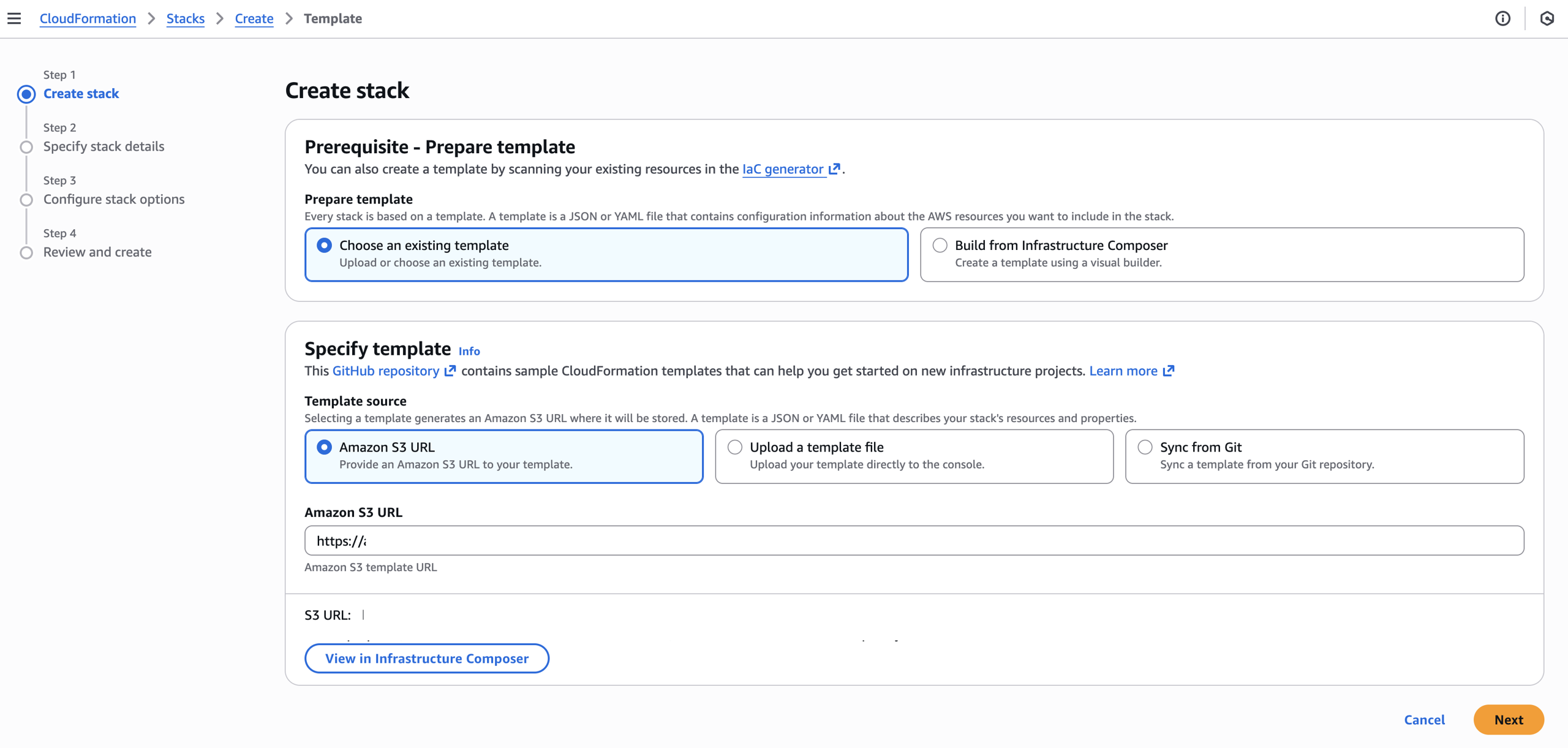
CloudFormation opens Create stack with the template already selected. Select Next.
Check the template version
On Specify stack details, the default value of AWSMediatorImage ends with the mediator release the template runs, messaging-mediator:v0.33.1. This guide is for that release.
Step 3: Generate the identities
Run the generator from the mediator-identity folder, passing the mediator’s host name: HostSubdomainName and HostBaseDomainName joined with a dot. The first run downloads and compiles its dependencies, which takes a few minutes.
cargo run --release -- --host mediator.goodcompany.comThis creates a did:web DID for the mediator. To create a did:webvh DID, which keeps a verifiable history of its changes, add --did-method webvh.
The program prints the DIDs and writes these files to the mediator-secrets folder. Each file is readable only by you on macOS and Linux. To write them to another folder, add --out <folder>. The program writes only to a folder that does not exist yet, so the keys you already use stay as they are. To run it again, pass a new --out folder.
| File | What it is | Secret |
|---|---|---|
admin_did.txt | The administrator DID, for MediatorAdminDID. | No |
admin_profile.json | The administrator DID’s private keys, as a profile for the mediator console. | Yes |
mediator_did.txt | The mediator’s DID, for MediatorDID. | No |
mediator_did_doc.json | The DID document (did:web) or the first log entry (did:webvh), on one line, for MediatorDIDDoc. | No |
mediator_operating_secrets.txt | The mediator’s private keys, for Secrets Manager. | Yes |
mediator_jwt_secret.txt | The key the mediator signs its access tokens with, for Secrets Manager. | Yes |
did_update_keys.json | did:webvh only: the keys that can update the DID. They cannot be recovered if lost. | Yes |
The administrator DID controls the mediator, and the mediator’s keys let anyone act as the mediator. Once the deployment works, delete mediator_operating_secrets.txt and mediator_jwt_secret.txt, because Secrets Manager holds their values. Keep admin_profile.json, which the mediator console needs, and for a did:webvh DID, did_update_keys.json, which you need to update the DID. Store both in your secrets manager.
The program prints only the public DIDs. Keep the secret files out of source control, tickets, chat and logs, and share them only through your secrets manager. To replace keys that may have leaked, run the program again with a new --out folder. Update the stack’s MediatorDID, MediatorDIDDoc and MediatorAdminDID parameters with the new values, replace both secret values as in Step 6, then force a new deployment of the mediator’s ECS service so that it loads them. A did:web DID stays the same with new keys, while a new did:webvh DID replaces the old one, and clients must then connect with it.
Step 4: Specify the stack details
Enter a Stack name, such as my-didcomm-mediator, then fill in the parameters. Keep the default values of AWSMarketplaceAMI and AWSMediatorImage.
| Parameter | Value |
|---|---|
| HostBaseDomainName | The base domain of your hosted zone, such as goodcompany.com. |
| HostSubdomainName | The subdomain for the mediator, such as mediator. The mediator is served at mediator.goodcompany.com. |
| HostedZoneID | The ID of the hosted zone for the base domain, such as Z03677621X7HFOMLQK20J. |
| MediatorAdminDID | The contents of admin_did.txt. |
| MediatorDID | The contents of mediator_did.txt. |
| MediatorDIDDoc | The contents of mediator_did_doc.json, pasted as one line. |
Select Next.
Step 5: Create the stack
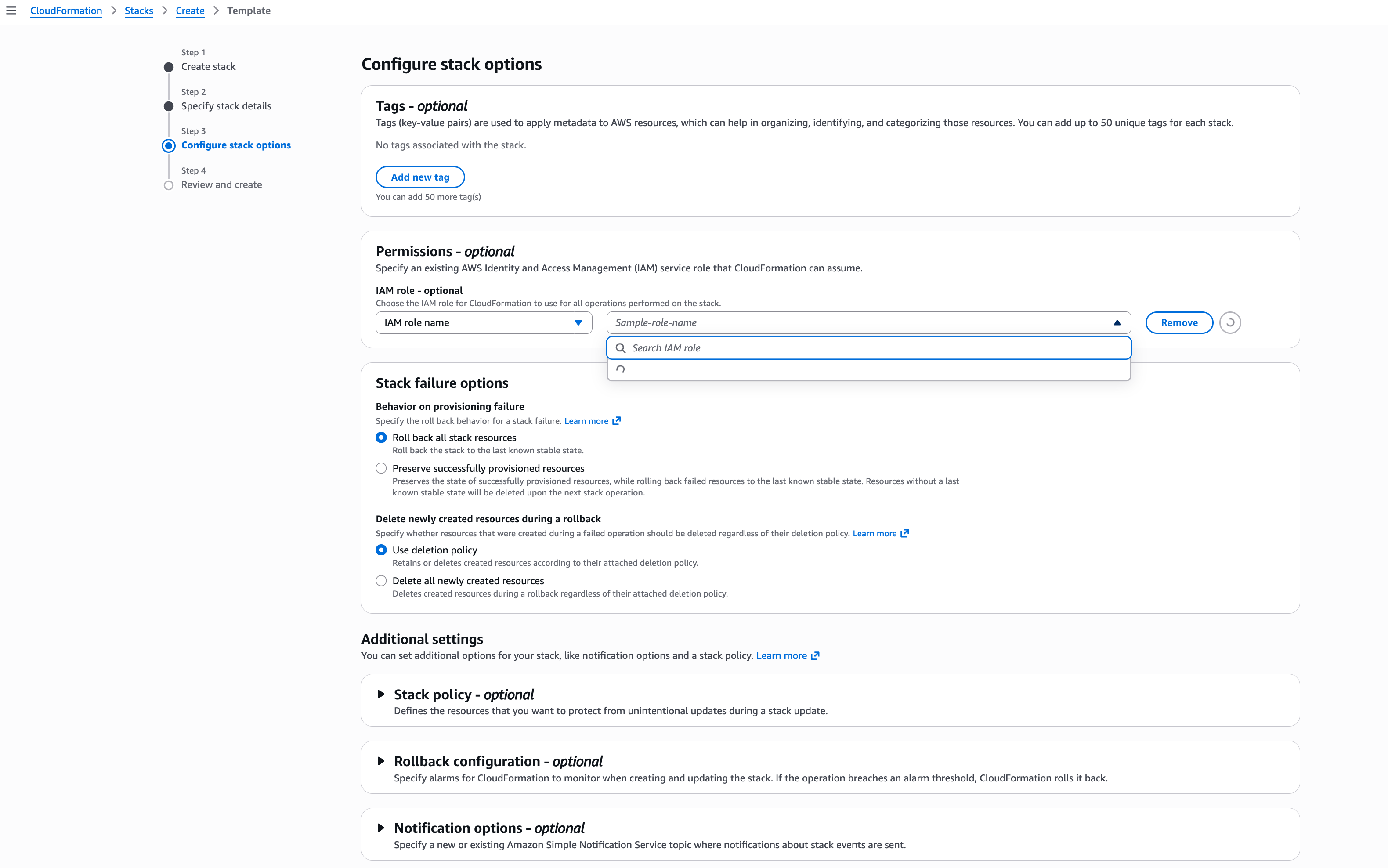
Configure stack options
Keep the defaults. Under Permissions, the IAM role is optional, and CloudFormation otherwise creates the stack with your own permissions. At the bottom of the page, acknowledge that the template creates IAM resources, then select Next.
Review and create
Check the parameters, then select Submit. CloudFormation starts creating the stack, which takes several minutes.
While the stack is being created, fill in the mediator’s secrets, as the next step describes.
Step 6: Add the mediator secrets
The template creates two secrets in AWS Secrets Manager early in the stack creation, and the mediator starts once they hold your values. Fill them in as soon as they appear, while the stack is still being created. In the Secrets Manager console, open each secret, edit its value, and on the Plaintext tab replace the whole value with the contents of the matching file:
| Secret | File |
|---|---|
mediator/atn/atm/mediator/secret-store/mediator_operating_secrets | mediator_operating_secrets.txt |
mediator/atn/atm/mediator/secret-store/mediator_jwt_secret | mediator_jwt_secret.txt |
Each value is one line that starts with eyJ. The mediator reads them each time it starts, so its next start picks them up.
Confirm the mediator is running
Test 1: Check the mediator’s health
Request the mediator’s readyz endpoint, replacing the host name with yours:
curl https://mediator.goodcompany.com/readyzA healthy mediator reports "status":"ready" and the release it runs, 0.33.1. A degraded status means it is still serving messages.
Test 2: Find the mediator’s DID
Clients connect to the mediator by its DID, the contents of mediator_did.txt. Opening https://mediator.goodcompany.com/.well-known/did.json in a browser shows the mediator’s DID document. For a did:webvh DID, that document shows the equivalent did:web DID as its id, and https://mediator.goodcompany.com/.well-known/did.jsonl serves the DID’s log.
Test 3: Send a test message
Follow Test the mediator connection with the mediator’s DID. The template gives new DIDs the access the test needs, so the trust ping and the test message go through without changes to the mediator.
Administer the mediator
admin_profile.json lets the mediator console connect as the administrator, to see the mediator’s health, accounts, queues and access control lists. It also holds the mediator’s DID, so the console finds the mediator from it. Run the console from the source of the mediator release the stack runs, 0.33.1:
git clone --branch affinidi-messaging-mediator-v0.33.1 https://github.com/affinidi/affinidi-tdk-rs.git
cd affinidi-tdk-rs
cargo run --release --locked -p affinidi-messaging-mediator-tui -- --profile <path>/admin_profile.json
Troubleshooting
| Symptom | Likely cause | Fix |
|---|---|---|
The generator stops with mediator-secrets already exists: choose another --out. | An earlier run already wrote its files to that folder. | Use the files from the earlier run, or pass --out <new-folder>. |
The generator stops with is not a host name. | --host was given a URL or a path, such as https://mediator.goodcompany.com. | Pass only the host name, such as mediator.goodcompany.com. |
readyz returns HTTP 503 or does not respond. | The mediator is still starting, or its secrets do not hold your values yet. | Wait a few minutes and retry. Check both secrets as described in Step 6. Then check the mediator’s logs in Amazon CloudWatch. |
The mediator’s log in Amazon CloudWatch shows Could not load operating secrets or is not valid base64. | A secret’s value has extra characters, such as a trailing newline or a space added while copying. | Paste the file’s contents again as one line, with nothing before or after it. |
The stack stays in CREATE_IN_PROGRESS for a long time. | The mediator service cannot start until both secrets hold your values. | Fill in both secrets as described in Step 6. |
What’s next
Related
Glad to hear it. Thanks for letting us know.
Sorry to hear that. Thanks for letting us know.
Still stuck? Ask the community on Discord or contact us.